
 Polski
  Deutsch
  Español
  Français
  Italiano
  Português
  Nederlands
  Svenska
  Українська
  Русский
 Weekly Meal Planning App: Top 5 Stress-Free Options for 2026
Find the best save money meal planning app for 2026. Stop wasting food and time. We review the top 5 apps to streamline your kitchen and cut grocery costs.

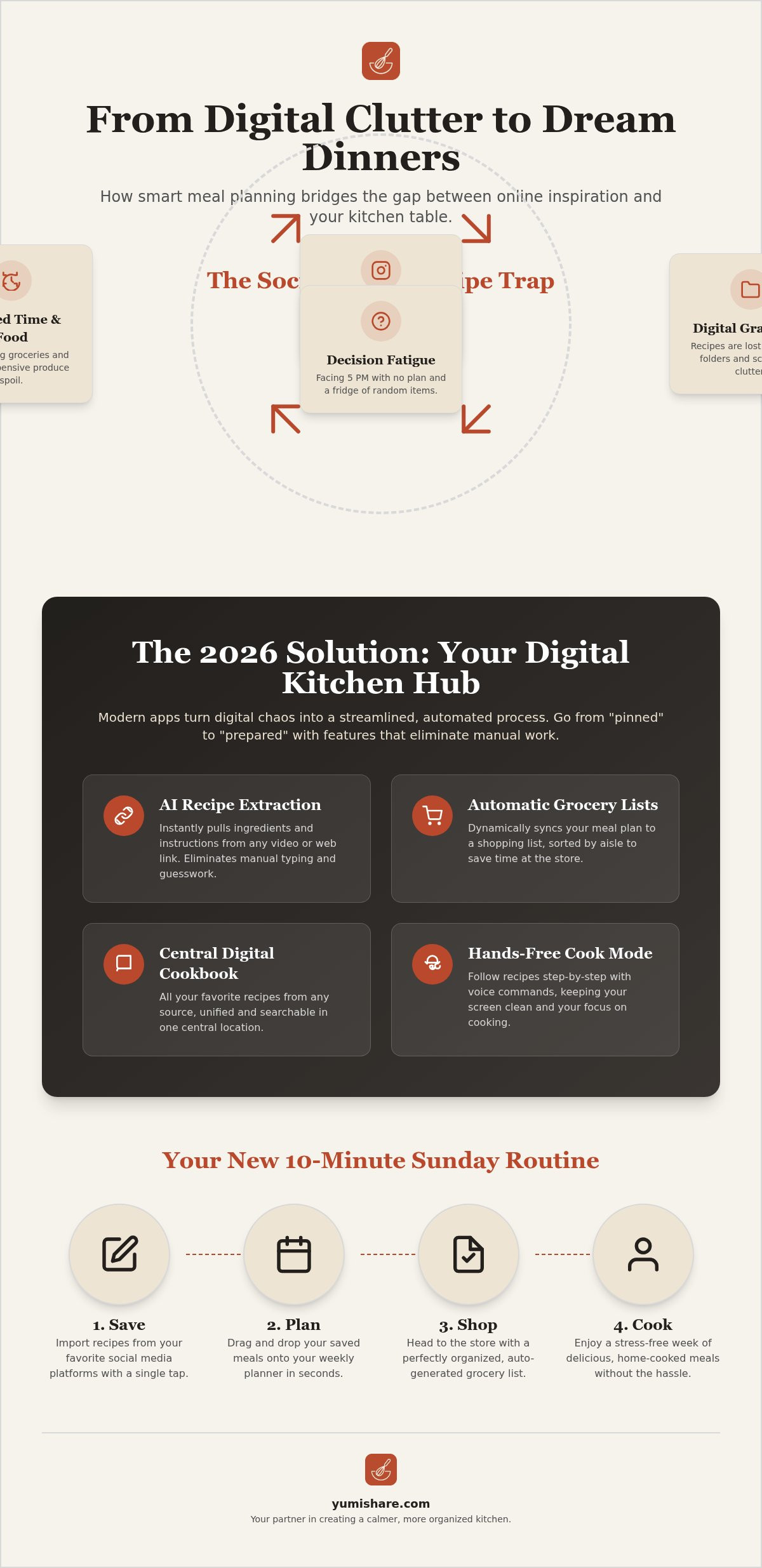
Your Instagram "Saved" folder isn't a cookbook. It's a digital graveyard where dinner ideas go to be forgotten. You likely spend more time scrolling for inspiration than actually enjoying a home-cooked meal. It's frustrating to face 5 PM decision fatigue while staring at a fridge full of random ingredients. We've all been there, manually typing out grocery lists while toggling between three different social media apps.
Finding a reliable save money meal planning app changes the game by turning digital clutter into a streamlined routine. You can finally move from "pinned" to "prepared" without the manual data entry. This guide highlights how to reclaim your time and budget with tools that bridge the gap between online discovery and your kitchen table. Discover the top five stress-free options for 2026 that offer central digital cookbooks, automatic lists, and hands-free cooking assistance.
Key Takeaways
- Stop losing recipes in social media folders; learn how to build a central digital cookbook that bridges the gap between discovery and dinner.
- Discover how AI ingredient extraction eliminates manual typing and turns video recipes into usable shopping lists instantly.
- Identify the best save money meal planning app for your lifestyle to cut grocery costs and stop the cycle of wasted ingredients.
- Streamline your kitchen workflow with hands-free cook modes that sync directly with your favorite social media videos.
- Master the 10-minute Sunday planning session to transform digital clutter into a stress-free weekly routine.
Why a Weekly Meal Planning App is Your 2026 Kitchen Essential
Your kitchen should be a sanctuary, not a source of stress. The modern kitchen has evolved into a digital hub where inspiration meets execution. Moving beyond paper scraps and endless browser tabs is essential for maintaining order. A "digital kitchen" concept centralizes your intentions. It turns the frantic search for that one lost recipe into a streamlined, automated process. You deserve a system that works as hard as you do.
Decision fatigue hits hardest at 5 PM. By the end of the day, solving a complex logistical puzzle for dinner feels impossible. A save money meal planning app removes this friction by providing a clear roadmap for your week. This structured approach does more than just lower your mental load; it has a massive economic impact. You stop buying duplicates. You stop letting expensive produce rot in the crisper drawer. Planning ahead ensures every dollar spent translates into a meal enjoyed.
From Chaos to Calm: The 2026 Meal Planning Shift
We have moved past the era of static, one-size-fits-all PDF plans. Today, the focus is on digital mindfulness. This means using technology to filter out the noise and keep only what is useful. Understanding what is meal preparation in a modern context involves dynamic, AI-assisted tools. These apps adapt to your pantry and your schedule in real time. Integrating a budget meal planning app into your routine is the most effective way to combat rising food costs. It transforms your phone from a source of distraction into a powerful tool for domestic tranquility.
The Problem with "Saved" Folders
Social media is the new "Screenshot Trap." Your Instagram and TikTok folders are often where recipes go to die. You save a beautiful Reel, but you never actually cook it. The friction is too high. Standing in a crowded grocery aisle while trying to scrub through a 60-second video for an ingredient list is a recipe for failure. You end up guessing, overbuying, or giving up entirely. Digital recipe clutter is a fragmented mess of bookmarks and screenshots that prevents real-world action. A dedicated save money meal planning app solves this by extracting the data you need and putting it exactly where it belongs: in your plan and on your list.
Essential Features: What Makes a Meal Planner Truly Smart?
A smart meal planner in 2026 is defined by its ability to eliminate manual labor. It acts as a filter for your digital life. You shouldn't have to type out a list of ingredients while squinting at a blurry TikTok caption. Truly intelligent tools offer multi-platform recipe importing. This allows you to pull inspiration directly from TikTok, Pinterest, and Instagram with a single tap. Once the recipe is saved, the app should handle the heavy lifting. This includes dynamic grocery list synchronization. It sorts your items by aisle automatically, saving you from zigzagging across the store. Cloud syncing ensures your plan moves with you. You can plan on your tablet at breakfast and shop using your phone in the afternoon. Choosing a save money meal planning app isn't just about the list; it's about the automation that keeps your life moving.
Automation and AI Extraction
AI has transformed how we interact with recipes. Modern apps use sophisticated algorithms to identify ingredients and instructions from a simple video link. This level of accuracy is a non-negotiable requirement for today's kitchen. It ensures you never miss a crucial step or a rare spice. Implementing an automatic meal plan from recipes saves hours of manual data entry every month. Beyond the time saved, there are clear benefits of meal planning, such as significantly reducing food waste. When your app handles the extraction, you can focus on the cooking rather than the logistics.
User Experience and Accessibility
A simple meal planner app must prioritize intuitive design. Complexity often leads to abandonment. If an interface feels cluttered, you won't use it. Accessibility features like "Hands-Free Cook Mode" are vital. This allows you to follow instructions without touching your screen with flour-covered fingers. Collaboration is another essential pillar. Sharing plans and lists with family members ensures everyone is on the same page. This collective approach makes a save money meal planning app even more effective. It turns household management into a shared, low-stress activity. If you're ready to simplify your routine, consider how a smart recipe saver can organize your digital kitchen today.
Choosing Your Tool: A Roundup of the Best Meal Planning Apps
Stop the scroll and start the stove. Choosing the right save money meal planning app is a personal decision that hinges on how you discover food. Not every tool fits every lifestyle. Some users want a pre-set menu that handles all the thinking. Others want a digital vault for family secrets. The goal is to find a system that reduces friction and fits your natural rhythm. By matching a tool to your specific habits, you turn a chore into a streamlined routine that respects your time and your budget.
- The "Database" Apps: Tools like Mealime are perfect for those who want a curated experience. You pick from a pre-set menu, and the app generates the list. It's efficient but can feel restrictive if you prefer your own social media finds.
- The "Manual" Managers: Paprika remains a favorite for the digital archivist. It's best for users who enjoy manually typing in old family recipes or clipping from traditional blogs. However, it often lacks the agility needed for modern video content.
- The "Social" Savants: YumiShare leads this category by bridging the gap between social media and the kitchen. It's the premier recipe keeper alternative for anyone who finds inspiration on TikTok or Instagram. It turns a 15-second Reel into a structured plan in seconds.
- The "Budget" Specialists: These apps focus heavily on price-per-serving metrics. They're ideal for users who prioritize cost-tracking above all else, though they sometimes require more manual data entry to stay accurate.
Categorizing the Top Contenders
Compare your options based on import speed and list accuracy. A save money meal planning app should save you time, not create more work. While professional managers offer deep customization, they often come with a steep learning curve. YumiShare simplifies this by focusing on high-speed video extraction. This ensures that your digital recipe collection stays current without the need for manual typing. If you value platform compatibility and want your recipes to follow you from Pinterest to the grocery aisle, prioritize apps that offer robust cross-platform support.
Matching the App to Your Cooking Style
Identify your cooking personality to pick the winner. The "Weekend Prep" style requires an app with strong batch-cooking support and pantry inventory features. If you're a "Daily Discovery" cook, you need the fast social media importing found in YumiShare. You don't have time for a complex setup; you just want to cook what you saw this morning. For the "Strict Budget" style, look for tools that emphasize price tracking. No matter your style, the right app acts as a savvy, organized companion that turns your digital inspiration into real-world execution.
The Social Media Strategy: Saving Recipes from Instagram and TikTok
Culinary inspiration moves fast. You see a viral pasta dish on Instagram and want to cook it tonight. But the gap between seeing and eating is often filled with manual labor. A save money meal planning app should bridge this gap instantly. Use the "Share to App" workflow to move a Reel into your planner in under three seconds. This simple action replaces the old habit of hoarding screenshots that never get opened. It's about moving from passive consumption to active kitchen execution. Using a save money meal planning app ensures your digital discoveries actually make it to your dinner plate.
Stop the cycle of pausing and rewinding. Extracting text from video means you never have to squint at a moving caption again. AI identifies the ingredients and instructions, creating a clean, readable recipe card. This allows you to organize your week by "vibe" rather than just ingredients. Use tags like "15-minute meals" or "Air Fryer Friday" to match your energy levels. Syncing with the original source keeps the video link handy. This provides vital visual cues during prep without the frustration of searching your history.
Mastering the TikTok Recipe Saver
Converting a viral video into a structured recipe card is now a one-tap process. Open TikTok, hit share, and select your app. The system analyzes the clip and populates your digital cookbook. This is especially helpful for visual planners who also use a pinterest recipe importer to keep their aesthetic pins and video content in one place. AI acts as the essential bridge between a 60-second clip and a fully functional shopping list. It turns a digital spark into a physical result with zero manual typing.
Building Your Personal Digital Cookbook
Shift your focus from following influencers to building a personal library. Your digital cookbook should reflect your tastes and your household's needs. Categorize saved content for easy retrieval months later. Using smart meal prep app techniques ensures your digital box stays organized and useful. This level of order transforms your phone into a savvy companion. It acts as a filter that removes the noise of the internet and leaves only what you actually want to eat. If you're ready to stop hoarding and start cooking, start building your organized recipe library today.
Implementing Your Plan: From Digital Inspiration to Stress-Free Cooking
Execution is where the magic happens. You have the recipes and the tools; now it's time to build the habit. Forget the grueling four-hour prep sessions often discussed in online forums. A modern save money meal planning app should fit into the cracks of your life, not consume your entire weekend. By using a highly methodical flow, you can move from a digital spark to tactile satisfaction in minutes. Your goal is a well-ordered home life that feels effortless rather than forced.
Start with the 10-Minute Sunday Session. Instead of staring at a blank calendar, populate your week directly from your saved recipe folder. Drag and drop your favorite TikTok finds into your schedule. This quick ritual removes the mental load of decision-making for the next seven days. Automated shopping lists then bridge the gap to the physical world. These smart lists prevent "double-buying" pantry staples by allowing you to check off what you already own. It's a simple way to ensure your save money meal planning app actually keeps your budget on track.
The Weekly Workflow
Efficiency thrives on structure. Use a meal planner with grocery list to organize your path through the store. Aisle-sorting features can reduce your time spent shopping significantly. This prevents aimless wandering and impulse purchases. When it's time to eat, leverage cook mode for mobile recipes. This feature allows for hands-free navigation. You can follow instructions and watch synced video clips without touching your screen with floury hands. It keeps you in the flow of cooking while maintaining the tranquility of your kitchen space.
Long-Term Success Habits
Build a library of winners. Not every recipe you save will be a masterpiece. Review and refine your collection regularly. Delete the "duds" to keep your digital cookbook high-quality. One of the ultimate secrets to success is planning for leftovers. Cook once, eat twice. This reduces your daily workload and stretches your grocery budget further. Use app data to track your most-cooked and most-loved meals. This creates a feedback loop that makes future planning even faster. You aren't just managing recipes; you're mastering your environment. This transformation from digital clutter to a streamlined routine is the core promise of a well-utilized meal planning tool.
Reclaim Your Time and Simplify Your Table
Your kitchen should be a place of calm, not a source of digital overwhelm. Transitioning from a graveyard of social media screenshots to a structured digital cookbook is the most effective way to reduce decision fatigue. By using a save money meal planning app, you turn fragmented inspiration into a concrete, budget-friendly plan. This shift ensures you only buy what you need and actually cook what you save.
Automation handles the heavy lifting so you can focus on the joy of cooking. From AI-driven extraction to smart lists that sort by aisle, the right tools make domestic management feel effortless. It's time to bridge the gap between the screen and the stove with a system that respects your mental space. You've already taken the first step by learning how to filter the noise and keep only what is useful.
Start organizing your digital kitchen with YumiShare today! Experience AI-powered recipe extraction from any social link and stay in the flow with a hands-free cook mode synced to original videos. It's available on both iOS and Android to support your journey toward organization.
Take the first step toward a more mindful kitchen. You deserve a routine that brings tranquility back to your home.
Frequently Asked Questions
What is the best free weekly meal planning app for beginners?
YumiShare is a top choice for beginners because it eliminates the need for manual data entry. You start by simply sharing links from your favorite social media platforms. It's available on both iOS and Android, offering a user-friendly entry point into digital organization. Most beginners struggle with the complexity of professional databases; this app solves that by focusing on the content you already love and discover naturally.
Can I import recipes from Instagram Reels and TikTok videos?
Yes, you can import recipes directly from Instagram Reels, TikTok, and Pinterest. The app uses AI-driven extraction to pull ingredients and instructions from the video description or the clip itself. This means you don't have to pause and rewind while standing in the kitchen. It creates a clean, structured recipe card that bridges the gap between digital inspiration and your actual stove.
How does a meal planning app help save money on groceries?
A save money meal planning app helps you cut costs by preventing impulse buys and reducing food waste. When you have a structured plan, you only buy the ingredients you actually need for the week. Smart grocery lists also allow you to check your pantry first, avoiding the common mistake of double-buying staples. This methodical approach ensures every dollar spent at the store translates into a meal on your table.
Is it possible to sync my meal plan and grocery list with my partner?
Collaboration is a core feature that allows you to sync plans and lists with your partner or family members. Any changes made on one device update instantly across all connected accounts. This ensures everyone is on the same page during a grocery run, preventing duplicate purchases. Cross-device cloud syncing means you can plan on a tablet at home while your partner shops using their phone at the store.
Do meal planning apps work for specific diets like Keto or Vegan?
These apps are perfect for specific diets like Keto, Vegan, or gluten-free because they are built around your personal discoveries. Instead of relying on a pre-set database that might not fit your needs, you save the exact recipes you find on social media. This flexibility allows you to build a custom digital cookbook that aligns perfectly with your health goals and dietary restrictions without any extra effort.
How do I turn a website link into a recipe in the app?
Turning a website link into a recipe is as simple as using the "Share" function on your mobile browser. Select the app from your share sheet, and the AI will automatically extract the relevant data. You can also copy a URL and paste it directly into the meal planner. This process removes the friction of manual typing, allowing you to build a comprehensive library from any corner of the internet.
Can I use a meal planning app for monthly instead of weekly planning?
While many users prefer a weekly rhythm, you can certainly use these tools for monthly planning. The flexible scheduling interface allows you to map out meals as far in advance as you like. This is ideal for batch cooking or managing long-term pantry inventory. You can drag and drop recipes across different weeks to create a balanced, varied menu that keeps your household running smoothly for the entire month.
What is "Cook Mode" and how does it work with social media videos?
Cook Mode provides hands-free cooking assistance by displaying instructions in a large, easy-to-read format. It syncs directly with the original social media video, allowing you to watch specific techniques without touching your screen. This is vital for maintaining a clean kitchen environment when your hands are covered in flour or oil. It keeps you in the flow of cooking by providing clear visual and text-based guidance.
FAQ
What is the best weekly meal planning app for beginners?
YumiShare provides an ideal entry point for beginners who feel overwhelmed by manual data entry. Most new users struggle to maintain a plan when they have to type every ingredient. This app automates the process by extracting recipes directly from social media links. It's a low-pressure way to transition from paper scraps to a digital system. Start with a few saved links to see how the AI identifies your ingredients instantly.
Can I import recipes from Instagram Reels and TikTok videos?
You can instantly import recipes from Instagram Reels, TikTok, and Pinterest. Simply tap the share button on the social media post and select the app to begin the extraction. The AI identifies the ingredient list and instructions from the video and caption. This removes the friction of pausing and rewinding clips while you scribble notes. It turns viral inspiration into a permanent, searchable recipe card in under three seconds.
How does a meal planning app help save money on groceries?
Using a save money meal planning app reduces your bill by generating precise grocery lists that prevent overbuying. It ensures you only purchase items required for your specific weekly meals. By organizing your ingredients, you avoid double-buying pantry staples you already own. Having a clear plan also reduces the urge to order expensive last-minute takeout. This structured approach helps you use fresh produce before it spoils in the drawer.
Is it possible to sync my meal plan and grocery list with my partner?
Syncing your meal plan and grocery list with a partner is a core feature of modern digital planners. You can share your digital cookbook so both users add items to the shopping list in real-time. This coordination prevents duplicate purchases and ensures the person at the store always has the most updated version. It streamlines household management and keeps everyone aligned on the week's culinary goals without constant back-and-forth texting.
Do meal planning apps work for specific diets like Keto or Vegan?
Meal planning apps are highly effective for specific diets like Keto or Vegan because you curate your own library. Instead of relying on generic pre-set menus, you save recipes that match your exact nutritional requirements. Use custom tags to filter your collection by diet type or allergen. This personalized approach ensures your save money meal planning app remains a relevant tool for your unique health journey and specific dietary restrictions.
How do I turn a website link into a recipe in the app?
Turning a website link into a recipe is as simple as pasting the URL into the app's importer. The software stripped away the blog fluff and advertisements to leave you with a clean, structured list of ingredients and steps. This digital mindfulness keeps your cookbook focused and easy to read during prep. It works across most major food blogs and recipe websites, allowing you to build a professional-grade library in minutes.
Can I use a meal planning app for monthly instead of weekly planning?
You can use the app for monthly planning, though a weekly rhythm is often better for managing fresh ingredients. Use the calendar feature to map out bulk meals or recurring favorites for the entire month. This longer-term view is excellent for tracking pantry inventory and planning large-scale grocery trips. It allows you to visualize your eating habits over a longer period, providing better financial control and reducing shopping frequency.
What is "Cook Mode" and how does it work with social media videos?
Cook Mode is an interactive interface designed for the hands-on environment of the kitchen. It provides a distraction-free view of your recipe steps with large, readable text. This feature often includes voice commands to advance instructions without touching your screen with messy hands. It syncs with the original social media video, allowing you to check visual techniques while you work. This ensures you stay in the flow and execute every dish with confidence.