
 Polski
  Deutsch
  Español
  Français
  Italiano
  Português
  Nederlands
  Svenska
  Українська
  Русский
 Pinterest Recipe Importer: Sync Pins to Your Cookbook
Use a Pinterest recipe importer to save pins to a clean digital cookbook. Stop losing recipes to broken links and ads. Sync recipes and create grocery lists ...

You finally found the perfect lasagna recipe on Pinterest, but when you click the pin, the link is broken or buried under ten paragraphs of life story and pop-up ads. It's a common frustration. We've all experienced the "recipe graveyard" where saved pins sit untouched because they're too difficult to access or read. You want to spend your evening cooking, not troubleshooting a cluttered website or manually typing ingredients into a notes app.
It's time to turn that digital inspiration into a physical meal. By using a pinterest recipe importer, you can instantly transform messy pins into a clean, organized, and shoppable digital cookbook. This article explores how AI-driven tools extract essential data from your boards, giving you a distraction-free cooking experience. We'll show you how to sync your collection across all your devices and generate automatic grocery lists with a single tap, moving you from digital overwhelm to kitchen calm.
Key Takeaways
- Stop losing recipes to broken links. Learn how a dedicated importer preserves your collection even if the original pin disappears from the web.
- Master the "Zero Effort" method. Use the mobile share extension to instantly transfer ingredients and instructions from Pinterest to your personal cookbook.
- Choose AI extraction over basic link saving. Stripping away blog fluff and intrusive ads leaves you with only the clean, readable instructions you need to cook.
- Use a pinterest recipe importer to turn digital inspiration into action. Sync your saved pins across all devices and generate smart grocery lists automatically.
- Build a functional meal plan. Drag and drop your imported recipes into a weekly schedule to streamline your household routine and reduce decision fatigue.
The Pinterest Recipe Graveyard: Why You Need an Importer
Pinterest is a visual feast. It's where we find that perfect sourdough starter or a 15-minute weekday pasta. But there's a disconnect. Pinterest was designed to help you discover ideas, not to help you execute them in a busy kitchen. When you save a pin, you aren't saving a recipe. You're saving a digital bookmark. This difference is subtle but critical for anyone trying to get dinner on the table without a headache.
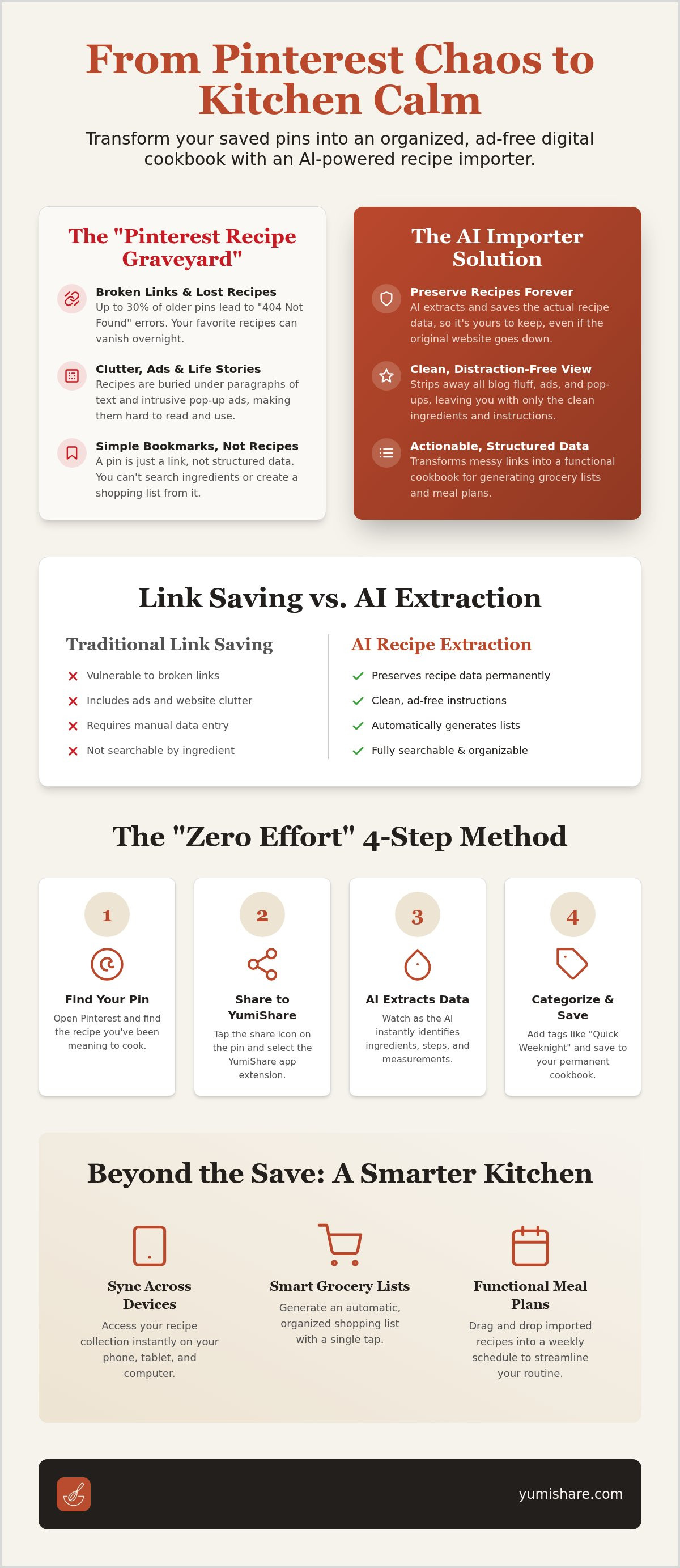
This creates what we call the "Pinterest Recipe Graveyard." You click on a beautiful image of a roast chicken you saved three years ago, only to find a "404 Page Not Found" error. Web domains expire. Bloggers move on. Some estimates suggest that up to 30% of older pins lead to broken links or dead websites. If you rely on the link alone, your favorite meal could vanish overnight. This is why a pinterest recipe importer is an essential tool for the modern home cook. It moves beyond simple bookmarking by extracting the actual data. It ensures your collection remains yours forever, regardless of what happens to the original website.
The difference between a Pin and a Recipe
A pin is a thumbnail. It's an invitation to visit a website. A recipe, however, is structured information. It requires a specific list of ingredients, precise measurements, and sequential steps. Many users try to solve the organization problem with screenshots. This is a temporary fix at best. Screenshots aren't searchable. They don't scale. You can't turn a screenshot into a shopping list with one click. Modern AI tools change the game. Instead of just looking at an image, an importer "reads" the page. It identifies what's an ingredient and what's just a blogger's personal story. It strips away the noise. This transformation from a messy web link to a structured file is what turns a disorganized board into a functional cookbook.
Why 2026 is the year of the 'Smart Kitchen'
We've moved past the era of manual data entry. In 2026, efficiency is the baseline. The modern kitchen thrives on automation and synchronization. You shouldn't have to type out a grocery list or toggle between five different tabs to find the oven temperature. Finding the best app for saved recipes is about more than just storage. It's about building a bridge between discovery and dinner. Today's tools prioritize speed and accuracy. They sync across your phone, tablet, and smart devices instantly. By using a pinterest recipe importer, you're not just saving a link; you're building a reliable, ad-free database that works for you.
How to Use a Pinterest Recipe Importer: A Step-by-Step Guide
Transforming your digital clutter into a streamlined kitchen assistant is faster than you think. You don't need technical skills or hours of free time. The modern pinterest recipe importer is designed for immediate action. It bridges the gap between a fleeting social media spark and a home-cooked meal. Follow these four simple steps to sync your pins and reclaim your mental space.
- Step 1: Open Pinterest. Find the pin you've been meaning to cook. Don't worry about whether the link looks messy or if the website is full of ads.
- Step 2: Share to YumiShare. Tap the share icon on the pin. Select the YumiShare extension from your list of apps. The link sends instantly.
- Step 3: Review the extraction. Watch as the AI identifies ingredients, measurements, and cooking steps. Check the details to ensure everything looks perfect.
- Step 4: Categorize and Save. Add a tag like "Quick Weeknight" or "Vegan Options." Hit save to add it to your permanent digital cookbook.
This workflow eliminates the need for manual typing. It's a "set and forget" process that ensures your recipes are ready when you are. If you want to experience this seamless transition from browsing to cooking, YumiShare offers the most intuitive interface for managing your collection.
Importing via the Mobile Share Sheet
The mobile share sheet is the secret to a "Zéro Effort" kitchen. To enable this on iOS or Android, tap the share button on any pin and scroll to the "More" option. Find YumiShare and toggle it on. Now, you can import recipes without ever leaving the Pinterest app. This "One-Tap" method is perfect for those late-night browsing sessions. The pinterest recipe importer also captures high-resolution images from the pin. Your digital cookbook will look just as beautiful as your Pinterest boards, but without the technical glitches.
Importing via URL (Desktop and Web)
Sometimes you need to do a deep clean of your existing boards. If you're sitting at a computer, the copy-paste method is your best friend for bulk organization. Simply copy the URL of any pin or Idea Pin and paste it into the app's import field. In 2026, AI technology has advanced to handle video-based content and Idea Pins with high precision. It can listen to the audio or scan the video text to extract instructions. This means your favorite TikTok-style Pinterest videos can finally live alongside your traditional blog recipes in one unified space.
Link Saving vs. AI Extraction: Why Technology Matters
Most people think saving a recipe is just saving a link. It isn't. A link is a fragile tether to someone else's server. If they delete the page or the domain expires, you lose the meal. A standard link saver merely stores a web address. In contrast, a pinterest recipe importer powered by AI actually digests the content. It reads the page, identifies the structure, and pulls the data into your personal space. It moves the recipe from the web into your permanent collection.
Think of the "Ad Jungle." You've likely spent minutes scrolling past pop-ups and long personal stories just to find the salt measurements. AI eliminates this noise. It strips away the fluff to leave just the ingredients and instructions. You get a clean, distraction-free interface that focuses on the task at hand. It's the difference between reading a cluttered magazine and a clear, professional manual. This process turns a messy blog post into a functional tool.
This technology also grants you the gift of offline access. Because the AI has extracted the data, the recipe lives inside your app. You don't need a stable Wi-Fi connection to check the oven temperature or the next step in the process. This reliability is essential for kitchens with spotty reception or when you're cooking away from home. Your data stays with you, regardless of your signal strength.
Why 'Dumb' Bookmarks Fail Home Cooks
Traditional bookmarks are "dumb" because they don't know what they are holding. They are just pointers. If you click a pin and see a 404 error, that recipe is gone forever. AI extraction solves this by creating a permanent, local copy that belongs to you. It also provides a consistent format. Every recipe in your collection will look and feel the same, regardless of where it originated. This visual harmony reduces mental load and makes cooking feel more intuitive and less frantic.
The Power of Ingredient Recognition
True intelligence lies in how the tool handles ingredients. Modern importers don't just see text; they understand measurements. They can automatically convert Metric to Imperial, saving you from manual calculations mid-prep. The AI also recognizes the difference between "optional" and "required" items. AI ingredient parsing acts as the foundation for smart shopping lists by transforming plain text into interactive, categorized data points. This level of precision ensures you only buy exactly what you need, reducing both waste and grocery store stress.
Beyond the Save: Turning Pins into Meal Plans
Saving a pin is a promise to yourself. Actually cooking it is the fulfillment of that promise. Most people stop at the save, leaving their boards to collect digital dust. By using a pinterest recipe importer, you break this cycle. You move from the passive act of scrolling to the active rhythm of meal preparation. The magic happens when you stop looking at your pins as individual links and start seeing them as the building blocks of your weekly schedule.
Managing a household requires coordination. A digital cookbook allows you to drag-and-drop your imported recipes directly into a weekly menu. This visual planning reduces decision fatigue. You don't have to wonder what's for dinner on a Tuesday night. Your plan is already set, synced across your mobile devices, and accessible to every family member. This shared visibility ensures everyone is on the same page, from grocery runs to prep work.
Automated Grocery List Generation
One of the most tedious parts of cooking is the manual list. When you import multiple recipes, the AI does the heavy lifting for you. It combines ingredients from three different pins into one consolidated list. If one recipe calls for two onions and another calls for one, your list simply shows three. The app then categorizes these items by store aisle. You'll spend less time wandering and more time finishing your shop. This organized approach is the foundation for anyone looking to create a digital family cookbook that actually gets used in the real world.
Using Cook Mode for Pinterest Recipes
The transition from a Pinterest board to a hot stove is often messy. You shouldn't have to touch your screen with flour-covered fingers just to check the next step. Once you've used a pinterest recipe importer to extract the data, you can launch a hands-free assistant. This specialized cook mode for mobile recipes keeps your screen awake and responds to your voice. It can even sync video timestamps from the original pin to specific cooking steps. This ensures you have a visual guide exactly when you need it, without the frustration of scrubbing through a long video.
Ready to move beyond mere bookmarks? Start building your smart meal plan with YumiShare today and turn your inspiration into action.
Why YumiShare is the Best Pinterest Recipe Importer for 2026
Choosing a tool for your kitchen is about more than just utility. It is about how that tool protects your time and mental energy. YumiShare stands out as a premier pinterest recipe importer because it prioritizes domestic tranquility over technical clutter. While other apps feel like complex spreadsheets, YumiShare feels like a helpful partner. It acts as a filter, removing the noise of the modern web and leaving you with the quiet satisfaction of a well-ordered home life.
Efficiency is built into the core of the experience. Legacy competitors often struggle with the heavy scripts and shifting layouts of 2026 recipe blogs. Our AI does not. It offers superior extraction accuracy, ensuring that ingredients and instructions are never swapped or missed. This precision is matched by a seamless cloud sync. Whether you are using an iPhone at the grocery store, an Android tablet in the kitchen, or a web browser at your desk, your cookbook is always current. You never have to worry about manual backups or lost data.
Speed is the new standard. The app mirrors the quick, intuitive actions of your favorite mobile interfaces. There are no deep menus or confusing settings. You discover a recipe, you import it, and you cook it. This streamlined movement from a digital spark to a physical result is what defines a modern digital kitchen. It turns the frantic energy of online consumption into the grounded reality of a family meal.
The All-in-One Social Recipe Hub
Your inspiration is rarely limited to a single platform. You might find a dinner idea on a Pinterest board and a quick dessert hack on TikTok. YumiShare consolidates these scattered sparks into one accessible archive. You don't need different apps for different social platforms anymore. Learn how to convert YouTube Shorts to recipes using the same intuitive AI engine. One tool handles Pinterest, Instagram, and YouTube, creating a unified home for every recipe you love.
Premium Features That Actually Save Money
Organization is an investment in your household's future. Unlimited imports prevent the "recipe loss" that occurs when blogs go offline or links break. This ensures your collection grows into a permanent legacy. Beyond storage, the premium subscription provides advanced nutrition analysis for every imported Pinterest pin. This data helps you plan healthier meals without the stress of manual calculations. Join the thousands of users who have ditched disorganized paper scraps and broken bookmarks for the clarity of YumiShare.
Reclaim Your Kitchen and Your Time
You now have the tools to rescue your favorite meals from the Pinterest graveyard. Moving beyond simple bookmarks ensures your recipes stay accessible even if original links break or websites disappear. AI-powered extraction strips away the ad-heavy clutter; leaving you with a clean, functional workspace that prioritizes your cooking experience over digital noise.
Transitioning from digital inspiration to a physical meal shouldn't feel like a chore. By utilizing a pinterest recipe importer, you can automate your grocery lists and sync your meal plans across every device instantly. It's about creating a streamlined routine that leaves room for the joy of sharing a meal. Join over 50,000 home cooks who have already simplified their daily lives with our advanced extraction technology.
Start your digital cookbook today with YumiShare. Our app is available on iOS and Android, offering the perfect bridge between your online discoveries and your real-world kitchen. Experience the relief of a truly organized home life today. Your next great meal is just one tap away. Happy cooking!
Common Questions About Pinterest Recipe Importing
Can I import an entire Pinterest board at once?
You can import individual pins quickly using the share extension. While current API limitations often prevent one-click board imports, you can move through your favorites in seconds. This ensures every recipe is accurately parsed by the AI. It prevents the data errors that often occur with bulk, unverified imports. Simply tap and share each pin to build your permanent collection.
Does the Pinterest recipe importer work on both iPhone and Android?
Yes, the pinterest recipe importer is fully compatible with both iOS and Android devices. You can download the app from the Apple App Store or Google Play Store. Because the app uses cloud synchronization, your collection stays updated across all your mobile devices. Start a save on your phone and view it later on your tablet in the kitchen.
What happens if the original website for the Pin is deleted?
Your recipe remains safe in your digital cookbook even if the original website goes offline. Unlike a standard bookmark, the AI extracts the ingredients and instructions into a permanent file. You won't have to worry about the "404 Page Not Found" errors that plague old boards. Your data belongs to you, regardless of the original blog's status.
Can I import recipes from Pinterest video pins or Idea Pins?
Yes, modern AI technology allows you to extract data from video pins and Idea Pins. The importer scans the video content and text overlays to identify steps and ingredients. This means you can finally turn those quick social clips into structured, readable recipes. It eliminates the need to pause and rewind a video while your hands are covered in flour.
Is there a limit to how many Pinterest recipes I can save?
You can save a limited number of recipes on the free tier, while a premium subscription offers unlimited imports. This flexibility allows you to test the features before committing to a larger collection. Premium users also gain access to advanced meal planning and scanning tools. It's a scalable solution that grows alongside your culinary skills and digital library.
How does the AI handle recipes written in different languages?
The AI-driven extraction tool supports multiple languages and can interpret international culinary terms. It recognizes various units of measurement and ingredient names from around the world. This allows you to save authentic recipes from global creators without needing a manual translator. The technology focuses on the underlying structure of the recipe to ensure accuracy regardless of the source language.
Can I share my imported Pinterest recipes with my family?
You can easily share your collection with family members to coordinate meals and shopping. The app allows you to create shared digital cookbooks where everyone can add their favorite pins. This collaborative approach makes it simple to manage household preferences and dietary needs. Everyone stays in sync, whether they are at the grocery store or starting prep for dinner.
Does YumiShare extract the nutritional information from the Pin?
Yes, the app provides advanced nutrition analysis for every recipe you import. The AI scans the ingredient list to calculate calories, macronutrients, and other vital data points automatically. This feature is particularly useful for users tracking specific health goals or managing dietary restrictions. It turns a simple social media post into a comprehensive health tool for your daily life.
FAQ
Can I import an entire Pinterest board at once?
You can import individual pins quickly using the share extension. While current API limitations often prevent one-click board imports, you can move through your favorites in seconds. This ensures every recipe is accurately parsed by the AI. It prevents the data errors that often occur with bulk, unverified imports. Simply tap and share each pin to build your permanent collection.
Does the Pinterest recipe importer work on both iPhone and Android?
Yes, the pinterest recipe importer is fully compatible with both iOS and Android devices. You can download the app from the Apple App Store or Google Play Store. Because the app uses cloud synchronization, your collection stays updated across all your mobile devices. Start a save on your phone and view it later on your tablet in the kitchen.
What happens if the original website for the Pin is deleted?
Your recipe remains safe in your digital cookbook even if the original website goes offline. Unlike a standard bookmark, the AI extracts the ingredients and instructions into a permanent file. You won't have to worry about the "404 Page Not Found" errors that plague old boards. Your data belongs to you, regardless of the original blog's status.
Can I import recipes from Pinterest video pins or Idea Pins?
Yes, modern AI technology allows you to extract data from video pins and Idea Pins. The importer scans the video content and text overlays to identify steps and ingredients. This means you can finally turn those quick social clips into structured, readable recipes. It eliminates the need to pause and rewind a video while your hands are covered in flour.
Is there a limit to how many Pinterest recipes I can save?
You can save a limited number of recipes on the free tier, while a premium subscription offers unlimited imports. This flexibility allows you to test the features before committing to a larger collection. Premium users also gain access to advanced meal planning and scanning tools. It's a scalable solution that grows alongside your culinary skills and digital library.
How does the AI handle recipes written in different languages?
The AI-driven extraction tool supports multiple languages and can interpret international culinary terms. It recognizes various units of measurement and ingredient names from around the world. This allows you to save authentic recipes from global creators without needing a manual translator. The technology focuses on the underlying structure of the recipe to ensure accuracy regardless of the source language.
Can I share my imported Pinterest recipes with my family?
You can easily share your collection with family members to coordinate meals and shopping. The app allows you to create shared digital cookbooks where everyone can add their favorite pins. This collaborative approach makes it simple to manage household preferences and dietary needs. Everyone stays in sync, whether they are at the grocery store or starting prep for dinner.
Does YumiShare extract the nutritional information from the Pin?
Yes, the app provides advanced nutrition analysis for every recipe you import. The AI scans the ingredient list to calculate calories, macronutrients, and other vital data points automatically. This feature is particularly useful for users tracking specific health goals or managing dietary restrictions. It turns a simple social media post into a comprehensive health tool for your daily life.