
 Polski
  Deutsch
  Español
  Français
  Italiano
  Português
  Nederlands
  Svenska
  Українська
  Русский
 Cook Mode: Hands-Free Mobile Cooking Guide 2026
Unlock a hands-free kitchen with the ultimate cook mode for mobile recipes. Our 2026 guide ends screen timeouts and turns messy video saves into clean steps.

You're mid-knead with flour coating your palms when your phone screen suddenly goes black. You nudge the power button with a clean knuckle, only to realize you've lost your place in that viral TikTok recipe. It's frustrating. It's messy. It's exactly why your kitchen needs a digital upgrade. We've all fought the battle against screen timeouts and oil-smudged glass while trying to follow a complex dinner plan. Balancing a smartphone between the salt shaker and the olive oil shouldn't be the hardest part of your meal prep.
This guide helps you reclaim your counter space and your peace of mind. Discover how using a dedicated cook mode for mobile recipes turns your device into a focused, hands-free assistant that stays awake as long as you do. We'll show you how to transform cluttered social media saves into clear, actionable instructions. Learn to sync original videos with step-by-step text and bypass the aggressive ads that stall your progress. It's time to move from digital overwhelm to the quiet satisfaction of a well-ordered kitchen. Let's bridge the gap between digital inspiration and the final dinner table without the sticky fingerprints.
Key Takeaways
- End the frustration of screen timeouts. Discover how screen-awake technology keeps your instructions visible from the first chop to the final plate.
- Protect your device from spills and splatters. Learn to position your phone at eye level to maintain clear visibility while keeping it out of the splash zone.
- Master the 2026 standard for a cook mode for mobile recipes. Sync social media videos with text instructions to stop scrubbing through clips with messy hands.
- Clean up your digital clutter. Use AI extraction to turn chaotic TikTok and Instagram saves into organized, professional-grade recipe cards instantly.
- Focus on visual hierarchy. Choose layouts with high-contrast text and large buttons designed specifically for reading from a distance across the counter.
The Struggle of the Digital Kitchen: Why Standard Mobile Recipes Fail
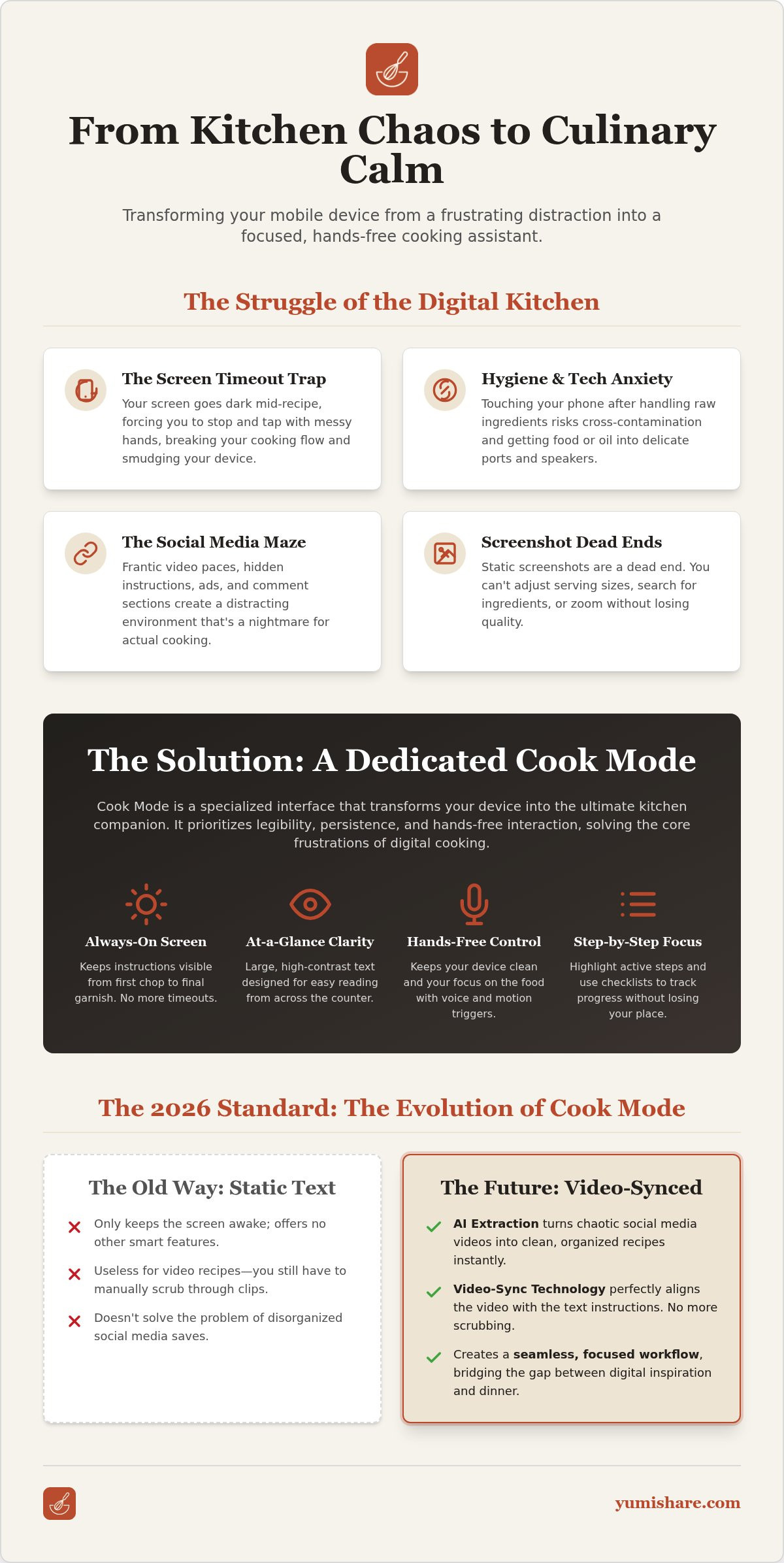
Cooking is a tactile, sensory experience. Your smartphone, however, is a delicate piece of glass and silicon designed for the office, not the grease-spattered counter. The friction begins the moment you start. Standard mobile browsers prioritize battery life over your dinner prep. They dim. They lock. They force you to stop mid-stir to tap the screen with a sticky finger. This mismatch creates a stressful environment where you're constantly fighting your device instead of focusing on the flavors. It's a fundamental design flaw for anyone trying to follow a digital guide in a physical world.
Many home cooks fall into the "screenshot trap." It feels efficient to snap a picture of a blog post, but static images are a dead end. You can't adjust serving sizes on a photo. You can't search for a specific ingredient. When you need to zoom in to read a fine-print measurement, the image pixelates and the context disappears. Using a dedicated cook mode for mobile recipes solves these structural flaws by providing a persistent, interactive interface. A true Cook Mode is a specialized UI overlay that prioritizes legibility and persistence.
The 'Dirty Finger' Dilemma: Hygiene and Tech
Handling raw protein while trying to scroll through a recipe is a recipe for cross-contamination. Every time you touch your screen after handling food, you risk transferring bacteria to a surface you touch hundreds of times a day. Beyond the hygiene risk, there's the "tech anxiety" of getting oil or flour into your phone's speakers or charging port. Modern hands-free computing technology bridges this gap. It allows you to follow complex instructions without physical contact. By keeping the screen awake and the text large, a cook mode reduces the need for constant manual adjustments and keeps your hardware safe.
Why Social Media Recipes are the Hardest to Follow
Social media is a brilliant source of inspiration but a nightmare for execution. TikTok and Instagram reels move at a frantic pace. Captions often cut off or disappear behind UI elements. The "Link in Bio" hunt is a distraction you don't need when the garlic is already browning in the pan. You need a way to extract the signal from the noise. Pausing a video every five seconds ruins your flow and leads to mistakes. A dedicated cook mode for mobile recipes acts as a filter; it removes the distractions of comments and ads while keeping the focus on the task at hand. It presents the recipe in a linear, manageable format that respects your time and your kitchen's pace.
What is Cook Mode for Mobile Recipes? A Deep Dive
At its core, a cook mode for mobile recipes is a specialized software layer designed to solve the physical limitations of using a smartphone in the kitchen. While a standard webpage dims to save power, a dedicated interface uses the Wakelock API. This technical bridge prevents your operating system from entering sleep mode while the recipe is active. It ensures your screen stays bright and responsive from the moment you prep your ingredients until the final garnish is placed. You no longer have to tap the glass with flour-covered fingers just to keep the instructions visible.
Efficiency in the kitchen relies on more than just an active screen. Visual hierarchy is the silent partner in a successful cook mode. Most mobile browsers are built for reading long-form text at a close distance. In contrast, a cooking-optimized interface uses large-format text and high-contrast buttons designed for at-a-distance reading. This allows you to glance at measurements from across the counter without squinting or leaning over the steam. For a streamlined experience that handles the tech for you, explore the Cook Mode features available in the YumiShare app.
The Anatomy of a Perfect Cook Mode UI
Legibility is the primary safety feature. A minimum font size of 16pt is essential to ensure you don't misread "tsp" as "tbsp" while multitasking. Perfect interfaces also utilize an "Active Step" highlight. This uses color or subtle animation to guide your eye back to your current progress instantly. By removing distracting headers, footers, and sidebars, the UI leaves only the "signal"-the instructions you need right now. Interactive checklists allow you to mark off completed tasks, saving your place even if you accidentally close the app.
Hands-Free Triggers: Voice and Motion
Modern technology has moved beyond the touch screen. Voice recognition through assistants like Siri or Google Assistant now integrates directly into high-end cooking interfaces. In 2026, AI interpretation has reached a level of accuracy where it understands "Next Step" commands even over the sizzle of a pan or the hum of a range hood. Experimental motion sensors are also becoming standard. These allow you to flip digital pages with a simple wave in front of the front-facing camera. Using a cook mode for mobile recipes that supports these triggers creates a truly hands-free environment, preserving both your phone's cleanliness and your culinary flow.
Static Text vs. Video-Synced Cook Modes: The 2026 Evolution
The way we follow recipes has undergone a quiet revolution. In the early days of digital cooking, we relied on the "Static Era." This meant converting a long-winded blog post into a simple list of steps. It worked, but it felt like reading a manual while trying to create art. Then came the "Hybrid Era." We saw YouTube videos embedded at the top of text recipes. It provided more context, but it forced you to jump between watching and reading. You lost your place. You scrubbed through timelines with messy hands. It wasn't the fluid experience we needed.
By 2026, we've entered the "Synced Era." Modern cook mode for mobile recipes technology, like that found in YumiShare, creates a unified environment. Instead of choosing between text and video, you get both in perfect harmony. Specific video timestamps are tied directly to individual text instructions. AI extracts ingredients from TikTok captions and overlays them on the video player, providing a real-time heads-up display of what you need next. This transformation turns a passive viewing experience into an active, guided culinary session.
Why Video-Syncing is a Game Changer
Visual verification is the ultimate confidence booster. You can compare your pan to the chef's pan in real-time. If they say "cook until golden brown," you can see exactly what shade they mean. This is especially vital for complex techniques like folding dough or tempering chocolate. A "No-Pause" workflow uses auto-looping for these specific segments. The video repeats the motion until you tell it to move on. This bridges the gap between entertainment and utility. You aren't just watching a reel; you're executing it with precision.
AI Extraction: The Tech Powering Your Kitchen
The magic happens behind the scenes with advanced AI. Optical Character Recognition (OCR) reads text directly from Reels and TikToks, even when it's part of a fast-moving overlay. Natural Language Processing (NLP) then takes over. It identifies messy, conversational captions and formats them into structured data. This tech is what makes YumiShare the Best App for Saved Recipes: Organize Your Digital Kitchen in 2026. It removes the manual labor of typing and lets you focus on the food. It's digital mindfulness in action, filtering out the noise so you can find your kitchen calm.
How to Optimize Your Mobile Cooking Setup with Hands-Free Tech
Transitioning from digital inspiration to physical execution requires more than just an app. It's about creating a workspace that respects both your culinary process and your hardware. Optimization starts with your environment. To truly leverage a cook mode for mobile recipes, you need to think like a professional chef. Mise en place isn't just for your ingredients; it's for your technology too. A well-organized digital station removes the frantic energy of searching for instructions mid-sizzle.
Follow these five steps to build a streamlined kitchen setup:
- Choose a dedicated recipe manager that supports 'Always-On' display modes. This bypasses the constant need to unlock your device with messy hands.
- Position your device at eye level. This prevents neck strain and keeps the screen safely out of the 'splash zone' near the stove or sink.
- Enable 'Voice Access' or specific app-based triggers. Modern assistants allow you to navigate steps without ever touching the glass.
- Sync your smart grocery list. Ensure your cook mode for mobile recipes has all the necessary ingredient data and measurements ready before you start.
- Pre-load video recipes. Buffering during a critical sauce reduction is a distraction you don't need.
Essential Hardware for Mobile Chefs
Magnetic mounts are the 2026 standard for high-efficiency kitchens. They attach directly to range hoods or refrigerators, keeping your counter clear of clutter. Weighted stands remain a solid choice for small kitchens with limited metallic surfaces, offering stability on any flat area. For a more permanent solution, under-cabinet tablet mounts have surged in popularity. These keep your device safe from spills while maintaining a perfect viewing angle. Always use a high-quality screen protector. Easy-clean cases are a must-have to prevent flour and oil from migrating into your device's ports.
Software Settings You Need to Toggle
Distractions ruin the cooking flow. Disable all non-essential notifications to prevent 'Recipe Interruption' during a timed step. You don't want a random social alert blocking your view of a boiling pot. Adjust your 'Night Shift' or 'True Tone' settings. These features can alter the color of your screen, making it harder to judge the actual color of your ingredients. Finally, keep an eye on your battery. A persistent display is power-intensive. Always start with a full charge or keep a charger nearby to ensure your assistant doesn't go dark mid-recipe. Ready to transform your workflow? Get started with the YumiShare Recipe Saver App to sync your kitchen today.
Beyond the Screen: Why YumiShare is the Ultimate Cook Mode Companion
YumiShare is the definitive answer to digital noise. While social platforms are designed to keep you scrolling, YumiShare is built to help you finish. It transforms the disorganized chaos of your Instagram and TikTok saves into a clean, professional-grade interface. By utilizing a high-performance cook mode for mobile recipes, it ensures your phone remains a tool rather than a distraction. The interface keeps your instructions front and center, preventing other apps or notifications from breaking your culinary rhythm. It prioritizes your focus, allowing you to move from a digital spark to a physical result with total clarity.
Forget the tedious labor of manual typing or copy-pasting. YumiShare’s AI extraction engine does the heavy lifting for you. It pulls ingredients and steps directly from video captions and descriptions, formatting them into a structured, legible layout instantly. This isn't just about saving time; it's about digital mindfulness. You can start your meal planning on a laptop during your lunch break and find everything perfectly synced to your phone when you step into the kitchen. Cloud synchronization ensures your digital cookbook is always where you need it, when you need it. It removes the friction of organization, leaving only the satisfaction of a well-ordered home life.
From Discovery to Dinner Table
The transition from a viral clip to a finished meal has never been smoother. Save a Reel, open the YumiShare cook mode for mobile recipes, and start chopping immediately. The app handles the complexities of smart scaling automatically. Need to feed six people instead of two? Adjust the proportions with a single tap, and the extracted instructions update your measurements in real-time. This turns your "Saved" folder from a graveyard of forgotten ideas into a functional, living digital cookbook. It bridges the gap between digital inspiration and real-world execution with effortless progression.
Join the Future of Home Cooking
2026 marks the end of the struggle between technology and the kitchen. We no longer have to fight our devices to prepare a simple meal. YumiShare acts as a filter, removing the clutter of ads and comments to leave only the utility you require. It's time to reclaim your counter space and your mental space. Move away from the frustration of disappearing captions and screen timeouts. Embrace a partner that values your time and your domestic tranquility. Start your hands-free cooking journey with YumiShare today and experience the relief of a truly organized kitchen.
Master Your Digital Kitchen Today
Cooking should be about the food, not the frustration of a sleeping phone. You've now seen how a dedicated cook mode for mobile recipes keeps your screen awake and your instructions clear. By syncing video timestamps with text, you bridge the gap between social media inspiration and a finished dinner. It's about moving away from the frantic energy of digital scrolling and toward the grounded satisfaction of a well-ordered home life. You can finally stop nudging your screen with flour-coated fingers.
Thousands of organized home cooks worldwide already use YumiShare to filter out the digital noise. Our AI-powered extraction pulls recipes from all major social platforms instantly, turning chaotic saved folders into professional guides. It's time to stop fighting your device and start enjoying the process of creation. Reclaim your counter space and your peace of mind. Your next great meal is just one hands-free step away. Ditch the messy screen and try YumiShare's Cook Mode for free. Step into a kitchen that works for you.
Frequently Asked Questions
What exactly does 'Cook Mode' do on a mobile phone?
Cook Mode is a specialized user interface designed to prioritize legibility and persistence while you work. It removes distracting ads, headers, and footers to focus entirely on ingredients and instructions. By using a cook mode for mobile recipes, you get large-format text and high-contrast buttons that are easy to read from across the counter. It acts as a digital filter, leaving only the essential "signal" for your meal prep.
Will my phone screen stay on the whole time I'm cooking?
Yes, your screen will remain active as long as the recipe is open in this mode. Modern apps utilize specific APIs to bypass your phone's standard sleep settings and battery-saving dimming. This persistent display ensures that you never have to tap the glass with messy hands just to wake the device. It provides a constant, reliable visual guide that stays bright from the first chop until the final garnish.
Can I use voice commands to go to the next step in a recipe?
Advanced cooking interfaces now integrate directly with voice recognition technology. You can simply say "Next Step" or "Go Back" to navigate without any physical contact. AI in 2026 has become highly accurate, recognizing commands even over the hum of a range hood or the sizzle of a hot pan. This creates a truly hands-free environment that protects your phone and maintains your culinary momentum.
Does cook mode work with recipes I've saved from TikTok or Instagram?
Absolutely, provided you use a tool with AI extraction capabilities. YumiShare specializes in pulling structured data from social media captions and video overlays. It turns a chaotic TikTok reel into a professional cook mode for mobile recipes layout. Instead of scrubbing through a fast-paced video, you get a clean list of ingredients and steps that sync perfectly with the original creator's content.
How do I prevent getting my phone dirty while following a recipe?
Combine hands-free software with smart physical placement. Use a magnetic mount or a weighted stand to keep your device at eye level and away from the stove's splash zone. By utilizing voice commands and a screen that stays awake, you eliminate the need to touch the phone while handling raw ingredients. This approach keeps your hardware clean and reduces the risk of cross-contamination in your kitchen.
Is there a cook mode for recipes that are only in video format?
Yes, modern apps can now sync video timestamps with extracted text instructions. This allows you to see the written step while the specific video segment loops in the background. It provides visual verification of techniques without forcing you to pause and play manually. You get the benefit of a chef's demonstration alongside the clarity of a traditional recipe, all within a single, unified interface.
Does using cook mode drain my phone battery quickly?
Keeping a screen at full brightness for an hour or more is power-intensive. While apps are optimized for efficiency, a persistent display will consume more battery than standard browsing. It's best to start your session with a full charge or keep a charger nearby for longer recipes. Managing your battery ensures your digital assistant doesn't go dark right when you need to check a critical measurement.
FAQ
What exactly does 'Cook Mode' do on a mobile phone?
Cook Mode is a specialized user interface designed to prioritize legibility and persistence while you work. It removes distracting ads, headers, and footers to focus entirely on ingredients and instructions. By using a cook mode for mobile recipes, you get large-format text and high-contrast buttons that are easy to read from across the counter. It acts as a digital filter, leaving only the essential "signal" for your meal prep.
Will my phone screen stay on the whole time I'm cooking?
Yes, your screen will remain active as long as the recipe is open in this mode. Modern apps utilize specific APIs to bypass your phone's standard sleep settings and battery-saving dimming. This persistent display ensures that you never have to tap the glass with messy hands just to wake the device. It provides a constant, reliable visual guide that stays bright from the first chop until the final garnish.
Can I use voice commands to go to the next step in a recipe?
Advanced cooking interfaces now integrate directly with voice recognition technology. You can simply say "Next Step" or "Go Back" to navigate without any physical contact. AI in 2026 has become highly accurate, recognizing commands even over the hum of a range hood or the sizzle of a hot pan. This creates a truly hands-free environment that protects your phone and maintains your culinary momentum.
Does cook mode work with recipes I've saved from TikTok or Instagram?
Absolutely, provided you use a tool with AI extraction capabilities. YumiShare specializes in pulling structured data from social media captions and video overlays. It turns a chaotic TikTok reel into a professional cook mode for mobile recipes layout. Instead of scrubbing through a fast-paced video, you get a clean list of ingredients and steps that sync perfectly with the original creator's content.
How do I prevent getting my phone dirty while following a recipe?
Combine hands-free software with smart physical placement. Use a magnetic mount or a weighted stand to keep your device at eye level and away from the stove's splash zone. By utilizing voice commands and a screen that stays awake, you eliminate the need to touch the phone while handling raw ingredients. This approach keeps your hardware clean and reduces the risk of cross-contamination in your kitchen.
Is there a cook mode for recipes that are only in video format?
Yes, modern apps can now sync video timestamps with extracted text instructions. This allows you to see the written step while the specific video segment loops in the background. It provides visual verification of techniques without forcing you to pause and play manually. You get the benefit of a chef's demonstration alongside the clarity of a traditional recipe, all within a single, unified interface.
Does using cook mode drain my phone battery quickly?
Keeping a screen at full brightness for an hour or more is power-intensive. While apps are optimized for efficiency, a persistent display will consume more battery than standard browsing. It's best to start your session with a full charge or keep a charger nearby for longer recipes. Managing your battery ensures your digital assistant doesn't go dark right when you need to check a critical measurement.