
 Polski
  Deutsch
  Español
  Français
  Italiano
  Português
  Nederlands
  Svenska
  Українська
  Русский
 How to Create a Digital Family Cookbook: 2026 Guide
Ready to create a digital family cookbook? Our guide shows you how to use AI to save recipes, sync grocery lists, and end meal planning stress for good.

You're standing in the grocery aisle, scrolling through a month-old group chat to find that one chicken recipe your spouse promised to cook. Your phone screen dims. The store is closing. You still don't know if you need heavy cream or half-and-half. It's a familiar frustration. Most households have recipes scattered across Instagram bookmarks, TikTok saves, and cluttered kitchen drawers. When you decide to create a digital family cookbook, you aren't just organizing files. You're reclaiming your time and your sanity.
We understand the "What is for dinner?" fatigue that settles in by 5:00 PM. This guide helps you transform those disconnected links into a synchronized, AI-powered kitchen hub. You'll learn how to build a shared resource where grocery lists update for everyone instantly and recipes save with a single click. We will show you how to use modern tools to automate meal planning, simplify your shopping, and preserve your family traditions in a format that evolves with you. Let's turn that digital noise into a streamlined, peaceful kitchen experience.
Key Takeaways
- Replace messy paper binders and scattered chat links with a searchable, mobile-first kitchen hub.
- Learn how to create a digital family cookbook that synchronizes across every device in your household instantly.
- Stop manual typing by using AI extraction to clip recipes directly from TikTok, Instagram, and Pinterest.
- Empower every household member to contribute notes and update a shared grocery list in real-time.
- Transform digital inspiration into a streamlined kitchen experience using dedicated family-sync technology.
What is a Digital Family Cookbook and Why Do You Need One?
A digital family cookbook is a collaborative, cloud-synced repository for your household’s culinary knowledge. It represents the modern evolution of the "messy kitchen binder" once filled with oil-stained clippings and handwritten scraps. Instead of flipping through physical pages, you search by ingredient, dietary tag, or meal type. Instead of asking your partner for the grocery list, you both access the same live updates. When you create a digital family cookbook, you move from a chaotic collection of ideas to a streamlined kitchen utility. It establishes a single, reliable source of truth for your household. This ensures everyone knows exactly what is for dinner and which ingredients are already in the pantry.
The Problem with "Link Chaos" in Family Chats
Fragmented links in WhatsApp or iMessage are where good recipes go to die. You find a great meal on Instagram, text it to your spouse, and it disappears under a mountain of daily chatter. Searching for "that one chicken recipe" while standing in a crowded grocery store is an exercise in frustration. Screenshots are digital dead ends. They clutter your photo gallery and offer zero utility. You can’t search for specific ingredients inside a picture, and you certainly can’t generate a shopping list from a static image. This "link chaos" is the slow death of recipe organization. It leads to forgotten meals and repetitive dinners because the effort to find the recipe exceeds the desire to cook it.
The 2026 Standard: Utility Over Storage
In 2026, simply saving a bookmark isn't enough. Modern organization demands structured data. This means your digital cookbook doesn't just store a URL; it extracts ingredients and instructions into a clean, readable format. Cloud synchronization is the backbone of this system. If you edit a recipe or add a meal to the calendar, the whole house stays updated instantly. AI has lowered the entry barrier significantly. You no longer need to spend hours manually typing out your favorite meals. When you create a digital family cookbook today, you benefit from several core features:
- Instant Search: Find any recipe in seconds using keywords or filters.
- Collaborative Access: Invite family members to add their own notes and tweaks.
- Structured Ingredients: Turn a blog post into a checklist automatically.
- Legacy Preservation: Store family traditions in a format that won't fade or tear.
This shift allows you to build a system that acts as a functional partner in your kitchen. It removes the mental load of meal planning and leaves you with the grounded, tactile satisfaction of a well-ordered home life.
The Core Pillars of a Share Recipes with Family App
A shared app is the heartbeat of a modern kitchen. It moves beyond simple storage and becomes a dynamic hub for household execution. When you create a digital family cookbook, the technology must work as fast as your daily life. Real-time synchronization is the first pillar. If you find a new pasta dish while commuting, your spouse should see it on their device by the time they reach the store. This instant connection removes the need for constant "Did you see that link?" texts. It ensures everyone is literally on the same page.
Collaborative editing turns recipe saving into a family project. Cooking is rarely a solo act; it is a series of tweaks and personal touches. Your digital hub should allow multiple "chefs" to add notes, adjust spice levels, or suggest side pairings. Cross-platform compatibility is equally vital. Your kitchen utility must bridge the gap between iOS and Android users. This ensures that no one is left out of the meal planning loop regardless of their hardware. If you want to start building your collection today, try a recipe saver app that handles the heavy lifting for you.
Synchronized Grocery Lists for the Whole House
Shopping should be a team effort. A high-quality digital cookbook automatically turns your chosen recipes into actionable shopping tasks. When you add a meal to your weekly plan, the ingredients should auto-populate a shared list instantly. This system eliminates the "What do we need?" guesswork. Live check-offs prevent the frustration of double-buying ingredients. If your partner grabs the garlic on their way home, it disappears from your screen in real-time. Categorizing items by aisle saves even more time; it allows you to move through the store with purpose and speed.
Preserving Heritage with Digital Notes
Don't let family history fade on yellowing paper. Modern OCR technology allows you to digitize Grandma’s handwritten cards with a quick scan. You can transform these physical artifacts into searchable data while keeping the original sentiment intact. Adding "Family Secrets" to these entries creates a private legacy. These notes are only visible to your invited members, keeping your traditions safe within the family circle. Photos of the finished dish help set expectations for the next generation. When you create a digital family cookbook, you aren't just saving data; you are protecting the flavors that define your home. It's about turning a digital spark into a lasting physical result.
How AI Extraction Simplifies Family Recipe Sharing
The biggest hurdle to create a digital family cookbook used to be the data entry. Typing out ingredients and instructions from a blog post or a video is tedious. AI-driven recipe clipping has changed this entirely. In 2026, the primary source of culinary inspiration isn't a static website; it's a short-form video on TikTok or Instagram. These platforms are notorious for "messy" data. Captions might be incomplete, and the actual instructions are often spoken rather than written. AI extraction bridges this gap. It scans video captions and reels to pull out structured data. This technology standardizes every source into a single, easy-to-read format. Whether the recipe came from a viral reel or a classic food blog, it looks the same in your digital library.
Standardization creates a sense of calm. When every recipe follows the same layout, your eyes find the information they need faster. You don't have to hunt through a long story about a blogger's childhood to find the oven temperature. The AI filters out the noise and leaves only the utility. This creates a cohesive Family Hub where everyone can navigate the meal plan with ease. It turns a fragmented collection of links into a high-performance kitchen tool.
Turning Social Media Inspiration into Reality
The "Save to App" workflow is the fastest way to build your collection. When you see a dish you love on TikTok, you don't need to grab a pen or open a notes app. You simply share the link to your recipe manager. The AI does the heavy lifting. It transcribes the ingredients list so you can stop pausing and rewinding videos. This automation is a game changer for busy households. You can even convert YouTube Shorts to recipes to build your library fast. This ensures that a fleeting moment of inspiration becomes a permanent part of your kitchen rotation. It moves you from passive consumption to active cooking in seconds.
Scaling and Unit Conversions
Kitchen math often leads to errors, especially during a hectic weeknight. AI handles these calculations for you instantly. If you find a recipe designed for a dinner for two, you can scale it up for a family of six with one tap. The system adjusts every measurement accurately. It also bridges the gap between international sources. If a recipe uses grams and milliliters, the AI provides automatic conversion to imperial units like cups and ounces. This precision removes the guesswork. It allows you to focus on the cooking rather than the calculator. When you create a digital family cookbook, these smart features ensure that every meal turns out exactly as intended, no matter the crowd size.
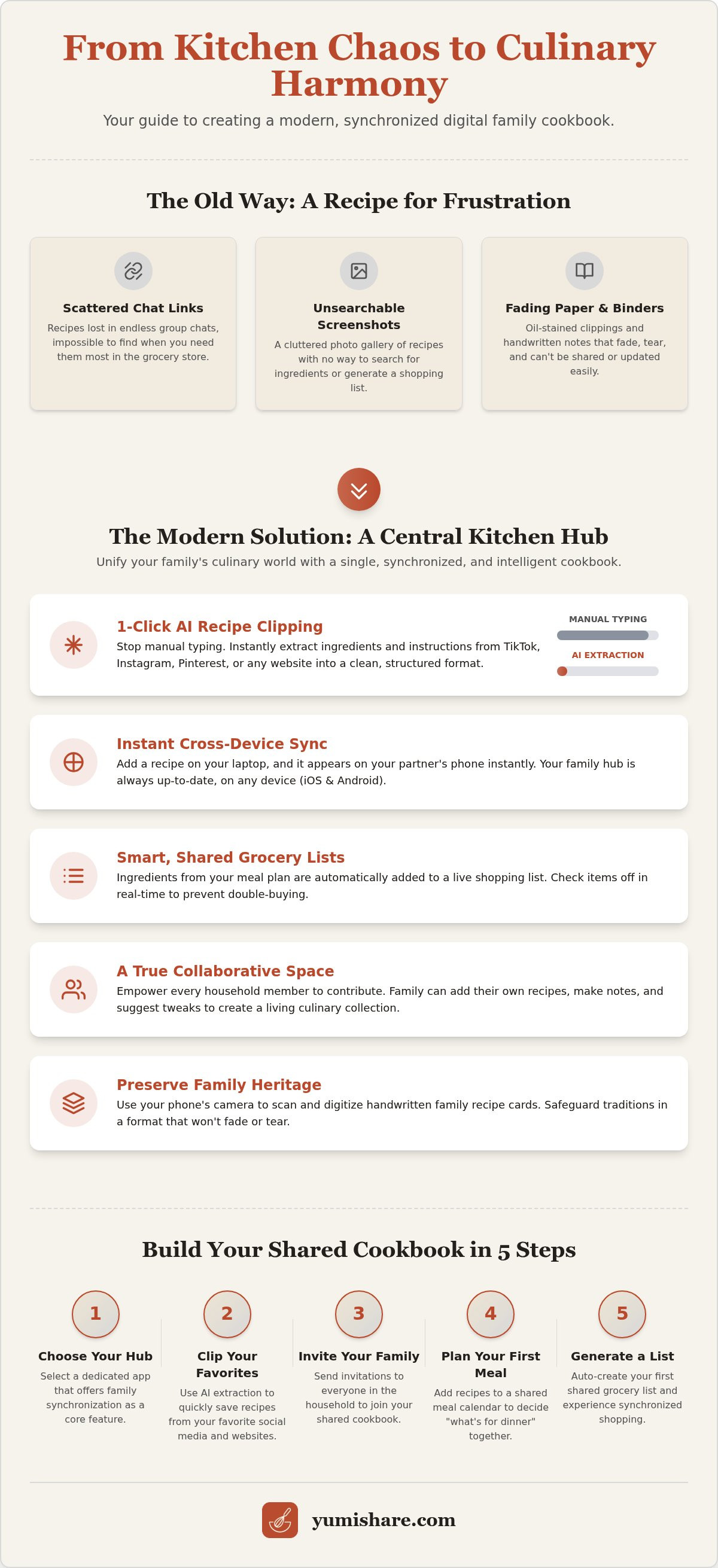
5 Steps to Build Your Shared Digital Cookbook
Building a centralized kitchen hub doesn't have to be a weekend-long project. By following a structured approach, you can move from scattered links to a synchronized system in minutes. When you create a digital family cookbook, the goal is to build a living resource that grows with your household. Follow these five steps to establish your new digital kitchen tradition:
- Select your foundation: Choose a dedicated app that supports social media imports and real-time family synchronization.
- Build the "Family Hub": Invite your household members immediately. Creating a collaborative account ensures everyone feels ownership of the meal plan.
- Clear the backlog: Move your "existing chaos" first. Import your Instagram saves, TikTok reels, and browser bookmarks to see the system in action.
- Tag by lifestyle: Organize recipes into "Collections" based on how you actually eat. Use tags like "15-Minute Meals" or "Sunday Roast" for quick filtering.
- Establish a rhythm: Set a recurring "Meal Planning Day." Sit down together once a week to pick recipes from your new library for the upcoming days.
This methodical setup prevents the digital overwhelm mentioned earlier. It turns a massive task into bite-sized, manageable segments. If you are ready to simplify your kitchen life, get started with YumiShare today and see how easy organization can be.
Choosing the Right Platform
Your choice of software determines how often your family will actually use the cookbook. You should prioritize a best recipe manager for iPhone that offers full support for Android devices. This ensures no one is locked out of the system. Look for a dedicated "Cook Mode." This feature keeps the screen awake and provides a hands-free interface for messy kitchen moments. Verify that the app offers automated cloud backups. Your family recipes are a digital legacy; they should never be at risk of being lost due to a hardware failure or a lost phone.
Onboarding the Less Tech-Savvy
Success depends on everyone participating. To help parents or less tech-savvy family members, start with the "Search" function. Show them how typing "Chicken" brings up every family favorite instantly. Use "View Only" permissions for those who just want to cook, while giving "Edit" access to the household chefs to keep the data clean. Don't try to digitize everything at once. Start with five high-value recipes that everyone loves. Once the family sees the relief of an organized grocery list and a clear plan, the system’s worth proves itself. You'll move from a frantic search for dinner to a grounded, tactile satisfaction in the kitchen.
Why YumiShare is the Ultimate Family Recipe Solution
YumiShare isn't just another storage app. It's a filter for the digital noise of the modern world. Most tools focus on simple bookmarks, but YumiShare acts as a functional partner in your home. It's the only platform designed specifically for the social media recipe era. When you create a digital family cookbook, you need a system that understands how we find inspiration today. You don't find recipes in dusty books anymore; you find them in thirty-second clips and trending reels. YumiShare captures that spark and turns it into a structured reality. It removes the frantic energy of digital consumption and replaces it with the grounded satisfaction of a well-ordered kitchen.
The AI extraction technology is the heart of this transformation. It saves busy households hours of manual data entry by pulling ingredients and steps directly from messy social captions. This efficiency is paired with seamless cross-device synchronization that feels like magic. If you update a meal plan on your tablet, it reflects on your spouse's phone instantly. This real-time connection ensures that everyone stays aligned. It creates a sense of domestic tranquility where the "What's for dinner?" question is answered before it's even asked. You aren't just saving data. You're reclaiming your mental space.
From Viral Video to Family Table
The journey from inspiration to execution should be frictionless. YumiShare allows you to save from TikTok, Instagram, and Pinterest in seconds. Once a recipe is in your library, the integrated Meal Planner helps you slot it into your week with a single tap. The Smart Grocery List then takes over. It organizes your needs by category, making your time in the store fast and purposeful. You can access your cookbook anywhere. Check your list in the grocery aisle, then switch to Cook Mode on your kitchen counter. This hands-free interface keeps your screen bright and your focus on the food. It bridges the gap between a digital spark and a physical result.
Start Your Digital Legacy Today
Ditch the paper clutter and embrace a new sense of digital calm. To create a digital family cookbook that lasts for generations, you need a platform that values your legacy. Download the YumiShare app from the App Store or Google Play to begin. You can start for free to test the interface and see the AI extraction in action. As your collection grows, you can transition to a premium subscription to unlock unlimited family imports and advanced scanning features. This investment protects your family traditions in a format that evolves with you. Stop scrolling through endless chat threads and start building a synchronized kitchen hub that works for your whole house. Your path to an organized, peaceful kitchen starts now.
Reclaim Your Kitchen Harmony Today
Transforming your household’s culinary chaos into a streamlined tradition is no longer a manual chore. You've seen how moving beyond scattered chat threads and paper scraps creates a single, reliable source of truth. By leveraging AI extraction from over 5 social platforms, you can bridge the gap between digital inspiration and a finished meal. Real-time synchronization across iOS and Android ensures that every family member stays updated, whether they are in the kitchen or the grocery aisle.
When you create a digital family cookbook, you aren't just saving data. You're building a legacy of flavors and shared experiences. Join the thousands of organized households already using a dedicated hub to simplify their daily lives. Focus on the joy of cooking rather than the stress of searching. The path to a more peaceful, efficient home life is just a few clicks away.
Start your shared family cookbook for free with YumiShare and experience the relief of true kitchen organization. It's time to turn that digital spark into a lasting family tradition.
Frequently Asked Questions
Can my family use the same account on different types of phones?
Yes, every member of your household can access the same shared account regardless of their hardware. The system features real-time cloud synchronization that works seamlessly across both iOS and Android devices. This ensures that when you create a digital family cookbook, no one is left out of the meal planning process because of their phone choice.
Is there a limit to how many family members I can invite to my cookbook?
You can invite multiple household members to join your collaborative "Family Hub" to ensure everyone stays aligned. The system is designed for the whole house to participate in the cooking and planning process. Every invited member can contribute their own notes, edit recipes, and update the shared grocery list in real-time.
How do I save a recipe from a TikTok video into our shared folder?
Saving from TikTok is a simple two-tap process that takes only seconds. Tap the share button on the video and select your recipe manager from the list of apps. The AI extraction technology then scans the video and captions to pull out structured ingredients and steps, placing them directly into your shared folder without any manual typing.
Can I print recipes if I still want a physical copy for my binder?
Yes, you can print any recipe from your digital library whenever you need a physical backup. While the goal is to reduce paper clutter, the app allows you to generate a clean, readable layout for any entry. This is perfect for those who still value the tactile feel of a traditional kitchen binder for specific holiday favorites.
Does the app work offline if I have bad reception in the kitchen?
The app works offline by caching your saved recipes directly on your mobile device. You don't need a constant internet connection to use the Cook Mode or view your grocery list while shopping. This reliability is essential for kitchens with spotty reception or for navigating large grocery stores with thick walls.
What happens if I find a recipe on a website instead of social media?
Traditional websites are handled with the same efficiency as social media reels. The app extracts data from food blogs and news sites, stripping away the intrusive ads and long introductory stories. It leaves you with just the ingredients and instructions in your standardized, easy-to-read format.
Is our family recipe data private, or can other users see it?
Your family data is private by default and secure within your account. Only the members you specifically invite to your "Family Hub" can view or edit the recipes in your collection. This ensures that your private family traditions and personal kitchen notes remain safe within your household circle.
Can I import recipes from other apps like Paprika or Recipe Keeper?
Yes, you can consolidate your existing collections into one centralized place. Most modern platforms allow you to import data files from other apps to help you create a digital family cookbook without starting from scratch. This makes it easy to transition from older, static tools to a more synchronized, AI-powered system.
FAQ
Can my family use the same account on different types of phones?
Yes, every member of your household can access the same shared account regardless of their hardware. The system features real-time cloud synchronization that works seamlessly across both iOS and Android devices. This ensures that when you create a digital family cookbook, no one is left out of the meal planning process because of their phone choice.
Is there a limit to how many family members I can invite to my cookbook?
You can invite multiple household members to join your collaborative "Family Hub" to ensure everyone stays aligned. The system is designed for the whole house to participate in the cooking and planning process. Every invited member can contribute their own notes, edit recipes, and update the shared grocery list in real-time.
How do I save a recipe from a TikTok video into our shared folder?
Saving from TikTok is a simple two-tap process that takes only seconds. Tap the share button on the video and select your recipe manager from the list of apps. The AI extraction technology then scans the video and captions to pull out structured ingredients and steps, placing them directly into your shared folder without any manual typing.
Can I print recipes if I still want a physical copy for my binder?
Yes, you can print any recipe from your digital library whenever you need a physical backup. While the goal is to reduce paper clutter, the app allows you to generate a clean, readable layout for any entry. This is perfect for those who still value the tactile feel of a traditional kitchen binder for specific holiday favorites.
Does the app work offline if I have bad reception in the kitchen?
The app works offline by caching your saved recipes directly on your mobile device. You don't need a constant internet connection to use the Cook Mode or view your grocery list while shopping. This reliability is essential for kitchens with spotty reception or for navigating large grocery stores with thick walls.
What happens if I find a recipe on a website instead of social media?
Traditional websites are handled with the same efficiency as social media reels. The app extracts data from food blogs and news sites, stripping away the intrusive ads and long introductory stories. It leaves you with just the ingredients and instructions in your standardized, easy-to-read format.
Is our family recipe data private, or can other users see it?
Your family data is private by default and secure within your account. Only the members you specifically invite to your "Family Hub" can view or edit the recipes in your collection. This ensures that your private family traditions and personal kitchen notes remain safe within your household circle.
Can I import recipes from other apps like Paprika or Recipe Keeper?
Yes, you can consolidate your existing collections into one centralized place. Most modern platforms allow you to import data files from other apps to help you create a digital family cookbook without starting from scratch. This makes it easy to transition from older, static tools to a more synchronized, AI-powered system.