
 Polski
  Deutsch
  Español
  Français
  Italiano
  Português
  Nederlands
  Svenska
  Українська
  Русский
 The 5 Best Recipe Managers for iPhone in 2026: Organize Your Digital Kitchen
Find the best recipe manager for iPhone to organize your digital kitchen. Our 2026 review compares the top 5 apps for video import and hands-free cooking.

You’re staring at a "Saved" folder on Instagram, but you’re still ordering takeout because the recipe you want is buried under a hundred other clips. We've all been there. Screenshots clutter your photo gallery while manual typing feels too slow for a busy weeknight. It’s overwhelming to manage a digital kitchen when your inspiration is scattered across three different social apps and a dozen browser tabs.
Finding the best recipe manager for iphone means choosing a tool that acts as a bridge between a viral video and your actual stove. You deserve a system that rescues your favorite meals from digital chaos and transforms them into a clean, searchable cookbook. This article reveals the top-rated apps designed to simplify your culinary life through smart organization and empathetic automation.
We’ll explore how the latest 2026 technology can generate automatic grocery lists and provide hands-free cooking assistance. Discover the essential tools that turn social media sparks into physical results without the stress of forgotten ingredients or messy screens. It’s time to bring order back to your kitchen and reclaim your mental space.
Key Takeaways
- Learn why video extraction is replacing traditional web scraping as the primary way to save and organize new recipes in 2026.
- Identify the specific features that define the best recipe manager for iphone, from lightning-fast imports to seamless cross-device syncing.
- Compare the top five tools available today, including minimalist options for web lovers and AI-powered powerhouses for social media fans.
- Discover a simple two-step process to audit your scattered social media folders and migrate legacy bookmarks into one organized space.
- Explore how hands-free Cook Mode keeps your original inspiration video in view while you work, bridging the gap between digital discovery and dinner.
The Evolution of iPhone Recipe Management: Why 2026 is Different
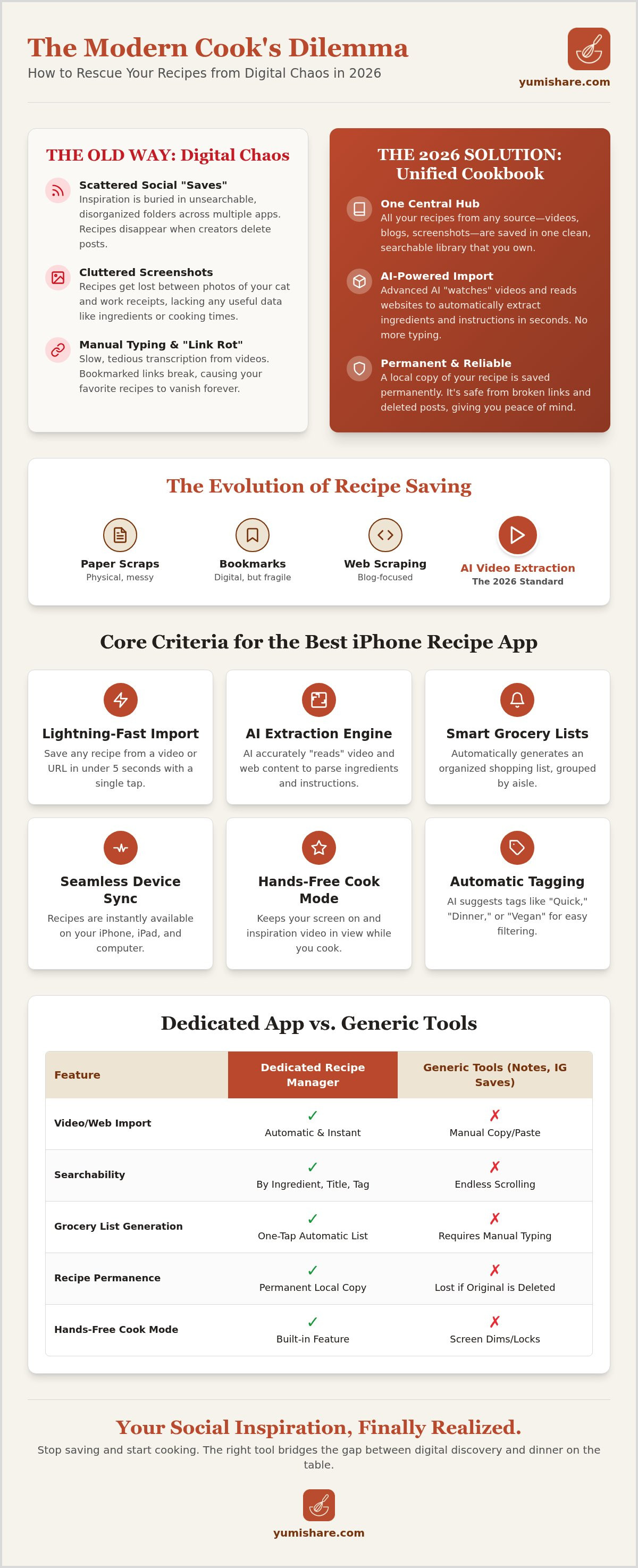
Your iPhone photos app is likely a recipe graveyard. You snap a screenshot of a viral pasta dish or a quick kitchen hack. It sits between a photo of your cat and a work receipt. You never look at it again. This is the digital clutter of the past. In 2026, the "Social-First" cook has moved beyond static images. We find our inspiration in motion. We watch a 15-second TikTok or an Instagram Reel and want those exact ingredients in our cart immediately. A simple screenshot can't do that. It can't generate a shopping list or tell you the oven temperature while your hands are covered in flour.
The gap between digital discovery and a finished meal has finally closed. We've moved from basic web-scraping to advanced video-extraction. Traditional apps used to just pull text from blogs. Now, the best recipe manager for iphone needs to understand video. It needs to "read" the ingredients shown on a creator's screen and translate them into a structured format. Using a dedicated app for this beats generic tools like Notes or Reminders every time. While Notes is great for a quick thought, it lacks the searchable metadata and interactive features required for a high-functioning kitchen.
From Paper Scraps to AI Extraction
The journey of recipe storage has taken us from messy index cards to cluttered browser bookmarks. Now, we've reached the era of automation. AI has effectively eliminated the need for manual typing. You no longer have to squint at a screen and transcribe measurements into a separate app. Modern tools handle the heavy lifting for you. This shift is vital when you're standing in the grocery store aisle. Having your entire cookbook in your pocket, perfectly organized and synced, means you never have to guess if you have enough cumin at home. It turns a frantic shopping trip into a calm, methodical process.
The Problem with Social Media 'Saved' Folders
Instagram and TikTok 'Saved' folders are where inspiration goes to die. They are disorganized, impossible to search, and offer zero utility once you actually start cooking. Even worse is the threat of "Link Rot." If a creator deletes their video or their account disappears, your favorite recipe vanishes with them. You need a permanent, personal archive that you own. A dedicated recipe saver app creates a local copy of those instructions. It protects your culinary library from the whims of social media algorithms and platform changes, ensuring your go-to meals are always accessible.
- Instant Search: Find that "lemon chicken" video in seconds, not minutes of scrolling.
- Ingredient Clarity: See a clean list instead of pausing a fast-moving video.
- Reliability: Your recipes stay put, even if the original post is deleted.
Core Criteria: What Makes an iPhone Recipe App the 'Best'?
Efficiency is the true measure of a kitchen tool. In 2026, the best recipe manager for iphone must do more than just store text. It needs to act as a silent partner in your culinary process. If an app requires you to spend ten minutes formatting a single entry, you'll stop using it. Speed and intuition are the primary benchmarks. A top-tier manager should allow you to save a recipe from a URL or a social media video in under five seconds. This immediacy keeps your momentum high and your digital kitchen clutter-free.
Seamless synchronization is non-negotiable. You might find inspiration on your Mac during a lunch break, but you'll need that data on your iPhone at the grocery store. Later, you'll likely want a larger view on your iPad while you cook. The data must move with you without friction. Beyond simple storage, look for smart organization. The app should categorize your meals automatically. It should tag a "15-minute pasta" as both "Quick" and "Dinner" without you lifting a finger. This level of automation turns a simple list into a functional library.
Grocery integration completes the cycle from discovery to dinner. A high-quality app transforms your saved meals into a checklist instantly. It doesn't just list ingredients; it groups them by aisle. This prevents you from zigzagging across the store. When your digital tools handle the logistics, you can focus on the joy of cooking. If you're ready to stop the manual typing and start cooking, explore a smarter way to save recipes today.
AI-Powered Extraction Capabilities
Modern AI has revolutionized how we capture information. It "reads" the text overlays and listens to the audio in a TikTok video to build a structured recipe. This tech parses ingredients with precision, ensuring that "2 tbsp of honey" isn't lost in a sea of captions. This structured data is the foundation for accurate grocery planning and automatic nutritional calculations. It removes the friction of manual entry entirely.
User Experience and Kitchen Safety
Kitchens are messy environments. A "Hands-Free" mode is essential to protect your expensive iPhone from flour, oil, and water. The app must keep your screen awake while you follow instructions. It should also optimize the display for different devices. While an iPhone is perfect for quick checks at the store, the interface should expand gracefully on an iPad to provide a clear, readable view from across the counter.
- Instant Import: Capture any recipe from any source in seconds.
- Cross-Platform Sync: Access your cookbook on iPhone, iPad, and Mac.
- Smart Lists: Generate organized grocery checklists automatically.
- Cook Mode: Follow instructions without touching your screen.
The Top 5 Recipe Managers for iPhone: 2026 Comparison
Selecting the right digital tool depends entirely on your kitchen habits. Some cooks prefer the structured depth of a database. Others want to capture a fleeting moment of inspiration from a social feed. The best recipe manager for iphone must bridge the gap between your digital life and your physical countertop. In 2026, the market has split into two distinct camps: traditional organizers and AI-driven extractors. Choosing between them determines whether your cooking process feels like a chore or a creative release.
YumiShare: Best for Social Media Lovers
YumiShare stands alone as the innovator of the group. It is designed specifically for the "Social-First" cook who finds inspiration on TikTok, Instagram, and YouTube. While other apps struggle with video content, YumiShare uses a proprietary AI engine to analyze visual data. It can accurately convert youtube shorts to recipes in seconds. The interface utilizes a unique "Z-rhythm" layout. This design allows for rapid, one-handed saving while you scroll through your favorite feeds. It doesn't just store a link; it captures the soul of the video and turns it into a functional set of instructions.
Other top contenders for the best recipe manager for iphone offer different strengths:
- Mela: This is the premier choice for minimalist users. It excels at pulling content from RSS feeds and traditional blogs. If you follow specific food writers rather than social influencers, Mela provides a clean, ad-free reading experience.
- Pestle: Known for having the sleekest UI on the App Store, Pestle feels like a native Apple app. It offers deep integration with iOS features like Live Text and Shared with You, making it a favorite for those who value aesthetics.
- Recipe Keeper: This is the reliable workhorse for families. It offers robust sharing features and a built-in meal planner that syncs across multiple accounts. It's the digital version of the family recipe binder.
- Paprika 3: As the legacy choice, Paprika remains a powerhouse for professional-level database management. While it lacks modern social integration, its ability to scale to thousands of recipes is unmatched.
Comparison: Features, Price, and Ease of Use
Budget and commitment levels vary across these platforms. YumiShare and Pestle typically favor subscription models to fund their ongoing AI development. In contrast, Mela and Paprika often offer one-time purchases for those who prefer a "buy it once" approach. For beginners, Mela and Recipe Keeper provide generous free tiers to get you started without an immediate investment.
Your persona also dictates the right choice. The Baker, who requires precise measurements and long-form notes, will appreciate the stability of Paprika or Recipe Keeper. The Meal Prepper, who needs speed and video-based inspiration, will find their match in YumiShare. Identify your primary pain point, whether it's disorganized folders or manual typing, and choose the tool that offers the most immediate relief.
Turning Social Inspiration into a Reality: The Migration Guide
Discovery is the spark, but organization is the fuel. Your iPhone is likely full of digital clutter from years of "saving" for later. To truly benefit from the best recipe manager for iphone, you must bridge the gap between that initial spark and your kitchen counter. This requires a methodical migration of your existing inspiration into a single, high-functioning system. Stop letting your favorite meals rot in an Instagram folder. It is time to move from passive consumption to active cooking.
Start with a ruthless audit. Open your Instagram, TikTok, and Pinterest 'Saved' folders. If a recipe doesn't excite you today, delete it. Be a digital minimalist. Next, utilize bulk-import tools to sweep through your legacy browser bookmarks. Most modern managers handle this in seconds, pulling text and images into a clean format. Instead of traditional filing, organize by 'Vibe' or 'Meal Type'. Labels like "Quick Weeknights" or "Rainy Day Baking" are far more useful than generic ingredient tags. Finally, commit to a weekly 10-minute cleanup. Use this time to scan your new additions and slot them into your upcoming meal plan. This small habit prevents the "recipe graveyard" from returning.
Breaking the Screenshot Habit
A screenshot is a static image with zero utility. It can't tell you how much garlic to buy or remind you of a cooking temperature. You should stop taking recipe screenshots immediately. Use the iOS Share Sheet instead. It’s a one-tap action that sends the full metadata directly to your manager. For even more speed, set up Siri Shortcuts. A simple voice command like "Save this recipe" can capture a URL and extract the ingredients while you keep scrolling. This keeps your photo gallery clean and your cookbook searchable.
Building a Meal Plan that Actually Works
A meal plan only works if it's visible. Connect your recipe manager to your digital calendar to see your dinner plans alongside your daily schedule. This visibility creates accountability and reduces the "what's for dinner" panic. The real magic happens at the store. Your manager should generate a smart grocery list that sorts items by supermarket aisle. This saves time and mental energy. If you live with others, use collaborative lists. Sharing the shopping duties ensures everyone stays on the same page. When everyone can see the plan, the mental load of household management decreases significantly.
Ready to transform your digital chaos? Get started with a smarter kitchen system and reclaim your evening peace.
Why YumiShare is the Ultimate 2026 Choice for iPhone
YumiShare is more than just a digital box for your data. It is a filter that removes the noise of the internet and leaves only the inspiration you need. While other apps focus on simple storage, YumiShare prioritizes the transition from discovery to execution. It understands that you don't just want to save a link; you want to recreate a specific culinary moment. This focus on the "Social-First" workflow makes it the best recipe manager for iphone for anyone who finds their next meal on a screen rather than in a book.
The heart of the experience is a sophisticated AI extraction engine. This tech doesn't just look for text on a webpage. It "reads" the video content of a TikTok or Instagram Reel. It identifies the text overlays, parses the creator's spoken instructions, and builds a structured ingredient list. You get the accuracy of manual typing without the effort. This automation handles the logistics so you can focus on the creative process. It turns a 15-second clip into a permanent, searchable entry in your personal library in seconds.
The "Cook Mode" feature provides a unique advantage once you're actually at the stove. It keeps the original inspiration video in view while you work. You get the visual cues of the creator alongside your structured text instructions. Your screen stays awake and responds to hands-free commands. This is essential when your fingers are covered in dough or oil. It’s a thoughtful design choice for real people with messy, active kitchens. YumiShare provides the empathetic confidence you need to tackle a complex new dish with ease.
Bridging the Digital-Physical Gap
True domestic tranquility comes from order. YumiShare reduces the mental load of the "What's for dinner?" panic by turning your scattered "Saved" folders into a well-ordered digital cookbook. There is a deep, tactile satisfaction in seeing your culinary life organized and accessible. Looking ahead, YumiShare continues to innovate with predictive grocery list features and even deeper integration with iOS smart home triggers. The goal is a seamless movement from a digital spark to a physical meal on your table.
Get Started with YumiShare Today
Transform your cooking routine right now. Download the app today and save your first five recipes for free to experience the speed of AI extraction firsthand. For power users, the premium subscription offers unlimited video saves and advanced meal planning tools that sync across all your devices. Stop letting your favorite recipes disappear into the social media void. Take control of your digital kitchen and start cooking with clarity today.
- AI Power: Extract ingredients from video automatically.
- Cook Mode: Keep your hands off the screen and your eyes on the meal.
- Smart Lists: Generate grocery checklists that sort by supermarket aisle.
- Cloud Sync: Access your library on iPhone, iPad, and Mac.
Choosing the best recipe manager for iphone is about reclaiming your time and your kitchen. Let YumiShare be the savvy companion that helps you bridge the gap between inspiration and reality.
Master Your Digital Kitchen Today
The days of messy screenshots and lost social media links are over. Video extraction is now the standard for the modern cook. By choosing a tool that bridges the gap between digital inspiration and physical execution, you reclaim your time. You reclaim your peace of mind. A well-ordered cookbook is more than just a list; it’s a path to domestic tranquility. It turns a frantic search for dinner into a calm, methodical process.
Finding the best recipe manager for iphone means choosing a partner that understands your reality. You need a system that handles the heavy lifting of organization. Let the technology manage the logistics while you focus on the joy of creating. With AI-powered video extraction, synced grocery lists, and a top-rated iOS cook mode, you have the ultimate toolkit for 2026.
Start organizing your digital kitchen with YumiShare for free today!
Take that first step toward a simpler, more mindful culinary life. Your future self in the kitchen will thank you.
Frequently Asked Questions
What is the best free recipe manager for iPhone in 2026?
YumiShare offers a powerful free tier to get you started with AI extraction. For users who strictly want a minimalist web-based experience, apps like Mela provide excellent value. The best recipe manager for iphone shouldn't hide its core utility behind a paywall immediately. Start by saving a few recipes for free to test the interface and speed before committing to a premium subscription for unlimited storage.
Can I save recipes from Instagram Reels to my iPhone?
Yes, you can save them directly using the iOS Share Sheet or a specialized extraction tool. Modern apps read the video data to pull ingredients and steps into a structured format. This replaces the old method of taking screenshots that just clutter your camera roll. It turns a fleeting social media clip into a permanent, searchable entry in your digital cookbook that you can actually use while cooking.
How do I move my recipes from Pinterest to a recipe app?
Most top-rated apps include bulk-import tools designed specifically for Pinterest boards. Simply connect your account or paste the board URL to migrate your legacy bookmarks. This process cleans up the data; it removes ads and blog filler. It leaves you with a streamlined list of instructions and ingredients. It's the fastest way to rescue your years of planning from a disorganized social folder.
Is there an app that can extract ingredients from a TikTok video?
YumiShare is the leading solution for TikTok extraction in 2026. It uses a proprietary AI engine to "read" text overlays and listen to audio cues. This tech creates a text-based ingredient list and set of instructions automatically. You don't have to pause and rewind a fast-moving video ten times just to write down the measurements. It does the heavy lifting for you in seconds.
How do I share my digital cookbook with my family on iOS?
Use the built-in family sharing or collaborative list features found in apps like Recipe Keeper or YumiShare. These tools allow you to sync your entire library across multiple Apple IDs. When you add a new meal or update a grocery list, the changes appear on your partner's iPhone instantly. It’s an efficient way to manage household chores and ensure everyone knows what’s on the menu for the week.
What happened to my saved recipes on Instagram?
You likely experienced "link rot." This occurs when creators delete their posts or change their account settings. Social media platforms aren't permanent storage solutions. If a video is removed, your saved link becomes useless. This is why migrating your favorites to the best recipe manager for iphone is essential. A dedicated app creates a local, permanent copy of the instructions so you never lose a go-to meal.
Do recipe managers work offline in the kitchen?
Yes, most high-quality recipe apps store your data locally on your device. This ensures you can access your instructions even if your kitchen has a weak Wi-Fi signal. While features like video streaming or cloud syncing require an internet connection, the core text and images remain available. This reliability is vital for a smooth cooking experience. You won't be left hanging in the middle of a complex step.
What is the easiest way to make a grocery list from a recipe?
Automatic smart list generation is the most efficient method. With one tap, your app should parse the ingredients and add them to a checklist. The best tools even group these items by supermarket aisle to save you time at the store. This eliminates the need for manual typing or switching between apps. It turns your meal plan into an actionable shopping guide with zero friction.
FAQ
What is the best free recipe manager for iPhone in 2026?
YumiShare offers a powerful free tier to get you started with AI extraction. For users who strictly want a minimalist web-based experience, apps like Mela provide excellent value. The best recipe manager for iphone shouldn't hide its core utility behind a paywall immediately. Start by saving a few recipes for free to test the interface and speed before committing to a premium subscription for unlimited storage.
Can I save recipes from Instagram Reels to my iPhone?
Yes, you can save them directly using the iOS Share Sheet or a specialized extraction tool. Modern apps read the video data to pull ingredients and steps into a structured format. This replaces the old method of taking screenshots that just clutter your camera roll. It turns a fleeting social media clip into a permanent, searchable entry in your digital cookbook that you can actually use while cooking.
How do I move my recipes from Pinterest to a recipe app?
Most top-rated apps include bulk-import tools designed specifically for Pinterest boards. Simply connect your account or paste the board URL to migrate your legacy bookmarks. This process cleans up the data; it removes ads and blog filler. It leaves you with a streamlined list of instructions and ingredients. It's the fastest way to rescue your years of planning from a disorganized social folder.
Is there an app that can extract ingredients from a TikTok video?
YumiShare is the leading solution for TikTok extraction in 2026. It uses a proprietary AI engine to "read" text overlays and listen to audio cues. This tech creates a text-based ingredient list and set of instructions automatically. You don't have to pause and rewind a fast-moving video ten times just to write down the measurements. It does the heavy lifting for you in seconds.
How do I share my digital cookbook with my family on iOS?
Use the built-in family sharing or collaborative list features found in apps like Recipe Keeper or YumiShare. These tools allow you to sync your entire library across multiple Apple IDs. When you add a new meal or update a grocery list, the changes appear on your partner's iPhone instantly. It’s an efficient way to manage household chores and ensure everyone knows what’s on the menu for the week.
What happened to my saved recipes on Instagram?
You likely experienced "link rot." This occurs when creators delete their posts or change their account settings. Social media platforms aren't permanent storage solutions. If a video is removed, your saved link becomes useless. This is why migrating your favorites to the best recipe manager for iphone is essential. A dedicated app creates a local, permanent copy of the instructions so you never lose a go-to meal.
Do recipe managers work offline in the kitchen?
Yes, most high-quality recipe apps store your data locally on your device. This ensures you can access your instructions even if your kitchen has a weak Wi-Fi signal. While features like video streaming or cloud syncing require an internet connection, the core text and images remain available. This reliability is vital for a smooth cooking experience. You won't be left hanging in the middle of a complex step.
What is the easiest way to make a grocery list from a recipe?
Automatic smart list generation is the most efficient method. With one tap, your app should parse the ingredients and add them to a checklist. The best tools even group these items by supermarket aisle to save you time at the store. This eliminates the need for manual typing or switching between apps. It turns your meal plan into an actionable shopping guide with zero friction.