
 Polski
  Deutsch
  Español
  Français
  Italiano
  Português
  Nederlands
  Svenska
  Українська
  Русский
 How to Plan Weekly Meals with a Budget Meal Planning App in 2026
Use a budget meal planning app to slash your 2026 grocery bill. This guide helps you organize recipes, automate lists, and finally stop wasting food.

What if your "Saved" folder on Instagram wasn't a digital graveyard for recipes you'll never cook, but the secret to cutting your grocery bill by 20%? You're likely feeling the squeeze at the checkout. With the price of fresh vegetables projected to jump 6.8% in 2026 and beef costs climbing even higher, the old way of winging it is becoming a luxury few can afford. It's frustrating to watch your digital inspiration turn into physical food waste because you lacked a cohesive plan for the week. You deserve a routine that feels like a relief, not another chore.
You can turn that digital clutter into a streamlined, cost-saving machine. By leveraging a modern budget meal planning app, you'll learn how to automate your organization and reclaim your mental space. This guide explores how to transform scattered social media clips into a precise, automated grocery list. We'll show you how to sync your favorite discoveries with smart automation to slash your monthly spending and finally start cooking the meals you love.
Key Takeaways
- Master strategic organization to combat 2026 food inflation and maximize your household spending power.
- Transform chaotic social media saves into clear instructions using a budget meal planning app that bridges the gap between digital inspiration and kitchen execution.
- Reclaim your weekend by replacing manual spreadsheets with automated grocery lists that instantly prevent expensive ingredient duplicates.
- Adopt a zero-waste routine by auditing your pantry first and building your weekly plan around items you already own.
- Leverage AI extraction to turn short recipe clips into organized, hands-free cooking guides without the hassle of manual typing.
Why a Budget Meal Planning App is Essential in 2026
Budget meal planning is more than just clipping digital coupons. It's the strategic organization of your food resources to minimize waste and maximize every dollar in your bank account. In 2026, this strategy is a necessity rather than a hobby. Food prices are climbing. The USDA projects a 3.1% increase in overall food costs this year. Specifically, fresh vegetable prices are expected to rise by 6.8%, and beef costs are forecasted to jump by 10.7%. You can't afford to let expensive ingredients rot in the back of your fridge.
A modern budget meal planning app replaces the heavy mental load of tracking portions, prices, and pantry inventory. It acts as a digital filter for your busy life. Instead of guessing what you need, automation calculates exact quantities based on your selected recipes. This creates a direct link between your inspiration and your shopping cart. It prevents the "random ingredient" trap. You stop buying a $12 jar of specialty spices for a single TikTok recipe you'll only make once. You start buying with purpose and precision.
Eliminating the 'Hidden Costs' of Home Cooking
Food waste is the silent budget killer in modern households. When ingredients sit unused, your money effectively disappears. Practicing consistent Meal preparation allows you to visualize exactly how your groceries will be used across the entire week. It also defeats decision fatigue. Most people default to expensive takeout because they lack the mental energy to choose a recipe at 6:00 PM. A plan removes that choice. It provides a clear directive that saves you from the $53.20 average cost of a casual takeout meal for four. You replace panic with a routine that feels like a relief.
From Digital Clutter to Kitchen Calm
Instagram and TikTok are the new frontiers for budget-friendly cooking hacks. Unfortunately, "Saved" folders are usually where these ideas stay forever. Passive consumption doesn't lower your grocery bill. You need a way to transition from scrolling to cooking. Building a structured digital cookbook provides an immediate psychological benefit. It moves you away from the frantic energy of digital consumption toward the calm of a well-ordered home life. When your inspiration is organized, execution becomes effortless. You stop feeling overwhelmed by your digital clutter and start enjoying the grounded, tactile satisfaction of a home-cooked meal.
Building Your Low-Cost Recipe Library from Social Media
TikTok and Instagram have replaced traditional cookbooks for the modern home chef. These platforms are flooded with creators sharing "stretched-dollar" meals and $5 dinner challenges. While these viral hacks offer incredible value, they come with a high friction cost. You can't easily shop from a 60-second video. Squinting at a fast-moving ingredient overlay while walking through grocery aisles is a recipe for frustration. It leads to forgotten items and wasted trips.
A high-quality budget meal planning app bridges this gap. It acts as a translator between your digital discovery and your physical kitchen. Instead of letting a great idea vanish into your feed, you can capture the data instantly. Modern AI tools now extract precise measurements and step-by-step instructions from a simple URL. This transforms a fleeting social media spark into a permanent, searchable asset in your digital pantry. You save time and reduce the mental energy required to turn a video into a meal.
Capturing Viral Budget Hacks Instantly
Stop relying on cluttered photo galleries filled with blurry screenshots. You can now save recipes from Instagram Reels or TikTok videos directly into a functional interface. This process converts the visual chaos of a video into a clean, text-based ingredient list. It even works for Pinterest pins; it syncs your aesthetic boards with a practical cooking environment. By using a tool like YumiShare's recipe saver, you ensure that every budget-friendly tip you find online actually makes it to your dinner table. Transition from passive scrolling to active kitchen execution with a few taps.
Categorizing for Financial Success
Organization is the foundation of any zero-waste weekly plan. Once your recipes are imported, group them by financial strategy. Create folders for "15-minute meals" to avoid the temptation of midweek takeout. Use tags for "bulk prep" or "pantry staples" like beans and rice to keep your spending low. Tagging recipes by seasonal produce also helps you capitalize on lower prices at the market when items are in abundance.
AI-driven extraction eliminates the risk of missing a critical measurement or ingredient that often occurs with manual transcription. This level of digital mindfulness turns your scattered inspiration into a tactical roadmap for savings. You move from passive consumption to purposeful preparation. Your digital library finally serves your financial goals rather than just taking up space on your phone.
Manual vs. Automated Planning: A Budget Comparison
Is spending three hours on a complex spreadsheet actually worth your time? For many, the "Time-Value" of manual planning doesn't add up. You might save a few dollars by meticulously comparing circulars, but you lose an entire afternoon of your weekend. Manual systems are also prone to human error. You forget to check the pantry for cumin. You buy a second carton of eggs, ignoring that egg prices dropped 27.9% in June 2026 compared to the previous year. These small mistakes compound into significant waste.
A budget meal planning app shifts the burden from your memory to a reliable digital system. Automation prevents "double-buying" by allowing you to cross-reference your current inventory with your shopping list instantly. It offers precision that a paper list can't match. AI-powered scaling adjusts ingredient quantities based on your desired portions. This ensures you buy exactly what you need for the week, which is critical when fresh vegetable prices are expected to rise by 6.8% this year. You control the budget by controlling the volume.
Cloud-syncing is the final piece of the efficiency puzzle. It eliminates the "lost list" syndrome. Your plan lives on your phone, updated in real-time, and accessible even when you're standing in the middle of a crowded grocery aisle. This constant synchronization provides a sense of digital mindfulness, keeping you focused on your financial goals without the stress of misplaced notes.
The Efficiency Gap
Manual list-making is a linear, slow process. You read a recipe, write down an ingredient, and repeat. One-click app generation does this work in seconds. Automation also tracks unit prices and seasonal shifts more effectively than any handwritten note. By using the best app for saved recipes, you can integrate your favorite low-cost finds directly into your weekly routine. You stop staring at a blank page and start executing a plan that is already optimized for your wallet.
Reducing Grocery Store Friction
Smart sorting transforms the shopping experience. Most apps organize your list by aisle, which slashes your time spent in the store. This speed is a budget tactic. The less time you spend wandering, the fewer opportunities you have for impulse buys. Digital cookbooks maintain your consistency. They provide a structured roadmap that prevents "forgotten items." Every extra trip to the store for a single missing ingredient is an opportunity to spend an extra $20 on things you didn't plan to buy. Stay on track and keep your monthly spending under control.
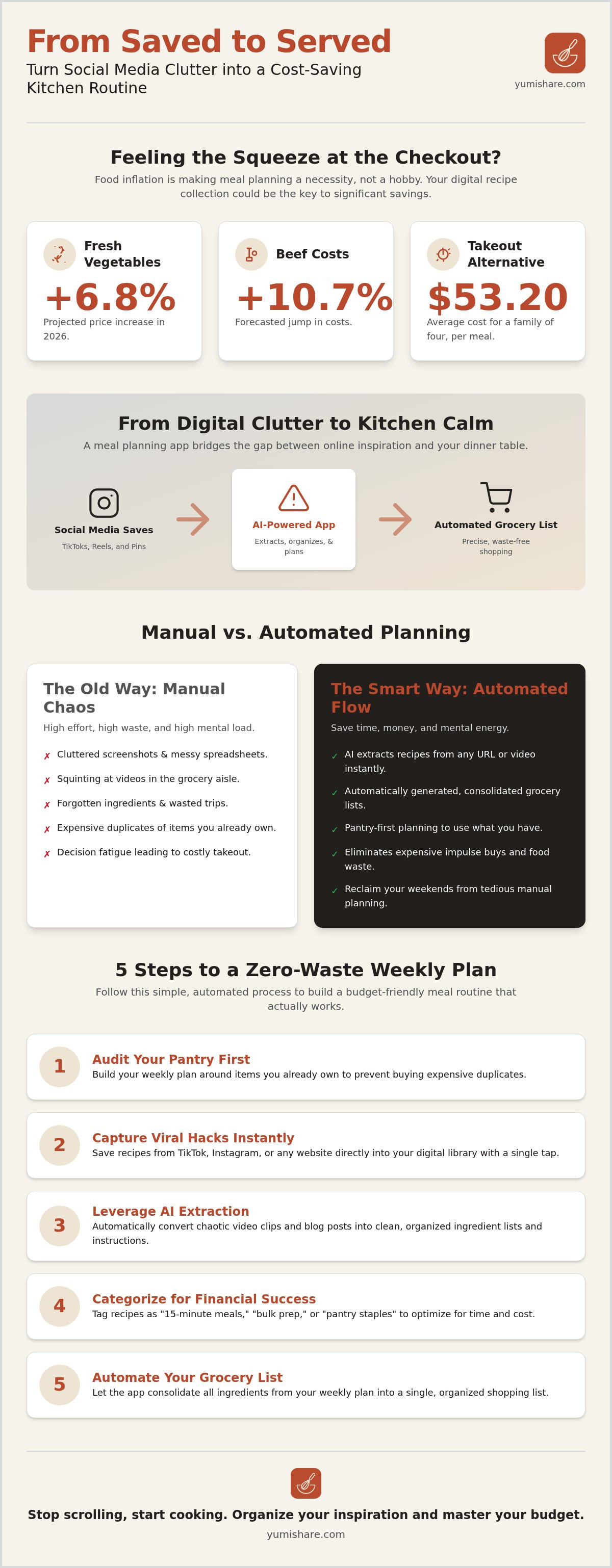
5 Steps to a Zero-Waste Weekly Plan
Transforming your kitchen from a site of digital clutter to a center of efficiency requires a methodical approach. You don't need a massive budget to eat well. You need a better system. By following a structured workflow, you can eliminate the friction that leads to food waste and overspending. A budget meal planning app acts as the filter that removes the noise and leaves only what is useful for your household.
- Step 1: Audit your pantry. Always "shop your kitchen" first. Look for half-used bags of grains, forgotten frozen proteins, or spices you bought months ago. Use these as the foundation for your week.
- Step 2: Import your inspiration. Pull 3 to 5 budget-friendly recipes from your social media feeds. Don't let those viral hacks sit idle. Sync them into your digital cookbook to turn them into actionable data.
- Step 3: Scale for your needs. Adjust the quantities immediately. If a recipe serves four but you're cooking for two, let the app do the math. This prevents you from buying excess perishables that will only end up in the trash.
- Step 4: Prune your smart grocery list. Generate your list and cross off items you already found in Step 1. This step alone prevents the "double-buying" that inflates your monthly bill.
- Step 5: Execute with precision. Follow the plan. Use your digital kitchen assistant to guide you through the preparation process without the stress of missing a step.
Simplify your routine today with YumiShare's automated meal planner.
Scaling and Portion Control
Portion accuracy is a secret weapon for budget control. Most viral recipes are written for a standard family of four. If you're a solo diner or have a larger household, manual math is often where errors occur. You end up with too much spinach or not enough protein. Automation allows you to adjust recipes for 1 or 6 people without the headache. This precision ensures that leftovers are planned and purposeful rather than accidental waste. You buy exactly what you'll eat, keeping your grocery spending tight and predictable.
Using Cook Mode to Minimize Mistakes
Cooking failures are an expensive source of wasted money. When you burn a meal or miss a critical instruction, you're often forced to default to pricey takeout. Leveraging a cook mode for mobile recipes ensures you stay on track from the first chop to the final plate. These tools sync with the original video inspiration, providing a clear path forward. A hands-free interface keeps your focus on the pan and your screen free from flour or grease. You maintain your kitchen's tranquility while ensuring every dollar spent on ingredients results in a successful meal.
Why YumiShare is the Best Budget Meal Planning App
YumiShare isn't just another piece of software; it's a savvy companion that solves the modern problem of digital clutter. While generic apps offer fixed, static databases, YumiShare empowers you to bring your own inspiration from Instagram, TikTok, and Pinterest. This flexibility makes it the premier budget meal planning app for those who find their best kitchen hacks on social media. You don't have to choose between a "budget" app and the viral recipes you actually want to cook. You get both in one streamlined interface.
The AI-powered ingredient extraction is a game-changer for your time and sanity. It removes the hours of manual entry that usually kill a meal planning habit before it starts. By converting a video link into a structured recipe, it turns a fleeting digital spark into a physical result on your dinner table. This automation works alongside Smart Grocery Lists to ensure you never overbuy. The freemium model ensures you can start saving money immediately. You experience the relief of a well-ordered home life without a heavy upfront investment. It's a low-risk path to high-reward organization.
A Personal Digital Cookbook That Grows With You
YumiShare acts as a digital filter that grows with your family. It learns your preferences over time, creating a personalized experience that suggests better planning strategies based on what you actually cook. Having all your social media finds in one searchable place removes the noise of your "Saved" folders. You stop hunting for that one TikTok clip from three weeks ago. You can also share budget plans with family members. This ensures total household alignment. Everyone stays on the same page, which prevents the frustration of miscommunication and duplicate grocery runs.
Ready to Simplify Your Kitchen?
Transitioning from passive consumption to active meal execution is the ultimate goal of digital mindfulness. Automation acts as the filter that leaves only what is useful for your daily life. Before you start your first budget week, follow this final checklist to ensure success:
- Sync your favorite social media saves to your digital cookbook.
- Audit your pantry for existing staples to "shop your kitchen" first.
- Scale your portions within the app to match your household size exactly.
- Generate your grocery list and prune it of items you already own.
- Activate Cook Mode for a stress-free, hands-free evening at the stove.
Start your journey toward a more organized, affordable kitchen today. Capture your inspiration. Save your budget. Savor your results. The path from scrolling to savoring is only a few taps away.
Take Control of Your Kitchen Economy
You've seen how the right system transforms your grocery bill from a source of stress into a manageable routine. By moving beyond manual spreadsheets and scattered folders, you reclaim your mental space and your household budget. The rise of 2026 food costs doesn't have to dictate your lifestyle. Instead, use a budget meal planning app to bridge the gap between social media inspiration and real-world execution. Focus on precision. Audit your pantry first, scale your recipes to fit your household exactly, and let automation handle the heavy lifting. You'll stop buying ingredients you don't need and start cooking the meals you actually love.
It's time to move from passive consumption to active kitchen calm. Experience the relief of AI-powered recipe extraction that syncs your favorite finds from Instagram and TikTok instantly. Use hands-free Cook Mode to stay focused at the stove without the digital mess. This is the path toward a more organized, affordable home life.
Start planning your budget meals for free with YumiShare.
Your journey toward a simpler, more satisfying kitchen routine begins today. You have the tools and the plan. Now, take the first step and enjoy the tranquility of a well-ordered home.
Frequently Asked Questions
Can a meal planning app really save me money on groceries?
Yes, using a dedicated app can significantly lower your monthly food spending by eliminating impulse buys and preventing duplicate purchases. Research from 2026 shows a planned home-cooked dinner for four costs roughly $17.40, while a casual takeout meal averages $53.20. A budget meal planning app ensures you only buy what you need for your specific recipes. This level of precision keeps your grocery bill predictable even as food price inflation rises.
How do I import a recipe from a TikTok video into an app?
Copy the URL of the TikTok video and paste it directly into the recipe saver feature of your app. AI-powered extraction tools instantly pull the ingredients and step by step instructions from the clip. This technology removes the need for manual typing or taking screenshots. It transforms a fleeting social media video into a permanent, searchable recipe in your digital cookbook within seconds.
Is it better to use a free or paid meal planning app for budgeting?
Choose an app based on your specific volume of recipe imports and need for advanced automation. Many apps offer a free tier that includes basic meal planning and grocery list features. However, premium subscriptions often remove caps on social media imports and provide deeper AI accuracy. A freemium model allows you to test the savings potential before committing to a monthly fee.
What is the best way to plan meals for a family on a tight budget?
Build your weekly plan around existing pantry staples and low cost ingredients like eggs, which saw a 27.9% price decrease in mid-2026. Audit your kitchen first to see what you already own. Then, use your budget meal planning app to scale portions to your exact family size. This prevents overbuying expensive proteins or fresh vegetables that are currently projected to rise 6.8% in price this year.
How can I reduce food waste using a digital meal planner?
Reduce waste by selecting recipes that share common ingredients throughout the week. If a recipe requires half a bunch of cilantro, use the app to find another budget meal for Thursday that uses the rest. Smart grocery lists help you prune items you already have in stock. This ensures every perishable item in your cart has a designated purpose before you even leave the store.
Do I need special equipment to use a 'Cook Mode' feature?
No, you only need your smartphone or tablet to access this feature. Cook Mode provides a hands-free interface that keeps your screen active while you follow the instructions. It often syncs directly with the original video inspiration to guide you through the process. This keeps your focus on the stove and your device free from kitchen messes like flour or oil.
Can I share my budget meal plans with my partner or roommates?
Yes, most modern meal planners offer cloud-syncing capabilities that allow multiple users to access the same plan. You can share your weekly menu and grocery list with anyone in your household to keep everyone aligned. This prevents the frustration of duplicate grocery runs or last-minute takeout orders. It ensures that everyone knows exactly what is for dinner and what ingredients are already in the fridge.
FAQ
Ready to Simplify Your Kitchen?
Transitioning from passive consumption to active meal execution is the ultimate goal of digital mindfulness. Automation acts as the filter that leaves only what is useful for your daily life. Before you start your first budget week, follow this final checklist to ensure success: Start your journey toward a more organized, affordable kitchen today. Capture your inspiration. Save your budget. Savor your results. The path from scrolling to savoring is only a few taps away. You've seen how the right system transforms your grocery bill from a source of stress into a manageable routine. By moving beyond manual spreadsheets and scattered folders, you reclaim your mental space and your household budget. The rise of 2026 food costs doesn't have to dictate your lifestyle. Instead, use a budget meal planning app to bridge the gap between social media inspiration and real-world execution. Focus on precision. Audit your pantry first, scale your recipes to fit your household exactly, and let automation handle the heavy lifting. You'll stop buying ingredients you don't need and start cooking the meals you actually love. It's time to move from passive consumption to active kitchen calm. Experience the relief of AI-powered recipe extraction that syncs your favorite finds from Instagram and TikTok instantly. Use hands-free Cook Mode to stay focused at the stove without the digital mess. This is the path toward a more organized, affordable home life. Start planning your budget meals for free with YumiShare. Your journey toward a simpler, more satisfying kitchen routine begins today. You have the tools and the plan. Now, take the first step and enjoy the tranquility of a well-ordered home.
Can a meal planning app really save me money on groceries?
Yes, using a dedicated app can significantly lower your monthly food spending by eliminating impulse buys and preventing duplicate purchases. Research from 2026 shows a planned home-cooked dinner for four costs roughly $17.40, while a casual takeout meal averages $53.20. A budget meal planning app ensures you only buy what you need for your specific recipes. This level of precision keeps your grocery bill predictable even as food price inflation rises.
How do I import a recipe from a TikTok video into an app?
Copy the URL of the TikTok video and paste it directly into the recipe saver feature of your app. AI-powered extraction tools instantly pull the ingredients and step by step instructions from the clip. This technology removes the need for manual typing or taking screenshots. It transforms a fleeting social media video into a permanent, searchable recipe in your digital cookbook within seconds.
Is it better to use a free or paid meal planning app for budgeting?
Choose an app based on your specific volume of recipe imports and need for advanced automation. Many apps offer a free tier that includes basic meal planning and grocery list features. However, premium subscriptions often remove caps on social media imports and provide deeper AI accuracy. A freemium model allows you to test the savings potential before committing to a monthly fee.
What is the best way to plan meals for a family on a tight budget?
Build your weekly plan around existing pantry staples and low cost ingredients like eggs, which saw a 27.9% price decrease in mid-2026. Audit your kitchen first to see what you already own. Then, use your budget meal planning app to scale portions to your exact family size. This prevents overbuying expensive proteins or fresh vegetables that are currently projected to rise 6.8% in price this year.
How can I reduce food waste using a digital meal planner?
Reduce waste by selecting recipes that share common ingredients throughout the week. If a recipe requires half a bunch of cilantro, use the app to find another budget meal for Thursday that uses the rest. Smart grocery lists help you prune items you already have in stock. This ensures every perishable item in your cart has a designated purpose before you even leave the store.
Do I need special equipment to use a 'Cook Mode' feature?
No, you only need your smartphone or tablet to access this feature. Cook Mode provides a hands-free interface that keeps your screen active while you follow the instructions. It often syncs directly with the original video inspiration to guide you through the process. This keeps your focus on the stove and your device free from kitchen messes like flour or oil.
Can I share my budget meal plans with my partner or roommates?
Yes, most modern meal planners offer cloud-syncing capabilities that allow multiple users to access the same plan. You can share your weekly menu and grocery list with anyone in your household to keep everyone aligned. This prevents the frustration of duplicate grocery runs or last-minute takeout orders. It ensures that everyone knows exactly what is for dinner and what ingredients are already in the fridge.