
 Polski
  Deutsch
  Español
  Français
  Italiano
  Português
  Nederlands
  Svenska
  Українська
  Русский
 The Best Recipe Keeper Alternative in 2026: From Social Media to Stove
Tired of messy screenshots? Find the best recipe keeper alternative for 2026. Discover AI tools that import from TikTok & create grocery lists automatically.

You're standing in your kitchen, phone propped against a bag of flour, frantically scrubbing through a TikTok video to find the measurement for cumin. The video loops for the tenth time. Your hands are covered in dough. You realize your "saved" folder is just a digital graveyard. If you're tired of manual data entry, it's time to find a recipe keeper alternative that actually works with your habits. Juggling messy screenshots and typing ingredients into a static app is exhausting.
Finding a modern solution means moving beyond simple storage and toward a sense of kitchen calm. In 2026, the best tools act as an AI-powered bridge between your social media feeds and your kitchen table. You deserve a system that understands how you actually discover food today. This guide reveals how to transform your digital inspiration into a streamlined cooking process by exploring one-click imports, automated grocery lists, and hands-free cook modes that keep pace with your life.
Key Takeaways
- Understand why traditional management tools struggle with video-first content and how modern AI bridges the gap between social feeds and your stove.
- Evaluate the best recipe keeper alternative options based on their ability to extract structured data directly from TikTok and Instagram captions.
- Learn how to audit your messy "Saved" folders and migrate your legacy collection without any exhausting manual data entry.
- Discover how a dedicated hands-free cook mode keeps you focused on the food instead of constantly scrubbing through looping videos.
- Streamline your weekly routine by syncing saved recipes with automated, smart grocery lists that organize your shopping in seconds.
Beyond the Digital Box: Why You Need a Recipe Keeper Alternative in 2026
The way we cook has fundamentally shifted. It started with handwritten scraps tucked into heavy binders. Then came the era of food blogs and lengthy preambles. Now, we're in the age of the viral video. You see a 15-second Reel, your mouth waters, and you hit "save." But that's usually where the process dies. Searching through a cluttered Instagram folder while your oil is shimmering in the pan is a recipe for disaster. You need a recipe keeper alternative that bridges the gap between digital discovery and a finished meal.
Legacy apps were built for a different internet. They rely on "scraping" clean URLs from traditional websites. When you encounter a recipe that only exists in a TikTok caption or a Pinterest image, these older tools often fail. They force you to type every ingredient manually. It's exhausting. It's the primary reason most people abandon their digital cookbooks within a month. You aren't just looking for a box to hold text; you're looking for a workflow that respects your time.
The Limitations of Legacy Recipe Managers
Manual entry is the ultimate motivation killer. If you have to spend ten minutes transcribing a video into an app, you probably won't do it. Many traditional digital recipe management tools were revolutionary when they launched, but they haven't caught up to the "caption recipe" era. These tools lack the "eyes" to see what's happening on social media. They offer static interfaces that feel like digital filing cabinets. They store information, but they don't help you execute. When you're mid-prep, you don't want to squint at a tiny font or scroll through a wall of text. You need a partner in the kitchen, not just a database.
What to Look for in a 2026 Alternative
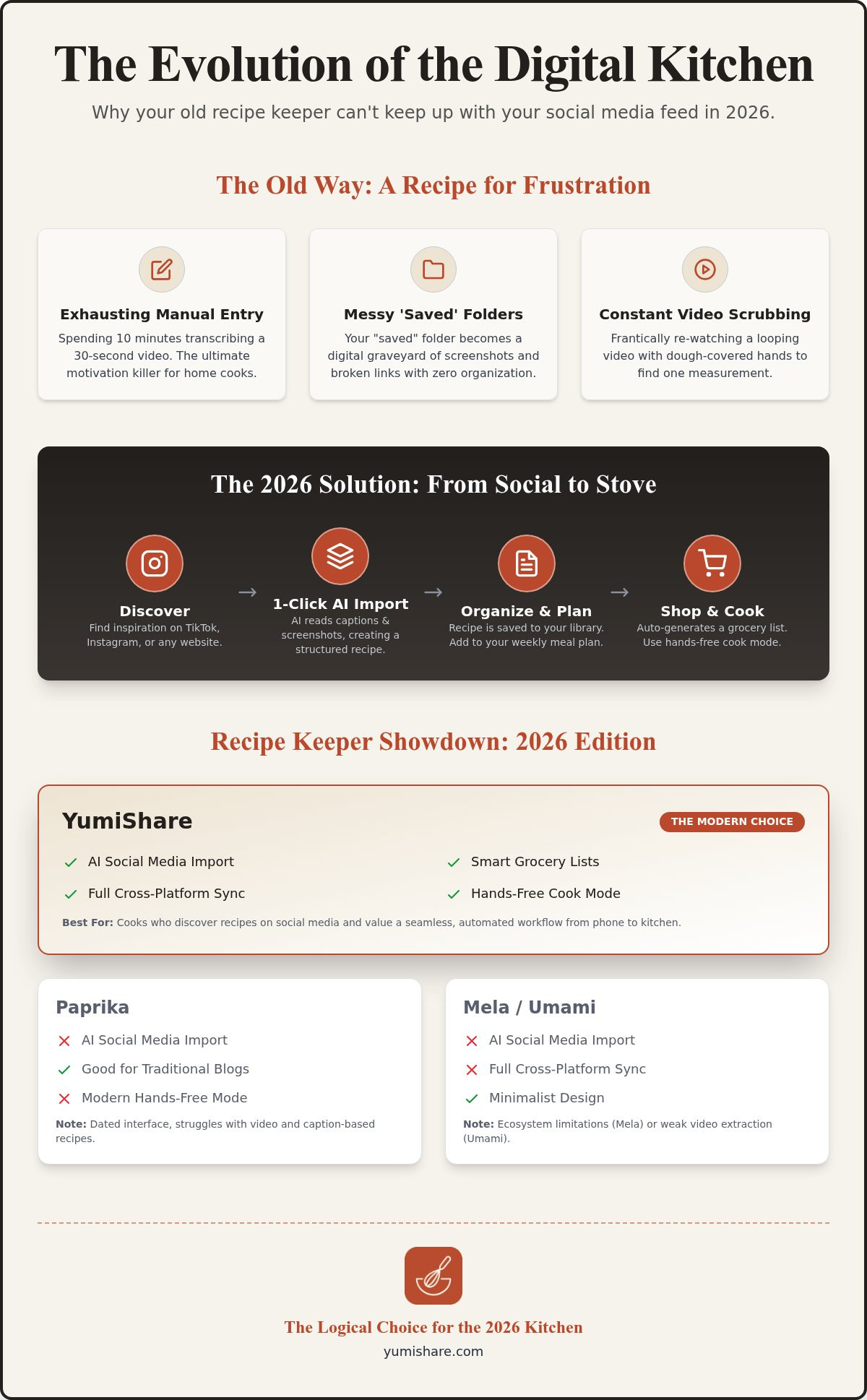
Efficiency is the new gold standard for home organization. A modern recipe keeper alternative must feature AI-powered extraction. It should "read" your screenshots and social captions instantly, turning messy text into structured data. Demand cross-platform cloud synchronization so your recipes follow you from your phone to your tablet. Most importantly, your manager should be a proactive tool. It must turn saved recipes into smart grocery lists and organized meal plans with a single tap. Stop settling for digital clutter. Choose a system that transforms a spark of inspiration into a physical result without the friction of manual data entry.
Comparing the Top Recipe Keeper Alternatives: 2026 Edition
Choosing the right recipe keeper alternative requires a clear framework. You shouldn't just look for storage; you need to evaluate import speed, UI/UX fluidity, and AI accuracy. If an app takes three minutes to process a single link, it's not saving you time. It's creating a new chore. In 2026, the market is split between legacy tools and AI-driven innovators that understand the value of your digital space.
Paprika remains the "old reliable" for many power users. It uses a one-time purchase model, costing roughly $4.99 per platform. While it's excellent for scraping traditional blogs, its interface feels dated and clunky. It lacks the modern social tools needed to handle a TikTok video or an Instagram Reel effectively. If your inspiration comes from social feeds, Paprika feels like using a flip phone in a smartphone world. It stores text well, but it doesn't bridge the gap to modern media.
Mela offers a beautiful, minimalist experience, but it's restricted to the Apple ecosystem. This creates friction in cross-platform households where one person uses an iPhone and another prefers Android. Umami is another strong contender for web-based imports. However, it still struggles with deep video extraction. It can't always "see" the ingredients hidden in a 30-second clip, leaving you to fill in the blanks manually. This defeats the purpose of an automated system.
YumiShare stands out as the specialized choice for the modern cook. It prioritizes the "social-to-stove" pipeline. By focusing on AI automation, it removes the friction that causes other apps to fail. It treats your kitchen library as a living archive. Thinking about preserving personal digital collections is just as important for recipes as it is for photos. You want a tool that ensures your culinary discoveries aren't lost to a broken link or a deleted post. You can try a modern recipe saver app to see the difference automation makes.
The Cost of Convenience: Subscription vs. One-Time Purchase
The financial landscape of recipe apps has shifted. Many platforms now utilize a freemium model. You get a taste of the features for free, then pay for unlimited storage or advanced AI. This allows for constant updates and better AI training. Often, a small monthly fee pays for itself in saved time and reduced food waste. Balancing feature updates with long-term affordability is key to a sustainable digital kitchen. While one-time fees seem attractive, they often result in slower feature rollouts for modern social media platforms.
Feature Comparison Matrix
When you're ready to switch, look for these three pillars of performance:
- Social Media Support: Does it import directly from Instagram, TikTok, and Pinterest captions?
- Hands-Free Cook Mode: Can you follow steps without touching your screen with greasy fingers?
- Cloud Sync Reliability: Do your recipes update instantly across all your mobile devices?
Most legacy options offer offline access, but they lack the "Cook Mode" that syncs with original video content. YumiShare excels here, providing a seamless transition from a viral video to a structured step-by-step guide. It turns your phone into a savvy kitchen assistant rather than just a digital paperweight. It's about turning a digital spark into a physical result with zero friction.
The Social Media Gap: Why Traditional Managers Fail the TikTok Generation
The way we discover food has changed. You're no longer just browsing static blogs with long backstories. You're scrolling through TikTok or Instagram at the end of a long day. You see a viral pasta dish that looks perfect. You check the description for a link, but it isn't there. The instructions are buried in a wall of text in the caption, filled with emojis and abbreviations. This is the "Caption Recipe" gap. Traditional tools can't bridge it. They require a clean web address to function. Without one, you're stuck manually transcribing text or taking a screenshot you'll never look at again. A modern recipe keeper alternative must solve this specific friction.
AI extraction is the necessary bridge. It reads the caption for you. It identifies that "2 cloves garlic" is an ingredient and "sauté until fragrant" is a step. It turns a chaotic social post into a structured, searchable guide. This isn't just about storage. It's about execution. By syncing the original video with a hands-free cook mode, you stop the constant cycle of pausing, scrubbing, and rewinding with messy fingers. You move from being a passive viewer to an active cook. You transform digital noise into kitchen clarity.
Turning Viral Videos into Text
Social media syntax is unique and often messy. Creators use shorthand like "tbs" or "tsp" and sometimes bury measurements in the comments section. YumiShare's AI is specifically tuned for this reality. It filters out the engagement bait and the hashtags, leaving only the instructions you need. This technology effectively eliminates the "screenshot and forget" habit. Instead of a phone gallery full of blurry images you can't search, you have an organized library. Every video you love becomes a permanent, searchable part of your personal cookbook.
Pinterest Integration: Syncing Your Visual Boards
Pinterest is a visual planner's dream but can quickly become a cook's nightmare. Boards often suffer from "Pin bloat," filled with dead links or beautiful images that lead to nowhere. A dedicated manager converts these visual inspirations into actionable meal plans in seconds. It pulls the data from the Pin and drops it into your grocery list. This turns your digital mood board into a physical reality. By moving active recipes from Pinterest to a specialized manager, you clear the clutter. You ensure that your best ideas actually make it to the dinner table without the frustration of broken links or missing steps.
Choosing a recipe keeper alternative that understands social media means reclaiming your time. It means your "saved" folder actually results in a meal. It's about digital mindfulness. You filter out the distractions of the feed and focus on the tactile satisfaction of cooking. This workflow respects your habits and your hunger.
How to Migrate Your Recipes Without the Manual Data Entry
Moving your culinary library to a new recipe keeper alternative shouldn't feel like a part-time job. Most home cooks are sitting on a mountain of "digital debt." This consists of hundreds of bookmarked TikToks, Instagram Reels, and Pinterest pins that have never actually been cooked. The first step toward a more organized kitchen life is a thorough audit. Open your social apps. Delete the videos that no longer spark interest. Focus on the ones you genuinely intend to make. This clears the noise and prepares your collection for a fresh start.
Once you've trimmed the fat, use bulk import tools to bring in your existing data. If you're moving from a legacy system, look for export options like .csv or .txt files. Modern tools can often ingest these lists and rebuild your recipes instantly. After importing, organize your new library by "vibe" or category. Use smart tags like "15-Minute Meals" or "Sunday Comfort." This makes finding the right dish intuitive. Finally, ensure your cloud sync is active. Your recipes should be just as accessible on your kitchen tablet as they are on your phone during a grocery run.
Transitioning from Recipe Keeper or Paprika
Legacy apps often store data in proprietary formats that feel like a walled garden. When you decide to switch, check if your current app allows for a clean export of URLs. Moving your collection is the perfect time for a digital deep clean. You can find more detailed strategies in our ultimate guide to an app to organize saved recipes. Use this transition to eliminate duplicates. If you've saved the same lasagna recipe three times across different platforms, pick the best version and discard the rest. This creates a streamlined, high-quality database that actually serves you.
The AI Cleanup: Refining Imported Recipes
AI extraction is powerful, but it's always smart to perform a quick verification. Spend thirty seconds reviewing the quantities and units in your newly imported social media recipes. Sometimes a creator might mention an "extra pinch" in the audio that isn't in the text. This is also the best moment to add your personal touch. Attach a photo of your own finished version or leave a note about a specific brand of sauce you preferred. This turns a generic internet recipe into a personal family favorite. Once your library is refined, set up your first automated meal plan. Watch as your saved inspirations turn into a structured week of eating without a single minute of manual typing. Ready to simplify your kitchen? Download the recipe saver app and start your migration today.
A well-executed migration changes your relationship with cooking. You stop searching and start doing. By choosing a modern recipe keeper alternative, you're investing in your own mental space. You're trading digital clutter for a reliable, automated system that respects your time and your table. The transition is fast. The relief is permanent.
YumiShare: The Logical Choice for the 2026 Digital Kitchen
YumiShare isn't just another app. It's a fundamental shift in how you interact with your kitchen. If you've been searching for a recipe keeper alternative, you've likely realized that static databases are dead. You need a tool that lives where you live: on social media. YumiShare takes the friction out of the "social-to-stove" pipeline. It transforms a chaotic 2 AM TikTok scroll into a structured Tuesday dinner without a single keystroke. This is the emotional relief of a decluttered digital life. You stop hoarding links. You start making memories over meals.
The real magic happens when you start cooking. The Hands-Free Cook Mode ensures your phone screen stays pristine. No more tapping the glass with flour-covered fingers or scrubbing through a looping video to find the oven temperature. The app syncs the original video with the extracted steps, giving you total control. It's like having a professional chef whispering instructions over your shoulder. It keeps you focused on the tactile satisfaction of the craft rather than the frustration of the interface.
Organization extends beyond the countertop and into the grocery store. YumiShare generates smart grocery lists that categorize items by store aisle automatically. You don't have to zig-zag through the shop. Produce stays with produce. Dairy stays with dairy. It's efficient. It's calm. It's the end of the "forgotten ingredient" panic that ruins your evening flow. This level of automation turns a chore into a streamlined process, leaving you with more time to enjoy the actual act of eating.
From Inspiration to Execution
YumiShare understands that modern life is cross-platform. Whether you're an iOS power user or an Android enthusiast, your library follows you everywhere. The cloud sync is seamless and instant. Because it uses a freemium model, it's the easiest recipe keeper alternative to try today. You can test the AI extraction on your favorite Reels without any upfront commitment. It's a low-risk path to a high-reward kitchen experience. Move your digital sparks into physical results with a single tap.
Future-Proofing Your Cooking
As we move through 2026, the trends are clear. AI nutrition analysis and automated meal planning are becoming the standard for organized homes. Understanding why automation is the biggest 2026 meal planning trend is essential for anyone looking to save time. YumiShare is built for this future. It acts as a filter that removes the noise of the digital world and leaves only the utility. Join the community of modern cooks who have traded digital clutter for culinary clarity. Simplify your life. Elevate your kitchen. Start your journey with a tool designed for the way you actually live.
Reclaim Your Kitchen Flow
We've explored how the shift from static blogs to viral videos requires a more agile tool. You've seen that the best recipe keeper alternative isn't just a place to store links; it's an AI-driven bridge that moves with you from discovery to the final bite. By automating the extraction of ingredients and syncing your grocery lists, you remove the mental load of meal prep. You deserve a system that respects your time and your table.
It's time to stop scrubbing through videos and start cooking with confidence. Experience the relief of a perfectly organized library that syncs across all your 2026 mobile devices. With AI-powered social media extraction and a top-rated hands-free cook mode, your culinary inspiration finally has a permanent home. Don't let your favorite recipes disappear into a cluttered feed.
Start your digital cookbook for free on YumiShare and transform your kitchen into a space of calm and creativity today. Your best meals are waiting to be made.
Common Questions About Your Digital Kitchen
Is there a free alternative to Recipe Keeper?
Yes, YumiShare offers a freemium model that allows you to start building your library for free. While Recipe Keeper requires a separate purchase for every platform, you can begin organizing your collection on YumiShare without any upfront cost. Other options like Samsung Food also provide free, ad-supported storage. This makes finding a high-quality recipe keeper alternative easier and more affordable for the modern home cook.
Can I import recipes from Instagram and TikTok into YumiShare?
Yes, you can import recipes directly from social media captions and videos with a single tap. YumiShare uses specialized AI to extract ingredients and instructions from Instagram Reels, TikToks, and Pinterest pins. It identifies the structured data hidden in messy captions, so you don't have to type a single word. This feature bridges the gap between your social feeds and your actual kitchen counter.
How do I move my recipes from Paprika to YumiShare?
You can migrate your collection by exporting your Paprika data and using YumiShare's bulk import tool. Most legacy apps allow you to export your library as a list of URLs or a compatible file format. Simply upload these to let the AI rebuild your recipes in a modern interface. It's the fastest way to switch to a recipe keeper alternative without losing years of saved culinary inspiration.
Does YumiShare work on both iPhone and Android?
Yes, YumiShare offers full cross-platform cloud synchronization for both iOS and Android devices. This ensures your recipes are always accessible whether you're using your phone at the grocery store or a tablet in the kitchen. Your library stays updated in real-time across every device you own. This seamless experience is a core reason why users choose it as their primary kitchen companion in 2026.
What makes YumiShare better than just using Pinterest?
YumiShare turns visual inspiration into actionable data, which Pinterest cannot do on its own. While Pinterest is great for bookmarking images, it often leads to dead links or cluttered boards. YumiShare extracts the actual text from those pins to create smart grocery lists and structured cooking steps. It moves you past the viewing stage and directly into the doing stage with zero manual effort.
Does the cook mode work with video recipes?
Yes, the hands-free cook mode is specifically designed to sync with original video content. You can follow step-by-step instructions while the relevant part of the TikTok or Instagram video plays alongside them. This eliminates the need to constantly scrub through a loop with messy fingers. It provides a focused, calm environment where you can execute complex dishes without the digital friction of traditional video players.
Can I share my recipe library with family members?
Yes, you can easily share your recipes and folders with family and friends. This feature is perfect for households that want to collaborate on meal planning or share a digital family cookbook. You can send individual recipes or entire collections with a few taps. It keeps everyone on the same page, ensuring that Sunday dinner prep is a shared, organized experience rather than a solo chore.
How accurate is the AI ingredient extraction?
The AI is highly accurate at identifying measurements, ingredients, and instructions from various social media syntaxes. It recognizes shorthand like "tsp" or "tbs" and understands the context of captions. While we always recommend a quick thirty-second review for specific creator quirks, the extraction is reliable enough to eliminate manual typing. It's designed to handle the messy reality of 2026 social media content with professional precision.
FAQ
Is there a free alternative to Recipe Keeper?
Yes, YumiShare offers a freemium model that allows you to start building your library for free. While Recipe Keeper requires a separate purchase for every platform, you can begin organizing your collection on YumiShare without any upfront cost. Other options like Samsung Food also provide free, ad-supported storage. This makes finding a high-quality recipe keeper alternative easier and more affordable for the modern home cook.
Can I import recipes from Instagram and TikTok into YumiShare?
Yes, you can import recipes directly from social media captions and videos with a single tap. YumiShare uses specialized AI to extract ingredients and instructions from Instagram Reels, TikToks, and Pinterest pins. It identifies the structured data hidden in messy captions, so you don't have to type a single word. This feature bridges the gap between your social feeds and your actual kitchen counter.
How do I move my recipes from Paprika to YumiShare?
You can migrate your collection by exporting your Paprika data and using YumiShare's bulk import tool. Most legacy apps allow you to export your library as a list of URLs or a compatible file format. Simply upload these to let the AI rebuild your recipes in a modern interface. It's the fastest way to switch to a recipe keeper alternative without losing years of saved culinary inspiration.
Does YumiShare work on both iPhone and Android?
Yes, YumiShare offers full cross-platform cloud synchronization for both iOS and Android devices. This ensures your recipes are always accessible whether you're using your phone at the grocery store or a tablet in the kitchen. Your library stays updated in real-time across every device you own. This seamless experience is a core reason why users choose it as their primary kitchen companion in 2026.
What makes YumiShare better than just using Pinterest?
YumiShare turns visual inspiration into actionable data, which Pinterest cannot do on its own. While Pinterest is great for bookmarking images, it often leads to dead links or cluttered boards. YumiShare extracts the actual text from those pins to create smart grocery lists and structured cooking steps. It moves you past the viewing stage and directly into the doing stage with zero manual effort.
Does the cook mode work with video recipes?
Yes, the hands-free cook mode is specifically designed to sync with original video content. You can follow step-by-step instructions while the relevant part of the TikTok or Instagram video plays alongside them. This eliminates the need to constantly scrub through a loop with messy fingers. It provides a focused, calm environment where you can execute complex dishes without the digital friction of traditional video players.
Can I share my recipe library with family members?
Yes, you can easily share your recipes and folders with family and friends. This feature is perfect for households that want to collaborate on meal planning or share a digital family cookbook. You can send individual recipes or entire collections with a few taps. It keeps everyone on the same page, ensuring that Sunday dinner prep is a shared, organized experience rather than a solo chore.
How accurate is the AI ingredient extraction?
The AI is highly accurate at identifying measurements, ingredients, and instructions from various social media syntaxes. It recognizes shorthand like "tsp" or "tbs" and understands the context of captions. While we always recommend a quick thirty-second review for specific creator quirks, the extraction is reliable enough to eliminate manual typing. It's designed to handle the messy reality of 2026 social media content with professional precision.