
 Polski
  Deutsch
  Español
  Français
  Italiano
  Português
  Nederlands
  Svenska
  Українська
  Русский
 Meal Planning App: Why Automation is the 2026 Trend
Discover the best meal planning app for 2026. Learn how automation turns social media recipes into easy grocery lists and stress-free weekly meal plans.

Your "Saved" folder on Instagram isn't a cookbook; it's a digital graveyard where delicious dinner ideas go to be forgotten. You find a viral 15-minute pasta on TikTok, hit save, and then spend half your Sunday scrolling through a mountain of screenshots just to find the ingredient list again. Manual typing is exhausting. Organizing screenshots is impossible. Finding a meal planning app that actually bridges the gap between a video and a meal shouldn't be this hard. It's a cycle of digital overwhelm that keeps you away from the grounded satisfaction of a well-ordered kitchen.
We understand the distance between digital inspiration and real-world execution. In 2026, automation is the key to domestic tranquility. You deserve a system that works as hard as you do. This guide shows you how the next generation of tools turns social media sparks into an organized kitchen reality. Discover how to build a digital cookbook that essentially writes itself. We'll explore one-click grocery lists and the secret to a truly stress-free meal prep routine that restores calm to your home life.
Key Takeaways
- Discover why the future of cooking focuses on "social discovery," moving beyond static recipe databases to capture inspiration directly from your social feeds.
- Identify essential automation tools like universal importers and AI ingredient extraction that eliminate the need for manual recipe typing.
- Learn the difference between high-effort legacy managers and modern platforms designed for instant recipe conversion and digital mindfulness.
- Master a 10-minute Sunday routine that uses a smart meal planning app to turn your favorite videos into organized weekly calendars.
- Bridge the gap between digital content and physical execution by letting AI handle the heavy lifting of recipe management and grocery list organization.
The Evolution of the Meal Planning App: From Databases to Social Discovery
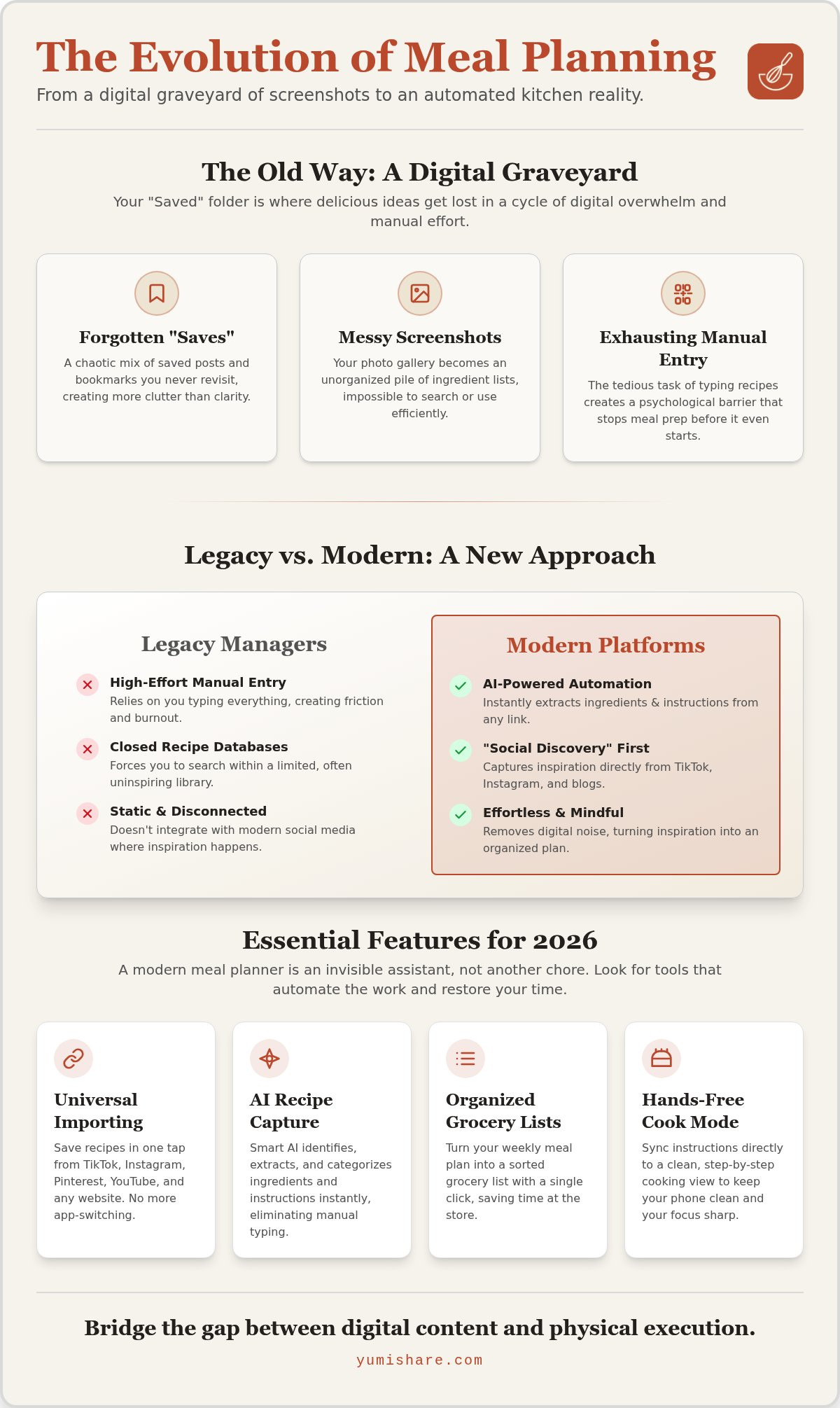
For years, the standard meal planning app felt like a closed ecosystem. You searched a built-in database for recipes that felt safe but often lacked inspiration. These legacy systems relied on static content. They forced you to stay within their walls. But the way we find food has changed. In 2026, the trend is Social Discovery. We don't search databases anymore; we scroll through TikTok, Instagram, and Pinterest. We find a viral recipe in a 30-second clip and want to eat it tonight. A "Social-First" planner isn't just a list. It's a tool that captures that fleeting digital spark and turns it into a structured reality. It acknowledges that your inspiration lives elsewhere. It acts as a filter. It clears the clutter. It rescues your dinner from the chaos of the algorithm.
The Problem with Manual Recipe Entry
Manual entry is where good intentions go to die. Think about your "Saved" folder. It's likely a digital graveyard of screenshots and bookmarked links you never revisit. Typing out ingredients from a fast-paced video is exhausting. It creates a massive psychological barrier. You want to start your meal preparation, but the friction of data entry stops you. You lose context. You lose the original video. You're left with a messy gallery of images that don't help you at the grocery store. This manual labor is the primary reason most people abandon their planning routines within two weeks. Screenshots are impossible to organize. They don't talk to your grocery list. They just sit there; taking up space and adding to your digital overwhelm.
The Rise of AI-Driven Recipe Capture
Automation changes the game. Modern platforms use AI to bridge the gap between a URL and your kitchen counter. Copy a link from a Reel. Paste it. Watch the AI identify ingredients and categorize instructions instantly. This is digital mindfulness in action. It removes the noise. It leaves you with a clean, organized digital cookbook. You move from the frantic energy of scrolling to the grounded satisfaction of a well-ordered home. This isn't just a technical upgrade; it's a lifestyle shift. You stop being a digital consumer and start being a confident home cook. The transition is seamless. The result is total clarity. By turning a 60-second video into a structured text recipe, you reclaim your time and your mental space.
- Extract ingredients from social media URLs in seconds.
- Eliminate the need for manual typing or messy screenshots.
- Sync instructions directly to a hands-free Cook Mode.
- Convert visual noise into an actionable, professional meal planning app experience.
Stop fighting with your phone. Start trusting a system that understands how you actually find recipes. The movement from digital spark to physical result should be effortless. When you remove the friction of data entry, you find the joy in cooking again. It's about moving toward a quiet, organized kitchen where the plan is already made.
Essential Features to Look for in a 2026 Meal Planner
Selecting the right meal planning app today means looking past simple digital calendars. You need a system that understands the fragmentation of modern media. The best tools act as a bridge. They connect your digital habits to your physical kitchen. Focus on automation that removes manual labor. Look for features that prioritize your time and mental clarity. A high-quality planner should feel like an invisible assistant; it shouldn't be another chore on your to-do list.
The Power of Universal Importing
Your inspiration doesn't stay in one place. You find dinner ideas on TikTok, Instagram, Pinterest, and YouTube. A 2026-ready app must support all of them. Don't settle for a locked ecosystem. Look for a universal importer that works via a browser extension or a mobile "Share to" function. This allows you to organize your digital kitchen in 2026 with a single tap. It's about capturing a spark before it fades. It's about moving from a video to a plan without typing a single word. Speed is the ultimate feature here. Efficiency creates the space you need to actually enjoy your evening.
AI and Nutrition Analysis
Smart ingredient extraction is where AI proves its worth. Modern apps shouldn't just copy text. They should interpret it. You need a system that categorizes items for your grocery list automatically. It should distinguish between a tablespoon of honey and a whole chicken. This precision leads to healthier eating habits by giving you clear macro and calorie data for every saved recipe. You gain control over your nutrition without the math. It's about clarity. It's about knowing exactly what's going into your body without the stress of manual tracking.
Precise ingredient quantities also solve the problem of food waste. When your list matches the recipe exactly, you stop buying things you don't need. You save money. You clear your pantry of clutter. It's a methodical way to bring domestic tranquility to your home life. Use these tools to remove the guesswork from your diet.
Seamless Synchronization and Smart Lists
Cross-device synchronization is a non-negotiable requirement. Your workflow moves from the couch to the car to the kitchen counter. You need your plan on a phone at the store and a tablet in the kitchen. Ensure your chosen meal planning app offers cloud syncing that updates in real time. Combine this with automated grocery lists that group items by aisle. Stop backtracking through the store. Get in. Get what you need. Get out. This level of efficiency defines a modern kitchen experience.
If you're ready to stop scrolling and start cooking, try a smart recipe saver to see how automation changes your Sunday routine.
Comparing Manual Managers vs. Automated Planning Platforms
Legacy systems demand your time before you even start cooking. You spend hours copy-pasting ingredients or hunting for lost links. It's a high-effort model that doesn't fit a busy schedule. Manual managers offer control, but they require a level of "upfront work" that most modern users find exhausting. Modern automated platforms flip this script. They provide instant gratification. They're built for the "scroller" who finds a recipe on social media and wants it organized in seconds. This is where a meal planning app becomes a helpful partner rather than a digital chore. It removes the friction of data entry and focuses on the result.
Why "Free" Often Costs More in Time
"Free" is a deceptive label in the digital kitchen. You might save a few dollars on a subscription, but you pay for it in manual labor. Think about the time spent typing out a TikTok recipe or organizing a gallery of messy screenshots. That's time you could spend with your family or simply relaxing. When you invest in a premium automated system, you're buying back your Sunday afternoons. It's a strategic move to save money and time by reducing the friction of organization. A structured plan leads to fewer frantic takeout orders. It means less food rotting in the crisper drawer. The return on investment for an organized kitchen is measured in both dollars and peace of mind. A premium subscription pays for itself through efficiency and reduced food waste.
The User Experience (UX) of 2026
The next generation of design focuses on digital mindfulness. We're moving away from cluttered, ad-heavy interfaces that overwhelm the senses. The UX of 2026 is minimalist. It acts as a filter. It removes the noise and leaves only what is useful. Your app shouldn't feel like a complex database. It should feel like a savvy companion that excels at bridging the gap between inspiration and execution. Brevity is the new gold standard. You need direct instructions that are easy to read while you're actually standing at the stove. This transition from "app as a tool" to "app as a partner" is what defines the modern cooking experience.
- Instant Capture: Turn a social media URL into a recipe in one tap.
- Digital Mindfulness: Clear the clutter of saved folders and screenshots.
- Reliable Sync: Access your recipes on any device, anytime.
- Actionable Data: Get grocery lists that actually match what you're cooking.
Reliability is the final piece of the puzzle. Cloud synchronization ensures your digital cookbook is never lost. If you lose your phone, your recipes stay safe in the cloud. You can move from your laptop to your tablet without missing a beat. This cross-device harmony is essential for a modern meal planning app. It provides the grounded, tactile satisfaction of a well-ordered home life. Trust a system that values your time and mental space above all else.
From Screen to Stove: Maximizing Your App During the Week
A great plan is only as good as its execution. Many people find that their organization falls apart the moment they step into the kitchen. Your meal planning app should do more than just store data; it should guide you through the entire week. Move with purpose. Transition from the screen to the stove with confidence. This methodical approach turns a frantic daily scramble into a series of calm, intuitive actions. By following a clear workflow, you bridge the gap between digital inspiration and a hot meal on the table.
- Step 1: Sunday Discovery. Spend 10 minutes importing your favorite social saves. Don't overthink it. Just capture what looks good.
- Step 2: One-Click Planning. Drag those recipes into your weekly calendar. Build your schedule around your busiest nights.
- Step 3: Smart Shopping. Use the auto-generated grocery list at the store. It groups items by aisle so you can get in and out quickly.
- Step 4: Stress-Free Cooking. Activate hands-free mode. Focus on the ingredients, not the interface.
The Magic of Cook Mode
Executing a recipe while holding a phone is a recipe for frustration. Messy fingers and expensive screens don't mix. This is where modern automation shines. Activate a hands-free interface to keep your momentum. You can master cook mode for mobile recipes by syncing text instructions with the original social media video. Follow along at your own pace. It removes the friction of scrolling back and forth. It keeps your focus on the grounded, tactile satisfaction of cooking. This feature is the ultimate filter for digital noise in the kitchen.
Sharing and Collaboration
Domestic tranquility is a team effort. Don't shoulder the burden of planning alone. Share your meal plans with partners or roommates instantly. Modern platforms allow for collaborative grocery lists that update in real-time. If your partner picks up the garlic on their way home, it disappears from your list. This synchronization prevents double-buying and reduces food waste. You're not just making a list; you're building a family digital recipe box that lasts for years. It's a savvy way to manage a household without the usual "what's for dinner?" stress.
Stop guessing and start executing. You deserve a system that values your time and your mental space. Start your organized journey today and use YumiShare to simplify your kitchen routine from start to finish.
Why YumiShare is the Definitive Choice for Modern Cooks
YumiShare isn't just another digital list. It's the bridge between a viral video and a finished meal. Most tools force you to do the heavy lifting. They ask you to type, edit, and organize. We take a different path. Our meal planning app is designed to remove the manual labor entirely. It acts as a filter for the digital age. It captures the spark of inspiration and turns it into a physical result. Experience the relief of a system that finally understands how you find food in 2026. This is about moving from digital overwhelm toward the grounded, tactile satisfaction of a well-ordered home life. It's the end of the digital graveyard and the beginning of a functional kitchen.
The YumiShare Difference: AI Extraction
Instagram Reels and TikTok videos are full of flavor but short on structure. YumiShare changes that. Our AI extractor identifies ingredients and steps from social media URLs instantly. It works with TikTok, Instagram, and Pinterest. We follow a specific flow called the "Z-rhythm": Discover, Save, Plan, Cook. It's a methodical progression. You discover a recipe you love. You save it with a single tap. You plan your week. You cook with total clarity. This process encourages the transition from a cluttered "saved folder" to a delicious cooked meal. Stop collecting links. Start making memories in the kitchen. The technology does the work so you can focus on the craft.
Synchronization is at the heart of the experience. Available on both iOS and Android, YumiShare ensures your data is always within reach. Your plan moves with you. It stays updated across all your devices via seamless cloud synchronization. This isn't just software; it's a savvy, organized companion that values your time and mental space above all else. Whether you're checking your list on a phone at the store or following instructions on a tablet, the experience is consistent. It's reliable. It's built for the reality of a busy, modern life.
Getting Started with Your Digital Cookbook
Building your new routine shouldn't be a project. It should be a relief. You can import your first recipe in under 10 seconds. Copy a link. Paste it. Watch the automation work. It's that simple. Start for free to experience the immediate transformation of your kitchen management. Clear out the noise of old screenshots and broken links. Replace them with a structured, intuitive system that makes Sunday prep feel like a breeze. You have the inspiration. We provide the execution. It's time to reclaim your kitchen and your peace of mind. Experience the calm of a well-planned week.
Start your stress-free meal planning journey with YumiShare and see how automation restores tranquility to your daily life.
Reclaim Your Kitchen with Automation
The era of manual recipe entry and disorganized screenshots is over. We've seen how the trend of social discovery is transforming the way we cook; moving from static databases to the vibrant inspiration of social feeds. By using a modern meal planning app, you remove the psychological barriers that keep your favorite viral recipes stuck in a "Saved" folder. Automation acts as a filter. It clears the digital noise. It leaves you with the grounded satisfaction of a well-ordered home life. You deserve a system that values your time and mental space above all else.
Stop fighting with the algorithm and start trusting a partner that bridges the gap between screen and stove. With an AI-powered social media importer and smart grocery list generation, the transition to a hot meal becomes effortless. Activate hands-free cook mode to maintain your momentum without messy screens. It's time to turn your digital sparks into physical results. Transform your social saves into real meals with YumiShare. Your stress-free Sunday routine is just one tap away. Embrace the calm of an organized kitchen today.
Frequently Asked Questions
What is the best meal planning app for social media recipes?
YumiShare is the definitive choice for modern cooks who find inspiration on social media. Unlike legacy databases, this meal planning app captures recipes from TikTok and Instagram directly. It acts as a filter for digital noise, turning viral videos into structured text. You get a clean interface that prioritizes your time and mental clarity while removing the friction of manual entry.
How do I save a recipe from TikTok to a meal planner?
Copy the URL of the TikTok video and paste it into the YumiShare app. The AI identifies ingredients and steps instantly, removing the need for manual typing or re-watching the clip repeatedly. It is a one-tap process that turns a 60-second video into a permanent entry in your digital cookbook. This automation bridges the gap between digital inspiration and real-world execution.
Can I generate a grocery list from Instagram recipes?
Yes, you can generate smart grocery lists from Instagram recipes automatically. Once you import a Reel, the AI extracts the ingredients and groups them by aisle. This prevents the frustration of grocery lists that don't match what is actually in the recipe. You get in and out of the store faster with a list that updates in real-time on your mobile device.
Is it better to use a free or paid meal planning app?
Paid apps generally offer automation that saves you hours of manual labor. While free apps might store links, a premium meal planning app like YumiShare provides AI extraction and unlimited imports. Think of the subscription as buying back your Sunday afternoons. The value comes from reduced food waste, fewer takeout orders, and the end of digital overwhelm.
How does AI extract ingredients from a cooking video?
The AI uses sophisticated pattern recognition to scan the recipe text or video metadata provided in the URL. It identifies specific quantities, units, and ingredient names instantly. This technology translates visual content into a structured format you can actually use. It distinguishes between a main ingredient and a garnish, ensuring your grocery list remains precise and actionable for your weekly prep.
Can I share my meal plan with my family using YumiShare?
You can share your meal plan and grocery lists with family members or roommates instantly. YumiShare uses cross-device cloud synchronization to keep everyone on the same page. If your partner buys the milk, the list updates for you in real-time. It's a savvy way to manage household chores and meal preparation without the constant back-and-forth texting or forgotten ingredients.
What is hands-free cook mode and why do I need it?
Cook Mode is a hands-free interface that lets you follow recipes without touching your screen with messy fingers. It syncs the instructions with the original video so you can see the technique while reading the steps. You need it to maintain momentum in the kitchen and protect your expensive devices from spills, flour, and the general chaos of cooking.
How do I stop taking recipe screenshots and start organizing?
Stop taking screenshots by using a universal importer that captures links directly from your social apps. Screenshots are a digital graveyard because they are impossible to organize and don't talk to your grocery list. Instead, use the "Share to" function on your phone to send recipes to YumiShare. This moves your inspiration from a messy gallery to a structured, searchable plan.
FAQ
What is the best meal planning app for social media recipes?
YumiShare is the definitive choice for modern cooks who find inspiration on social media. Unlike legacy databases, this meal planning app captures recipes from TikTok and Instagram directly. It acts as a filter for digital noise, turning viral videos into structured text. You get a clean interface that prioritizes your time and mental clarity while removing the friction of manual entry.
How do I save a recipe from TikTok to a meal planner?
Copy the URL of the TikTok video and paste it into the YumiShare app. The AI identifies ingredients and steps instantly, removing the need for manual typing or re-watching the clip repeatedly. It is a one-tap process that turns a 60-second video into a permanent entry in your digital cookbook. This automation bridges the gap between digital inspiration and real-world execution.
Can I generate a grocery list from Instagram recipes?
Yes, you can generate smart grocery lists from Instagram recipes automatically. Once you import a Reel, the AI extracts the ingredients and groups them by aisle. This prevents the frustration of grocery lists that don't match what is actually in the recipe. You get in and out of the store faster with a list that updates in real-time on your mobile device.
Is it better to use a free or paid meal planning app?
Paid apps generally offer automation that saves you hours of manual labor. While free apps might store links, a premium meal planning app like YumiShare provides AI extraction and unlimited imports. Think of the subscription as buying back your Sunday afternoons. The value comes from reduced food waste, fewer takeout orders, and the end of digital overwhelm.
How does AI extract ingredients from a cooking video?
The AI uses sophisticated pattern recognition to scan the recipe text or video metadata provided in the URL. It identifies specific quantities, units, and ingredient names instantly. This technology translates visual content into a structured format you can actually use. It distinguishes between a main ingredient and a garnish, ensuring your grocery list remains precise and actionable for your weekly prep.
Can I share my meal plan with my family using YumiShare?
You can share your meal plan and grocery lists with family members or roommates instantly. YumiShare uses cross-device cloud synchronization to keep everyone on the same page. If your partner buys the milk, the list updates for you in real-time. It's a savvy way to manage household chores and meal preparation without the constant back-and-forth texting or forgotten ingredients.
What is hands-free cook mode and why do I need it?
Cook Mode is a hands-free interface that lets you follow recipes without touching your screen with messy fingers. It syncs the instructions with the original video so you can see the technique while reading the steps. You need it to maintain momentum in the kitchen and protect your expensive devices from spills, flour, and the general chaos of cooking.
How do I stop taking recipe screenshots and start organizing?
Stop taking screenshots by using a universal importer that captures links directly from your social apps. Screenshots are a digital graveyard because they are impossible to organize and don't talk to your grocery list. Instead, use the "Share to" function on your phone to send recipes to YumiShare. This moves your inspiration from a messy gallery to a structured, searchable plan.