
 Polski
  Deutsch
  Español
  Français
  Italiano
  Português
  Nederlands
  Svenska
  Українська
  Русский
 Smart Meal Prep App: The 2026 Guide to Digital Kitchen Organization
Tired of lost recipe screenshots? Our 2026 guide to the best smart meal prep app helps you organize meals, automate grocery lists, and save hours weekly.

You're standing in a busy grocery aisle, scrolling through thousands of screenshots to find that one viral lemon pasta recipe. The ingredients are buried somewhere between a forgotten meme and a vacation photo. You eventually give up and buy a frozen pizza. It's a frustrating cycle where digital inspiration leads to real-world exhaustion. You aren't alone in this clutter. Most of us have a "to-cook" list that feels more like a graveyard of forgotten ideas. It's time to let a smart meal prep app do the heavy lifting and bring order to your kitchen.
Learn how to transform scattered social media saves into a streamlined, automated system that recovers hours of your time every single week. We'll explore how to build a unified digital cookbook, generate grocery lists instantly, and master the art of hands-free video cooking. Stop manual typing and start executing. This guide breaks down the path to digital mindfulness, helping you bridge the gap between your screen and your dinner plate. Let's turn those digital sparks into physical, delicious results with ease and confidence.
Key Takeaways
- End the era of recipe screenshots. Learn how to move from passive scrolling to active kitchen organization.
- Identify the core features of a smart meal prep app that automate recipe capture from TikTok, Instagram, and Pinterest.
- Compare the efficiency of manual planning against AI-driven grocery list generation to save hours every week.
- Adopt a 15-minute Sunday workflow that bridges the gap between digital inspiration and real-world execution.
- Unlock a hands-free cooking experience with video-synced instructions that eliminate digital noise at the stove.
Beyond the Saved Folder: Why You Need a Smart Meal Prep App
We've all been there. You spend hours scrolling through TikTok or Instagram, saving mouth-watering dishes you promise to make. But when Sunday arrives, those recipes vanish into a digital abyss. This is the "saved folder" trap. It turns your phone into a graveyard of good intentions. The process of planning and preparing meals shouldn't feel like a part-time job. A smart meal prep app changes the game by shifting you from passive scrolling to active kitchen organization. It removes the mental load of remembering which app held which recipe. You stop guessing and start doing.
Manual planning is exhausting. It requires you to toggle between apps, write down ingredients, and pray you didn't forget the garlic. This friction is why most people quit before they even start. Smart automation acts as a filter. It removes the digital noise and leaves you with a clear, actionable plan. You gain back your mental space. You trade frantic searching for the grounded, tactile satisfaction of a well-ordered home life. It's about moving from digital sparks to physical, delicious results.
The Death of the Recipe Screenshot
Screenshots are where recipes go to die. They lack searchability and don't scale when you need to double a batch. You can't click a screenshot to add ingredients to a grocery list. Think about the hidden time cost. You spend ten minutes scrolling through your photo gallery for "that one chicken recipe" while the stove is already hot. It's inefficient. Transitioning to a centralized digital recipe box is the only way to stay sane. If you want to find the best app for saved recipes, look for one that treats your data as actionable steps rather than static images. A unified system ensures every inspiration is just one tap away.
Bridging Inspiration and Execution
"Recipe Amnesia" is a real problem. You buy the kale and the quinoa, but you can't remember if the dressing needed honey or maple syrup. You lose the rhythm of the original video. A smart meal prep app bridges this gap by keeping the original inspiration connected to the text. It syncs the TikTok or Instagram video directly with the extracted instructions. You get the visual cues of the creator alongside the precise measurements you need. This connection sets the stage for a stress-free Sunday prep. You move through your kitchen with purpose. You aren't just following a list; you're executing a vision with total clarity.
What Defines a Truly 'Smart' Meal Prep App in 2026?
In 2026, a smart meal prep app isn't just a place to store web links. It's an AI-driven ecosystem. It automates the messy parts of kitchen life. Think about how you find food now. You see a TikTok. You save a Pinterest pin. You scroll Instagram. A truly smart system imports from all these platforms instantly. It turns digital chaos into a nutritionally balanced diet without the manual labor. It bridges the gap between your screen and your stove. You deserve a tool that works as hard as you do.
AI-Powered Recipe Extraction
Stop typing ingredients by hand. AI-powered extraction uses natural language processing to read video captions and comments. It identifies quantities and units automatically. Sometimes, creators only mention a pinch of salt or a splash of vinegar in the audio. Advanced apps catch these "hidden" details. They turn a 60-second video into a structured list. This eliminates the boring data entry that kills your motivation. You focus on the cooking. The app handles the logistics. It's about precision and speed. You gain back your evening by letting the software do the heavy lifting.
Portions matter. A smart system offers dynamic scaling. Cooking for two tonight but six on Friday? Adjust the slider. The app recalculates every measurement. No more mental math or ruined sauces. If you're tired of manual tools, it's time to start using a digital kitchen assistant that understands your specific needs. It's the difference between a static list and a living document that adapts to your life.
Seamless Device Synchronization
Your workflow moves through the house. You might plan your week on a laptop while drinking coffee. You check your grocery list on your phone at the store. Finally, you follow the steps on a tablet perched on your counter. This requires robust cloud sync recipe managers to keep everything updated. If you add eggs to the list, your partner sees it instantly on their own device. Real-time updates prevent double-buying and missed ingredients. It’s about creating a unified front for your household. Everyone stays on the same page. No more "what's for dinner" texts. Digital mindfulness means everyone has the information they need, exactly when they need it.
Manual vs. Smart Meal Prep: A Performance Comparison
Manual meal prep is a chore. It takes hours of transcribing ingredients from social media posts into a notebook or notes app. You often miss things. A smart meal prep app eliminates this manual labor. It imports recipes in seconds. You move from planning to doing almost instantly. If you're looking for a simple meal planner app, the difference in performance is clear. Efficiency isn't just about speed; it's about accuracy and peace of mind. Manual methods require you to be the data entry clerk, the organizer, and the chef all at once. Automation lets you focus on being the chef.
The "friction to start" is the biggest hurdle in any kitchen routine. When the process is manual, the mental load is heavy. You have to verify quantities, check your pantry, and manually aggregate ingredients. A smart meal prep app handles the tallying for you. It combines like items and scales recipes to fit your needs. This reduction in cognitive load makes it easier to actually start cooking. You don't feel overwhelmed before you even pick up a knife. You feel prepared, organized, and ready to execute.
The Grocery Store Efficiency Test
Manual lists are messy. You write things down as you think of them. This leads to "forgotten item syndrome" and multiple trips across the store. You wander from the produce section to the dairy aisle and back again. Smart lists change this. They categorize items by aisle. This reduces shopping time by up to 40%. Smart Grocery Lists are an automated bridge from recipe to aisle. You walk in, grab what you need, and leave. It’s a streamlined experience that respects your time. You avoid the frantic energy of a disorganized trip. Instead, you enjoy the calm of a well-ordered process.
The Cooking Friction Factor
Think about the last time you cooked a viral dish. You probably paused and rewound a TikTok 20 times while your hands were covered in flour. This is high friction. It makes cooking feel like a struggle. You lose the rhythm of the recipe. Using Cook mode for mobile recipes solves this. It offers hands-free navigation. You follow the steps without touching your screen. Automation reduces the cognitive load. You stay in the flow of the kitchen. Cooking becomes a grounded, tactile satisfaction rather than a digital battle. You move with empathetic confidence. You know the next step is ready when you are.
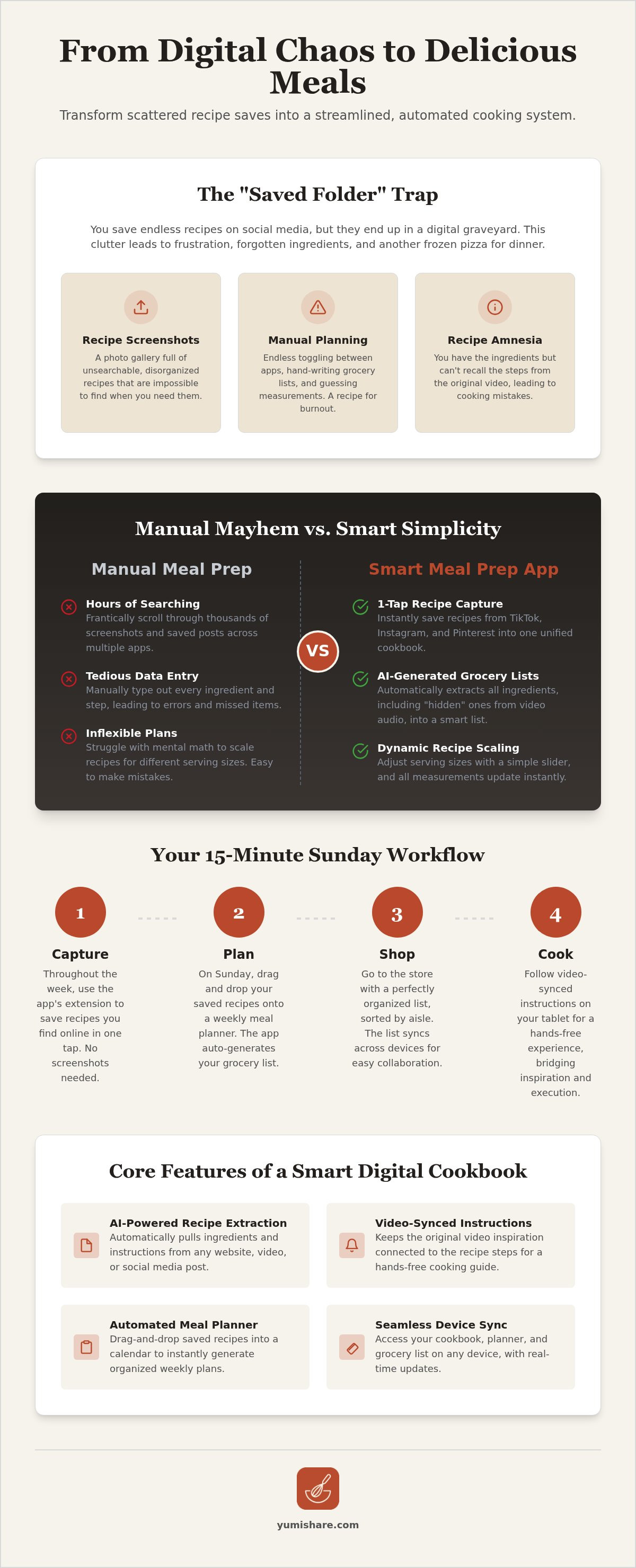
Your 2026 Smart Meal Prep Template: The Sunday Workflow
Sunday morning. Coffee in hand. You open your smart meal prep app. The goal isn't to spend hours planning; it's to execute a 15 minute workflow that sets you up for total success. This methodical approach turns digital inspiration into a physical reality. You move through four distinct phases that bridge the gap between your screen and your kitchen. It's about domestic tranquility through modern efficiency. Stop guessing what's for dinner. Start following a template that respects your time and mental space.
Step 1: Curating Your Weekly Menu
The "Inspiration Sweep" is your first move. Don't let your ideas stay trapped on social media. Use a pinterest recipe importer to pull your latest mood boards into your cookbook. Drag and drop these recipes directly into a calendar view. Balance is the key here. Mix two "slow batch" meals for Sunday afternoon with three "quick 15 minute" dishes for busy weeknights. This variety prevents burnout. You aren't just saving links; you're building a roadmap for your week. You control the rhythm of your kitchen.
Step 2: Mastering the Smart Grocery List
Once your menu is set, let the app perform the "Automatic Tally." It scans your chosen recipes and combines like items. If three recipes call for onions, the app tells you exactly how many to buy. This eliminates manual math. Before you leave, "shop your fridge" to check off items you already own. This step prevents waste and saves money. For a deeper look at this process, check out our meal planner with grocery list guide. It's the ultimate bridge from recipe to aisle.
Step 3: The Smart Sort
Efficiency happens in the aisles. Your smart meal prep app categorizes your list by department or shelf life. You don't wander. You walk a linear path from produce to pantry staples. This "Smart Sort" ensures you grab heavy items last and fragile greens first. You feel the relief of simplification. The frantic energy of a disorganized store is gone. You are an efficient problem-solver in the grocery aisle.
Step 4: The Cook Mode Execution
Now, the transformation. Head to the kitchen for your "Cook Mode" session. This is where you batch prep your foundational ingredients. Use hands-free navigation to move through steps while your hands are busy. The AI keeps the original video instructions visible alongside the text. You stay in the flow. You finish your prep feeling energized rather than exhausted. Ready to reclaim your Sundays? Start your streamlined kitchen journey with YumiShare today.
Why YumiShare is the Ultimate Digital Kitchen Assistant
YumiShare acts as the definitive bridge between your social media discovery and real-world kitchen execution. It is more than just a smart meal prep app; it is a filter for the digital noise that often clutters our lives. You see a recipe you love. You save it. YumiShare handles the rest. It moves you from the frantic energy of scrolling to the grounded, tactile satisfaction of a home-cooked meal. This shift is part of a larger meal planning app trend toward complete automation. By removing the friction of manual data entry, YumiShare lets you reclaim your time and mental space. Stop saving and start cooking today.
Designed for the Modern Foodie
Your inspiration comes from everywhere. YumiShare is fully compatible with Instagram, TikTok, YouTube, and Pinterest. It pulls data from your favorite platforms seamlessly. The interface is clean and intuitive. It feels like a natural extension of your social apps rather than a separate chore. For those seeking deeper insights, premium AI features offer advanced nutrition analysis. You get a clear picture of what you are eating without the guesswork. Unlimited imports ensure your digital cookbook grows as fast as your appetite. It is about empowering your creativity with precise, high-energy tools. Every feature is designed to move you toward a physical result with total clarity.
Taking the Stress Out of 'What's for Dinner?'
The 4:00 PM panic is over. You feel the immediate relief of a pre-populated grocery list that is already synced to your phone. There is no more second-guessing ingredients or searching for lost screenshots. You walk into the kitchen with the confidence of a professional. The unique video-sync Cook Mode keeps original instructions visible while you work. You navigate the steps hands-free. No flour-covered screens. No missed steps. YumiShare acts as your savvy, organized companion throughout the entire process. It bridges the gap between a digital spark and a physical result. Download YumiShare and simplify your meal prep to experience a new level of kitchen calm and domestic tranquility.
Reclaim Your Kitchen and Your Time
Digital inspiration shouldn't feel like a burden. You've seen how a smart meal prep app transforms scattered screenshots into a cohesive, actionable system. By using AI to extract ingredients from social media, you eliminate the tedious data entry that often kills your motivation. You move from passive scrolling to active cooking with total confidence. This shift brings a sense of domestic tranquility back to your home. It's about working smarter, not harder, in the heart of your house. You deserve a system that respects your mental space.
Experience the immediate relief of smart grocery lists that categorize items by aisle for maximum efficiency. Use the hands-free Cook Mode to follow video recipes without ever touching your screen or losing your place. It's time to bridge the gap between your screen and your stove. Turn your saved recipes into a meal plan with YumiShare. Embrace the grounded, tactile satisfaction of a well-ordered life. Start your journey toward digital mindfulness today and enjoy the calm that comes with a truly organized kitchen. You've got this.
Frequently Asked Questions
What is a smart meal prep app exactly?
A smart meal prep app is an AI-driven ecosystem that automates your kitchen workflow. Unlike a basic notes app, it extracts ingredients from social media, organizes your weekly schedule, and generates categorized shopping lists. It acts as a digital kitchen assistant that removes the friction of manual planning. You gain a centralized hub for all your culinary inspiration without the digital clutter.
Can a smart meal prep app really extract ingredients from a TikTok video?
Yes. Modern apps use AI to scan captions and video metadata for specific quantities and instructions. They turn a fast-paced video into a structured, readable list in seconds. This technology eliminates the need to pause and rewind while you're standing in the grocery aisle. You get the data you need without any manual typing. It's a seamless bridge from entertainment to execution.
How do smart grocery lists save money?
These lists prevent overspending by tallying exactly what you need for your chosen recipes. They combine overlapping ingredients so you don't buy duplicates by mistake. By categorizing items by aisle, they help you avoid impulse buys in sections you don't need to visit. You shop with purpose. You leave the store with exactly what you planned and nothing more.
Is it better to use a free meal prep app or a paid one in 2026?
Paid versions typically offer the most advanced AI features like nutrition analysis and unlimited social media imports. Free apps might limit how many recipes you can save or omit the hands-free Cook Mode. Consider your frequency of use. If you prep every week, the time saved by a premium smart meal prep app usually outweighs the small subscription cost.
Does YumiShare sync between iPhone and Android devices?
YumiShare offers full cross-platform synchronization for all users. You can plan your week on an iPad and access your grocery list on an Android phone at the store. Your data stays updated in real-time across every logged-in device. This ensures you never lose a recipe or a shopping item. Your kitchen organization follows you wherever you go, regardless of your hardware.
Can I share my smart meal plans with my partner or family?
You can easily share your planned menus and grocery lists with other household members. This feature allows everyone to see what's for dinner and contribute to the shopping list in real-time. It eliminates "what's for dinner" texts and ensures whoever gets to the store first has the right information. Collaboration creates a more harmonious and organized home life for everyone.
What happens if a recipe website has a paywall?
AI-driven extraction tools focus on public data from social media platforms like Instagram and TikTok. If a specific website is hidden behind a paywall, the app may not be able to scrape the content automatically. In these cases, you can usually manually paste the ingredients into your meal planner. Always check the specific platform compatibility before attempting to import from a restricted site.
How does 'Cook Mode' help if I'm a beginner?
Cook Mode provides a step-by-step guide that keeps you focused on one task at a time. It synchronizes the original video instructions with the text, giving you visual cues for techniques you might not know yet. Hands-free navigation means you won't get stuck with messy hands on your screen. It builds your confidence by removing the chaos of traditional recipe following.
FAQ
What is a smart meal prep app exactly?
A smart meal prep app is an AI-driven ecosystem that automates your kitchen workflow. Unlike a basic notes app, it extracts ingredients from social media, organizes your weekly schedule, and generates categorized shopping lists. It acts as a digital kitchen assistant that removes the friction of manual planning. You gain a centralized hub for all your culinary inspiration without the digital clutter.
Can a smart meal prep app really extract ingredients from a TikTok video?
Yes. Modern apps use AI to scan captions and video metadata for specific quantities and instructions. They turn a fast-paced video into a structured, readable list in seconds. This technology eliminates the need to pause and rewind while you're standing in the grocery aisle. You get the data you need without any manual typing. It's a seamless bridge from entertainment to execution.
How do smart grocery lists save money?
These lists prevent overspending by tallying exactly what you need for your chosen recipes. They combine overlapping ingredients so you don't buy duplicates by mistake. By categorizing items by aisle, they help you avoid impulse buys in sections you don't need to visit. You shop with purpose. You leave the store with exactly what you planned and nothing more.
Is it better to use a free meal prep app or a paid one in 2026?
Paid versions typically offer the most advanced AI features like nutrition analysis and unlimited social media imports. Free apps might limit how many recipes you can save or omit the hands-free Cook Mode. Consider your frequency of use. If you prep every week, the time saved by a premium smart meal prep app usually outweighs the small subscription cost.
Does YumiShare sync between iPhone and Android devices?
YumiShare offers full cross-platform synchronization for all users. You can plan your week on an iPad and access your grocery list on an Android phone at the store. Your data stays updated in real-time across every logged-in device. This ensures you never lose a recipe or a shopping item. Your kitchen organization follows you wherever you go, regardless of your hardware.
Can I share my smart meal plans with my partner or family?
You can easily share your planned menus and grocery lists with other household members. This feature allows everyone to see what's for dinner and contribute to the shopping list in real-time. It eliminates "what's for dinner" texts and ensures whoever gets to the store first has the right information. Collaboration creates a more harmonious and organized home life for everyone.
What happens if a recipe website has a paywall?
AI-driven extraction tools focus on public data from social media platforms like Instagram and TikTok. If a specific website is hidden behind a paywall, the app may not be able to scrape the content automatically. In these cases, you can usually manually paste the ingredients into your meal planner. Always check the specific platform compatibility before attempting to import from a restricted site.
How does 'Cook Mode' help if I'm a beginner?
Cook Mode provides a step-by-step guide that keeps you focused on one task at a time. It synchronizes the original video instructions with the text, giving you visual cues for techniques you might not know yet. Hands-free navigation means you won't get stuck with messy hands on your screen. It builds your confidence by removing the chaos of traditional recipe following.