
 Polski
  Deutsch
  Español
  Français
  Italiano
  Português
  Nederlands
  Svenska
  Українська
  Русский
 The Ultimate Meal Planner with Grocery List: A 2026 Guide to Stress-Free Cooking
Discover the best meal planner with grocery list for 2026. Turn social media recipes into automated shopping lists and reclaim your Sundays. Stress-free cook...

You're standing in the grocery aisle, scrolling through your Instagram "Saved" folder to find that one pasta recipe you saw on Tuesday. You remember the garlic, but was there a specific type of cheese? By the time you find the video, you've already walked past the dairy section twice. It's a common frustration. Between scattered recipes across five different apps and the dreaded decision fatigue, mealtime often feels more like a chore than a comfort. You deserve a better way to manage your kitchen.
We agree that manual data entry is a waste of your precious time. This guide shows you how to use a modern meal planner with grocery list to turn social media inspiration into a structured weekly plan in minutes. Learn how to bridge the gap between a digital spark and a physical result. We'll explore how to build a single digital cookbook, automate your shopping trips, and reclaim your Sunday afternoons for actual relaxation instead of tedious list-making.
Key Takeaways
- Stop scrolling through endless "Saved" folders on Instagram and TikTok by centralizing your social media recipes into one digital cookbook.
- Discover how a modern meal planner with grocery list uses AI to extract ingredients automatically, eliminating the need for tedious manual typing.
- Compare manual planning with automated workflows to see how you can save hours every Sunday while ensuring total shopping accuracy.
- Master a simple five-step process to import social links and assign them to your weekly calendar with a single tap.
- Enhance your kitchen experience with hands-free tools that bridge the gap between digital inspiration and the physical stove.
What is a Smart Meal Planner with Grocery List?
Think of a smart meal planner with grocery list as the central nervous system for your kitchen. It's a digital ecosystem that bridges the gap between digital discovery and physical execution. In the past, meal planning meant flipping through heavy cookbooks and scribbling notes on the back of receipts. Today, the process is automated. It connects your favorite social media recipes directly to your shopping cart through AI-driven ingredient extraction. This "Social-to-Stove" workflow ensures that a 15-second video clip actually becomes a Tuesday night dinner.
To understand the foundation of this shift, it helps to look at what is meal preparation and how its core principles of efficiency have been digitized. Modern tools go beyond simple storage. They act as a filter, removing the noise of the internet and leaving only the actionable steps you need to feed your family. A complete system consists of three core components: a centralized recipe storage hub, an interactive calendar, and a dynamic, categorized grocery list.
The Evolution of Meal Planning in 2026
We've moved far beyond static PDFs and clunky spreadsheets. In 2026, meal planning is interactive and predictive. Recent industry data shows the meal planning app market saw a 47% jump in adoption rates in 2025. This surge is driven by a need to combat decision fatigue. Busy families no longer want to decide "what's for dinner" at 5:00 PM. Instead, they rely on AI-powered mobile apps that synchronize across devices. Cloud synchronization allows every member of the household to see the plan in real-time. It transforms a solo chore into a collaborative household effort.
Why Manual Grocery Lists are Failing Home Cooks
Manual lists are prone to human error. They lead to forgotten ingredients, duplicate purchases, and unnecessary stress. With the USDA forecasting a 2.8% increase in food-at-home prices for 2026, these mistakes carry a physical cost. Scattered notes across various messaging apps create kitchen chaos. You lose the "single source of truth" required for a calm home life. Transitioning to a smart meal planner with grocery list provides the psychological relief of total organization. You stop reacting to your pantry and start managing it. This shift reduces food waste and ensures you never walk past the dairy aisle twice because of a missed item.
How an Integrated Meal Planner Simplifies Your Week
Stop fighting with your "Saved" folder on Instagram. Centralize your inspiration from TikTok, Pinterest, and YouTube into one cohesive system. The benefits of meal prep are well documented; they include lower stress levels and better nutritional balance. However, you can't reap those rewards if your recipes are scattered across five different apps. A meal planner with grocery list solves this by acting as a bridge. It pulls your digital discoveries into a physical reality, ensuring that the viral pasta dish you saw on Monday actually makes it to your table by Thursday.
Modern planning is about more than just storage. It's about dynamic scaling. If you're cooking for two people instead of four, your list should reflect that automatically. This level of integration removes the mental math that often leads to food waste or mid-week grocery runs. By centralizing your workflow, you create a repeatable habit that saves hours of scrolling and second-guessing.
AI Recipe Extraction: The Secret Sauce
Manual typing is the enemy of consistency. YumiShare uses AI to turn a 15-second Reel or a TikTok video into a complete ingredient list instantly. The technology identifies "hidden" steps located in video captions or overlay text, moving them directly into your digital cookbook. This process ensures total accuracy. You won't miss a specific spice or a secondary prep step just because it wasn't explicitly listed in a blog post. It's a one-click transformation from a digital spark to a structured plan. If you're tired of manual entry, you can start saving recipes with YumiShare to see the difference immediately.
Smart Lists vs. Basic Notes Apps
A "dumb" list in a basic notes app leads to inefficient shopping trips. You end up zig-zagging across the store because your ingredients aren't organized by aisle. Smart grocery lists use auto-grouping to sort items into categories like Produce, Dairy, and Pantry. This logic mirrors the physical layout of your local market. Research shows that 60% of shoppers build their weekly plans around ingredient overlap. A smart system recognizes these overlaps, combining quantities so you don't buy two jars of cumin when you only need one. It syncs across devices instantly, allowing your partner or roommate to check off items in real-time. This synchronization turns a chaotic errand into a streamlined, high-speed mission.
Comparing Manual Planning vs. Automated App Workflows
Manual planning often feels like the "free" choice, but it carries a high hidden cost. You spend your Sunday afternoon scrolling through Instagram to find that one specific salmon recipe. Then, you manually type each ingredient into a notes app. This process is prone to error. A modern meal planner with grocery list eliminates this friction by doing the heavy lifting for you. It turns a two-hour planning session into a five-minute sync. By automating the extraction of data, you ensure that every clove of garlic and pinch of salt is accounted for before you leave the house.
Accuracy is the foundation of a stress-free kitchen. When you plan manually, you might miss a key ingredient, leading to a mid-week grocery run. These extra trips are where budgets fail. Data from Abasto shows that 60% of shoppers try to build plans around ingredient overlap. Manual math makes this difficult. Automated workflows identify these overlaps instantly. They combine quantities across multiple recipes, ensuring you buy exactly what you need. This precision helps you stick to your budget and reduces the impulse buys that happen when you're "just grabbing one thing."
Life happens. A late meeting might mean Monday's complex dinner needs to move to Friday. In a manual system, this requires re-calculating your entire week or scribbling over a paper calendar. With an automated app, you simply drag and drop the meal to a new day. The system updates your digital cookbook and keeps your schedule aligned. It's about maintaining domestic tranquility even when your schedule shifts.
The True Cost of 'Free' Manual Planning
You aren't just losing time with manual entry; you're losing the peace of mind that comes with a well-ordered home. While you can find government resources for meal planning to help with basic nutrition structure, they often lack the technological speed required for a busy 2026 lifestyle. Investing in a weekly meal planning app is an investment in your mental health. It removes the "what's for dinner" decision fatigue and replaces it with a clear, actionable roadmap.
Why Automation is the 2026 Trend
We're seeing a massive shift toward "digital mindfulness" in the kitchen. Automation is no longer a luxury; it's a household standard. The rise of meal planning apps that use AI to learn your preferences has changed the game. These systems notice when you prefer certain ingredients or avoid others, suggesting better shopping habits over time. There is also a significant environmental impact. Since 73% of consumers now prioritize minimizing food waste, precise shopping is essential. Automated lists ensure you don't over-buy perishables, keeping your fridge clean and your conscience clear.
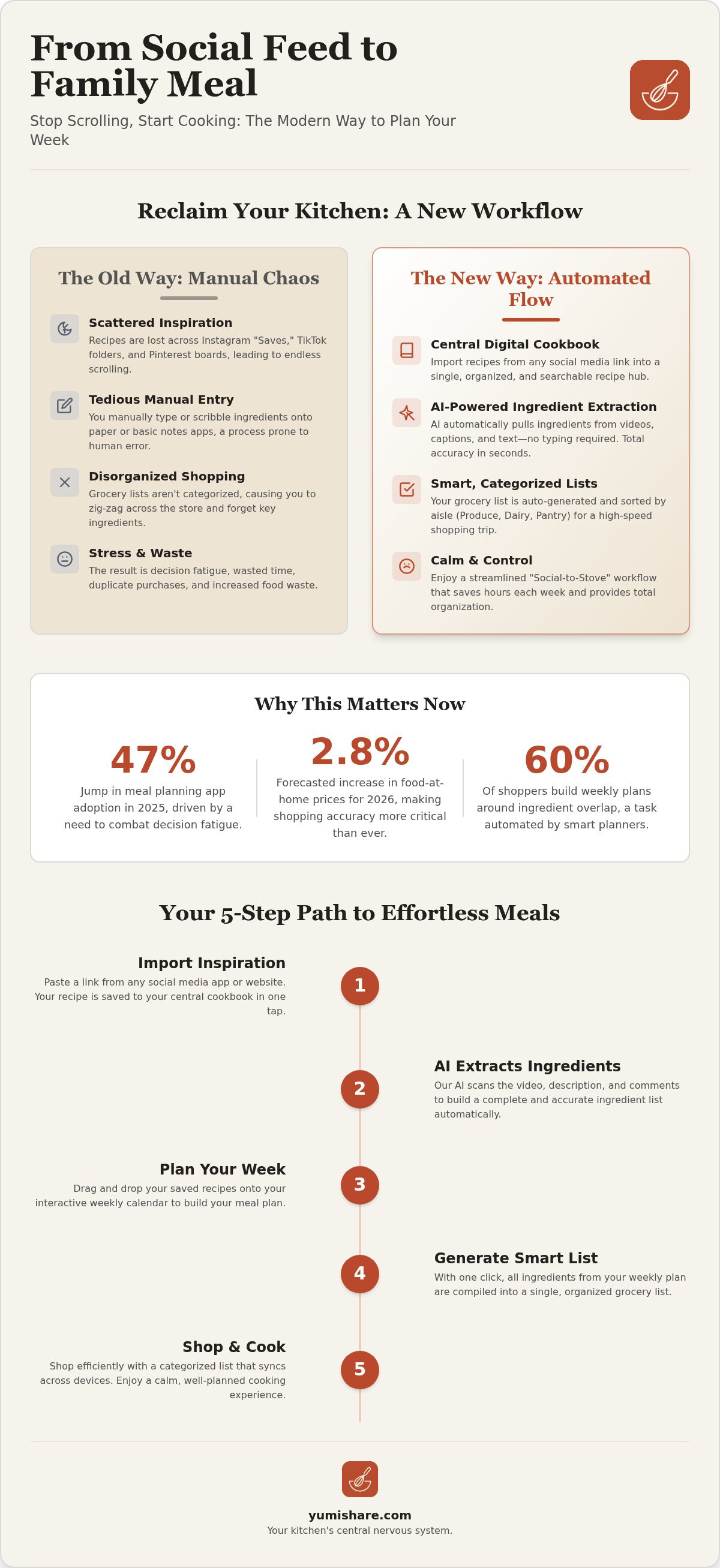
5 Steps to Build Your Meal Plan and Grocery List
Transforming your kitchen from a site of daily stress into a space of organized calm doesn't require hours of effort. It requires a system. By following a structured workflow, you move from digital inspiration to a physical meal with minimal friction. Using a meal planner with grocery list allows you to automate the most tedious parts of the process. Follow these five steps to reclaim your time and master your weekly menu.
- Step 1: Import your inspiration. Capture recipes directly from social media links. Let the AI parse the details so you don't have to.
- Step 2: Map your week. Assign your saved recipes to specific days on your weekly calendar with a single tap.
- Step 3: Generate your list. Review your automated shopping list. The system combines duplicate ingredients and scales quantities based on your needs.
- Step 4: Shop with precision. Use aisle-by-aisle categorization to move through the store with speed and purpose.
- Step 5: Execute perfectly. Use a dedicated Cook Mode to view instructions hands-free, keeping your phone clean while you work.
Importing from Instagram and TikTok
Most recipe discovery starts on social media. Copy the link from a TikTok video or an Instagram Reel and paste it into your app. The AI parses the video captions and overlay text to extract a clean ingredient list and step-by-step instructions. This is the fastest way to build a personal digital recipe box that actually works for you. You can clean up the data or add personal notes, such as "add extra chili" or "substitute almond milk," ensuring your cookbook reflects your family's unique tastes. You can start building your recipe box with YumiShare today to see how easy importing can be.
Optimizing Your Shopping Trip
Efficiency in the grocery store starts before you leave the house. Open your generated list and check off any items you already have in your pantry. This prevents the duplicate purchases that drive up your monthly food costs. Since modern apps offer cross-platform sync, you can share the list with a partner for a "divide and conquer" strategy. One person handles the produce while the other grabs the pantry staples. Because the list is sorted by aisle, you can avoid the middle sections of the store where impulse buys are most likely to happen. This disciplined approach keeps you on budget and gets you out of the store in record time.
Transforming Your Kitchen Workflow with YumiShare
Planning and shopping are only half the battle. The true test of any system happens at the stove. You've used your meal planner with grocery list to organize your week and navigate the store. Now, you need to bridge the gap between a digital screen and a hot pan. YumiShare is designed to be your savvy, organized companion during this final execution phase. It moves you away from the frantic energy of scrolling and toward the tactile satisfaction of a well-ordered home life.
Traditional recipe savers often fail because they require you to jump between apps to see the original inspiration. YumiShare acts as the logical successor to the "Instagram Saved" folder. It is the ultimate recipe keeper alternative because it keeps the original social media video synced with your clean, extracted instructions. You get the visual guidance of the creator alongside the structured data you need to succeed. It's about digital mindfulness; it removes the noise and leaves only what is useful for the task at hand.
Mastering Cook Mode
Messy screens and flour-covered fingers are common kitchen hazards. You can avoid these pitfalls by using cook mode for mobile recipes. This feature provides a dedicated, hands-free interface that keeps your phone clean while you work. It breaks the recipe down into bite-sized, manageable segments. You can view the original TikTok or Instagram Reel directly within the interface if you need to double-check a specific technique. This dedicated assistant lives in your pocket, ensuring that every dish turns out exactly as the creator intended. It provides the relief of simplification, turning a complex multi-step process into a linear, stress-free experience.
Getting Started with YumiShare Today
Transformation starts with a single action. Download YumiShare on iOS or Android to begin centralizing your kitchen management. The setup process is designed for speed and modern efficiency. You can import your first batch of recipes and build a complete weekly plan in under 10 minutes. Stop letting great recipes get lost in the digital void. Join the community of organized home cooks who value their time and mental space. You can start your stress-free meal planning journey with YumiShare and experience the grounded satisfaction of a perfectly organized kitchen today.
Master Your Kitchen Management
The movement from a digital spark to a physical result should be effortless. You've learned how to turn scattered social media links into a structured weekly reality. You've seen how automation removes the decision fatigue that often ruins a busy weeknight. By adopting a modern meal planner with grocery list, you don't just save time; you protect your mental space. It's about moving away from digital overwhelm and toward the grounded satisfaction of a well-ordered home life.
YumiShare brings this vision to life with AI-powered recipe extraction from TikTok and Instagram. It eliminates manual entry and replaces it with instant clarity. Your shopping trips become faster with automated aisle-sorted grocery lists. Everyone in the house stays updated through cross-device cloud synchronization. This is the final piece of your kitchen organization puzzle. Trade the frantic scrolling for a streamlined experience that respects your time and energy.
Stop scrolling and start cooking with YumiShare
You have the tools. You have the plan. Take the final step toward a more manageable, mindful daily life and enjoy the tranquility of a stress-free kitchen.
Frequently Asked Questions
Can I really import recipes from a TikTok video into a grocery list?
Yes. Copy the link from any TikTok video and paste it into the app. Our AI parses the captions and on-screen text to extract a clean ingredient list and step-by-step instructions. This process turns a viral video into a functional meal planner with grocery list entry in seconds.
Does the meal planner allow for dietary restrictions or allergies?
Absolutely. You have full control over every recipe you import. Once the AI extracts the data, you can swap ingredients or add specific notes about allergies. This ensures your digital cookbook remains safe and personalized for your family's unique nutritional needs.
Can I share my grocery list with my spouse or roommates?
Yes. Use the cross-platform sync feature to connect with other household members. Any items checked off by one person update instantly on everyone else's device. This synchronization makes it easy to coordinate shopping trips and prevents duplicate purchases of the same items.
Is there a free version of the meal planner with grocery list?
Yes. YumiShare is free to start. You can use the basic features to organize your kitchen right away. We offer a Premium option for those who want unlimited AI imports and advanced scanning capabilities to grow their digital recipe collection faster.
How does the app handle ingredients I already have in my pantry?
Review your generated list before you head to the store. Simply tap the items you already have in stock to move them to your "checked" section. This keeps your active shopping list focused only on what you truly need to buy, reducing food waste and saving money.
Can I export my grocery list to other apps or for printing?
Yes. You can export your organized shopping list whenever you need to. This is a great option if you prefer a physical paper list or want to send the ingredients to a friend via a messaging app. The list remains sorted by aisle even after exporting.
Does YumiShare work on both iPhone and Android devices?
Yes. The app is designed for modern household management across all major mobile platforms. Your data syncs to the cloud automatically. This ensures you can access your recipes and shopping lists whether you are using an iPhone or an Android device.
How do I organize my recipes once they are imported?
Use your digital recipe box to tag and categorize your imports. You can sort recipes by meal type, cuisine, or specific themes. This organization makes it easy to find your favorite social media discoveries when you sit down to build your next weekly meal planner with grocery list.
FAQ
Can I really import recipes from a TikTok video into a grocery list?
Yes. Copy the link from any TikTok video and paste it into the app. Our AI parses the captions and on-screen text to extract a clean ingredient list and step-by-step instructions. This process turns a viral video into a functional meal planner with grocery list entry in seconds.
Does the meal planner allow for dietary restrictions or allergies?
Absolutely. You have full control over every recipe you import. Once the AI extracts the data, you can swap ingredients or add specific notes about allergies. This ensures your digital cookbook remains safe and personalized for your family's unique nutritional needs.
Can I share my grocery list with my spouse or roommates?
Yes. Use the cross-platform sync feature to connect with other household members. Any items checked off by one person update instantly on everyone else's device. This synchronization makes it easy to coordinate shopping trips and prevents duplicate purchases of the same items.
Is there a free version of the meal planner with grocery list?
Yes. YumiShare is free to start. You can use the basic features to organize your kitchen right away. We offer a Premium option for those who want unlimited AI imports and advanced scanning capabilities to grow their digital recipe collection faster.
How does the app handle ingredients I already have in my pantry?
Review your generated list before you head to the store. Simply tap the items you already have in stock to move them to your "checked" section. This keeps your active shopping list focused only on what you truly need to buy, reducing food waste and saving money.
Can I export my grocery list to other apps or for printing?
Yes. You can export your organized shopping list whenever you need to. This is a great option if you prefer a physical paper list or want to send the ingredients to a friend via a messaging app. The list remains sorted by aisle even after exporting.
Does YumiShare work on both iPhone and Android devices?
Yes. The app is designed for modern household management across all major mobile platforms. Your data syncs to the cloud automatically. This ensures you can access your recipes and shopping lists whether you are using an iPhone or an Android device.
How do I organize my recipes once they are imported?
Use your digital recipe box to tag and categorize your imports. You can sort recipes by meal type, cuisine, or specific themes. This organization makes it easy to find your favorite social media discoveries when you sit down to build your next weekly meal planner with grocery list.