
 Polski
  Deutsch
  Español
  Français
  Italiano
  Português
  Nederlands
  Svenska
  Українська
  Русский
 Recipe App That Syncs Across Devices: The 2026 Guide to Digital Cooking
Find the best recipe app that syncs across devices in our 2026 guide. Unify your digital cookbook, auto-generate grocery lists, and cook hands-free.

You're standing in the grocery aisle, scrolling through hundreds of liked Instagram posts to find that one lemon pasta recipe you saved last Tuesday. The signal is weak. Your frustration is high. It's a common digital headache; inspiration is everywhere, but it's rarely where you need it when the stove is on. You deserve a kitchen experience that feels like a calm, well-ordered sanctuary rather than a frantic search for a lost link.
Finding a reliable recipe app that syncs across devices is the first step toward reclaiming your culinary flow. It's time to stop manual typing and start cooking. This guide reveals how a cloud-sync recipe manager can unify your scattered digital saves into one organized assistant accessible anywhere. We'll dive into the latest 2026 technology, including AI-driven extraction and hands-free cook modes, to help you build a unified digital cookbook that generates grocery lists automatically. From your desktop at work to the tablet on your counter, your kitchen is finally about to get in sync.
Key Takeaways
- Stop losing recipes in Instagram and TikTok folders. Move your digital inspiration into a centralized hub that works as hard as you do.
- Understand why a recipe app that syncs across devices is the backbone of a modern kitchen. Ensure your plans move seamlessly from your phone to your tablet.
- Leverage AI extraction to skip the manual typing. Pull ingredients and instructions from social media posts with a single tap.
- Simplify your shopping with automated grocery lists. Transform your meal plan into an organized checklist without the extra effort.
- Experience hands-free cooking with specialized modes designed for busy kitchens. Focus on the food while your digital assistant handles the instructions.
The Problem with Scattered Saves: Why You Need a Syncing Recipe App
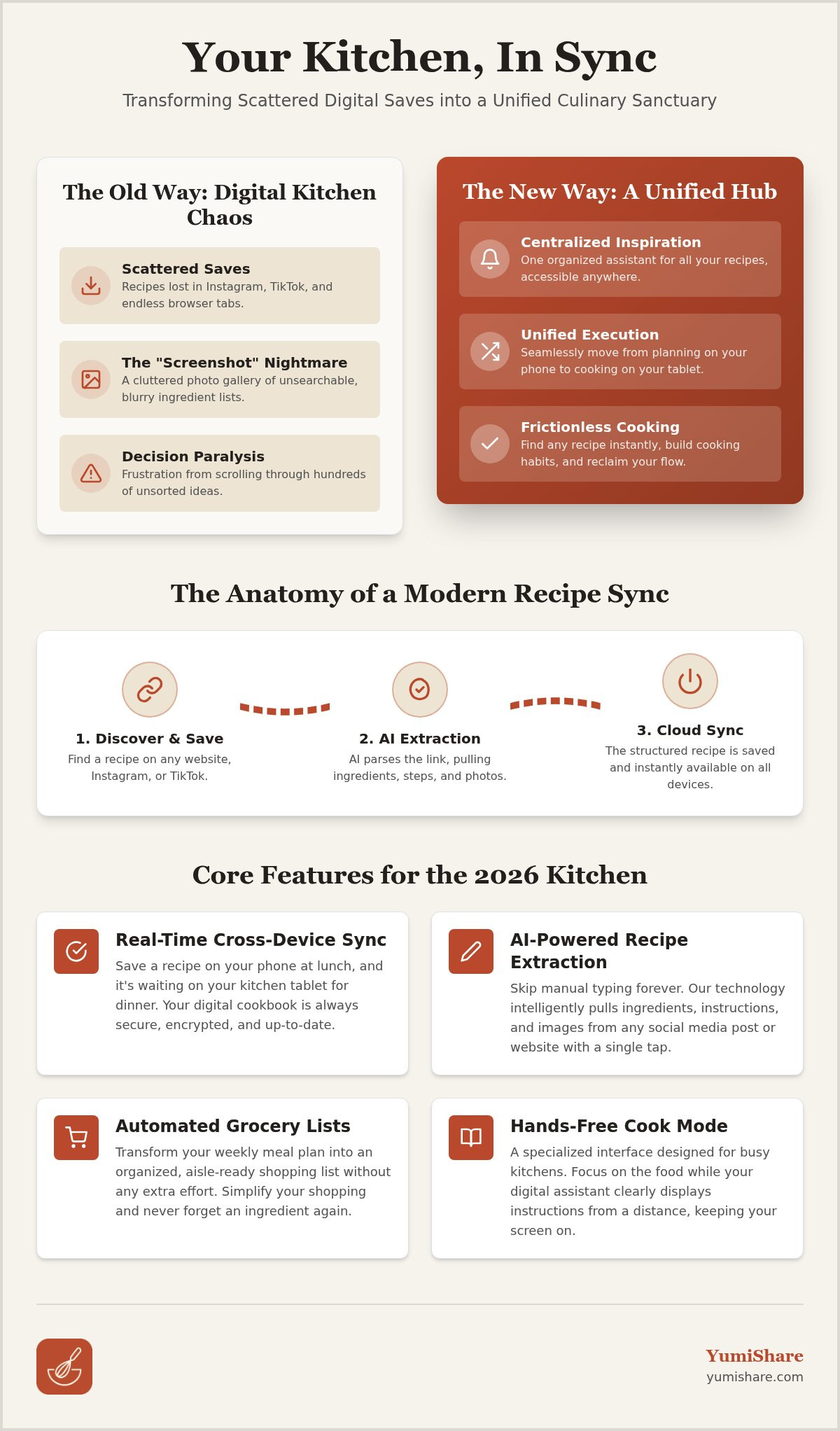
Your Instagram "Saved" folder is likely a graveyard for dinner ideas. You see a viral TikTok, hit save, and never look at it again. Algorithms prioritize the new, making it nearly impossible to find that specific garlic shrimp recipe from three months ago. This digital clutter creates decision paralysis. When you're hungry and tired, scrolling through hundreds of unsorted videos feels like a chore. You end up ordering pizza instead of cooking the healthy meal you planned. Moving to a recipe app that syncs across devices ends this cycle of lost inspiration.
Modern cooking requires agility. In the early 2010s, a recipe management and meal planning application was the gold standard for digital organization. These tools were functional but often required heavy manual effort. You had to copy and paste text or use browser extensions to clip data. By 2026, the kitchen has evolved. We've moved beyond manual entry into a world of automated synchronization. You shouldn't have to type out ingredients twice just to see them on your tablet. True efficiency means your data moves as fast as your cravings.
The "Screenshot" Nightmare
Stop taking screenshots of ingredient lists. It's a recipe for disaster. Your photo gallery becomes a cluttered mess where a photo of a recipe sits between a picture of your cat and a work document. You can't search for "tacos" in a sea of JPEG files. This is where an app to organize saved recipes changes everything. It turns static images into searchable, interactive data. No more squinting at a blurry photo while trying to shop. Clean up your gallery and let a specialized database handle the heavy lifting.
Fragmented Inspiration vs. Unified Execution
There is a massive gap between seeing a recipe and actually eating it. Inspiration happens on your phone during a commute. Execution happens on your laptop or kitchen display. Without a recipe app that syncs across devices, that gap feels like a canyon. A central hub acts as your kitchen's operating system. It provides the emotional relief of knowing your favorites are safe. You gain a consistent cooking habit because the friction is gone. Every recipe you love is exactly where you expect it to be, ready for the stove.
What is a Cloud Sync Recipe Manager and How Does it Work?
Think of a cloud sync recipe manager as a specialized, private database for your culinary life. It stores your recipe data on remote servers rather than just inside your phone's local memory. This setup allows for instant access on any logged-in device. If you find a recipe on your phone during lunch, it's waiting for you on your kitchen tablet by dinner. A high-quality recipe app that syncs across devices eliminates the need for manual backups or file transfers. It simply works in the background.
Real-time synchronization is the standard for 2026. Unlike older apps that required exporting files to third-party storage, modern tools use live data streams. This ensures perfect version control. You won't accidentally follow an old version of a recipe on your phone after you've updated the cook time on your laptop. Security and data integrity are equally vital. Your personal cookbook is encrypted; this ensures your family secrets remain yours while staying accessible across the globe.
The Anatomy of a Modern Recipe Sync
The process begins when the app reads a URL or social media post. It doesn't just save a link. It parses the page to identify ingredients, cooking steps, and high-resolution photos. Once extracted, the data is pushed from your mobile "Save" directly into a structured "Cook Mode." AI recipe extraction acts as the bridge between video content and structured data. This transformation turns a messy 60-second video into a step-by-step guide you can actually follow.
Cross-Platform Compatibility in 2026
Your kitchen ecosystem is likely diverse. You might use an iPhone, a Windows laptop for planning, and an Android tablet mounted on the wall. A unified UI/UX is essential for a recipe app that syncs across devices. The interface must adapt to different screen sizes without losing functionality. This seamless flow makes sharing recipes with family a one-tap process. Everyone stays on the same page, literally.
Stop fighting with browser tabs and manual notes. Simplify your digital life. If you're ready to unify your kitchen, start building your organized recipe library today.
The Benefits of Syncing Recipes Across All Your Devices
A recipe app that syncs across devices transforms your kitchen from a site of frustration into a center of modern efficiency. It supports a fluid movement through every phase of the cooking process. You no longer have to worry about where a piece of information lives. It lives everywhere you do. This cross-platform harmony creates a seamless bridge between your digital inspiration and your physical dinner table.
The journey of a meal typically follows four distinct stages. Discovery starts on your phone. You find a vibrant salad on TikTok during your morning commute and save it instantly. Planning happens on your desktop. On Sunday evening, you open your laptop for a comfortable weekly overview and drag recipes into your calendar. Execution moves to the tablet. When it's time to cook, your tablet provides a large, readable display. Finally, shopping happens back on your mobile. Your grocery list stays in your pocket, updated in real-time as you finalize your plans.
The Grocery Store Advantage
Never forget a niche ingredient again with a meal planner with grocery list. Your phone becomes a smart shopping companion that knows exactly what's missing from your shelves. Check your pantry inventory in real-time via the app to avoid buying duplicates of spices you already own. Sort your lists by aisle for maximum efficiency. This methodical approach turns a chaotic grocery run into a quick, focused task that respects your time and your budget.
The Hands-Free Kitchen Experience
Use your tablet as a dedicated digital sous-chef. A large screen is much easier to read from across the counter than a cramped phone display. A recipe app that syncs across devices ensures your tablet is always ready with the latest version of your meal plan. Specialized cook mode for mobile recipes keeps your screen clean while you work. It prevents the display from dimming or locking while your hands are covered in flour. You can even use voice-activated controls to move to the next step. Focus on the tactile satisfaction of cooking while your digital assistant handles the instructions.
Choosing the Best Syncing App: Key Features to Look For
Selecting the right recipe app that syncs across devices requires looking beyond basic storage. In 2026, the best tools prioritize social media extraction. If an app can't handle Instagram Reels or TikTok videos, it's already obsolete. You need a system that parses video content into ingredients and steps automatically. Stop typing. Start cooking. This automation bridges the gap between viral inspiration and your dinner plate. It removes the friction that usually stops you from trying something new. You deserve an interface that mirrors the quick, intuitive actions of a modern mobile experience.
Reliability is the next pillar of a great digital kitchen. Consider these essential features before committing to a platform:
- Offline Access: Your kitchen Wi-Fi might drop. You need local copies of your recipes that sync as soon as you're back online. This ensures your cooking flow remains uninterrupted.
- Smart Categorization: Look for AI that tags recipes by cuisine, dietary needs, or prep time without your input. It should act as a filter that removes noise and leaves only what is useful.
- Scalability: The app should adjust ingredient amounts for different serving sizes instantly. No more manual math while the pan is hot. This feature allows for immediate action regardless of your guest count.
Understanding the total cost versus the value provided is also vital for your budget. A premium subscription is only worth the investment if the automation saves you more time than it costs in dollars. Evaluate the features against your actual cooking habits to find the best value for your household. Choose efficiency. Look for a partner that values your time and mental space above all else. Transformation from a digital spark to a physical result should be the primary goal.
Automation and AI Integration
Manual entry is the primary reason people abandon digital cookbooks. Typing out ingredients is tedious; it feels like work rather than a hobby. A modern meal planning app should learn your preferences and handle the data entry for you. AI now suggests substitutions based on your synced pantry inventory. If you're out of heavy cream, the app should recommend Greek yogurt before you even start the stove. This level of digital mindfulness keeps you focused on the craft of cooking. It moves you away from the frantic energy of consumption toward grounded satisfaction. Efficiency meets tranquility.
Reliability of Synchronization
Speed and conflict resolution define a high-quality recipe app that syncs across devices. If you edit a cook time on your laptop, that change must appear on your phone in seconds. Sync speed matters. Robust cloud infrastructure prevents data loss if you happen to edit the same recipe on two different screens simultaneously. Choosing a recipe keeper alternative with strong sync capabilities ensures your data stays consistent and safe. It creates a sense of domestic tranquility knowing your library is always up to date. Your digital kitchen should feel like a helpful partner rather than just software.
Stop settling for fragmented tools that slow you down. Experience the future of organized cooking with YumiShare today.
YumiShare: The Ultimate Syncing Recipe App for 2026
YumiShare understands that your inspiration moves fast. You see a vibrant TikTok while scrolling in bed; you shouldn't have to struggle to find it when you're at the stove. It turns "I saw this" into "I am cooking this." This is the core of our 2026 vision. We believe your kitchen should be as smart as your phone. By using a recipe app that syncs across devices, you bridge the gap between digital discovery and a physical meal. Our advanced AI doesn't just pull text. It extracts the "soul" of a social media recipe, capturing the nuance of the creator's method alongside the raw data.
The transition between platforms is invisible. You can save a recipe on your iPhone, adjust the serving sizes on your Android tablet, and check the grocery list on your Apple Watch. This seamless ecosystem eliminates the friction that usually kills a cooking habit. You aren't just saving links; you're building a living, breathing database of your culinary life. It’s about domestic tranquility. It’s about knowing that your data is safe, organized, and always ready for the next meal.
Built for the Modern Foodie
Our platform stands out as the best app for saved recipes because it prioritizes the social-to-stove workflow. The "Cook Mode" is a standout feature. It syncs directly with the original social media video, allowing you to reference the technique without leaving the app. This creates a focused environment that eliminates the noise of the platform it came from. Additionally, the integrated meal planner simplifies your weekly routine. You can easily build a budget meal planning app workflow that tracks your spending while keeping your diet varied and exciting.
Getting Started with YumiShare
Transitioning to a more organized life is simple. Follow our three-step process: Import, Plan, and Cook. First, use our AI to import recipes from any social platform. Next, drag those recipes into your weekly schedule to generate a smart grocery list. Finally, open your tablet and start cooking. You can even invite family members to join your synced digital cookbook. This ensures everyone is on the same page for dinner. A recipe app that syncs across devices makes collaboration effortless. Start your journey toward a calmer, more efficient kitchen today.
Embrace the Future of Stress-Free Cooking
Domestic tranquility begins with organization. You've seen how a recipe app that syncs across devices removes the frantic friction of scattered saves and manual data entry. By unifying your digital inspiration into a single, searchable hub, you reclaim your time and mental space. Whether you're planning on a desktop or cooking with a tablet, your culinary world remains perfectly aligned and ready for action. It's the relief of simplification in a digital age.
YumiShare acts as the essential bridge between viral inspiration and your dinner table. Our AI-powered extraction pulls precise data directly from TikTok and Instagram, while real-time cloud sync keeps your iOS and Android devices updated instantly. Join the thousands of modern home cooks who trust us to manage their digital cookbooks with ease. It's time to move away from the noise of social media and toward the tactile satisfaction of a well-ordered home life.
Start your organized kitchen journey with YumiShare today!
Your next favorite meal is already waiting for you. Let's get cooking and bring that inspiration to life.
Frequently Asked Questions
Can I sync my recipes between an iPhone and an Android tablet?
Yes, you can easily sync recipes across different operating systems. High-quality apps use cloud-based databases to bridge the gap between iOS and Android. Simply log in with the same account on both your iPhone and your tablet. Your entire collection will appear instantly on both screens, ensuring your kitchen stays organized regardless of the hardware you prefer to use.
Does a syncing recipe app work without an internet connection?
Most modern syncing apps offer offline access to your saved recipes. You can view your ingredients and instructions even when your kitchen Wi-Fi is spotty or disconnected. Any changes you make while offline, such as adding notes or adjusting portions, will be saved locally. These updates sync to the cloud automatically as soon as your device reconnects to the internet.
How do I save recipes from Instagram Reels into a syncing app?
You save Instagram Reels by sharing the link directly to your recipe manager. Open the Reel, tap the share button, and select your app from the list of options. The internal AI then analyzes the video content and the caption to pull out ingredients and steps. This process turns a viral video into a structured, searchable recipe in your digital library.
Is there a limit to how many recipes I can sync across devices?
Recipe limits vary depending on whether you use a free version or a premium subscription. Many basic tiers allow for a specific number of saves, while professional plans usually offer unlimited cloud storage. A recipe app that syncs across devices is designed to handle thousands of entries. This allows you to build a massive culinary library that remains accessible everywhere without slowing down.
Can I share my synced recipe folders with other family members?
Yes, you can share specific folders or your entire library with others. Most apps allow you to send an invite link to family members via email or text. Once they join, they can view, edit, or add recipes to the shared collection. This makes it simple to collaborate on weekly meal plans and ensures everyone has the same grocery list on their own phones.
What happens to my synced recipes if I delete the app on one device?
Your recipes remain safe in the cloud if you delete the app from your phone or tablet. Because the data is stored on remote servers, your library isn't tied to a single piece of hardware. You can log in from a web browser or a new device to see all your saved content. Your digital cookbook only disappears if you choose to delete your entire account.
Does YumiShare extract ingredients from TikTok videos automatically?
Yes, YumiShare uses specialized AI to automatically extract ingredient lists and instructions from TikTok videos. The technology scans the video and the creator's description to build a clean, readable recipe format. This automation makes it a powerful recipe app that syncs across devices, allowing you to move from social media inspiration to actual cooking in just a few seconds.
FAQ
Can I sync my recipes between an iPhone and an Android tablet?
Yes, you can easily sync recipes across different operating systems. High-quality apps use cloud-based databases to bridge the gap between iOS and Android. Simply log in with the same account on both your iPhone and your tablet. Your entire collection will appear instantly on both screens, ensuring your kitchen stays organized regardless of the hardware you prefer to use.
Does a syncing recipe app work without an internet connection?
Most modern syncing apps offer offline access to your saved recipes. You can view your ingredients and instructions even when your kitchen Wi-Fi is spotty or disconnected. Any changes you make while offline, such as adding notes or adjusting portions, will be saved locally. These updates sync to the cloud automatically as soon as your device reconnects to the internet.
How do I save recipes from Instagram Reels into a syncing app?
You save Instagram Reels by sharing the link directly to your recipe manager. Open the Reel, tap the share button, and select your app from the list of options. The internal AI then analyzes the video content and the caption to pull out ingredients and steps. This process turns a viral video into a structured, searchable recipe in your digital library.
Is there a limit to how many recipes I can sync across devices?
Recipe limits vary depending on whether you use a free version or a premium subscription. Many basic tiers allow for a specific number of saves, while professional plans usually offer unlimited cloud storage. A recipe app that syncs across devices is designed to handle thousands of entries. This allows you to build a massive culinary library that remains accessible everywhere without slowing down.
Can I share my synced recipe folders with other family members?
Yes, you can share specific folders or your entire library with others. Most apps allow you to send an invite link to family members via email or text. Once they join, they can view, edit, or add recipes to the shared collection. This makes it simple to collaborate on weekly meal plans and ensures everyone has the same grocery list on their own phones.
What happens to my synced recipes if I delete the app on one device?
Your recipes remain safe in the cloud if you delete the app from your phone or tablet. Because the data is stored on remote servers, your library isn't tied to a single piece of hardware. You can log in from a web browser or a new device to see all your saved content. Your digital cookbook only disappears if you choose to delete your entire account.
Does YumiShare extract ingredients from TikTok videos automatically?
Yes, YumiShare uses specialized AI to automatically extract ingredient lists and instructions from TikTok videos. The technology scans the video and the creator's description to build a clean, readable recipe format. This automation makes it a powerful recipe app that syncs across devices, allowing you to move from social media inspiration to actual cooking in just a few seconds.