
 Polski
  Deutsch
  Español
  Français
  Italiano
  Português
  Nederlands
  Svenska
  Українська
  Русский
 Pinterest Recipe Organizer: How to Turn Your Pins into a Digital Cookbook in 2026
Use a Pinterest recipe organizer to turn your pins into a digital cookbook. Learn how to bypass broken links, extract ingredients, and create smart grocery l...

You're standing in the kitchen; phone in hand; scrolling through a board of three hundred saved pins to find that one lemon chicken recipe you liked last Tuesday. When you finally find it; the link leads to a 404 error or a three thousand word essay on the history of citrus. This is the Pinterest Paradox. You've spent hours collecting inspiration but zero minutes actually cooking. To fix this; you need a dedicated pinterest recipe organizer that transforms your digital clutter into a functional kitchen tool.
It's frustrating to feel like your favorite recipes are trapped behind broken links and endless ads. You deserve a streamlined experience that honors your time and your kitchen space. In this guide; you'll learn how to bridge the gap between discovery and dinner by building a clean; ad-free digital cookbook. We'll show you how to automate your meal prep and reclaim the joy of cooking without the digital noise.
We'll explore how to use AI-driven extraction to pull ingredients instantly; sync your pins to smart grocery lists; and use hands-free cook modes that keep your screen active while you work. By the end of this article; you'll have a clear strategy to turn your digital sparks into physical results. It's time to turn those pins into plates.
Key Takeaways
- Bridge the gap between digital discovery and dinner by transforming scattered pins into an organized; actionable personal cookbook.
- Adopt a dedicated pinterest recipe organizer to bypass broken links and tedious blog stories while keeping your favorite dishes searchable.
- Use AI-powered extraction to isolate ingredients and instructions from social media posts; removing unnecessary noise and ads for a cleaner view.
- Master a seamless workflow that moves from Pinterest inspiration to automated grocery lists and hands-free cooking in seconds.
The Pinterest Paradox: Why Your Saved Pins Aren’t Helping You Cook
Pinterest is a brilliant visual discovery engine for recipes; but it often fails the moment you step into the kitchen. You find a stunning photo of garlic butter salmon; save it to a board; and then promptly forget it exists. This is the Pinterest Paradox. It's the growing gap between digital discovery and physical execution. In 2026; saving a pin represents only 10% of the cooking process. The real challenge lies in turning that static image into a tangible meal without losing your mind to broken links or 404 errors.
The biggest frustration for home cooks today isn't a lack of ideas. It's the friction of the source. You click a promising pin only to find a blog post buried under two thousand words of personal backstory and aggressive pop-up ads. Your phone screen times out while you're elbow-deep in flour. This chaos is why a dedicated pinterest recipe organizer has become the essential missing link in the modern kitchen. It moves the focus from "collecting" to "doing." It turns a cluttered board into a streamlined; actionable digital cookbook.
The Problem with Pinterest Boards
Pinterest boards are designed for curation; not utility. They lack the structural logic required for efficient meal prep. Searching for "chicken" across five different boards is a manual chore. You can't easily filter by ingredients you already have in your pantry; nor can you scale a serving size from two to eight people with a single tap. The interface is built to keep you scrolling; not to help you shop. Without a way to generate automated grocery lists; your boards remain a graveyard of good intentions rather than a functional meal plan. They offer inspiration without the infrastructure to back it up.
Why 2026 Demands a Digital Kitchen Bridge
In 2026; our food inspiration is no longer just static. We discover meals through high-speed video on TikTok and Instagram Reels. These formats are engaging but nearly impossible to follow while actually cooking. You need a bridge that can extract the "how-to" from the "show-off." A digital kitchen bridge provides a single source of truth for all your social media finds. It practices digital mindfulness by stripping away the noise and leaving only the ingredients and instructions. This transformation brings domestic tranquility back to your home; replacing frantic scrolling with a clear; linear path to dinner. Using a pinterest recipe organizer ensures that your digital spark always results in a physical meal.
Digital vs. Physical: Choosing the Best Pinterest Recipe Organizer
The dream of a hand-curated recipe binder often clashes with the reality of a busy life. You print a pin; punch holes in the paper; and slide it into a plastic sleeve. It feels productive for exactly ten minutes. Then; the oil splatters hit the page. The ink fades. Eventually; that binder becomes a bulky; unorganized mess taking up valuable counter space. Choosing a digital pinterest recipe organizer solves these physical limitations instantly. It replaces the clutter of paper with the clarity of a streamlined interface.
Speed is the ultimate differentiator in a modern kitchen. Finding a "lemon chicken" recipe in a physical binder requires flipping through dozens of pages or checking a manual index. In a digital app; you type the word and see results in two seconds. Searching for a specific ingredient like "quinoa" becomes an effortless task. Instead of scanning a table of contents; you get a filtered list of every relevant dish you've ever saved. Digital storage doesn't tear; stain; or get lost during a move. It's a permanent; evolving archive of your culinary journey.
Access matters most when you're standing in the grocery store aisle. A physical binder stays on your shelf at home. A mobile app travels with you; ensuring your weekly meal plan is always in your pocket. You'll never forget the one specific spice needed for a new dish again. This constant connectivity bridges the gap between your kitchen and the market; making your shopping trips faster and more focused. You transition from a passive collector to an active; organized cook.
The High Cost of Manual Organization
Manual organization is a silent time-sink. Consider the hours spent cropping screenshots; managing printer settings; and filing paper. The hidden costs of ink and toner add up quickly; often exceeding the price of a digital subscription. Most people abandon manual projects because the friction is too high. When organization feels like a second job; it stops being a hobby. A digital system removes these barriers; allowing your collection to grow without the physical clutter or the mental load of manual entry.
The Smart Advantage of a Pinterest Recipe Importer
A modern pinterest recipe organizer functions as an intelligent importer. It strips the fluff and extracts core data with one tap. Whether you're on your phone at work or using a tablet on the kitchen island; your data stays synced in the cloud. This cross-platform utility is essential for the 2026 kitchen. Check out the Best app for saved recipes to see how this works in practice. This automation removes the admin work from cooking. You can focus on the flavors while YumiShare handles the logistics of your digital library.
How AI Technology Turns a Static Pin into an Actionable Recipe
The magic of a modern pinterest recipe organizer lies in its ability to read between the lines. Traditional bookmarking only saves a link; but AI technology actually understands the content. When you share a pin to a smart organizer; the AI scans the page to identify specific data points. It separates the ingredient list from the cooking instructions and isolates the serving sizes. This process effectively solves the "dead link" problem. Even if the original blog post disappears tomorrow; your recipe data remains safely stored in your digital cookbook.
Stripping the fluff is perhaps the greatest relief for any home cook. You no longer have to scroll past a thousand words of personal history to find out how much garlic you need. The AI acts as a filter; removing ads and pop-ups to present a clean; readable interface. It also categorizes your collection automatically. By analyzing the ingredients; the system can tag recipes as "Vegan;" "Gluten-Free;" or "30-Minute Meals" without you lifting a finger. This level of automation brings a sense of calm and order to your kitchen routine.
No More Manual Typing
Manual data entry is a relic of the past. Using a Pinterest recipe importer tool allows you to build your library with a single tap. The technology is sophisticated enough to handle diverse formats; including YouTube descriptions and TikTok captions. It recognizes the difference between a tablespoon and a teaspoon; ensuring your measurements stay accurate. If a recipe is written for four people but you're cooking for two; the app scales the ingredients instantly. You save time and avoid the mental math that often leads to kitchen errors.
The Hands-Free Cooking Experience
Once your recipes are organized; the focus shifts to execution. A dedicated cook mode for mobile recipes is a game-changer for the active chef. It keeps your screen awake so you don't have to touch your phone with messy; flour-covered hands. This feature often syncs step-by-step instructions with the original video source. If you're a visual learner; you can watch a specific technique while reading the corresponding step. This synchronization removes the friction of jumping between apps. You stay focused on the stove while your digital assistant manages the details.
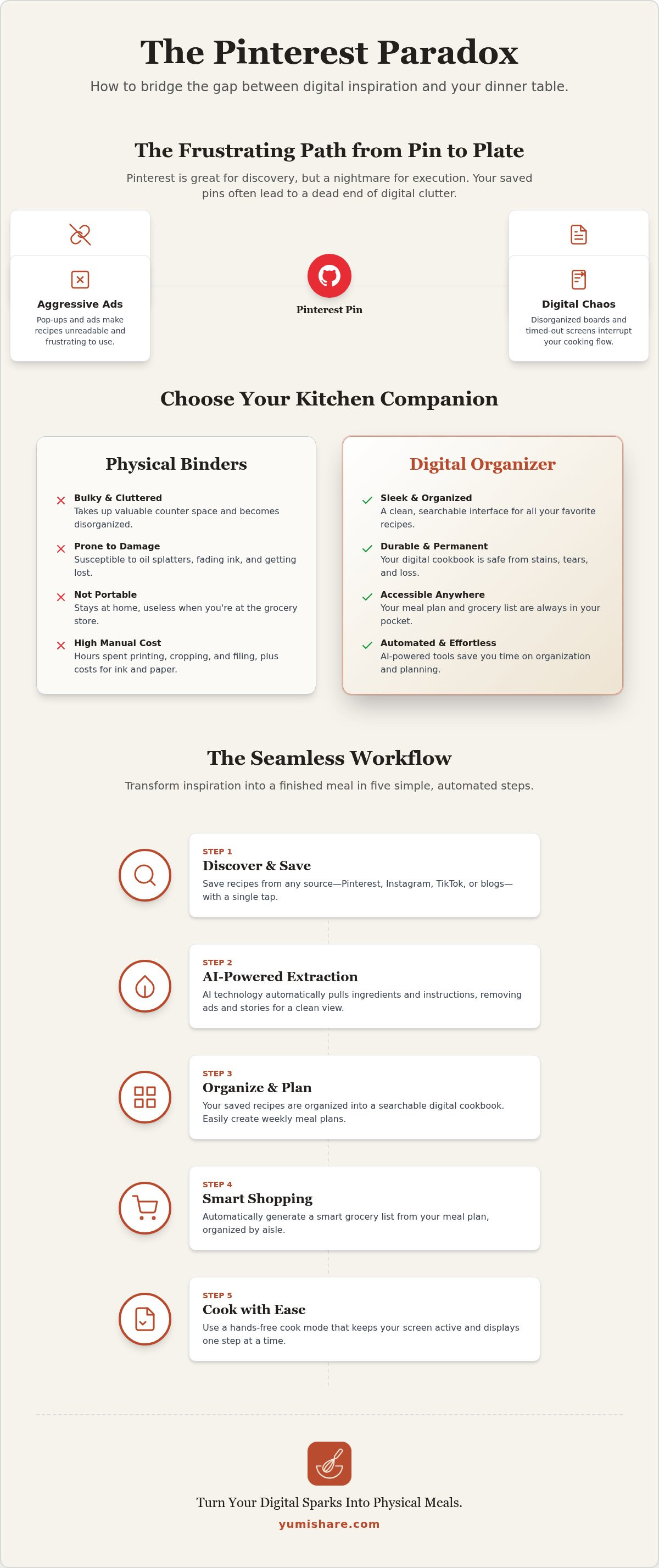
The Workflow: From Pinterest Inspiration to Your Weekly Meal Plan
The journey from a digital spark to a physical meal should be frictionless. It begins while you browse Pinterest for inspiration. When a recipe catches your eye; you simply tap the "share" button and send the link directly to your pinterest recipe organizer. There's no need to copy and paste text or take manual screenshots. The app receives the URL and immediately begins the extraction process; identifying the core components of the dish while you continue scrolling for your next favorite meal.
Once the pin is imported; take a moment to review the results. You can add custom notes; such as "kids loved this" or "reduce salt next time;" and assign tags for easy retrieval later. This step ensures your digital cookbook is personalized to your household's unique tastes. By the time you've finished your morning coffee; you've successfully bridged the gap between a random social media post and a verified entry in your kitchen library. You are no longer just a collector; you are a planner.
Scheduling for Success
Decision fatigue often leads to expensive takeout orders. You can avoid this by dragging your saved recipes into a weekly calendar within seconds. This proactive approach is why a modern meal planning app is an essential tool for the 2026 kitchen. It allows you to pre-decide your meals; reducing the mental load of daily "what's for dinner" questions. Set reminders to defrost proteins or prep vegetables in advance to ensure you stay on track with your health and dietary goals.
Automating Your Grocery Shopping
Transforming your plan into a shopping list is the final step in a streamlined workflow. With one tap; the app consolidates every ingredient from your scheduled recipes into a single; smart list. It intelligently combines items; so if three different recipes require onions; you'll see the total quantity needed in one place. Using a meal planner with grocery list saves money by eliminating unnecessary impulse buys. In the store; items are automatically categorized by aisle. You move through the aisles with purpose; checking off items on your screen as you go. This efficiency brings a sense of calm to a typically chaotic chore.
Stop letting your saved pins go to waste. You can start building your automated kitchen today by using YumiShare to organize your Pinterest recipes.
YumiShare: The Ultimate Pinterest Recipe Organizer for 2026
Choosing the right tools determines whether you actually cook or just keep scrolling. YumiShare stands out as the premier pinterest recipe organizer because it was built for the 2026 digital ecosystem. It doesn't just store links; it understands the social media platforms where you spend your time. Whether you're pulling a viral pasta dish from TikTok or a classic roast from a Pinterest board; the app handles the transition with quiet efficiency. It acts as a filter that removes noise and leaves only what is useful for your kitchen.
Legacy recipe managers often feel like spreadsheets. They're clinical and cold. YumiShare is different. It's a true recipe keeper alternative that balances high-tech automation with domestic tranquility. The interface is clean and intuitive; removing the frantic energy of digital consumption. You can start for free to experience the relief of an organized kitchen; then upgrade to a premium plan for unlimited imports and advanced meal planning power. This flexibility ensures that every home cook can find a path toward simplification.
Why YumiShare Wins
Speed is a core superpower of this pinterest recipe organizer. You can move from a Pin to the app in under three seconds. This efficiency respects your time and mental space. The design acknowledges the messy reality of daily life; offering a supportive guide rather than just a piece of software. You can also share your curated digital cookbook with family and friends. This community aspect turns solitary planning into a shared household experience; making mealtime a collaborative joy rather than a solo chore.
Getting Started Today
Taking control of your kitchen library is simple. Download the app for iOS or Android to begin your transformation. The setup process is designed to be as intuitive as the cooking experience itself. Once installed; follow these three steps to reclaim your kitchen:
- Sync your boards: Connect your primary Pinterest recipe boards to see your pins in a new light.
- Run extraction: Use the AI tool on your top five favorite dishes to see how the fluff disappears.
- Plan your week: Drag those recipes into next week's meal plan to see your grocery list generate automatically.
Stop screenshotting and start organizing. Your future self; standing in a calm and well-ordered kitchen; will thank you for making the switch. Move away from the digital overwhelm and toward the grounded; tactile satisfaction of a well-planned meal. It's time to turn your digital sparks into physical results with a system that actually works for you.
Transform Your Kitchen Inspiration into Action
The transition from a scattered board of pins to a thriving kitchen doesn't have to be a manual chore. By adopting a dedicated pinterest recipe organizer; you remove the friction that keeps you from cooking the meals you love. You've seen how AI technology can strip away digital noise and how a streamlined workflow turns a single tap into a full weekly meal plan. These tools don't just save recipes; they save your evening sanity. They replace the frantic energy of searching for links with the quiet satisfaction of a well-ordered home.
You deserve a cooking experience that feels like a partnership; not a technical struggle. Experience the relief of AI-powered recipe extraction and stay focused at the stove with our hands-free Cook Mode. As a top-rated mobile recipe manager; we help you bridge the gap between digital discovery and the tactile joy of a home-cooked meal. It's time to stop scrolling through broken links and start building a library that actually works for you.
Turn your Pinterest pins into a digital cookbook with YumiShare today. Your next great meal is just one tap away.
Frequently Asked Questions
How do I import my existing Pinterest boards into YumiShare?
You can import your boards by using the share extension on your mobile device or the dedicated pinterest recipe organizer tool within the app. Simply select the board you wish to sync; and YumiShare will begin extracting the data from each individual pin. This process turns your static collection into a searchable; organized database. It's designed to handle large boards quickly; so you can move your entire library in just a few minutes.
Does a digital recipe organizer work for TikTok and Instagram too?
Yes; YumiShare is built to extract content from TikTok and Instagram Reels as well as Pinterest. Our AI technology identifies ingredients and instructions directly from video captions and descriptions. This allows you to maintain one single source of truth for all your social media inspiration. You won't have to jump between different apps to find that one viral recipe you saved last week; as everything lives in your personal digital cookbook.
What happens if the original Pinterest link goes dead?
Your recipes remain safe even if the original link disappears or leads to a 404 error. When you use YumiShare as your pinterest recipe organizer; the AI extracts and stores the text and instructions locally in your account. This ensures that the "dead link" problem common on social media never ruins your dinner plans. Once a recipe is imported; you own that data; regardless of what happens to the source website or blog.
Can I share my organized recipe collection with my family?
Sharing is a core feature designed to bring domestic tranquility to your household. You can easily send individual recipes or entire curated collections to family and friends through the app interface. This makes it simple to coordinate meal prep or share a favorite new dish with a partner. Whether you're sending a grocery list or a step-by-step instruction set; the process is fast and intuitive; ensuring everyone is on the same page for dinner.
Is there a limit to how many recipes I can save from Pinterest?
YumiShare operates on a freemium model that allows you to start saving recipes for free today. While the free tier offers a generous amount of storage for casual cooks; you can upgrade to a premium plan for unlimited imports and advanced features. This "unlimited power" is ideal for those who have hundreds of pins across multiple boards. You can scale your digital cookbook as your collection grows; ensuring you never have to delete a favorite dish.
Does the app automatically create a grocery list from my pins?
The app generates automated smart grocery lists with a single tap. Once you've added recipes to your meal planner; the system consolidates all necessary ingredients into one organized list. It even categorizes items by grocery aisle to make your shopping trip more efficient. This feature reduces impulse buys and ensures you never forget a critical spice again. It's a seamless transition from digital discovery to physical shopping that saves you both time and money.
Can I add my own notes and photos to a saved Pinterest recipe?
Customization is highly encouraged to make these recipes your own. You can add personal notes; such as "reduce oven temp" or "add extra garlic;" to any saved pin. You can also upload your own photos of the finished dish to track your results. These personalized touches transform a generic internet recipe into a family favorite that reflects your unique cooking style. It's about moving from digital inspiration to a successful; real-world result in your own kitchen.
Is YumiShare available on both iPhone and Android?
YumiShare offers full cross-platform sync for both iOS and Android devices. You can browse for inspiration on your iPhone during your commute and then pull up the same recipe on an Android tablet in the kitchen. Your data stays synchronized across all your devices; providing a consistent experience wherever you are. This flexibility is essential for the modern; connected kitchen; ensuring your digital cookbook and meal planner are always within reach when you need them most.
FAQ
How do I import my existing Pinterest boards into YumiShare?
You can import your boards by using the share extension on your mobile device or the dedicated pinterest recipe organizer tool within the app. Simply select the board you wish to sync; and YumiShare will begin extracting the data from each individual pin. This process turns your static collection into a searchable; organized database. It's designed to handle large boards quickly; so you can move your entire library in just a few minutes.
Does a digital recipe organizer work for TikTok and Instagram too?
Yes; YumiShare is built to extract content from TikTok and Instagram Reels as well as Pinterest. Our AI technology identifies ingredients and instructions directly from video captions and descriptions. This allows you to maintain one single source of truth for all your social media inspiration. You won't have to jump between different apps to find that one viral recipe you saved last week; as everything lives in your personal digital cookbook.
What happens if the original Pinterest link goes dead?
Your recipes remain safe even if the original link disappears or leads to a 404 error. When you use YumiShare as your pinterest recipe organizer; the AI extracts and stores the text and instructions locally in your account. This ensures that the "dead link" problem common on social media never ruins your dinner plans. Once a recipe is imported; you own that data; regardless of what happens to the source website or blog.
Can I share my organized recipe collection with my family?
Sharing is a core feature designed to bring domestic tranquility to your household. You can easily send individual recipes or entire curated collections to family and friends through the app interface. This makes it simple to coordinate meal prep or share a favorite new dish with a partner. Whether you're sending a grocery list or a step-by-step instruction set; the process is fast and intuitive; ensuring everyone is on the same page for dinner.
Is there a limit to how many recipes I can save from Pinterest?
YumiShare operates on a freemium model that allows you to start saving recipes for free today. While the free tier offers a generous amount of storage for casual cooks; you can upgrade to a premium plan for unlimited imports and advanced features. This "unlimited power" is ideal for those who have hundreds of pins across multiple boards. You can scale your digital cookbook as your collection grows; ensuring you never have to delete a favorite dish.
Does the app automatically create a grocery list from my pins?
The app generates automated smart grocery lists with a single tap. Once you've added recipes to your meal planner; the system consolidates all necessary ingredients into one organized list. It even categorizes items by grocery aisle to make your shopping trip more efficient. This feature reduces impulse buys and ensures you never forget a critical spice again. It's a seamless transition from digital discovery to physical shopping that saves you both time and money.
Can I add my own notes and photos to a saved Pinterest recipe?
Customization is highly encouraged to make these recipes your own. You can add personal notes; such as "reduce oven temp" or "add extra garlic;" to any saved pin. You can also upload your own photos of the finished dish to track your results. These personalized touches transform a generic internet recipe into a family favorite that reflects your unique cooking style. It's about moving from digital inspiration to a successful; real-world result in your own kitchen.
Is YumiShare available on both iPhone and Android?
YumiShare offers full cross-platform sync for both iOS and Android devices. You can browse for inspiration on your iPhone during your commute and then pull up the same recipe on an Android tablet in the kitchen. Your data stays synchronized across all your devices; providing a consistent experience wherever you are. This flexibility is essential for the modern; connected kitchen; ensuring your digital cookbook and meal planner are always within reach when you need them most.