
 Polski
  Deutsch
  Español
  Français
  Italiano
  Português
  Nederlands
  Svenska
  Українська
  Русский
 How to Save Recipes from Instagram: Stop Bookmarking and Start Cooking
Tired of losing good food ideas? Learn how to save recipes from Instagram using AI to instantly create a digital cookbook, grocery lists, and start cooking.

You're standing in your kitchen, phone propped against a bag of flour, frantically rewinding a 15-second Reel to catch the exact measurement of cumin. It's a messy, frustrating dance that often ends with flour on your screen and a half-finished meal. We've all been there. Your Instagram "Saved" folder is likely a graveyard of delicious ideas you'll never actually make because the friction of manual typing is just too high. You need a streamlined way to save recipes from instagram that fits your actual lifestyle.
It's time to bridge the gap between digital inspiration and real-world execution. You can stop bookmarking and start cooking by transforming cluttered social posts into a clean, searchable digital cookbook. This guide reveals the fastest way to use AI to extract ingredients automatically, turning viral videos into actionable grocery lists and organized instructions. We'll show you how to move from scrolling to sautéing without the digital overwhelm, leaving you with a well-ordered home life and a better dinner on the table.
Key Takeaways
- Stop losing ideas in your "Saved" folder and learn the fastest way to save recipes from instagram into a searchable digital format.
- Use link copying as a universal handshake to move content from social media into your personal cookbook.
- Let AI handle the heavy lifting by automatically extracting ingredients and step-by-step instructions from unstructured captions.
- Generate smart grocery lists that aggregate items from multiple posts to make your shopping trips efficient.
- Access your recipes anywhere with cross-platform sync and use hands-free Cook Mode to keep your screen clean while you work.
Why Your Instagram "Saved" Folder is Where Recipes Go to Die
Your Instagram account is likely full of culinary potential that will never see a frying pan. We call it the "digital hoard." It starts with a quick tap on the bookmark icon. Soon, you have hundreds of videos buried under memes and travel photos. This accumulation creates a subtle psychological burden. You know the inspiration is there, but finding it feels like a chore. When you try to save recipes from instagram using native tools, you aren't building a cookbook; you're creating a disorganized mess.
Cooking should be tactile and grounding. Instead, it becomes a frantic "Pause Game." You scrub through a 15-second Reel with sticky fingers. You miss the seasoning step. You rewind. The video loops, the music grates, and the screen dims just as you need to read the next step. Screenshots aren't much better. They lack searchability and don't scale. You can't search a gallery of images for "chicken" and expect organized results. You need a bridge between the digital spark and the physical result.
The Limitations of Native Instagram Bookmarks
Instagram's bookmarking system was built for discovery, not utility. Even if you create a "Food" folder, it quickly becomes a bottomless pit. You can't filter by ingredient or prep time. Worse, your favorite dinner idea is at the mercy of the creator. If they delete the post or hide their profile, your dinner plans vanish instantly. It's time to evolve. You should stop taking recipe screenshots and move toward a system that actually works in a kitchen environment.
Digital Overwhelm vs. Kitchen Calm
Clutter in your app leads directly to friction at the stove. A clean digital workspace is the first step toward a peaceful meal. Throughout the history of cookbooks, the goal has always been clarity and accessibility. In 2026, that means using a Digital Kitchen Assistant. This isn't just a storage app. It's a filter that removes the noise of social media and leaves you with the essentials. It moves you away from the frantic energy of digital consumption toward the grounded satisfaction of a well-ordered home life.
By learning to save recipes from instagram into a structured format, you transform passive scrolling into active cooking. You replace the frantic energy of the feed with the quiet satisfaction of a well-ordered home. This shift reduces the mental load of meal planning and makes trying new dishes a seamless part of your daily routine rather than a stressful project.
How to Save Recipes from Instagram Reels and Posts
Stop scrolling and start doing. Moving a recipe from your social feed to your kitchen counter requires a clear, repeatable process. This transition is essential to combat the psychology of digital hoarding, where we collect content but never consume it. By following a few simple steps, you can ensure your favorite culinary discoveries actually end up on your dinner table.
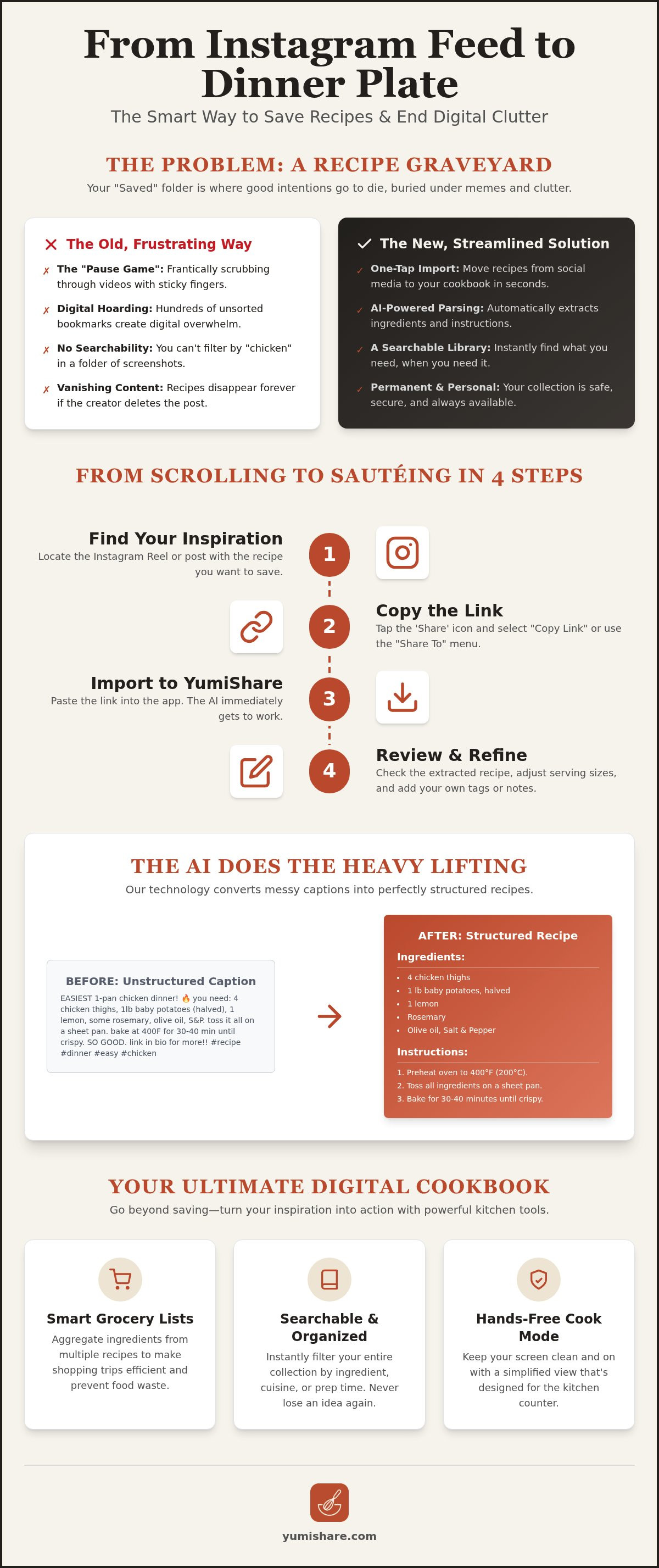
- Step 1: Find your inspiration. Locate the Reel or post that caught your eye. Don't just "Like" it; prepare to move it.
- Step 2: Copy the link. Tap the share icon and select "Copy Link." This is the universal handshake that lets different apps communicate.
- Step 3: Import to YumiShare. Open the app and paste the link. Our AI begins the heavy lifting immediately, scanning for ingredients and methods.
- Step 4: Review and refine. The AI is incredibly fast, but your personal touch matters. Check the serving sizes or swap an ingredient to match what's in your pantry.
This method simplifies the way you save recipes from instagram by removing the need for manual typing. It turns a fleeting digital moment into a permanent, useful resource in your kitchen.
Saving from Reels vs. Static Photo Posts
Video content presents unique challenges. Reels often bury instructions in long, emoji-filled captions or flash them briefly on the screen. YumiShare's AI handles both, extracting text from captions even when creators use the frustrating "Link in Bio" tactic. Instead of hunting for a third-party website, just import the direct source. For even more speed on mobile, use the "Share to" menu. Select YumiShare directly from your Instagram share sheet to skip the copy-paste step entirely. This streamlined workflow is why many consider it the best app for saved recipes available today.
Organizing Your New Imports Immediately
Clarity comes from organization. Once you save recipes from instagram, tag them immediately. Categorize by cuisine, prep time, or specific dietary needs like "Gluten-Free" or "High Protein." Add personal notes to the digital file. If a dish needs more salt or if your kids loved a specific sauce, record it while the memory is fresh. This turns a generic recipe into a personalized heirloom. To see how this organization transforms your daily routine, you can explore the YumiShare interface and start building your library today. A well-tagged library ensures that when 6:00 PM rolls around, you spend your time cooking rather than searching.
The AI Magic: Converting Video Captions into Structured Text
Social media captions are often a chaotic mix of hashtags, emojis, and personal anecdotes. AI recipe extraction changes this by identifying these fragments and turning them into structured data. It looks at a sentence like "Grab 2 big spoons of honey" and records exactly "2 tablespoons; honey." This transformation is what allows you to save recipes from instagram without the mental fatigue of sorting through digital noise. It turns a messy paragraph into a professional, readable format.
In 2026, AI doesn't just read text; it interprets context. It recognizes the difference between an ingredient and a serving suggestion. By converting unstructured captions into a clean list, the software enables advanced features like automatic calorie counting and instant unit conversion. You can switch from imperial to metric measurements with a single tap. This level of organization brings a sense of calm to your meal preparation, moving you away from the frantic energy of a scrolling feed and toward the grounded satisfaction of a well-ordered kitchen.
No More Manual Typing
The old way of saving recipes involved a tedious cycle of manual copy-pasting. You would switch between apps, accidentally lose your place, and struggle to format the text on your small screen. The YumiShare way is instant. The AI scans the content, identifies the method, and populates your digital cookbook in seconds. It even handles vague instructions or missing measurements by flagging them for your review. AI extraction is the bridge between video entertainment and kitchen utility.
Cross-Platform Versatility
Your kitchen shouldn't be limited by which app you were browsing when you found a great meal. The same logic that helps you save recipes from instagram applies to other video-first platforms. You can use these features as a TikTok recipe saver to capture viral trends before they disappear. Whether the inspiration comes from YouTube Shorts or Facebook, the extraction process remains consistent. This platform-agnostic approach ensures your digital cookbook is a central, reliable source of truth for your home. You own the data, regardless of where the creator originally posted it. You build a library that exists outside the volatile algorithms of social media.
From Instagram Inspiration to a Smart Grocery List
Discovery is only half the battle. The real challenge begins when you step into the grocery store. Most people who save recipes from instagram end up wandering the aisles, scrolling through their "Saved" folder to find an ingredient list buried in a caption. It is a slow, inefficient process. A smart digital assistant removes this friction by turning your social media inspiration into a structured, actionable shopping plan.
Efficiency starts with aggregation. When you select multiple saved recipes for the week, the app automatically combines them into a single list. It identifies that three different Reels call for garlic and calculates the total amount you need. It eliminates duplicate items instantly. The list then sorts itself by aisle. You move through produce, dairy, and pantry sections in one fluid path. This organization turns a chaotic hour at the store into a focused 15-minute run.
Building Your Weekly Meal Plan
Strategic planning reduces decision fatigue. You can drag your Instagram saves directly into a meal planner with grocery list to visualize your week. Balance your schedule by mixing quick 15-minute Reels for busy weeknights with more complex bakes for the weekend. This bird’s-eye view ensures you aren't overwhelmed by difficult techniques on a Tuesday evening. It creates a sustainable rhythm for your kitchen life.
Smart Ingredient Scaling
Social media creators often cook for an undefined number of people. You might find a perfect pasta dish that serves six, but you only need dinner for two. The AI extraction tool allows for real-time scaling. Adjust the serving size, and the grocery list updates your quantities immediately. This precision reduces food waste and saves money. You buy exactly what the recipe requires, nothing more. Once you return home, use Cook Mode to follow the instructions hands-free. It keeps your screen active and synced with the original video, so you never have to touch your phone with messy hands. To experience this seamless transition from feed to fridge, start building your smart grocery list today. It is the most effective way to turn digital sparks into physical results.
YumiShare: Your Ultimate Digital Cookbook for 2026
Modern home life is busy. You need tools that respect your time and mental space. YumiShare acts as a central hub for your entire culinary life. It synchronizes your collection across your phone, tablet, and web browser instantly. This cloud synchronization ensures that when you save recipes from instagram during your commute, they are waiting for you on your kitchen tablet. It removes the stress of digital fragmentation. You can also build collaborative cookbooks. Share your favorite social media finds with family or roommates to streamline household meal planning. This communal approach and ease of use make YumiShare the leading recipe keeper alternative in 2026.
Efficiency is the core of the experience. The app doesn't just store data; it organizes your life. By moving away from the frantic energy of social media, you create a dedicated space for kitchen tranquility. You no longer need to hunt through multiple apps to find that one viral pasta dish. Everything is in one place, formatted for action rather than just observation. It is a tool designed for the savvy, organized cook who values execution over endless scrolling.
Hands-Free Cooking with Cook Mode
Traditional digital recipes often fail the moment you start cooking. Your screen dims. Your hands are covered in flour. You lose your place in a long caption. YumiShare solves this with a dedicated Cook Mode. It keeps the original source video accessible right alongside the structured text. You can toggle between the AI-extracted instructions and the creator's Reel for quick visual cues. The "stay awake" feature prevents the screen from locking, while voice commands allow for hands-free navigation. Learn more about cook mode for mobile recipes to see how it protects your device and your sanity.
Start Your Digital Transformation Today
Transitioning from a messy "Saved" folder to a curated library is effortless. Download the app, link your account, and begin the extraction process. You can save recipes from instagram in seconds, transforming years of digital clutter into a functional kitchen asset. This shift is about more than just organization; it is about reclaiming your time. It moves you from the frantic energy of digital consumption to the tactile satisfaction of a well-ordered home. Start small. Import three of your favorite recent finds. See how much easier your evening becomes when the friction of manual typing disappears. Organize your kitchen with YumiShare and turn every digital spark into a successful meal.
Master Your Digital Kitchen
You've officially moved past the "Saved" folder graveyard. By choosing to save recipes from instagram into a structured digital cookbook, you've reclaimed both your time and your mental space. You now have the tools to bridge the gap between a fleeting Reel and a successful Tuesday night dinner. This simple shift turns digital noise into culinary order. It allows you to focus on the joy of the meal rather than the frustration of the search.
It's time to bring this modern efficiency to every corner of your kitchen. Our AI-powered extraction works seamlessly across Instagram, TikTok, and Pinterest. This ensures your inspiration is never more than a tap away. Streamline your week with automatic smart grocery lists that sort by aisle and eliminate duplicates. When the prep begins, rely on hands-free Cook Mode to keep your instructions visible without messy screen taps. It's the ultimate bridge from social discovery to real-world execution.
Transform your Instagram feed into a cookbook with YumiShare. Start building your curated collection today and enjoy the grounded satisfaction of a well-ordered home. You've got this.
Frequently Asked Questions
Is it legal to save recipes from Instagram creators?
Yes, saving recipe content for personal use is legally defensible in the United States. You aren't republishing the creator's work for profit; you are simply organizing your personal inspiration into a functional format. While Instagram uses technical measures to prevent large-scale data scraping, capturing individual recipes for your own kitchen is a standard and acceptable practice.
Can YumiShare extract recipes from Instagram Reels with music?
Yes, YumiShare extracts data regardless of the audio track. The AI focuses on the written captions and on-screen text to identify ingredients and methods. Background music or trending audio doesn't interfere with the scanning process. This allows you to quickly save recipes from instagram even when the original video features loud or distracting soundtracks.
Does the app save the original video along with the text?
Yes, the app keeps a link to the original video synced with your structured text. When you enter Cook Mode, you can view the Reel alongside the extracted instructions. This gives you the best of both worlds: a clean, text-based ingredient list and the creator's original visual cues for technique and plating.
How do I organize my saved Instagram recipes into categories?
Use the internal tagging system to sort your library by cuisine, prep time, or dietary needs. You can create custom categories like "Weeknight Dinners" or "Holiday Baking" to keep things tidy. This organization turns a massive list of saves into a searchable digital cookbook. It removes the friction of scrolling through a disorganized folder when you're hungry.
Can I share my saved Instagram recipes with my partner?
Yes, you can share individual recipes or entire folders with family and friends. Collaborative cookbooks allow your partner to see the same grocery lists and instructions on their own device. This feature simplifies household meal planning. It ensures everyone is on the same page regarding dinner plans and shopping needs for the week.
Does YumiShare work on both iPhone and Android?
Yes, YumiShare is available on both iOS and Android platforms to ensure total accessibility. Your data synchronizes across all your devices, including tablets and web browsers. This cross-platform availability ensures you can save recipes from instagram on your phone and access them later on a larger screen while you are actually cooking.
What happens if an Instagram creator deletes their post?
Your extracted text and ingredient lists remain safe in your library even if the original post is deleted. The app captures and stores the recipe data at the moment of import. While the video link may no longer work if the creator removes it, your organized instructions and grocery lists are preserved forever for your personal use.
Is there a limit to how many Instagram recipes I can save?
The free tier includes a base for your digital cookbook and meal planning features. To unlock unlimited AI imports and advanced scanning features, you can upgrade to a premium subscription. This model allows you to test the system before committing to a larger collection. It scales with your cooking ambitions as your library grows over time.
FAQ
Is it legal to save recipes from Instagram creators?
Yes, saving recipe content for personal use is legally defensible in the United States. You aren't republishing the creator's work for profit; you are simply organizing your personal inspiration into a functional format. While Instagram uses technical measures to prevent large-scale data scraping, capturing individual recipes for your own kitchen is a standard and acceptable practice.
Can YumiShare extract recipes from Instagram Reels with music?
Yes, YumiShare extracts data regardless of the audio track. The AI focuses on the written captions and on-screen text to identify ingredients and methods. Background music or trending audio doesn't interfere with the scanning process. This allows you to quickly save recipes from instagram even when the original video features loud or distracting soundtracks.
Does the app save the original video along with the text?
Yes, the app keeps a link to the original video synced with your structured text. When you enter Cook Mode, you can view the Reel alongside the extracted instructions. This gives you the best of both worlds: a clean, text-based ingredient list and the creator's original visual cues for technique and plating.
How do I organize my saved Instagram recipes into categories?
Use the internal tagging system to sort your library by cuisine, prep time, or dietary needs. You can create custom categories like "Weeknight Dinners" or "Holiday Baking" to keep things tidy. This organization turns a massive list of saves into a searchable digital cookbook. It removes the friction of scrolling through a disorganized folder when you're hungry.
Can I share my saved Instagram recipes with my partner?
Yes, you can share individual recipes or entire folders with family and friends. Collaborative cookbooks allow your partner to see the same grocery lists and instructions on their own device. This feature simplifies household meal planning. It ensures everyone is on the same page regarding dinner plans and shopping needs for the week.
Does YumiShare work on both iPhone and Android?
Yes, YumiShare is available on both iOS and Android platforms to ensure total accessibility. Your data synchronizes across all your devices, including tablets and web browsers. This cross-platform availability ensures you can save recipes from instagram on your phone and access them later on a larger screen while you are actually cooking.
What happens if an Instagram creator deletes their post?
Your extracted text and ingredient lists remain safe in your library even if the original post is deleted. The app captures and stores the recipe data at the moment of import. While the video link may no longer work if the creator removes it, your organized instructions and grocery lists are preserved forever for your personal use.
Is there a limit to how many Instagram recipes I can save?
The free tier includes a base for your digital cookbook and meal planning features. To unlock unlimited AI imports and advanced scanning features, you can upgrade to a premium subscription. This model allows you to test the system before committing to a larger collection. It scales with your cooking ambitions as your library grows over time.