
 Polski
  Deutsch
  Español
  Français
  Italiano
  Português
  Nederlands
  Svenska
  Українська
  Русский
 Stop Taking Recipe Screenshots: The Smarter Way to Save Food in 2026
Tired of lost recipes in your camera roll? It's time to stop taking recipe screenshots. Learn how to create a searchable digital cookbook with smart grocery ...

You're standing in the grocery aisle, scrolling frantically through thousands of photos to find that one viral pasta dish you saved last Tuesday. It's buried under dog pictures, work memos, and random memes. It's time to stop taking recipe screenshots and finally reclaim your kitchen. Your camera roll has become a culinary graveyard where great meals go to be forgotten. This digital clutter doesn't just waste time; it leads to forgotten ingredients and the constant frustration of pausing messy videos with flour-covered fingers.
We know how exhausting it feels to manage digital inspiration in a world that moves this fast. You deserve a cooking process that feels like a relief, not a chore. This article shows you how to transform chaotic screenshots into a searchable digital cookbook that works for you. You'll learn how to generate automatic grocery lists and master hands-free cooking without typing a single word. We're moving away from the frantic energy of the scroll and toward the grounded satisfaction of a well-ordered home life.
Key Takeaways
- Identify why screenshots act as a "culinary graveyard" by creating digital clutter and mental friction that prevents you from actually cooking.
- Learn why you must stop taking recipe screenshots to regain searchability and transform static images into actionable cooking data.
- Discover how AI extraction technology reads social media videos to instantly pull ingredients and instructions without any manual typing.
- Streamline your entire kitchen workflow by syncing your digital cookbook with smart grocery lists and hands-free cook modes.
- Follow a simple two-step audit to move your saved recipes from chaotic phone folders into one centralized, organized hub.
The Recipe Screenshot Trap: Why Your Camera Roll is a Culinary Graveyard
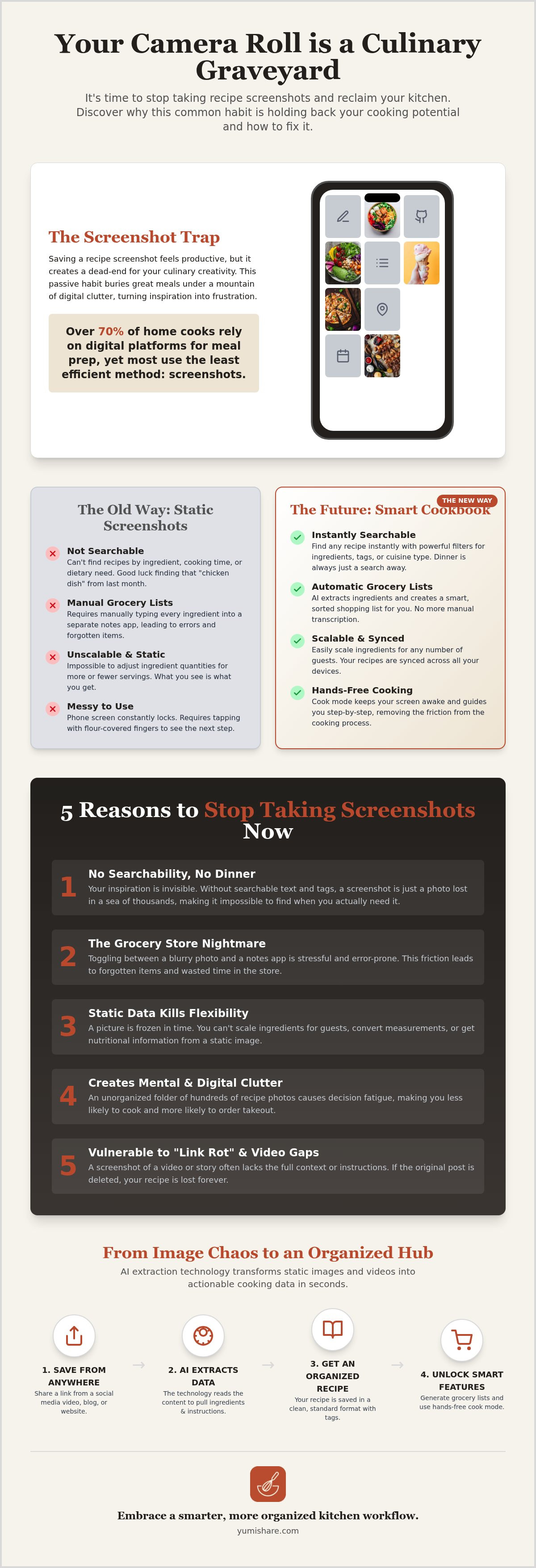
Every home cook has been there. You're scrolling through your feed, see a vibrant pasta dish, and instantly snap a photo. It feels like a win. You've captured the inspiration, and it's safely tucked away for later. This is the "Screenshot Trap." It's a digital habit that mimics productivity but actually creates a dead-end for your culinary creativity. In reality, your camera roll has become a culinary graveyard where great meals are buried under a mountain of memes, work notes, and blurry sunset photos.
Research shows that over 70% of home cooks now rely on digital platforms for daily meal preparation. However, the screenshot is the most passive way to save information. It requires zero organization and offers even less utility. To truly master your kitchen in 2026, you need to stop taking recipe screenshots and move toward active saving. Passive saving is just a bookmark to nowhere; active saving creates a path to a finished meal.
The "I’ll Cook This Later" Illusion
Saving a recipe provides an instant dopamine hit. It feels like you've already started the cooking process. This psychological trick is why your phone is full of food you'll never eat. This visual clutter leads to massive decision fatigue. When you finally stand in your kitchen at 6:00 PM, the thought of digging through five hundred photos to find that one specific sauce recipe feels exhausting. The psychological cost of an unorganized digital kitchen is high; it turns a moment of inspiration into a stressful search mission.
The Technical Failure of Static Images
Beyond the mental clutter, screenshots are technically useless in a modern kitchen. Static images are not searchable. You can't filter your photos for "chicken" or "30-minute meals." They are frozen in time, meaning you can't scale the ingredients if you're hosting six people instead of two. Perhaps the most frustrating part is the physical experience of cooking from a photo. Your phone screen constantly turns off because it doesn't recognize the image as an "active" app. You're forced to tap the screen with flour-covered fingers just to read the next step. It's a messy, inefficient way to work that kills the joy of cooking.
- No Searchability: You can't find recipes by ingredient or dietary need.
- Manual Labor: You have to manually type ingredients into a separate grocery list.
- Static Data: Images don't update, scale, or sync across your devices.
Moving away from this outdated habit is the first step toward a more mindful, organized home life. It’s about clearing the digital noise and focusing on the tactile satisfaction of a well-prepared meal.
5 Reasons You Need to Stop Taking Recipe Screenshots in 2026
The digital landscape of 2026 moves too fast for static imagery. While snapping a quick photo of a recipe felt like the standard a few years ago, it's now a major bottleneck in your kitchen productivity. You need to stop taking recipe screenshots because they act as a one-way street. They capture a moment of inspiration but offer no path toward a finished meal. As nearly 49% of home cooks now engage with AI-powered kitchen features, sticking to manual screenshots puts you behind the curve of modern efficiency.
No Searchability, No Dinner
Searching for "chicken" in a standard photo library is a recipe for frustration. You'll likely scroll past hundreds of unrelated photos before finding that specific tray bake you saved last month. This lack of searchability is the primary reason to ditch the screenshot habit. Without metadata, your recipes are invisible to your phone’s search bar. Transitioning to the best app for saved recipes solves this crisis by adding tags, categories, and searchable text to every dish you save. It turns a messy pile of images into a functional, indexed database.
The Grocery Store Nightmare
Standing in a crowded grocery aisle while toggling between a blurry screenshot and a notes app is a recipe for stress. This friction often leads to forgotten ingredients or double-buying items you already have. Manual transcription is slow and prone to error. Screenshots are also the natural enemy of budget meal planning. They don't allow you to aggregate ingredients across multiple recipes, making it impossible to see exactly what you need for the week at a glance.
Link Rot and the Video Gap
Screenshots are vulnerable to "link rot." If a creator deletes their original Instagram post or TikTok video, your screenshot becomes a fragment of a lost idea. You lose the ability to go back and watch the original creator's technique. This "video gap" is particularly painful for complex dishes. A static image can't show you the exact consistency of a sauce or the specific folding technique for sourdough. By saving the data rather than the image, you maintain a live link to the source of your inspiration.
Beyond these functional failures, high-resolution recipe images hog valuable cloud storage. A single minute of scrolling can result in ten screenshots that take up megabytes of space without providing any actionable value. It's time to clear the clutter. Using a dedicated tool like YumiShare allows you to store the essential data without the storage bloat, keeping your phone lean and your kitchen organized.
AI Extraction vs. Static Images: The Tech Changing How We Cook
The shift from static images to AI-driven extraction represents the biggest leap in home cooking since the digital recipe itself. To truly stop taking recipe screenshots, you must understand the technology that makes them obsolete. While a screenshot is just a collection of pixels, AI-powered tools see a recipe as a living set of data. In 2026, nearly 49% of home cooks are already using these AI features to bridge the gap between social inspiration and their dinner table. It’s the difference between looking at a map and having a GPS guide you to your destination.
How AI Reads Cooking Videos
Modern AI doesn't just look at a video; it understands it. When you are extracting ingredients from a TikTok video, the system scans for text overlays, listens to audio cues, and analyzes the visual components of the dish. It catches those "blink-and-you-miss-it" ingredient lists that creators often flash on screen for a split second. This process turns a frantic 60-second Reel into a structured, readable text document in seconds. It eliminates the need to pause, rewind, and squint at your screen while trying to jot down measurements with messy hands.
The accuracy of these extractors has reached a tipping point. High-speed AI now processes complex social media content with incredible precision, identifying subtle differences between "teaspoons" and "tablespoons" even in chaotic video formats. This one-click import replaces the tedious manual labor of typing out instructions. It saves time and removes the human error that often leads to ruined meals. You get the exact details you need without the digital friction.
The Power of a Unified Recipe Format
One of the greatest frustrations of the "screenshot era" is the lack of consistency. One recipe might be a photo of a blog post, while another is a screen grab of a caption. This chaos ends when you stop taking recipe screenshots and start using structured data. AI brings every recipe into a unified format. Whether your inspiration comes from YouTube, Instagram, or a traditional website, the ingredients and steps always appear in the same clean, readable layout. This visual harmony brings a sense of calm to your cooking process.
This structure allows for powerful features like automatic unit conversion. If a creator uses grams but you prefer cups, the system handles the math instantly. More importantly, this clean data is the foundation for meal planning automation. Because the app understands exactly what "2 cloves of garlic" means, it can aggregate that data with other recipes to build your shopping list automatically. It transforms your digital kitchen from a messy pile of images into a streamlined, high-performance system that actually helps you get dinner on the table.
How to Transition from Image Chaos to a Digital Cookbook
Moving from a cluttered camera roll to a functional digital system is a transformative act of digital mindfulness. It’s time to stop taking recipe screenshots and start building a library that actually serves your lifestyle. This isn't just about deleting photos; it's about creating a streamlined workflow from discovery to dinner. You are moving from a passive "culinary graveyard" to an active, high-performance kitchen hub.
Auditing Your Digital Clutter
Open your camera roll and be ruthless. Identify "keeper" recipes that actually align with your current tastes and dietary goals. Delete the junk. If you haven’t cooked a recipe within three months of saving it, let it go. This "Three-Month Rule" prevents your new system from becoming as bloated as your old one. For Instagram or TikTok, look through your saved folders and find the original posts. These links are the keys to your new organized life. Batch-processing your backlog might take an hour, but it saves days of frustration in the long run.
Setting Up Your Smart Kitchen Hub
Choose a central hub that offers seamless cross-device synchronization. You find inspiration on your phone during a commute, but you need that recipe on a tablet or laptop when you’re actually in the kitchen. Cross-device sync ensures your grocery list is always in your pocket and your instructions are always on the counter. Organize your new digital cookbook by meal type, dietary restriction, or "to-cook" status. Invite family members to join a shared recipe box. This turns meal planning from a solo burden into a collaborative household activity. It brings a sense of domestic tranquility to the daily question of what to cook for dinner.
Once your hub is ready, begin the import process. Use the share button on social media to send links directly to your digital cookbook. Watch as AI extracts the ingredients and steps instantly. As each recipe is successfully imported, delete the corresponding screenshot from your phone. It’s a satisfying ritual that reclaims storage space and mental clarity. This "Z-to-A" workflow ensures that every digital spark leads directly to a physical result. It is the most efficient way to stop taking recipe screenshots and start actually cooking. Finally, test your new system by launching a hands-free Cook Mode for your next meal. Experience the relief of a screen that stays on and instructions that follow your pace. To begin reclaiming your kitchen space, start building your smart digital cookbook.
Beyond the Screenshot: Why YumiShare is Your 2026 Kitchen Essential
Revolutionize your kitchen workflow by moving beyond the limitations of your camera roll. YumiShare acts as the savvy companion that bridges the gap between digital inspiration and real-world execution. It is the definitive reason to stop taking recipe screenshots for good. By utilizing high-speed AI extraction, the app transforms chaotic social media content into a structured, searchable digital cookbook. This isn't just about saving text; it's about reclaiming your mental space and focusing on the joy of cooking. It filters out the digital noise, leaving only the useful data you need to get dinner on the table.
From Social Feed to Grocery Aisle in Seconds
The "Share to YumiShare" feature is the heart of this transformation. When you discover a viral dish on Instagram, TikTok, or YouTube, you simply share the link directly to the app. In seconds, the AI parses the video or post to generate a full, structured recipe. This data feeds directly into a smart grocery list that automatically categorizes your items by aisle. You'll never wander aimlessly through the store again looking for specific spices or produce. This methodical flow moves you from a moment of discovery to a shopping checklist with zero manual typing.
Efficiency doesn't stop at the store. YumiShare provides a deep nutrition analysis for every saved meal, giving you total clarity over your health goals without the guesswork. Integrated pantry tracking ensures you only buy what you actually need. By syncing your digital cookbook with your current inventory, the app helps you eliminate the waste of double-buying. It’s a level of digital mindfulness that turns a frantic shopping trip into a calm, purposeful experience. You save money, reduce waste, and keep your kitchen lean and organized.
The Hands-Free Cooking Experience
The real magic happens when you finally start the stove. Traditional screenshots are a physical burden in the kitchen. They force you to touch your phone constantly with messy hands just to keep the screen from dimming. YumiShare's cook mode for mobile recipes changes the game entirely. It offers a hands-free experience that keeps your screen active and follows your specific pace. You stay focused on the tactile satisfaction of the meal rather than the frustration of your device.
Voice commands and video-syncing allow you to rewatch specific techniques while your hands stay busy with the prep. This seamless transition between technical features and lifestyle benefits ensures that you remain the master of your kitchen. It is time to stop taking recipe screenshots and embrace a system that values your time. Clear the clutter and return to the grounded satisfaction of a well-ordered home life. Ditch the screenshots and start your digital cookbook with YumiShare today!
Reclaiming Your Kitchen Clarity
Your camera roll shouldn't be the place where great meals go to be forgotten. Moving from static images to a structured digital system is the ultimate act of digital mindfulness. When you stop taking recipe screenshots, you trade clutter for clarity. You replace the frustration of searching through thousands of photos with the ease of a searchable, indexed database. This shift transforms your kitchen from a space of digital overwhelm into a sanctuary of organized creativity.
Embrace the efficiency of AI-powered extraction from over five social platforms. Let automation handle your grocery lists and hands-free Cook Mode guide your preparation. It is time to clear the noise and focus on the tactile satisfaction of a well-prepared meal. Reclaim your time and your storage space with a partner that understands the messy reality of daily life. You deserve a cooking process that feels like a relief, not a chore.
Stop taking screenshots and start cooking with YumiShare
Take the first step toward a more tranquil home today. Your next favorite meal is just one click away from being perfectly organized and ready to enjoy.
Frequently Asked Questions
Why should I stop taking recipe screenshots if it feels faster?
Screenshots are a digital dead-end because they lack searchability and utility. While snapping a photo takes a second, you'll spend minutes later scrolling through thousands of unrelated images to find it. You should stop taking recipe screenshots to gain essential features like automatic grocery lists and hands-free cook modes. Transitioning to a structured system turns passive inspiration into an active, organized kitchen workflow that actually helps you get dinner on the table.
How do I move my existing screenshots into a recipe app?
Start by auditing your camera roll to identify your "keeper" recipes. Find the original source links for these dishes on social media and share them directly to your recipe app. As the AI extracts the ingredients and instructions, delete the old photo to reclaim storage space. This simple ritual clears digital clutter and ensures your most-loved meals are moved into a searchable, functional hub that you can access from any device.
Can I save recipes from TikTok and Instagram in the same place?
Yes, YumiShare unifies your culinary inspiration by allowing you to save recipes from TikTok, Instagram, and YouTube in one central hub. The app uses AI to extract data from various social platforms and presents it in a clean, consistent format. This eliminates the need to jump between different apps or folders. Every dish you save looks and functions the same way, regardless of where you originally found the video or post.
Does YumiShare work on both Android and iPhone?
YumiShare is currently available for iOS devices through the App Store. If you're an Android user, a dedicated version of the app is listed as "coming soon" on the official website. The iOS version offers full access to AI-driven extraction, cross-device cloud synchronization, and smart meal planning features. Stay tuned for updates regarding the Android release to bring these organizational tools to even more home cooks looking for a better way to save food.
Is there a way to search for recipes by the ingredients I already have?
Structured data makes it possible to filter your digital cookbook by the specific ingredients you have in your pantry. This is a primary reason to stop taking recipe screenshots, as static images cannot be indexed or searched. Simply type "chicken" or "spinach" to see every relevant dish you've saved. It simplifies meal planning and helps you reduce food waste by using what you already own. You'll save time and money by staying organized.
What happens if a creator deletes the video I saved?
Your saved recipe remains fully accessible even if the original creator deletes their video or post. Once the AI extracts the ingredients and instructions into your digital cookbook, that data is stored independently in the cloud. You won't lose "that one recipe" to link rot or platform changes. This provides a permanent, reliable record of your culinary inspiration that outlasts the fleeting nature of social media content. Your digital cookbook is yours to keep.
Can I share my digital cookbook with my partner or roommates?
You can invite family members, partners, or roommates to join a shared digital recipe box. This feature ensures everyone is on the same page for weekly meal planning and grocery shopping. When you add a new dish, the shared grocery list updates for everyone instantly. It turns the daily chore of food preparation into a collaborative household activity. This brings a sense of domestic tranquility and shared responsibility to your kitchen management.
Is AI recipe extraction accurate for complicated measurements?
Modern AI extractors are incredibly precise at reading text overlays and processing audio cues from video content. They easily distinguish between complex measurements like teaspoons, tablespoons, and grams. This high-speed technology minimizes the human error often found in manual typing or messy handwriting. You get a clean, accurate set of instructions that you can scale for different serving sizes, ensuring your meals turn out perfectly every time you step into the kitchen.
FAQ
Why should I stop taking recipe screenshots if it feels faster?
Screenshots are a digital dead-end because they lack searchability and utility. While snapping a photo takes a second, you'll spend minutes later scrolling through thousands of unrelated images to find it. You should stop taking recipe screenshots to gain essential features like automatic grocery lists and hands-free cook modes. Transitioning to a structured system turns passive inspiration into an active, organized kitchen workflow that actually helps you get dinner on the table.
How do I move my existing screenshots into a recipe app?
Start by auditing your camera roll to identify your "keeper" recipes. Find the original source links for these dishes on social media and share them directly to your recipe app. As the AI extracts the ingredients and instructions, delete the old photo to reclaim storage space. This simple ritual clears digital clutter and ensures your most-loved meals are moved into a searchable, functional hub that you can access from any device.
Can I save recipes from TikTok and Instagram in the same place?
Yes, YumiShare unifies your culinary inspiration by allowing you to save recipes from TikTok, Instagram, and YouTube in one central hub. The app uses AI to extract data from various social platforms and presents it in a clean, consistent format. This eliminates the need to jump between different apps or folders. Every dish you save looks and functions the same way, regardless of where you originally found the video or post.
Does YumiShare work on both Android and iPhone?
YumiShare is currently available for iOS devices through the App Store. If you're an Android user, a dedicated version of the app is listed as "coming soon" on the official website. The iOS version offers full access to AI-driven extraction, cross-device cloud synchronization, and smart meal planning features. Stay tuned for updates regarding the Android release to bring these organizational tools to even more home cooks looking for a better way to save food.
Is there a way to search for recipes by the ingredients I already have?
Structured data makes it possible to filter your digital cookbook by the specific ingredients you have in your pantry. This is a primary reason to stop taking recipe screenshots, as static images cannot be indexed or searched. Simply type "chicken" or "spinach" to see every relevant dish you've saved. It simplifies meal planning and helps you reduce food waste by using what you already own. You'll save time and money by staying organized.
What happens if a creator deletes the video I saved?
Your saved recipe remains fully accessible even if the original creator deletes their video or post. Once the AI extracts the ingredients and instructions into your digital cookbook, that data is stored independently in the cloud. You won't lose "that one recipe" to link rot or platform changes. This provides a permanent, reliable record of your culinary inspiration that outlasts the fleeting nature of social media content. Your digital cookbook is yours to keep.
Can I share my digital cookbook with my partner or roommates?
You can invite family members, partners, or roommates to join a shared digital recipe box. This feature ensures everyone is on the same page for weekly meal planning and grocery shopping. When you add a new dish, the shared grocery list updates for everyone instantly. It turns the daily chore of food preparation into a collaborative household activity. This brings a sense of domestic tranquility and shared responsibility to your kitchen management.
Is AI recipe extraction accurate for complicated measurements?
Modern AI extractors are incredibly precise at reading text overlays and processing audio cues from video content. They easily distinguish between complex measurements like teaspoons, tablespoons, and grams. This high-speed technology minimizes the human error often found in manual typing or messy handwriting. You get a clean, accurate set of instructions that you can scale for different serving sizes, ensuring your meals turn out perfectly every time you step into the kitchen.