
 Polski
  Deutsch
  Español
  Français
  Italiano
  Português
  Nederlands
  Svenska
  Українська
  Русский
 TikTok Recipe Saver: How to Turn Viral Videos into a Digital Cookbook in 2026
Tired of losing viral recipes? Use a TikTok recipe saver to turn fast-paced videos into an organized digital cookbook with grocery lists. Start cooking now!

You are standing in your kitchen with flour-dusted fingers, desperately tapping your phone screen to rewind a three-second clip of a viral pasta sauce. It is a familiar, frantic dance. You know the recipe is buried somewhere in your Saved folder; however, finding it and actually cooking from it are two very different things. Using a dedicated tiktok recipe saver changes the game by pulling the signal from the noise. It turns those fast-paced videos into clear, organized instructions you can actually follow without the digital headache.
We all agree that social media is brilliant for inspiration but often fails at the execution stage. You shouldn't have to pause, rewind, and manually type out ingredient lists just to get dinner on the table. This guide shows you how to rescue your favorite food trends and transform them into a shop-able digital cookbook in seconds. We will explore how AI-powered extraction, automated grocery lists, and hands-free cook modes turn digital clutter into a calm, well-ordered kitchen experience.
Key Takeaways
- Rescue viral food trends from the clutter of your 'Saved' folder and turn them into permanent, organized files.
- Use a tiktok recipe saver to instantly extract text-based ingredients and instructions using simple AI-driven sharing.
- Build a customized digital cookbook with tailored collections and personal notes to keep your kitchen organized.
- Generate automated meal plans and smart grocery lists that group identical ingredients for faster shopping.
- Master hands-free cooking with a dedicated interface designed to keep your phone clean while you work.
The 'Saved' Folder Graveyard: Why You Need a TikTok Recipe Saver
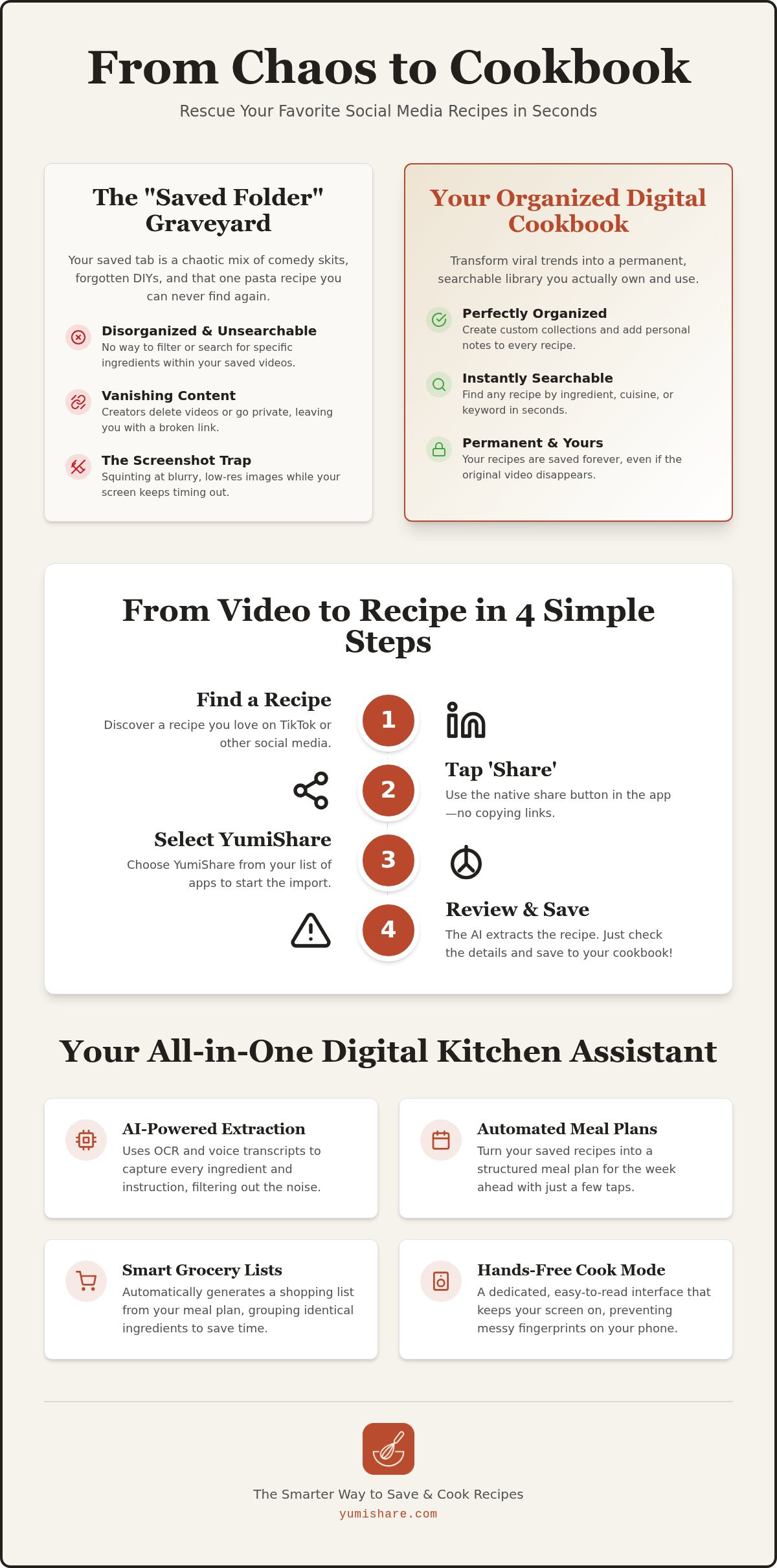
Your "Saved" folder is likely a digital attic. It's filled with quick-cut pasta videos and viral dessert hacks you promised yourself you'd make "someday." By the time that day arrives, the video is buried under a hundred other clips. Given TikTok's influence on food trends, we are consuming inspiration at a record pace. Yet, without a dedicated tiktok recipe saver, that inspiration rarely makes it to the dinner table. Social media platforms are built for scrolling; they aren't built for cooking.
The "Screenshot Trap" is equally frustrating. You snap a photo of a recipe card shown for half a second at the end of a video. Later, you're at the stove, squinting at a blurry image while trying to keep your screen from timing out. It's a recipe for disaster. In 2026, we need more than just a list of bookmarks. We need a "Digital Recipe Execution Engine" that turns pixels into plates. This requires a tool that doesn't just store a link, but understands the data within the video.
The Problem with Social Media Bookmarks
Social media bookmarks are fundamentally broken for active home cooks. Your saved tab is a chaotic mix of fitness tips, comedy skits, and five-minute meals. There is no way to search for "chicken" or "gluten-free" within your own saves. Worse, videos often vanish. Creators delete their accounts or set videos to private, leaving you with a broken link and a lost dinner plan. Relying on a platform's native bookmarking feature means you don't actually own your culinary library. You're just renting space on a server that doesn't care about your meal prep.
The Manual Labor of Modern Cooking
Cooking from a video shouldn't feel like a chore. The "Pause-Write-Play" cycle is a joy-killer. You watch three seconds, pause, scribble down an ingredient, and repeat. This manual data entry is slow and prone to error. You miss a teaspoon of salt or misread a measurement, leading to a disappointing meal or a last-minute trip to the store. Digital overwhelm is real. When the friction of finding and preparing a recipe is too high, most people simply default to takeout. A tiktok recipe saver removes this friction, allowing you to focus on the tactile satisfaction of the kitchen instead of the frustration of the interface.
How to Turn a TikTok Video into a Text Recipe in Seconds
Turning a chaotic video into a clean recipe used to be a chore. Now, it's a four-step process that takes less time than it does to watch the intro of a viral clip. Start by opening your TikTok app and finding the recipe that caught your eye. Instead of hitting the bookmark icon, tap the "Share" button. Select YumiShare from your apps list. The tiktok recipe saver immediately begins its work in the background. You don't even need to leave the app to initiate the transfer.
Once the link is sent, the AI analyzes the video content. It scans for ingredients, identifies specific measurements, and outlines the cooking steps. Within seconds, you'll see a structured draft. Review the details for any personal preferences, then save it directly to your digital cookbook. It is a seamless transition from digital inspiration to a functional kitchen tool. This efficiency is essential as major media companies focus on adapting to online trends to keep up with modern home cooks.
Using the Share Sheet Integration
The share sheet is your shortcut to an organized kitchen. It works natively with both iOS and Android, allowing for a frictionless experience. You don't have to copy links or switch between windows. YumiShare handles TikTok links instantly via the share button, ensuring you never lose a recipe to a closed tab or a forgotten URL. This integration turns your phone into a powerful tiktok recipe saver that works where you already spend your time. If you haven't tried it yet, you can get started with the Recipe Saver App to see how it simplifies your workflow.
The AI Behind the Magic
The real power lies in how the data is processed. Most basic savers only pull text from the video caption, which is often incomplete or missing entirely. YumiShare goes deeper. It uses advanced transcripts to listen to the creator's voice and extract spoken instructions. If a creator displays a list of ingredients on the screen for just a moment, Optical Character Recognition (OCR) captures it. The AI then filters out the noise. It removes the "storytime" elements and the sponsor mentions. What remains is a clean, structured recipe. It formats chaotic descriptions into logical, numbered steps. This transformation turns a fast-paced entertainment clip into a reliable guide for your next meal.
Beyond Saving: Organizing Your Digital Cookbook for 2026
Saving a recipe is a digital spark. Organizing it is where the real transformation happens. A high-quality tiktok recipe saver shouldn't just dump links into a pile. It needs to act as a filter that removes noise and leaves only what's useful for your home life. In 2026, cloud synchronization is a baseline requirement for any organized cook. You should be able to discover a recipe on your phone during a commute and find it waiting on your kitchen tablet when you get home. Smart search features allow you to find that one specific salmon dish simply by searching "miso," even if the word isn't in the title.
Personalization is the bridge between a viral video and a physical plate. Your digital cookbook should reflect your actual taste and the reality of your kitchen. Add personal notes like "use less salt" or "substitute honey for sugar" to ensure every meal is a success. You can even replace the generic video thumbnail with a photo of your own final result. This turns a social media trend into a family staple. If you're cooking for a crowd, look for tools that adjust serving sizes automatically. Rating your attempts ensures that only the most successful dishes stay in your rotation. This selective process is the core of digital mindfulness. Use your tiktok recipe saver to curate a library that actually works for your life.
Categorization Strategies for the Modern Cook
Stop sorting by "Dinner" or "Lunch." That's too broad for the modern kitchen. Instead, build collections around your lifestyle and mood. Try folders like "Viral Trends," "15-Minute Meals," or "Air Fryer Hacks." This methodical approach moves you away from the frantic energy of consumption toward the grounded satisfaction of a well-ordered home. You can even use tags to filter for specific dietary needs like "High Protein" or "Vegan." For a deeper look at advanced filing systems, check out our guide on the Best App for Saved Recipes. This move toward mood-based organization creates a sense of calm and makes meal selection effortless.
Personalizing Your Digital Recipe Box
Viral recipes are often designed for views, not necessarily for your specific kitchen setup. Make these recipes your own by tweaking the data. Adjusting serving sizes automatically is a massive time-saver for family-sized meals. It prevents the mental math that often leads to kitchen errors. Rating recipes helps you prune your collection, keeping your digital space clean and manageable. By focusing on the movement from a digital spark to a physical result, you turn a chaotic "Saved" folder into a professional-grade culinary resource. This is about more than just storage; it's about building a tool that respects your time and mental space.
From Viral Video to Grocery Aisle: Automated Planning
Discovery is the easy part. The real challenge lies in moving those vibrant video clips from your screen to your dinner table. A high-performing tiktok recipe saver bridges this gap by turning inspiration into an actionable schedule. In 2026, digital mindfulness means spending less time on logistics and more time on the craft of cooking. One of the most significant shifts is the integration of AI nutrition analysis. You can now view the macros and caloric breakdown of a viral trend before you even commit to the ingredients. It allows you to make informed decisions that align with your health goals without manual calculation.
Automation transforms the way we interact with food media. Instead of a messy list of bookmarks, you have a functional system that understands your time and your pantry. Aisle-sorting technology further refines this experience by organizing your needs based on the layout of a modern supermarket. You no longer wander aimlessly through the store. Your phone becomes a precise guide that moves you from the produce section to the checkout with quiet efficiency. It is the relief of simplification in action.
The 2-Minute Meal Plan
Stop overthinking your weekly menu. Use the drag-and-drop interface to place your saved TikToks into a clean calendar view. This methodical flow helps you balance your week with diverse recipes from various creators. You might pair a heavy pasta dish from Monday with a light, protein-packed salad on Tuesday. Coordination is effortless when you share these plans with family members. It keeps everyone on the same page and removes the daily friction of deciding what to eat. Ready to streamline your shopping? Try the YumiShare Meal Planner today and turn your saves into a reality.
Smart Shopping Lists That Understand Food
Traditional shopping lists are just static text. Smart lists actually understand the data they hold. If you've saved three different recipes that call for garlic, the tiktok recipe saver aggregates those entries. It combines "2 cloves" from three separate videos into one clear instruction to buy a single bulb. This prevents waste and saves money. You can check off items in real-time as you move through the aisles, ensuring nothing is forgotten. If you prefer a different workflow, export your list to external reminders or third-party apps with a single tap. This flexibility ensures your digital assistant fits into your life, not the other way around.
The YumiShare Experience: Hands-Free Cooking Mode
The real test of a tiktok recipe saver happens at the stove. It is one thing to save a video; it's another to execute it while your hands are covered in dough. Traditional apps often fail here by forcing you to squint at small text or tap a screen with messy fingers. YumiShare's Cook Mode acts as your digital kitchen assistant. It transforms the extracted data into large, readable fonts that you can see from across the counter. Experience the relief of simplification. No more frantic wiping of hands just to check the next step. It's about moving away from the frantic energy of digital consumption toward the grounded satisfaction of a well-ordered kitchen.
Visual reference is vital for tricky techniques like folding pastry or emulsifying a sauce. YumiShare syncs the original TikTok video directly with your text-based instructions. You get the clarity of written steps alongside the visual guidance of the creator. It's the best of both worlds. This integration ensures you never miss a nuance of the viral method. It moves you from a digital spark to a physical result. The interface is intuitive, following your natural workflow from the first ingredient to the final garnish. This logical delivery reinforces our promise of turning complexity into simplicity.
Mastering the Hands-Free Cook Mode
Activate voice or gesture controls to move between steps without touching your device. This keeps your phone clean and your focus on the food. You can learn more about these specific features in our Cook Mode: Hands-Free Mobile Cooking Guide 2026. Seeing the original creator's technique right next to your structured list removes all guesswork. It turns a fast-paced clip into a calm, manageable process. Use these high-energy tools to reclaim your kitchen and your time.
Why YumiShare Wins in 2026
Efficiency shouldn't come at the cost of your data. We take a privacy-first approach, ensuring we don't sell your personal information to advertisers. The freemium model offers flexibility for everyone. You can start for free to rescue your "Saved" folder and upgrade for unlimited power as your digital cookbook grows. Using a tiktok recipe saver isn't just about storage. It's about the emotional relief of a perfectly organized kitchen. It is the final step in your journey from digital clutter to a well-ordered home life. Trust your savvy, organized companion to bridge the gap between inspiration and execution.
Take Control of Your Digital Kitchen Today
Stop letting your culinary inspiration gather digital dust. You have the power to transform a chaotic social media feed into a structured, professional-grade kitchen resource. By using a tiktok recipe saver, you bridge the gap between watching a video and tasting the result. You've already seen how AI-powered extraction removes the manual labor of typing ingredient lists. Now, it's time to put those tools to work in your own home.
Automating your grocery lists and utilizing hands-free navigation means you can focus on the craft of cooking rather than the friction of technology. YumiShare offers seamless cross-platform sync for iOS and Android, ensuring your digital cookbook is always within reach. Whether you stick with the freemium model or unlock unlimited imports with premium options, the path to a calmer, more efficient kitchen is just a tap away.
Download YumiShare for free and start saving TikTok recipes today!
Reclaim your time and your mental space. Your next viral meal is ready to move from the screen to your table. Happy cooking!
Frequently Asked Questions
Is there a free TikTok recipe saver app for iPhone and Android?
Yes, YumiShare is a freemium tiktok recipe saver available on both iOS and Android platforms. You can start saving and organizing viral recipes at no initial cost. While premium tiers offer unlimited imports and advanced features, the core functionality allows every home cook to begin building their digital library without a subscription.
How do I extract ingredients from a TikTok video automatically?
Open the TikTok app and find your target video; then use the share sheet to send the link to your saver app. The AI immediately scans the video audio, captions, and on-screen text to identify specific ingredients and measurements. This automated process replaces the tedious "pause and write" cycle, giving you a clean text recipe in seconds.
Can I save recipes from TikTok if the creator didn't put them in the description?
Yes, modern AI tools can parse the video content even when the caption is empty. By utilizing Optical Character Recognition (OCR) and speech-to-text technology, the app "reads" text overlays and "listens" to the creator's spoken instructions. This ensures you capture the full recipe regardless of how much detail was typed into the post description.
Do TikTok recipe savers work for Instagram Reels and YouTube Shorts too?
Yes, most high-quality savers are designed to handle various short-form video formats across different platforms. You can use the same share-sheet method to import recipes from Instagram Reels and YouTube Shorts. This creates a single, centralized hub for all your culinary inspiration, regardless of where the original video was posted.
What happens if a TikTok video is deleted after I save the recipe?
Your saved text recipe remains accessible in your digital cookbook even if the original creator deletes the video. Because the app extracts the data and stores it in your personal account, you own the instructions. You won't lose your favorite meals to broken links or private account settings once the extraction is complete.
Can I share my saved TikTok recipes with my partner or roommates?
Yes, you can easily share organized recipes or entire meal plans with family and friends. The app allows you to send text-based versions of your finds or sync shared grocery lists in real-time. This coordination makes it simple for partners or roommates to help with shopping and meal prep without any digital confusion.
How does AI extract measurements correctly from social media posts?
The AI uses natural language processing to identify numbers and units of measurement within the context of food preparation. It recognizes that "two cups" followed by "flour" belongs in the ingredient list. By cross-referencing on-screen text with the creator's spoken words, a tiktok recipe saver provides high accuracy for even the most complex viral trends.
Is it legal to save recipes from social media into a private app?
Yes, saving recipe data for personal, private use is legal. Ingredient lists and functional cooking instructions are generally not subject to copyright protection in the same way as creative works. As long as you aren't republishing the content for commercial profit, building your own private digital cookbook is a standard and permitted practice.
FAQ
Is there a free TikTok recipe saver app for iPhone and Android?
Yes, YumiShare is a freemium tiktok recipe saver available on both iOS and Android platforms. You can start saving and organizing viral recipes at no initial cost. While premium tiers offer unlimited imports and advanced features, the core functionality allows every home cook to begin building their digital library without a subscription.
How do I extract ingredients from a TikTok video automatically?
Open the TikTok app and find your target video; then use the share sheet to send the link to your saver app. The AI immediately scans the video audio, captions, and on-screen text to identify specific ingredients and measurements. This automated process replaces the tedious "pause and write" cycle, giving you a clean text recipe in seconds.
Can I save recipes from TikTok if the creator didn't put them in the description?
Yes, modern AI tools can parse the video content even when the caption is empty. By utilizing Optical Character Recognition (OCR) and speech-to-text technology, the app "reads" text overlays and "listens" to the creator's spoken instructions. This ensures you capture the full recipe regardless of how much detail was typed into the post description.
Do TikTok recipe savers work for Instagram Reels and YouTube Shorts too?
Yes, most high-quality savers are designed to handle various short-form video formats across different platforms. You can use the same share-sheet method to import recipes from Instagram Reels and YouTube Shorts. This creates a single, centralized hub for all your culinary inspiration, regardless of where the original video was posted.
What happens if a TikTok video is deleted after I save the recipe?
Your saved text recipe remains accessible in your digital cookbook even if the original creator deletes the video. Because the app extracts the data and stores it in your personal account, you own the instructions. You won't lose your favorite meals to broken links or private account settings once the extraction is complete.
Can I share my saved TikTok recipes with my partner or roommates?
Yes, you can easily share organized recipes or entire meal plans with family and friends. The app allows you to send text-based versions of your finds or sync shared grocery lists in real-time. This coordination makes it simple for partners or roommates to help with shopping and meal prep without any digital confusion.
How does AI extract measurements correctly from social media posts?
The AI uses natural language processing to identify numbers and units of measurement within the context of food preparation. It recognizes that "two cups" followed by "flour" belongs in the ingredient list. By cross-referencing on-screen text with the creator's spoken words, a tiktok recipe saver provides high accuracy for even the most complex viral trends.
Is it legal to save recipes from social media into a private app?
Yes, saving recipe data for personal, private use is legal. Ingredient lists and functional cooking instructions are generally not subject to copyright protection in the same way as creative works. As long as you aren't republishing the content for commercial profit, building your own private digital cookbook is a standard and permitted practice.