
 Polski
  Deutsch
  Español
  Français
  Italiano
  Português
  Nederlands
  Svenska
  Українська
  Русский
 Extract Text from Cooking Videos: 5 Myths Blocking Your Digital Kitchen in 2026
Tired of pausing videos for recipes? Learn how to extract text from cooking videos with AI and debunk 5 myths holding you back from a streamlined digital kit...

You’re standing over a sizzling pan, trying to rewind a 15-second TikTok with a flour-covered knuckle just to catch that one missing spice measurement. It’s a messy, frustrating dance we’ve all performed. Your "Saved" folder has become a digital graveyard of recipes you’ll never actually make because the friction of transcribing them is simply too high. With over 40 billion views on recipe-related social content every month according to Tastewise, the inspiration is endless, but the execution remains exhausting. You need a seamless way to extract text from cooking videos without the manual headache.
We understand the struggle of balancing a phone on a spice jar while trying not to get grease on the screen. It's time to stop the frantic pausing and start enjoying the process again. Discover how to instantly turn chaotic social media videos into clean, organized recipes without typing a single word. This guide shows you how to build a searchable digital cookbook and generate automatic grocery lists with ease. We’re debunking five common myths about AI transcription that are currently blocking your path to a streamlined, hands-free digital kitchen in 2026.
Key Takeaways
- End the frustration of manual transcription by learning how to extract text from cooking videos using modern AI tools.
- Move beyond the "screenshot graveyard" and transform your social media saves into a clean, searchable digital library.
- Discover how multi-signal AI technology captures precise measurements and instructions more accurately than general transcription apps.
- Bridge the gap between discovery and dinner by turning video content into automatic grocery lists and actionable meal plans.
Myth #1: "Cooking Directly from Video is Efficient and Easy"
We've been conditioned to think that following a viral Reel is the peak of modern convenience. It isn't. The reality is a frantic cycle of pausing, rewinding, and squinting at a tiny screen. Video-to-text extraction changes this by automating the conversion of audiovisual cooking cues into structured, readable data. By using Optical character recognition (OCR) to pull text from on-screen overlays, you can finally extract text from cooking videos and turn a fleeting clip into a permanent kitchen resource.
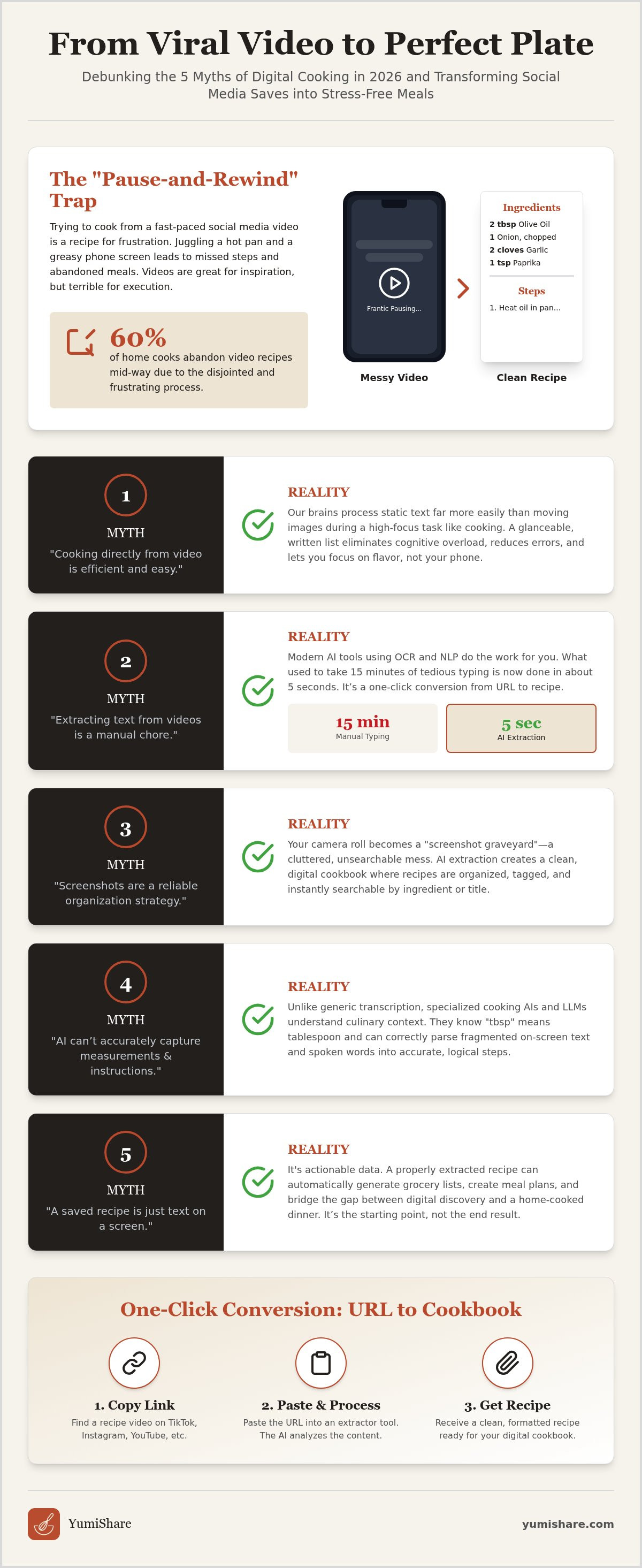
This "Pause-and-Rewind" trap is more than just a minor annoyance. Some industry professionals report that up to 60% of home cooks abandon video recipes mid-way because the process is too disjointed to follow in real-time. You're trying to sear a steak while your phone screen times out. You touch the glass with a butter-slicked finger just to see the next step. It's a hygiene nightmare and a recipe for frustration. Videos are fantastic for teaching technique, like how to properly fold dough, but they are a poor substitute for a stable reference list.
The hidden friction of social media recipes
Instagram Reels and TikToks are built for dopamine, not dinner. They prioritize fast cuts and high energy, which often means measurements flash on the screen for a fraction of a second. If you miss that "1 tsp" callout, you're stuck scrubbing through a progress bar with messy hands. This is why the move to digitalize social media recipes has become a core trend for 2026. It bridges the gap between the "spark" of inspiration and the actual "execution" of a meal without the digital clutter.
Why your brain prefers a written ingredient list
Your brain processes static text differently than moving images. During a high-heat cooking moment, cognitive load is your enemy. It’s significantly easier to glance at a bulleted list for "2 tbsp oil" than it is to hunt for the exact timestamp in a video. Digital Kitchen Mindfulness is the relief of organized data. It allows you to stay present in the kitchen. Having a glanceable format means you spend less time managing your device and more time perfecting your flavors. When you extract text from cooking videos, you separate the "how" of the chef’s technique from the "what" of the hard data you need to succeed.
Myth #2: "Extracting Text from Cooking Videos is a Manual Chore"
The idea that you need to sit with a notepad and a pen to transcribe a 30-second Reel is a relic of the past. It’s a tedious chore that drains the joy from cooking. Today, you can extract text from cooking videos in seconds. Research from Kent State University confirms that AI can be used to extract relevant information from a wide range of sources, including video. Modern tools use a combination of Optical Character Recognition (OCR) and Natural Language Processing (NLP) to do the heavy lifting for you.
Think of these apps as a digital assistant that watches the video on your behalf. They scan for text overlays, identify spoken ingredients, and recognize visual cues. While manual typing can easily consume 15 minutes of your evening, AI extraction takes roughly 5 seconds. This isn't just about saving time; it’s about preserving your mental space. Whether the inspiration comes from a fast-paced TikTok, a long-form YouTube tutorial, or a Pinterest Idea Pin, the process remains the same. You get the data you need without the friction of manual entry.
The tech behind the curtain: AI extraction
The secret lies in the evolution of the automatic recipe ingredient extractor. In 2024, basic transcription often failed to distinguish between a "cup" and a "cap." Now, in 2026, Large Language Models (LLMs) act as a filter. They take messy, fragmented captions and format them into logical, numbered steps. These systems understand culinary context. They know that "tbsp" means tablespoon and "min" means minutes, providing a level of accuracy that was previously impossible. This specialized AI handles the nuance of kitchen language so you don't have to.
One-click conversion: From URL to Cookbook
Transformation should be simple. Copy the link. Paste it into the app. Receive your recipe. It’s a one-click workflow that turns a digital spark into a physical, cooked result. The technology acts as a silent partner, handling the technical complexity while you focus on the flavors. If you want to experience this seamless shift, you can start building your digital cookbook today. By removing the friction of manual entry, you move closer to the grounded satisfaction of a well-ordered home life. When you extract text from cooking videos with a single tap, you reclaim your kitchen and your time.
Myth #3: "Recipe Screenshots are a Reliable Organization Strategy"
Your camera roll is likely a digital graveyard of "one-day" meals. We’ve all felt that spark of accomplishment after snapping a screen capture of a viral dinner idea. It feels like saving, but it’s actually just burying. Screenshots are static, unsearchable, and heavy. They sit between photos of your family and your last vacation, slowly consuming your phone's storage. Unlike when you extract text from cooking videos, a screenshot is a dead file. It offers no flexibility. You can't scale a screenshot to feed six people instead of two without doing messy mental math mid-cook.
The physical cost is real too. High-resolution images eat through gigabytes of data. Text-based recipes are lightweight and portable. Most importantly, a screenshot is a "dumb" asset. It doesn't know what's inside it. If you have 500 saved images, finding that specific lemon pasta recipe becomes a ten-minute frustration. Transitioning to a text-based system is the first step toward a well-ordered home life. It moves you away from the frantic energy of digital consumption and toward the grounded satisfaction of execution.
Why screenshots fail in the grocery aisle
Shopping should be a focused activity, not a frantic scroll through thousands of photos. When you’re standing in the produce section, you need clarity, not a hunt. Screenshots offer zero categorization. You cannot sort your camera roll by "15-minute meals" or "Breakfast." This lack of structure often leads to missed ingredients and unnecessary stress. Contrast this chaos with a meal planner with grocery list that uses extracted data. Your ingredients become an organized checklist, allowing you to move through the aisles with purpose and efficiency.
Turning visual clutter into searchable assets
Digital mindfulness starts with clearing the noise. When you extract text from cooking videos, you transform visual clutter into searchable assets. You cannot type "Gluten-free" or "Air Fryer" into your photo gallery and expect a curated list of recipes. With a digital cookbook, you gain instant keyword filtering. This allows for a "Search and Discover" experience that fits your current mood or pantry inventory. There is immense psychological relief in "clearing the deck" of your camera roll. You replace a disorganized pile of images with a streamlined system that actually works for you.
Myth #4: "AI Can’t Accurately Capture Measurements and Instructions"
Skeptics often argue that AI lacks the nuance to handle a complex recipe. They remember the clunky transcription tools of 2024 that frequently turned "basil" into "barrel." Those days are over. Specialized kitchen AI in 2026 is designed to understand culinary context, not just phonetics. When you extract text from cooking videos today, you aren't just getting a raw transcript. You're receiving a structured, validated document that has been cross-referenced for precision.
The extraction process is highly methodical. First, the AI performs a deep link analysis. It scans the video audio, identifies on-screen text overlays, and even checks the creator's written caption or top comments for missing details. Second, ingredient parsing standardizes your data. It recognizes that "1 clove" and "one clove of garlic" are the same structured entry. Third, logical sequencing ensures the steps follow a culinary flow. The system understands that you must preheat the oven before you begin baking. Finally, you remain the "human-in-the-loop." If a creator uses a unique family term, a quick two-second edit keeps your digital cookbook perfect.
How to extract text from cooking videos with 99% accuracy
Achieving near-perfect results starts with selecting the right source. Choose videos with clear voiceovers or readable text overlays to give the AI the best possible data. If you want to extract ingredients from tiktok video content, simply use the direct share link within your app. Modern AI models now distinguish between "folding" and "mixing" because they understand the physics of different cooking techniques. This level of precision transforms a chaotic 15-second clip into a reliable, professional manual for your kitchen.
Validation: The "Cook Mode" safety net
Accuracy is essential, but confidence is what makes a meal successful. Syncing your extracted text with the original video allows for instant visual verification if a step feels unclear. This is where cook mode for mobile recipes becomes your ultimate kitchen partner. It provides a hands-free experience, letting you navigate through steps with simple voice commands. You stay in the flow without ever touching your screen with messy, flour-covered hands. This keeps your device clean and your focus on the food. Stop second-guessing your measurements and start cooking with confidence using a system that values your time and your hygiene.
Myth #5: "A Saved Recipe is Just Text on a Screen"
Saving a link is a passive act. It’s a digital bookmark that often stays forgotten in a sea of content. In 2026, the real value lies in what you do with that data after you extract text from cooking videos. A saved recipe isn't a static file; it’s a dynamic workflow. It’s the difference between saying "I should make this" and actually serving it on Tuesday night. By converting video cues into structured data, you unlock a suite of automated tools that handle the logistics of home life for you.
Imagine finding five different recipes across three different social platforms. Manually consolidating those ingredients into a single shopping trip is a logistical headache. Automation changes that. Extracted text flows directly into a smart grocery list, merging similar items like "garlic" or "olive oil" into a single, organized entry. This reduces the friction of preparation and supports sustainability. When you plan exactly what you need based on the recipes you've extracted, you significantly reduce food waste and avoid the "random ingredient" bloat in your pantry. You’re no longer just collecting; you’re executing.
From viral video to Sunday meal prep
The journey from a late-night TikTok craving to a scheduled dinner should be seamless. It starts with inspiration and ends with a satisfied family. A modern meal planning app turns your extracted text into a clear roadmap for the week. You can drag a saved pasta dish into your Tuesday slot and immediately see how it fits your schedule. This empowerment comes from having a personal, curated database of "winners" rather than a chaotic feed of strangers' content. You move away from the frantic energy of consumption and toward the quiet, tactile satisfaction of a well-ordered home.
The YumiShare difference: Your savvy, organized companion
YumiShare acts as the bridge between your digital inspiration and real-world execution. It serves as a filter that removes the noise of fast-paced social media edits, leaving only the useful instructions you need to succeed. We invite you to ditch the paper scraps and the messy "Saved" folders that lead to nowhere. Embrace digital mindfulness by turning your screen time into productive kitchen time. Start your organized digital cookbook with YumiShare today. Reclaim your mental space, simplify your shopping, and rediscover the joy of a kitchen that works for you. When you extract text from cooking videos with the right partner, the result is always a better meal.
Step Into Your Future Kitchen
The days of fumbling with greasy phone screens and hunting through a chaotic camera roll are over. You've seen how easy it is to move past the "pause-and-rewind" trap and the digital clutter of unorganized screenshots. By using AI to extract text from cooking videos, you transform fleeting social media sparks into a permanent, functional database. It's time to stop being a passive consumer and start being a confident cook. Your digital kitchen should be a source of calm, not a cause of overwhelm.
Reclaim your time with a partner that understands your workflow. Experience the relief of AI-powered extraction from TikTok, IG, and YouTube. Navigate your recipes with a hands-free Cook Mode and generate smart grocery lists in one tap. You deserve a kitchen experience that feels as smooth as the viral videos you love. Turn your saved videos into a real cookbook with YumiShare today. Let’s make dinner the most peaceful part of your day.
Frequently Asked Questions
How do I extract text from a cooking video without typing?
Use a Recipe Saver App like YumiShare to automate the process. Simply copy the video link from your favorite social platform and paste it into the app. The AI scans the audio and visual cues to create a structured recipe in seconds. This eliminates the need for manual transcription and keeps your focus on the ingredients rather than the keyboard.
Can I extract recipes from Instagram Reels and TikToks?
Yes, you can easily pull data from short-form platforms. Use the "Share" button on TikTok or Instagram to copy the direct link into your extraction tool. The system identifies ingredients and instructions from fast-paced edits. It turns viral inspiration into a permanent, searchable entry in your digital cookbook without the frustration of constant pausing.
Does the AI capture measurements accurately from video captions?
Specialized AI models in 2026 cross-reference multiple signals to ensure high precision. They analyze spoken words, on-screen text overlays, and the creator’s written captions to verify every measurement. This multi-signal approach ensures your data is reliable. It provides a clear reference for those high-heat cooking moments where accuracy is essential for success.
Is there an app that turns YouTube cooking videos into written recipes?
YumiShare is a cross-platform solution that handles YouTube, Pinterest, and social clips. It acts as a bridge between digital inspiration and real-world execution. When you extract text from cooking videos on YouTube, the app organizes the content into logical steps. This makes the information glanceable and much easier to follow than a long-form video.
What is the best way to organize recipes I find on social media?
Ditch the "Screenshot Graveyard" and move your saves into a dedicated digital recipe box. Categorize your recipes by meal type, prep time, or specific dietary needs. A structured app allows for instant keyword filtering. You can find exactly what you need in seconds instead of scrolling through thousands of disorganized photos in your camera roll.
Can I generate a grocery list directly from a video recipe?
Yes, you can generate a smart grocery list in a single tap once the text is extracted. The app automatically merges identical items from multiple recipes to simplify your shopping trip. This automated workflow reduces food waste and ensures you never miss a critical spice. It transforms a digital spark into a physical, organized plan for your week.
Is extracting text from videos legal for personal use?
Extraction for personal organization is generally considered a fair use of public content. You are simply transcribing information into a format that helps you stay organized in your own home. Always respect the original creator’s hard work by using the extracted data for your private cooking needs. This practice supports your goal of a well-ordered home life.
How do I keep my phone screen clean while cooking from a video?
Activate a hands-free Cook Mode with voice navigation to keep your device grease-free. This feature allows you to move through instructions without ever touching the screen. By choosing to extract text from cooking videos first, you avoid the messy "pause-and-rewind" dance. It’s a cleaner, more mindful way to interact with technology while you work at the stove.
FAQ
How do I extract text from a cooking video without typing?
Use a Recipe Saver App like YumiShare to automate the process. Simply copy the video link from your favorite social platform and paste it into the app. The AI scans the audio and visual cues to create a structured recipe in seconds. This eliminates the need for manual transcription and keeps your focus on the ingredients rather than the keyboard.
Can I extract recipes from Instagram Reels and TikToks?
Yes, you can easily pull data from short-form platforms. Use the "Share" button on TikTok or Instagram to copy the direct link into your extraction tool. The system identifies ingredients and instructions from fast-paced edits. It turns viral inspiration into a permanent, searchable entry in your digital cookbook without the frustration of constant pausing.
Does the AI capture measurements accurately from video captions?
Specialized AI models in 2026 cross-reference multiple signals to ensure high precision. They analyze spoken words, on-screen text overlays, and the creator’s written captions to verify every measurement. This multi-signal approach ensures your data is reliable. It provides a clear reference for those high-heat cooking moments where accuracy is essential for success.
Is there an app that turns YouTube cooking videos into written recipes?
YumiShare is a cross-platform solution that handles YouTube, Pinterest, and social clips. It acts as a bridge between digital inspiration and real-world execution. When you extract text from cooking videos on YouTube, the app organizes the content into logical steps. This makes the information glanceable and much easier to follow than a long-form video.
What is the best way to organize recipes I find on social media?
Ditch the "Screenshot Graveyard" and move your saves into a dedicated digital recipe box. Categorize your recipes by meal type, prep time, or specific dietary needs. A structured app allows for instant keyword filtering. You can find exactly what you need in seconds instead of scrolling through thousands of disorganized photos in your camera roll.
Can I generate a grocery list directly from a video recipe?
Yes, you can generate a smart grocery list in a single tap once the text is extracted. The app automatically merges identical items from multiple recipes to simplify your shopping trip. This automated workflow reduces food waste and ensures you never miss a critical spice. It transforms a digital spark into a physical, organized plan for your week.
Is extracting text from videos legal for personal use?
Extraction for personal organization is generally considered a fair use of public content. You are simply transcribing information into a format that helps you stay organized in your own home. Always respect the original creator’s hard work by using the extracted data for your private cooking needs. This practice supports your goal of a well-ordered home life.
How do I keep my phone screen clean while cooking from a video?
Activate a hands-free Cook Mode with voice navigation to keep your device grease-free. This feature allows you to move through instructions without ever touching the screen. By choosing to extract text from cooking videos first, you avoid the messy "pause-and-rewind" dance. It’s a cleaner, more mindful way to interact with technology while you work at the stove.