
 Polski
  Deutsch
  Español
  Français
  Italiano
  Português
  Nederlands
  Svenska
  Українська
  Русский
 How to Extract Ingredients from TikTok Videos: The Complete 2026 Guide
Tired of pausing and rewinding? Learn how to extract ingredients from TikTok video instantly with our 2026 guide. Turn viral recipes into easy grocery lists.

You've finally found that viral recipe on your FYP, but the creator talks faster than you can blink. You spend ten minutes frantically tapping the screen to pause, squinting at a blurry frame, and scribbling notes on a napkin. It's the opposite of the relaxing kitchen experience you wanted. You need a better way to extract ingredients from tiktok video without the digital headache.
We've all been there, drowning in a "Saved" folder full of videos we never actually cook because the manual effort is just too high. It's time to move away from the frantic energy of digital consumption toward the satisfaction of a well-ordered home life. This guide will show you how to instantly turn fast-paced clips into organized, actionable ingredient lists without ever hitting the pause button again.
You'll learn how to transform a digital spark into a physical result in seconds. We are covering everything from automatic grocery list generation to saving the original video right alongside your text. Let's turn that digital noise into a streamlined, peaceful cooking routine that actually works for your busy life.
Key Takeaways
- End the "screenshot graveyard" cycle by identifying why manual note-taking disrupts your creative cooking flow.
- Learn how AI-powered OCR technology can instantly extract ingredients from tiktok video to create structured, actionable lists.
- Replace the frantic "pause and rewind" loop with a streamlined link-pasting process that saves up to 15 minutes per recipe.
- Turn digital inspiration into physical results by syncing your extracted recipes with smart grocery lists and hands-free cook modes.
The Struggle of Social Media Cooking: Why Manual Note-Taking Fails
The kitchen should be a place of calm. Yet, for many home cooks, the process starts with a frantic digital scavenger hunt. You see a mouthwatering pasta dish on your feed, tap the "Save" icon, and tell yourself you'll make it for dinner. Fast forward to 6:00 PM. You're scrolling through hundreds of unsorted clips, trying to find that one specific creator. When you finally locate it, the real work begins. You spend the next ten minutes in a "Pause and Rewind" loop. The creator flies through the measurements while upbeat music plays. You're left trying to extract ingredients from tiktok video by hand, scribbling on a scrap of paper that will inevitably get covered in flour. This isn't cooking; it's data entry.
The mental load of managing multiple digital platforms for a single meal is exhausting. You have the video on TikTok, the list in your Notes app, and the missing items in your head. This disjointed workflow leads to the "Screenshot Graveyard" phenomenon. Your phone is filled with thousands of recipe captures you'll never look at again because the effort to organize them feels insurmountable. You need a path toward domestic tranquility that starts with better tools. The goal is to move from the frantic energy of consumption to the grounded satisfaction of a well-ordered home.
Why Your Saved Folder Isn’t a Cookbook
Standard social media folders are where recipes go to die. They lack searchability, categorization, and clarity. You can't filter by "chicken" or "under 30 minutes." Instead, you're faced with a wall of thumbnails that all look the same. Switching between a fast-paced video and your notes app creates constant friction. It breaks your focus and turns a creative spark into a chore. To find true kitchen peace, you need to digitalize social media recipes into a format that actually serves you. A list of ingredients without the original video for context is often useless. You lose the visual cues of texture and timing that make the recipe work.
The Problem with Manual Transcription
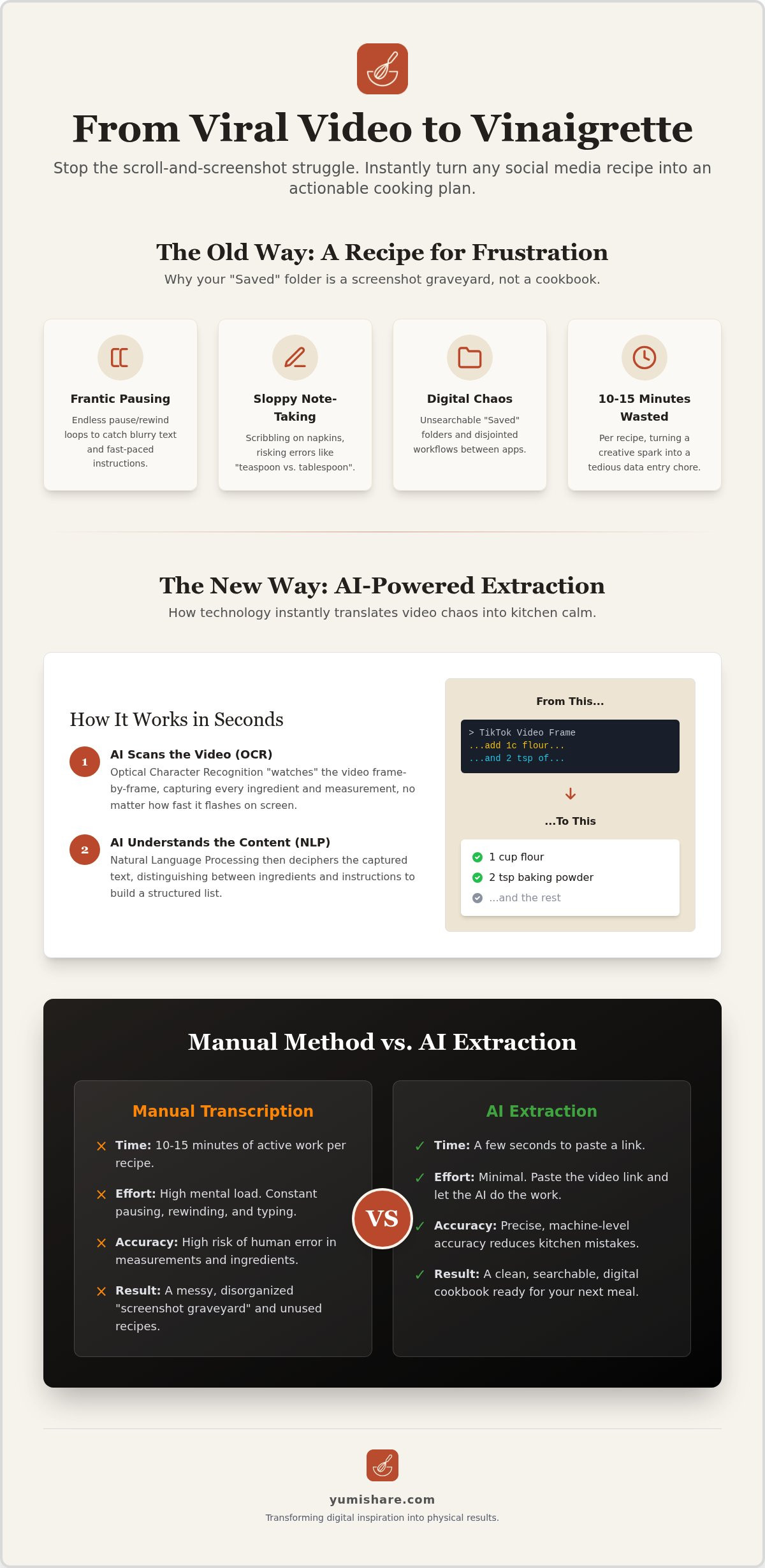
Transcribing a 60-second video manually is a massive time sink. It often takes 10 to 15 minutes to accurately capture every measurement and step. One distraction, and you've missed the difference between a teaspoon and a tablespoon. This risk of error leads to kitchen disasters and wasted food. The technology behind Optical Character Recognition has existed for years, yet we still act like we're back in the era of handwritten index cards. Manual typing is a relic of a disorganized digital life. It adds to your mental load instead of reducing it. You deserve a workflow that moves as fast as your inspiration. When you extract ingredients from tiktok video using modern automation, you reclaim your time and your sanity.
The Science of AI Recipe Extraction: How Technology Reads Your Screen
AI recipe extraction isn't magic. It's a precise combination of Optical Character Recognition (OCR) and Natural Language Processing (NLP). These systems work together to turn raw video frames into structured, usable data. In the past, you might have tried to manually pause a video every three seconds. Now, software handles the heavy lifting. This technology bridges the gap between a digital spark and a physical meal. By 2026, these algorithms have become sophisticated enough to handle the chaotic edits common on social media. They provide a clear path toward organization and calm in the kitchen.
OCR: Reading Between the Frames
TikTok videos move fast. Text overlays often flash for less than a second before disappearing. An automatic recipe ingredient extractor uses OCR to "watch" the video at a granular level. It identifies characters regardless of the font style or the busy background colors behind them. While human eyes might miss a quick measurement during a transition, the AI captures it instantly. It scans every frame to ensure no detail is left behind. This process turns a visual blur into a clean text string. It's the first step to extract ingredients from tiktok video with total accuracy.
NLP: Understanding the Language of Food
Capturing text is only the start. The system then uses NLP to understand what that text actually means. It distinguishes between "1 cup of flour" and a creator's personal anecdote about their grandmother. Research on The Role of New Media in modern cooking shows how much we rely on social platforms for inspiration. However, that inspiration needs structure to be useful. NLP categorizes ingredients, units, and instructions into separate data fields. It ignores the fluff and focuses on the actionable steps. This intelligence is what allows you to build a personal digital recipe box that is actually searchable and organized.
Modern AI in 2026 is exponentially faster than transcription methods from even two years ago. It processes a full video in seconds. You get a clean list while the pan is still heating up. If you want to experience this efficiency firsthand, you can start building your library with YumiShare today. It’s about replacing digital overwhelm with domestic tranquility. You don't need to be a tech expert to extract ingredients from tiktok video anymore. The software does the thinking, so you can do the cooking. It moves you away from the frantic energy of digital consumption toward the grounded satisfaction of a well-ordered home.
Comparing Methods: Manual Transcription vs. AI Extraction Tools
Choosing between manual transcription and automation is the difference between a cluttered mind and a calm kitchen. For years, the only way to save a recipe was to write it down. Today, that process feels archaic. When you try to extract ingredients from tiktok video by hand, you're performing a task that should take seconds but often eats up 15 minutes of your evening. This time isn't just lost; it's spent in a state of high-friction multitasking. You're balancing a phone, a pen, and your focus. It makes cooking feel like a chore rather than a relief. AI tools replace this frantic energy with a single, intuitive action.
The utility of these methods differs significantly. Manual notes are static blocks of text. They live in your phone’s default notes app or on physical scraps of paper. They don't talk to your grocery list, and they certainly don't help you plan your week. In contrast, AI-extracted data is dynamic. It's portable and cloud-synced. You can access your recipe at the grocery store or share it with a partner instantly. It moves with you, bridging the gap between digital inspiration and real-world execution.
Efficiency and Accuracy Metrics
The "mental cost" of transcribing while cooking is often overlooked. Your brain has to switch between sensory tasks, like smelling the garlic, and analytical tasks, like typing "2 tbsp olive oil." This context switching is exhausting. Modern AI handles the analytical side for you. It even manages unit conversions automatically. If a creator uses metric measurements but your kitchen uses imperial, the software translates the data in real time. In the 2026 digital kitchen, efficiency is the total elimination of friction between discovering an idea and executing the meal. By choosing to extract ingredients from tiktok video using specialized software, you preserve your mental space for the joy of cooking.
The Long-Term Value of Structured Data
Searchable text is always superior to a gallery of screenshots. You can't search an image for "gluten-free" or "low carb." When your recipes are saved as structured data, your entire collection becomes a searchable database. This organization is the foundation of effective meal planning. It allows for instant nutrition analysis and automatic grocery list generation. You're no longer just "saving a video." You're building a personal library that grows with you. This transition from a "digital spark" to a "physical result" is what creates a truly organized home. It turns the chaos of social media into the tranquility of a well-ordered life.
Step-by-Step: How to Extract TikTok Ingredients Like a Pro
Turning a chaotic video into a clean recipe card is a simple, three-step process. First, find the video that sparked your inspiration. Tap the "Share" icon on TikTok and select "Copy Link." This link is the key that unlocks the data hidden inside the video frames. Next, open your preferred recipe keeper alternative and paste the URL into the import field. The software immediately begins to extract ingredients from tiktok video, processing the visual and audio data in the background. It's a moment of digital mindfulness that replaces ten minutes of manual typing with a single tap.
Once the extraction is complete, review the generated list. AI is powerful, but it doesn't know your personal pantry. Check for specific dietary adjustments or substitutions you might want to make, such as swapping heavy cream for coconut milk. Finally, save the recipe to your digital cookbook. This action moves the recipe from the ephemeral world of social media into your permanent, organized collection. You've successfully bridged the gap between digital discovery and real-world execution.
Optimizing the Extraction Process
Not every TikTok video is perfectly edited with clear text overlays. Some creators rely entirely on voiceovers. If you choose a tool with advanced audio transcription, you can still extract ingredients from tiktok video even when no text appears on screen. For private or restricted videos, ensure you have the proper permissions or use the "Share to" function to send the link directly to your recipe manager. If the output isn't perfect, use the quick-edit feature to refine measurements or add a missing step. This ensures your digital recipe box remains a reliable source of truth for your kitchen.
Organizing for Future Access
A saved recipe is only useful if you can find it when the stove is hot. Categorization is the secret to a peaceful kitchen. Use a cloud sync recipe manager to ensure your library is accessible on your phone at the store and your tablet on the counter. Follow these steps to categorize every new import:
- Open the newly saved recipe card in your library.
- Tap the "Tags" or "Collections" button.
- Select a primary category like "30-Minute Meals" or "Sunday Prep."
- Add dietary tags such as "Vegan" or "High Protein" for faster filtering later.
- Hit save to sync the changes across all your devices instantly.
Stop letting great recipes disappear into your saved folder. Start building your organized kitchen today by using YumiShare to capture every culinary spark you find online.
From Video to Table: Organizing Your Extracted Recipes with YumiShare
Extraction is only the beginning of your journey toward a peaceful kitchen. Once you extract ingredients from tiktok video, those raw details need a home where they can become useful. YumiShare acts as the essential bridge between digital inspiration and real-world execution. It takes the fragmented data from a viral clip and transforms it into a structured, professional recipe card. This process replaces the frantic energy of social media scrolling with the grounded satisfaction of a well-ordered home life. You aren't just saving content; you're building a sustainable meal planning app habit that relies on automation rather than willpower.
The transition from a digital spark to a physical result should be seamless. YumiShare ensures that every recipe you save is immediately actionable. By centralizing your discoveries, you remove the mental load of remembering where you saw that specific pasta dish. Your kitchen becomes a space of domestic tranquility where technology works quietly in the background to support your creativity. When you choose to extract ingredients from tiktok video using a dedicated platform, you're choosing to value your time and your mental space.
The Power of Smart Grocery Lists
YumiShare takes your extracted ingredients and instantly generates smart, categorized grocery lists. It groups items by supermarket aisle, such as produce, dairy, or pantry staples. This organization allows you to move through the store with momentum and purpose. You can check off items on your phone as you go, ensuring nothing is forgotten. This precision reduces food waste because you only buy exactly what the recipe requires. It moves you away from the "guesswork" of traditional shopping and toward a more mindful, efficient household routine.
Mastering the Hands-Free Kitchen
Cooking with a mobile device often feels like a recipe for disaster. Flour-covered fingers and locking screens create constant friction. The cook mode for mobile recipes feature solves this by keeping your screen awake throughout the entire process. It provides hands-free guidance that syncs directly with the original video for visual reference. You can follow the steps at your own pace without ever touching your device. It’s a sophisticated way to keep your hands clean and your focus on the food.
Stop struggling with screenshots and manual notes. Turn your digital inspiration into a tactile reality with a tool designed for the modern home. Start your organized digital kitchen with YumiShare today and experience the relief of a truly simplified workflow.
Reclaim Your Kitchen Peace
Manual note-taking is a relic of the past that adds unnecessary mental load to your evening routine. You've discovered how AI-powered tools replace the frantic "pause and rewind" loop with a single, intuitive action. This technology allows you to extract ingredients from tiktok video instantly, ensuring you never lose a viral recipe to a cluttered "Saved" folder again. By transforming digital sparks into structured data, you create a clear path toward domestic tranquility and organized meal planning.
It's time to move away from digital overwhelm and toward the tactile satisfaction of a well-ordered home. You deserve a kitchen experience that feels functional and quietly aspirational. With AI-powered accuracy, smart grocery lists, and a hands-free Cook Mode, you can keep your screen awake and your focus on the food. Stop scribbling on scraps of paper and start building a library that actually serves your busy life.
Turn your TikTok "Saved" folder into a digital cookbook with YumiShare. Your journey toward a more mindful, efficient cooking routine starts right now. Enjoy the confidence of a perfectly organized kitchen.
Frequently Asked Questions
Can I extract ingredients from a TikTok video if the creator didn’t list them in the caption?
Yes, you can still extract ingredients from tiktok video even when the caption is empty. Advanced AI tools use Optical Character Recognition to "read" text overlays that flash on the screen during the video. Many platforms also use audio transcription to capture spoken measurements. This ensures you get a complete list regardless of how the creator shared the details.
Is it legal to extract recipes from social media videos for personal use?
Extracting recipes for personal organization and private use is generally considered acceptable. You are simply digitalizing public information to make it more accessible in your own kitchen. It moves you away from the frantic energy of digital consumption toward a more grounded, tactile cooking experience. Just ensure you don't republish the extracted text as your own original content for commercial gain.
Does AI extraction work for Instagram Reels and YouTube Shorts too?
AI extraction works seamlessly across Instagram Reels, YouTube Shorts, and other video-first platforms. The technology identifies the video link and processes the frames to pull out structured data. This allows you to maintain a unified digital cookbook for all your social media discoveries. You get the same clean, organized lists regardless of where you originally found the inspiration.
What happens if the AI misses a measurement or a specific ingredient?
You can manually edit any part of the extracted recipe in seconds. While AI-driven extraction is highly accurate, it's always a good habit to review the list for specific dietary adjustments or creator nuances. Most apps provide a quick-edit interface that lets you refine measurements or add missing steps. This ensures your personal digital recipe box remains a reliable source of truth.
Can I share my extracted TikTok recipes with friends and family?
Yes, you can share your organized recipes instantly through built-in sharing features. Instead of sending a link to a fast-paced video that your friends might never watch, you can send a clean, formatted ingredient list. This makes it easier for others to follow the recipe without the digital headache. It’s a savvy way to bridge the gap between social discovery and real-world execution.
Do I need a paid subscription to extract ingredients from tiktok video?
Many apps offer a free trial or a limited number of free imports to let you test the technology. To access premium features like unlimited extractions, smart grocery lists, and hands-free cook mode, a paid plan is typically required. These plans are designed to value your time and mental space by removing the friction of manual note-taking.
How do I organize my extracted recipes so I can find them later?
Use tags and categories to keep your library manageable and searchable. Label your new imports by meal type, dietary needs, or prep time, such as "Vegan" or "30-Minute Meals." This turns a chaotic collection of videos into a professional-grade digital cookbook. It’s the ultimate filter that removes digital noise and leaves only the useful information you need for dinner.
Can I use an ingredient extractor app on both iPhone and Android?
Most major recipe saver apps are available on both iOS and Android platforms to ensure your data stays synced. For example, YumiShare is currently available for iOS, with an Android version announced as coming soon. Using a cloud-synced app allows you to access your recipes on your phone at the grocery store and on your tablet in the kitchen.
FAQ
Can I extract ingredients from a TikTok video if the creator didn’t list them in the caption?
Yes, you can still extract ingredients from tiktok video even when the caption is empty. Advanced AI tools use Optical Character Recognition to "read" text overlays that flash on the screen during the video. Many platforms also use audio transcription to capture spoken measurements. This ensures you get a complete list regardless of how the creator shared the details.
Is it legal to extract recipes from social media videos for personal use?
Extracting recipes for personal organization and private use is generally considered acceptable. You are simply digitalizing public information to make it more accessible in your own kitchen. It moves you away from the frantic energy of digital consumption toward a more grounded, tactile cooking experience. Just ensure you don't republish the extracted text as your own original content for commercial gain.
Does AI extraction work for Instagram Reels and YouTube Shorts too?
AI extraction works seamlessly across Instagram Reels, YouTube Shorts, and other video-first platforms. The technology identifies the video link and processes the frames to pull out structured data. This allows you to maintain a unified digital cookbook for all your social media discoveries. You get the same clean, organized lists regardless of where you originally found the inspiration.
What happens if the AI misses a measurement or a specific ingredient?
You can manually edit any part of the extracted recipe in seconds. While AI-driven extraction is highly accurate, it's always a good habit to review the list for specific dietary adjustments or creator nuances. Most apps provide a quick-edit interface that lets you refine measurements or add missing steps. This ensures your personal digital recipe box remains a reliable source of truth.
Can I share my extracted TikTok recipes with friends and family?
Yes, you can share your organized recipes instantly through built-in sharing features. Instead of sending a link to a fast-paced video that your friends might never watch, you can send a clean, formatted ingredient list. This makes it easier for others to follow the recipe without the digital headache. It’s a savvy way to bridge the gap between social discovery and real-world execution.
Do I need a paid subscription to extract ingredients from tiktok video?
Many apps offer a free trial or a limited number of free imports to let you test the technology. To access premium features like unlimited extractions, smart grocery lists, and hands-free cook mode, a paid plan is typically required. These plans are designed to value your time and mental space by removing the friction of manual note-taking.
How do I organize my extracted recipes so I can find them later?
Use tags and categories to keep your library manageable and searchable. Label your new imports by meal type, dietary needs, or prep time, such as "Vegan" or "30-Minute Meals." This turns a chaotic collection of videos into a professional-grade digital cookbook. It’s the ultimate filter that removes digital noise and leaves only the useful information you need for dinner.
Can I use an ingredient extractor app on both iPhone and Android?
Most major recipe saver apps are available on both iOS and Android platforms to ensure your data stays synced. For example, YumiShare is currently available for iOS, with an Android version announced as coming soon. Using a cloud-synced app allows you to access your recipes on your phone at the grocery store and on your tablet in the kitchen.