
 Polski
  Deutsch
  Español
  Français
  Italiano
  Português
  Nederlands
  Svenska
  Українська
  Русский
 Digital Recipe Box: The Ultimate Guide to Organizing Your Kitchen in 2026
Tame your kitchen chaos! This guide shows you how to use a modern digital recipe box to organize recipes from TikTok and Instagram into a searchable library.

You're standing at the kitchen counter, sauce bubbling on the stove, while you frantically scroll through six months of Instagram "Saved" folders to find that one garlic pasta video. It's a common frustration. Most of us have spent too much time pausing TikToks to scribble ingredients on the back of an envelope or squinting at a phone screen with flour-covered fingers. Your kitchen deserves better than a cluttered collection of paper scraps and lost links. A modern digital recipe box isn't just a list of bookmarks; it's a tool that brings order to the digital noise.
This guide will show you how to transform your scattered social media saves into a single, searchable library that actually helps you cook. We'll explore how AI-powered extraction can pull ingredients from videos instantly and how new "cook mode" features let you follow instructions without ever touching your screen. You'll learn to move from digital overwhelm to the quiet satisfaction of a perfectly organized home life. It's time to bridge the gap between digital inspiration and real-world execution.
Key Takeaways
- Understand how a modern digital recipe box acts as an AI-powered engine to turn social media inspiration into organized, actionable data.
- Learn to extract ingredients and instructions automatically from TikTok and Instagram, eliminating the need to pause videos or manually transcribe notes.
- Identify the differences between traditional web clippers and new-era social savers to find the best fit for your culinary workflow.
- Follow a streamlined five-step process to transition from a cluttered kitchen of paper scraps to a clean, searchable digital library.
- Discover how hands-free tools like Cook Mode bridge the gap between digital discovery and the tactile satisfaction of cooking.
Beyond the Notebook: What is a Digital Recipe Box in 2026?
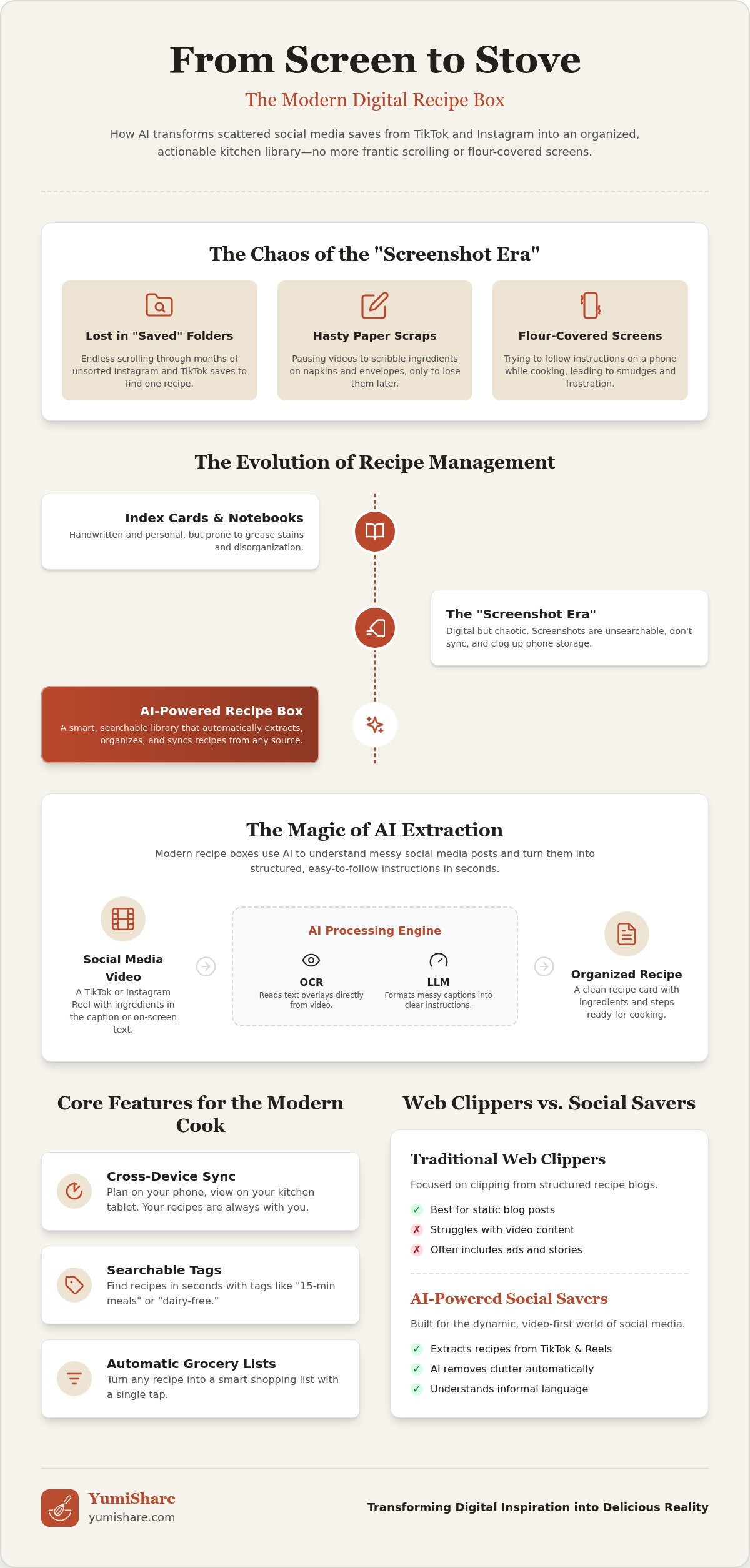
A digital recipe box is no longer just a list of website bookmarks. In 2026, it serves as a central hub for all your culinary data, pulling inspiration from every corner of the internet into one searchable library. Think of it as a smart filter. It removes the ads, the long stories, and the scrolling videos, leaving you with only the ingredients and steps you need to make dinner. This shift from digital clutter to organized calm is more than a convenience; it's a way to reclaim your kitchen from the chaos of the "screenshot era."
Compare this to how we cooked just a few years ago. In 2020, a modern recipe management app focused on clipping structured blog posts. Today, the model has evolved. We've moved past static links into the era of AI extraction. Your tools now understand raw video captions and messy social media posts. They identify measurements and instructions automatically. This transition solves the primary frustration of modern cooks: the Instagram "Saved" folder. These folders are where recipes go to die. They're unsearchable, disorganized, and buried under a mountain of other content. A dedicated digital recipe box brings those ideas back to life.
The Evolution of Recipe Management
Kitchen organization has come a long way from handwritten index cards and grease-stained notebooks. We moved to printing blog pages, then to the "screenshot era." But screenshots failed us. They don't sync, they aren't searchable, and they take up massive amounts of storage. Now, technology creates a personal digital recipe box that actually thinks for you. It categorizes your finds and ensures you never lose a viral TikTok recipe again.
Core Features of a Modern Digital Cookbook
A high-functioning digital cookbook does more than store text. It integrates into your daily life. Look for these essential features in 2026:
- Cross-device synchronization: Start your meal plan on your phone during a commute and view it on your kitchen tablet later.
- Searchable tags: Go beyond folders. Use tags like "15-minute meals" or "dairy-free" to find exactly what you need in seconds.
- Automatic lists: Turn your saved recipes into smart grocery lists with one tap.
These features bridge the gap between seeing a great dish online and actually putting it on your table. It's about turning a digital spark into a physical result without the stress of manual data entry.
How AI-Powered Recipe Boxes Extract Details from Social Media
The primary hurdle for home cooks today isn't a lack of inspiration; it's the format of that inspiration. Most of our favorite dishes are hidden inside 60-second Reels or fast-paced TikToks. A modern digital recipe box solves this by using AI to bridge the gap between video pixels and kitchen reality. Instead of manually pausing and rewinding, these tools scan the video and its metadata to build a structured recipe in seconds. It's a complete transformation of the cooking workflow, moving from passive consumption to active preparation.
The technology behind extracting ingredients from TikTok videos is remarkably sophisticated. It doesn't just copy text; it understands it. The AI analyzes raw captions, identifies specific measurements, and organizes them into a logical order. If a creator mentions "a thumb of ginger" or "a splash of soy," the AI interprets those domestic nuances into clear instructions. It even pulls the best frame from the video to serve as your recipe's cover photo. This makes your library visually intuitive and beautiful. You get the clarity of a professional cookbook with the excitement of social media trends.
No More Manual Typing
Stop wasting time transcribing ingredients from your phone screen. Modern tools use a combination of technologies to do the heavy lifting for you:
- OCR (Optical Character Recognition): Reads text overlays directly from the video.
- LLMs (Large Language Models): Formats messy, informal captions into professional instructions.
This "one-tap" importing is what separates advanced tools from the pack. Many trusted cookery and recipe apps now prioritize this speed to keep up with the pace of social discovery. It's about getting you away from the keyboard and back to the stove.
The End of the Screenshot Era
Your phone's gallery is likely a graveyard of culinary ideas. There are several reasons why you should stop taking recipe screenshots immediately. Screenshots aren't searchable, they're static, and they lack context. You can't tap a photo to build a shopping list or check off steps. A digital recipe box turns these "dead pixels" into interactive data. It connects inspiration to action by linking ingredients to your grocery list. If you're ready to clear the clutter, try a smart recipe saver to organize your kitchen today. It's the simplest way to move from scrolling to serving.
Comparing Digital Recipe Boxes: Web Clippers vs. Social Savers
Choosing a digital recipe box in 2026 depends entirely on where you find your culinary sparks. The market is currently split into two distinct camps: the "Old Guard" web clippers and the "New Era" social savers. Understanding the difference is the first step toward moving from digital clutter to kitchen calm. It's about finding a tool that matches your discovery habits rather than forcing you to change them.
Traditional managers like Paprika or Mela were built for the era of long-form food blogs. They use web scraping to identify structured data on a website. They're excellent for text-heavy sites and stripping away ads. However, they often fail when faced with the unstructured data of a viral video. If you try to save a TikTok link to an old-school clipper, you'll likely end up with a dead link and a blank page. This makes them feel like a recipe keeper alternative rather than a primary solution for the modern, social-first cook.
Social-First Recipe Savers
Newer platforms like YumiShare represent the next evolution of kitchen organization. These apps offer native support for Instagram, TikTok, and Pinterest. Instead of just "clipping" a site, they use AI to transcribe video content into professional instructions. This is a massive shift in utility. You get video-sync features that allow you to watch the original creator's technique while your ingredients are displayed clearly on the same screen. It bridges the gap between seeing a dish and actually making it.
Cloud Sync and Family Sharing
Organization shouldn't happen in a vacuum. High-quality cloud sync recipe managers are essential for modern households. They ensure your library is available on your phone at the market and on your tablet in the kitchen. More importantly, they enable effortless family sharing. When one person saves a recipe, the entire household gets access to the synchronized grocery list and meal plan. It turns a solo chore into a collaborative experience.
The 2026 freemium landscape makes it easy to find your fit. Most social savers offer a limited number of free imports, allowing you to test the AI's accuracy with your favorite creators before you commit. Evaluate the cost based on time saved. If a digital recipe box saves you ten minutes of typing per recipe, the premium subscription pays for itself in a single week of meal prepping. Invest in the tool that removes the friction from your daily life.
5 Steps to Transition from Paper Scraps to a Smart Digital Kitchen
Moving your kitchen into the future requires more than just a new app. It requires a system. Stop juggling stained notebooks, blurry screenshots, and forgotten bookmarks. A digital recipe box works best when it's populated with content you actually use. Start by auditing your current "chaos points." Identify where your recipes currently hide. Are they buried in Instagram "Saved" folders? Are they pinned to boards you never visit? Once you see the mess, you can begin the migration.
Step 1: The Great Digital Declutter
Clean your digital house before you organize it. Use a Pinterest recipe importer to move your boards into a single home. This is the perfect time to be honest about your habits. Separate the "aspirational saves" from the meals you actually cook. If you haven't made that 48-step pastry in three years, let it go. For those irreplaceable family recipe cards, use your phone's camera to scan them directly into your library. This preserves the history without the physical clutter.
Step 2: Organizing for Success
Structure your library for speed. Use smart tags that reflect your real-life needs. Don't just sort by "Chicken" or "Pasta." Use tags like "15-minute meals," "Air Fryer," or "Toddler Approved" for instant access during a busy Tuesday. High-quality cover photos are essential here. They allow you to navigate your collection visually, much like flipping through a physical cookbook. If you share a home, set up shared folders. This keeps you and your partner on the same page for every meal.
Put your collection to work immediately. Set up a weekly meal planner with grocery list to turn your saved ideas into a shopping plan. This removes the "what's for dinner" stress before it starts. Establish a "Sunday Sync" routine. Spend ten minutes every Sunday morning importing new inspiration from your social feeds and clearing out your Instagram "Saved" folder. This keeps your digital recipe box fresh and relevant. Ready to simplify your kitchen? Download YumiShare and start your transition today.
Mastering the Kitchen with YumiShare: The Ultimate Digital Solution
YumiShare acts as the final piece of your kitchen organization puzzle. It bridges the gap between the frantic energy of social media scrolling and the grounded, tactile satisfaction of a home-cooked meal. While other tools focus on simple bookmarks, this platform serves as a high-energy engine for your culinary life. It's the ultimate digital recipe box for anyone tired of losing great ideas in the depths of their phone. By focusing on AI-driven extraction, it removes the friction of manual entry and lets you focus on the joy of cooking.
From Social Discovery to Grocery Store
Transform your inspiration into a plan with a single tap. YumiShare identifies ingredients and measurements from raw video captions, turning a viral Reel into a functional meal planning app workflow. The automation doesn't stop at your library. The Smart Grocery List feature automatically categorizes your items by supermarket aisle. This saves you time and prevents the frustration of doubling back for forgotten herbs. Precise ingredient management also helps reduce food waste. You buy exactly what you need for the recipes you've saved; nothing more, nothing less.
The Hands-Free Cooking Experience
Kitchen surfaces are messy, but your phone shouldn't be. The cook mode for mobile recipes is the essential feature for the modern cook. It allows you to follow instructions step-by-step without ever touching your screen with floury fingers. You can sync your progress with the original creator’s video, ensuring your technique matches the inspiration perfectly. This methodical, segment-by-segment delivery turns complex dishes into manageable tasks. It provides a sense of effortless progression from the first chop to the final plate.
For power users, the premium subscription offers unlimited imports and advanced meal planning tools. It's an investment in digital mindfulness that clears the noise and leaves only what is useful. You'll move away from digital overwhelm and toward a well-ordered home life. Start your journey toward kitchen calm now. Download YumiShare and start your digital recipe box today. It's time to turn your digital sparks into physical results.
Reclaim Your Kitchen Harmony
The days of scrolling through endless social media feeds to find a single dinner idea are over. You've learned how a modern digital recipe box uses AI to turn raw video content from TikTok and Instagram into clear, actionable instructions. By adopting a "Sunday Sync" routine and utilizing smart tags, you can move from digital overwhelm to a streamlined culinary workflow. Features like hands-free cook mode and automated grocery lists ensure that your technology serves your life, not the other way around. This is about more than just storage; it's about reclaiming your time and mental space.
It's time to bridge the gap between digital discovery and real-world execution. Clear the clutter of paper scraps and blurry screenshots once and for all. Experience the relief of a well-ordered home where every recipe is searchable and every meal is planned with precision. You deserve a kitchen experience that feels effortless and inspiring every single day. Stop scrolling and start creating in a space that rewards your curiosity.
Start Building Your Digital Recipe Box with YumiShare to access AI-powered extraction, hands-free cooking, and smart grocery lists today. Your kitchen should be a place of calm and creativity. Let's make it happen together.
Frequently Asked Questions
What is the best digital recipe box for TikTok users?
YumiShare is the top choice for TikTok users because of its native AI extraction capabilities. Most traditional apps only handle structured blog links, but this platform scans video captions and on-screen text. It identifies ingredients and steps automatically, so you don't have to pause the video constantly. This turns a fast-paced video into a structured recipe within seconds. It's the most efficient way to manage viral inspiration without manual typing.
Can I save recipes from Instagram Reels into a digital box?
Yes, you can save Instagram Reels directly into your library using a modern recipe saver. Simply copy the link from the Reel and paste it into the app. The AI then extracts the ingredients and instructions from the caption. This creates a clean, searchable version of the dish. It eliminates the need for messy screenshots or buried "Saved" folders, making your favorite social media recipes actually useful in the kitchen.
How do I move my physical recipes into a digital format?
Use your phone's camera to scan physical recipe cards or printed pages directly into your library. Many apps feature built-in scanning tools that use technology to read handwritten or printed text. Once scanned, the app converts the image into a searchable text format. This preserves your family's culinary history while clearing out the physical clutter of stained notebooks and loose paper scraps in your kitchen drawers.
Is there a free digital recipe box app for iPhone and Android?
YumiShare offers a free version for both iOS and Android users. This freemium model allows you to download the app and import your first 10 recipes at no cost. You get access to core features like AI extraction and the hands-free cook mode right away. If you find yourself saving inspiration daily, you can upgrade to a premium subscription for unlimited imports and advanced meal planning tools.
Can a digital recipe box generate a grocery list automatically?
A high-quality digital recipe box will generate a smart grocery list from your saved recipes with a single tap. The system identifies the ingredients within your library and compiles them into a list. It even categorizes items by supermarket aisle to save you time. This automation ensures you never forget a key herb or spice again. It also helps reduce food waste by focusing your shopping on exactly what you need.
What happens if the original social media video is deleted?
Your saved recipe remains safe in your library even if the original creator deletes the video. Once you import a link, the AI extracts and stores the text data on its own servers. You won't lose the ingredients or instructions you've already saved. While the synced video playback might become unavailable, the core recipe data stays accessible. This makes a digital recipe box a more reliable long-term storage solution than social media bookmarks.
How do I share my digital recipe box with my family?
Use shared folders or synchronization features to distribute your collection among household members. Most modern apps allow you to invite partners or roommates to specific folders. When you update a meal plan or add an item to the grocery list, everyone sees the changes in real-time. This collaborative approach removes the confusion of multiple lists and ensures everyone stays on the same page regarding dinner plans and shopping needs.
Do I need to type in the instructions manually for social media saves?
You don't need to type instructions manually when using AI-powered extraction tools. The software reads the captions and video text for you. It identifies the measurements and preparation steps, then formats them into professional, easy-to-read instructions. While you can always edit the text to add your own personal notes or substitutions, the heavy lifting of data entry is handled automatically by the platform's underlying technology.
FAQ
What is the best digital recipe box for TikTok users?
YumiShare is the top choice for TikTok users because of its native AI extraction capabilities. Most traditional apps only handle structured blog links, but this platform scans video captions and on-screen text. It identifies ingredients and steps automatically, so you don't have to pause the video constantly. This turns a fast-paced video into a structured recipe within seconds. It's the most efficient way to manage viral inspiration without manual typing.
Can I save recipes from Instagram Reels into a digital box?
Yes, you can save Instagram Reels directly into your library using a modern recipe saver. Simply copy the link from the Reel and paste it into the app. The AI then extracts the ingredients and instructions from the caption. This creates a clean, searchable version of the dish. It eliminates the need for messy screenshots or buried "Saved" folders, making your favorite social media recipes actually useful in the kitchen.
How do I move my physical recipes into a digital format?
Use your phone's camera to scan physical recipe cards or printed pages directly into your library. Many apps feature built-in scanning tools that use technology to read handwritten or printed text. Once scanned, the app converts the image into a searchable text format. This preserves your family's culinary history while clearing out the physical clutter of stained notebooks and loose paper scraps in your kitchen drawers.
Is there a free digital recipe box app for iPhone and Android?
YumiShare offers a free version for both iOS and Android users. This freemium model allows you to download the app and import your first 10 recipes at no cost. You get access to core features like AI extraction and the hands-free cook mode right away. If you find yourself saving inspiration daily, you can upgrade to a premium subscription for unlimited imports and advanced meal planning tools.
Can a digital recipe box generate a grocery list automatically?
A high-quality digital recipe box will generate a smart grocery list from your saved recipes with a single tap. The system identifies the ingredients within your library and compiles them into a list. It even categorizes items by supermarket aisle to save you time. This automation ensures you never forget a key herb or spice again. It also helps reduce food waste by focusing your shopping on exactly what you need.
What happens if the original social media video is deleted?
Your saved recipe remains safe in your library even if the original creator deletes the video. Once you import a link, the AI extracts and stores the text data on its own servers. You won't lose the ingredients or instructions you've already saved. While the synced video playback might become unavailable, the core recipe data stays accessible. This makes a digital recipe box a more reliable long-term storage solution than social media bookmarks.
How do I share my digital recipe box with my family?
Use shared folders or synchronization features to distribute your collection among household members. Most modern apps allow you to invite partners or roommates to specific folders. When you update a meal plan or add an item to the grocery list, everyone sees the changes in real-time. This collaborative approach removes the confusion of multiple lists and ensures everyone stays on the same page regarding dinner plans and shopping needs.
Do I need to type in the instructions manually for social media saves?
You don't need to type instructions manually when using AI-powered extraction tools. The software reads the captions and video text for you. It identifies the measurements and preparation steps, then formats them into professional, easy-to-read instructions. While you can always edit the text to add your own personal notes or substitutions, the heavy lifting of data entry is handled automatically by the platform's underlying technology.