
 Polski
  Deutsch
  Español
  Français
  Italiano
  Português
  Nederlands
  Svenska
  Українська
  Русский
 Cloud Based Recipe Manager: Organizing Your Digital Kitchen in 2026
Tired of losing TikTok recipes? A cloud based recipe manager uses AI to organize your digital kitchen, create grocery lists, and end 'screenshot fatigue'.

You’re standing in the middle of a crowded grocery aisle, staring at a wall of pasta shapes, trying to remember that viral lemon-garlic recipe you saved on TikTok last night. You scroll frantically through your "Saved" folder, but it's buried under a mountain of travel hacks and home decor tips. This "screenshot fatigue" is the silent thief of your dinner plans. It's time to stop losing your favorite meals to the social media void and start using a cloud based recipe manager to reclaim your kitchen's calm.
We understand the digital overwhelm of the modern home cook. You want to spend your time enjoying a meal, not manually typing ingredients from a video or forgetting your list at home. This article shows you how to turn scattered saves into a perfectly synced, searchable digital cookbook. You'll learn how AI extraction, automatic grocery list generation, and hands-free cooking assistance can simplify your workflow. We’ll preview the essential tools for 2026 that bridge the gap between a digital spark and a physical result.
Key Takeaways
- End "screenshot fatigue" by centralizing scattered Instagram saves and TikTok bookmarks into one searchable, organized digital home.
- Learn how a cloud based recipe manager uses AI to extract ingredients from video-first platforms, eliminating the need for manual typing.
- Simplify your workflow with automated grocery list generation and hands-free cook modes that sync seamlessly between your mobile and tablet devices.
- Follow a clear setup guide to bulk import your existing Pinterest boards and digital folders into a single intelligence hub.
- Discover how to transform high-energy social media discovery into the grounded, tactile satisfaction of a well-ordered kitchen.
The Rise of the Cloud Based Recipe Manager in 2026
The kitchen is no longer a place for heavy binders or grease-stained index cards. In 2026, a cloud based recipe manager acts as a central intelligence hub. It connects your digital inspiration to your physical dinner plate. Traditional paper cookbooks are static. They don't update when your dietary needs change. Bookmarks are equally fragile. They break when a website goes down or a blog is deleted. Today, discovery happens through motion. We watch a 15-second Reel and want to cook it immediately. This shift to dynamic, video-based content requires a tool that lives everywhere you do. Whether you're on your phone at the store or your tablet on the counter, your data must follow you seamlessly across mobile, tablet, and desktop interfaces.
Modern home cooks demand more than just storage. They need a system that understands the context of their lives. A central hub doesn't just hold text; it organizes your habits. It transforms a fleeting moment of social media discovery into a repeatable, successful meal. By 2026, the global recipe app market has grown to over $7 billion, reflecting our collective need for digital order in a world of content overload. This growth is driven by the move away from clunky, manual entry toward automated, cloud-synced solutions that prioritize speed and ease of use.
Why Local Storage Isn’t Enough
Relying on a single device is a recipe for disaster. If your phone takes a swim in the kitchen sink, your entire culinary history shouldn't vanish with it. Local storage creates frustrating silos. You might save a decadent dessert on your laptop during your lunch break, only to find yourself standing in the grocery aisle with no way to access the ingredient list. Cloud synchronization solves this immediately. It enables real-time updates to your smart grocery lists. When you add an ingredient on one screen, it appears on every other device in your house. This connectivity removes the mental load of remembering what to buy, ensuring you never leave the store without that one essential spice.
The Problem with "Saved" Folders on Social Media
Instagram and TikTok folders are often where great meals go to die. They are disorganized black holes. Native social apps lack searchability and categorization. You can't filter your "Saved" folder by "gluten-free" or "high protein." You're forced to scroll through a chaotic grid of thumbnails, hoping to spot a specific video you liked three months ago. It's a digital mess that leads to "screenshot fatigue." Using the best app for saved recipes bridges this gap. It extracts the data from these platforms and places it in a structured environment. It turns a fragmented social feed into a functional, searchable digital cookbook that actually helps you cook.
Core Features of a Modern Digital Cookbook
A modern cloud based recipe manager does more than just store text. It acts as a bridge between your digital inspiration and your kitchen counter. Forget the days of tedious copy-paste methods. Today’s tools utilize automated importing to pull data directly from URLs and social feeds. This technology ensures that your library grows effortlessly as you browse. Once your recipes are saved, advanced search and filter functions allow you to find dinner ideas based on the ingredients already sitting in your pantry. It turns a "nothing to eat" night into a creative culinary opportunity.
Seamless cross-device synchronization is the backbone of this experience. Start your meal planning on a desktop during your morning coffee. Review your list on your smartphone while walking through the market. Finally, pull up the instructions on your tablet when it's time to prep. This constant state of sync keeps your kitchen in order. Collaborative features also allow you to share your digital cookbook with family members. Everyone stays on the same page regarding tonight's menu and the weekly shopping needs. If you're ready to simplify your routine, start building your synced library today.
AI-Powered Ingredient Extraction
In 2026, AI has solved the frustration of manual entry. When you save a TikTok video, the system reads the caption and on-screen text to build a structured list. It identifies quantities and units automatically. This process separates ingredients from instructions, creating a clean interface that’s easy to scan. This structure is vital for the cook mode for mobile recipes. It allows you to focus on the technique without getting lost in a wall of text. You get a clear, readable roadmap for every dish you discover.
Smart Grocery Lists and Meal Planning
Efficiency doesn't stop at the recipe box. A high-performing manager consolidates ingredients from multiple recipes into one unified shopping trip. If three different meals require garlic, the app sums the total amount for you. It then categorizes every item by grocery store aisle. You’ll save time by moving through the store in a single, logical path. Utilizing a meal planner with grocery list helps you buy exactly what you need. This precision reduces food waste and lowers your weekly spending. It transforms the frantic energy of shopping into a calm, methodical task.
Traditional Web Managers vs. Social Media Savers
Cooking in 2026 looks different. We don't just search for keywords anymore. We discover. A vibrant video flashes across our feed, and suddenly, we're hungry. Traditional web managers were built for the "URL-first" era. They excel at scraping text from a food blog. But modern discovery is "Video-first." If you can't parse a 60-second TikTok, your organizer is already obsolete. This is why a recipe keeper alternative is no longer optional. It's a necessity for anyone who finds inspiration on social media rather than a search engine.
You might ask: "Why not just use a web browser?" Browsers are passive. They store links, not data. A browser won't extract an ingredient list or build a shopping path. It won't help you find a recipe based on what's in your fridge. A dedicated cloud based recipe manager is an active partner. It removes the noise of ads and pop-ups. It leaves only the utility you need to get dinner on the table. It transforms a fleeting digital spark into a structured, repeatable result.
The Challenge of Video Content
Pausing a Reel with flour-covered fingers is a universal pain point. Rewinding to find that one specific measurement is even worse. Modern cloud managers solve this by converting video frames into readable text instructions. They sync video timestamps directly with step-by-step instructions. You get the visual guidance of the creator without the frantic screen-tapping. It’s about moving from digital consumption to physical execution without the mess. This automation saves time and keeps your device clean.
Importing from Pinterest and Beyond
Many of us have years of inspiration locked away in Pinterest boards. You shouldn't have to leave those legacy Pins behind. A pinterest recipe importer allows you to bridge the gap. Sync your old favorites with your newest social media discoveries. This creates a unified cloud database. It doesn't matter where the recipe started. It all ends up in one organized, searchable home. This centralized approach ensures your entire culinary history is available on any device, at any time.
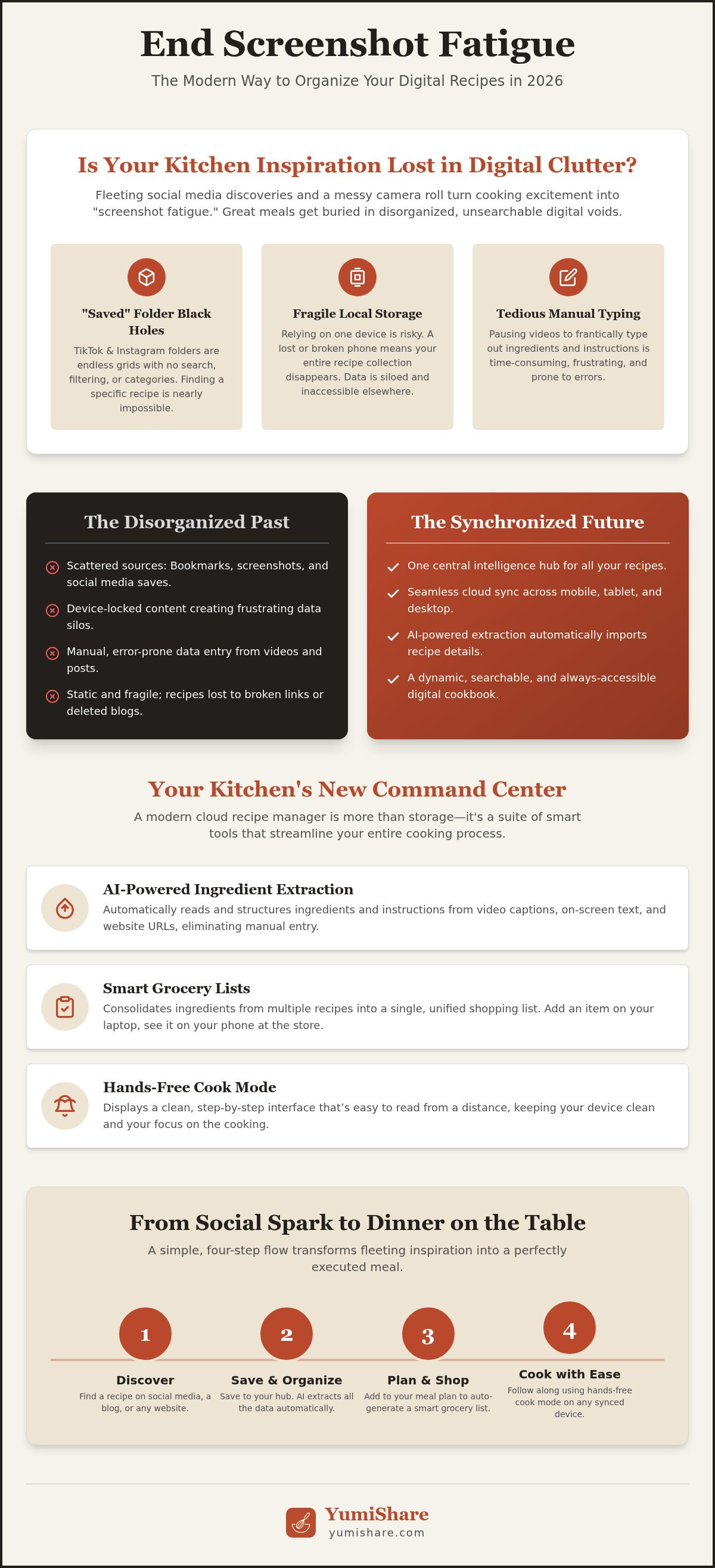
How to Set Up Your Cloud Recipe Hub
Setting up your digital kitchen hub should feel like a relief, not a chore. It’s about moving from digital chaos to a state of domestic tranquility. Start by choosing a platform that prioritizes social discovery. You need a cloud based recipe manager that natively understands Instagram Reels and TikTok videos. Don't settle for a tool that requires manual typing. Look for one that bridges the gap between your phone and your stove with minimal effort.
Follow these steps to build your foundation:
- Step 1: Connect your discovery apps. Grant your manager access to your primary social platforms. This allows the AI to monitor your "Saved" folders and Pinterest boards.
- Step 2: Bulk import your history. Use automated tools to pull in your existing collections. Watch as months of screenshots and bookmarks transform into a structured, searchable database.
- Step 3: Apply smart tags. Organize your meals by category. Use tags like "15-minute meals" or "Low carb" to make decision-making easier on busy weeknights.
- Step 4: Enable dual-screen sync. Link your mobile device to your kitchen tablet. This creates a seamless workflow. Discover on your phone during your commute. Cook on your tablet at home.
Organizing for Efficiency
Let AI do the heavy lifting of categorization. Modern systems can auto-tag recipes based on dietary needs like keto or gluten-free. This "digital mindfulness" filters out the noise. Create custom collections for specific goals, such as "Meal Prep Sundays" or "Holiday Baking." Manage your library by separating a "To Cook" queue from your "All-time Favorites." This keeps your dashboard clean and ensures you always have a fresh idea ready for dinner. If you want to streamline your setup process, create your free account now.
Maximizing the Hands-Free Experience
The best cloud based recipe manager stays out of your way while you work. Enable voice commands to scroll through instructions without touching the screen. This keeps flour and oil away from your expensive hardware. Adjust your device settings to ensure the screen stays awake throughout the entire cooking process. For a truly automated experience, integrate your library with a meal planning app. This connection moves you from the initial spark of inspiration to a fully prepped meal without the typical friction of manual planning. It’s about reclaiming your time and mental space.
Why YumiShare is the Ultimate 2026 Choice
YumiShare isn't just another app. It's the definitive cloud based recipe manager designed for the way we live now. We don't just find recipes; we experience them through high-energy social feeds. YumiShare captures that energy and channels it into organized action. It bridges the massive gap between a late-night scroll and a successful Tuesday dinner. By focusing on the "Social Media to Stove" journey, it provides a clear path through the digital noise. It’s about achieving domestic tranquility in an age of constant content. This empathetic design acknowledges your overwhelm and offers a partner in organization.
Our platform acts as a savvy, organized companion. It excels at bridging the gap between digital inspiration and real-world execution. We value your time and mental space above all else. By removing the friction of manual entry, we allow you to focus on the grounded, tactile satisfaction of cooking. It is an innovation that prioritizes the user's experience over the underlying technology.
From Social Spark to Physical Result
Stop struggling with the pause button. YumiShare’s AI engine is built specifically to parse the unique structure of Instagram Reels and TikTok videos. It identifies ingredients hidden in captions and instructions mentioned in voiceovers. In seconds, a 15-second video becomes a structured, searchable meal plan. You gain a single, reliable source of truth. No more hunting for that one specific post you liked weeks ago. Everything lives in your personal cloud. For those who cook daily, the premium cloud sync offers unlimited recipe imports. It ensures your entire library is always available, whether you're on your phone or your kitchen tablet. This seamless synchronization across iOS and Android devices turns digital inspiration into a physical result every time.
Getting Started with Digital Mindfulness
It’s time to ditch the clutter. Clear out the thousands of screenshots and loose paper scraps that weigh down your mental space. Embrace a streamlined, automated kitchen workflow that respects your time. YumiShare acts as a filter, removing the distractions of ads and pop-ups. It leaves only the utility you need for a well-ordered home life. This approach to "digital mindfulness" replaces frantic searching with grounded execution. You don't just organize recipes; you organize your habits. Join the YumiShare community to see how simple a modern cloud based recipe manager can be. Start your journey toward a calmer, more efficient kitchen today. Turn the chaos of discovery into the satisfaction of a meal well made.
Reclaim Your Kitchen Calm
Your kitchen should be a place of grounded, tactile satisfaction, not a source of digital overwhelm. By embracing a modern cloud based recipe manager, you move beyond the frantic energy of screenshotting and manual typing. You've learned how to bridge the gap between social discovery and the stove. AI-powered extraction turns viral videos into structured plans. Seamless synchronization ensures your library is always at your fingertips, whether you're at the market or the counter.
The transition from a scattered social feed to a well-ordered home life is simpler than it looks. It's about choosing a partner that values your mental space and time. With AI-driven extraction from Instagram and TikTok, smart grocery list automation, and a seamless cloud sync across iOS and Android, you can finally ditch the clutter. You get a streamlined experience that removes the noise and leaves only what is useful.
Start organizing your digital kitchen with YumiShare today. Reclaim your time and enjoy the relief of a perfectly synced, searchable digital cookbook. You deserve a kitchen that works as hard as you do. Happy cooking.
Frequently Asked Questions
What is a cloud-based recipe manager?
A digital hub that stores and organizes recipes on remote servers. It lets you access your collection from any device with an internet connection. Unlike local files, a cloud based recipe manager ensures your data is backed up and synced in real-time. It acts as a central intelligence center for your kitchen. Move from discovery on a phone to cooking on a tablet without missing a step.
Can I save recipes from Instagram Reels and TikTok?
Yes, you can capture inspiration directly from these platforms. Modern tools use AI to scan video captions and on-screen text to extract ingredient lists and instructions. This eliminates the need for manual typing or taking endless screenshots. Simply share the video link to your manager. It transforms high-energy social content into a structured, readable format that is ready for your next meal prep session.
How do I sync my recipes between my phone and tablet?
Synchronization happens automatically through your account login. When you save a new dish on your smartphone, the cloud based recipe manager pushes that data to all other connected devices instantly. This seamless handoff is essential for a modern workflow. Plan your weekly menu on a laptop during your commute. Find the exact instructions waiting on your kitchen tablet when you start cooking dinner.
Does a cloud recipe manager work offline at the grocery store?
Most advanced managers include an offline mode for your saved data. Your grocery lists and core recipe details are cached on your device. This ensures you can still access your shopping path even if you lose signal in the back of a large supermarket. Once you reconnect to Wi-Fi or cellular data, any changes you made while offline will automatically sync back to the cloud.
Can I share my recipe collections with my family?
Collaboration is a core feature of digital cookbooks. Create shared folders or invite family members to view specific collections. This keeps everyone aligned on the weekly meal plan and prevents duplicate grocery purchases. Whether you're planning a holiday feast or just coordinating Tuesday night's tacos, sharing features ensure that every household member has access to the latest version of your digital library.
Is it better to use a free app or a paid subscription for recipes?
The choice depends on your volume of cooking. Free versions often provide basic storage and manual entry. However, a freemium subscription model usually unlocks the most valuable features. These include AI video extraction, unlimited cloud sync, and advanced smart grocery lists. If you find dozens of recipes a week on social media, the time saved by automation justifies the cost of a premium upgrade.
How does AI extract ingredients from a video?
The AI uses optical character recognition and natural language processing. It "reads" the text overlays on a Reel or TikTok and parses the caption for quantities and units. It then categorizes these items into a structured list. This technology removes the friction of "screenshot fatigue." It turns a 15-second visual spark into a physical result by organizing data into a format your kitchen can actually use.
Will I lose my recipes if I delete the social media app?
No, your recipes remain safe. Once a manager extracts the data and saves it to the cloud, it exists independently of the original social media platform. Even if a video is deleted or you remove the TikTok app from your phone, your structured recipe remains in your personal digital cookbook. This provides a permanent, reliable source of truth for all your favorite culinary discoveries.
FAQ
What is a cloud-based recipe manager?
A digital hub that stores and organizes recipes on remote servers. It lets you access your collection from any device with an internet connection. Unlike local files, a cloud based recipe manager ensures your data is backed up and synced in real-time. It acts as a central intelligence center for your kitchen. Move from discovery on a phone to cooking on a tablet without missing a step.
Can I save recipes from Instagram Reels and TikTok?
Yes, you can capture inspiration directly from these platforms. Modern tools use AI to scan video captions and on-screen text to extract ingredient lists and instructions. This eliminates the need for manual typing or taking endless screenshots. Simply share the video link to your manager. It transforms high-energy social content into a structured, readable format that is ready for your next meal prep session.
How do I sync my recipes between my phone and tablet?
Synchronization happens automatically through your account login. When you save a new dish on your smartphone, the cloud based recipe manager pushes that data to all other connected devices instantly. This seamless handoff is essential for a modern workflow. Plan your weekly menu on a laptop during your commute. Find the exact instructions waiting on your kitchen tablet when you start cooking dinner.
Does a cloud recipe manager work offline at the grocery store?
Most advanced managers include an offline mode for your saved data. Your grocery lists and core recipe details are cached on your device. This ensures you can still access your shopping path even if you lose signal in the back of a large supermarket. Once you reconnect to Wi-Fi or cellular data, any changes you made while offline will automatically sync back to the cloud.
Can I share my recipe collections with my family?
Collaboration is a core feature of digital cookbooks. Create shared folders or invite family members to view specific collections. This keeps everyone aligned on the weekly meal plan and prevents duplicate grocery purchases. Whether you're planning a holiday feast or just coordinating Tuesday night's tacos, sharing features ensure that every household member has access to the latest version of your digital library.
Is it better to use a free app or a paid subscription for recipes?
The choice depends on your volume of cooking. Free versions often provide basic storage and manual entry. However, a freemium subscription model usually unlocks the most valuable features. These include AI video extraction, unlimited cloud sync, and advanced smart grocery lists. If you find dozens of recipes a week on social media, the time saved by automation justifies the cost of a premium upgrade.
How does AI extract ingredients from a video?
The AI uses optical character recognition and natural language processing. It "reads" the text overlays on a Reel or TikTok and parses the caption for quantities and units. It then categorizes these items into a structured list. This technology removes the friction of "screenshot fatigue." It turns a 15-second visual spark into a physical result by organizing data into a format your kitchen can actually use.
Will I lose my recipes if I delete the social media app?
No, your recipes remain safe. Once a manager extracts the data and saves it to the cloud, it exists independently of the original social media platform. Even if a video is deleted or you remove the TikTok app from your phone, your structured recipe remains in your personal digital cookbook. This provides a permanent, reliable source of truth for all your favorite culinary discoveries.