
 Polski
  Deutsch
  Español
  Français
  Italiano
  Português
  Nederlands
  Svenska
  Українська
  Русский
 TikTok Recipe Saver: Turn Viral Videos into Organized Cookbooks
Tired of rewinding videos? Use a tiktok recipe saver to turn viral clips into an organized cookbook with AI-powered grocery lists. Cook with ease!

You’re standing in your kitchen with flour on your hands, squinting at your phone while a 60-second video loops for the twentieth time. You missed the measurement for the sauce. Now you’re frantically tapping the screen to rewind, only to accidentally swipe to a video of a dancing cat. It’s a familiar frustration for anyone who relies on social media for dinner inspiration. Your saved folder is a digital graveyard of brilliant meals you’ll likely never make because finding the instructions feels like a chore.
We agree that TikTok is perfect for discovery, but it’s a terrible place to store a recipe. This guide shows you how a tiktok recipe saver can rescue your favorite meals from the clutter of your phone gallery. You'll learn how to transform viral clips into a searchable, organized digital cookbook in seconds. We’ll explore how AI-powered tools like YumiShare extract ingredients automatically, generate smart grocery lists, and provide a hands-free cook mode that stays in sync with your workflow. Stop rewinding and start cooking with a system that turns digital noise into kitchen calm.
Key Takeaways
- Stop losing viral meals to a cluttered "saved" folder and learn how to rescue recipes before they vanish into your digital gallery.
- Understand how a tiktok recipe saver uses AI to extract ingredients and steps from a video link, turning visual noise into a clean, text-based manual.
- Master the five-step workflow to import social media inspiration directly into a structured digital cookbook for instant access.
- Transition from frantic rewinding to hands-free "Cook Mode" by using tools that generate automated grocery lists and streamlined instructions.
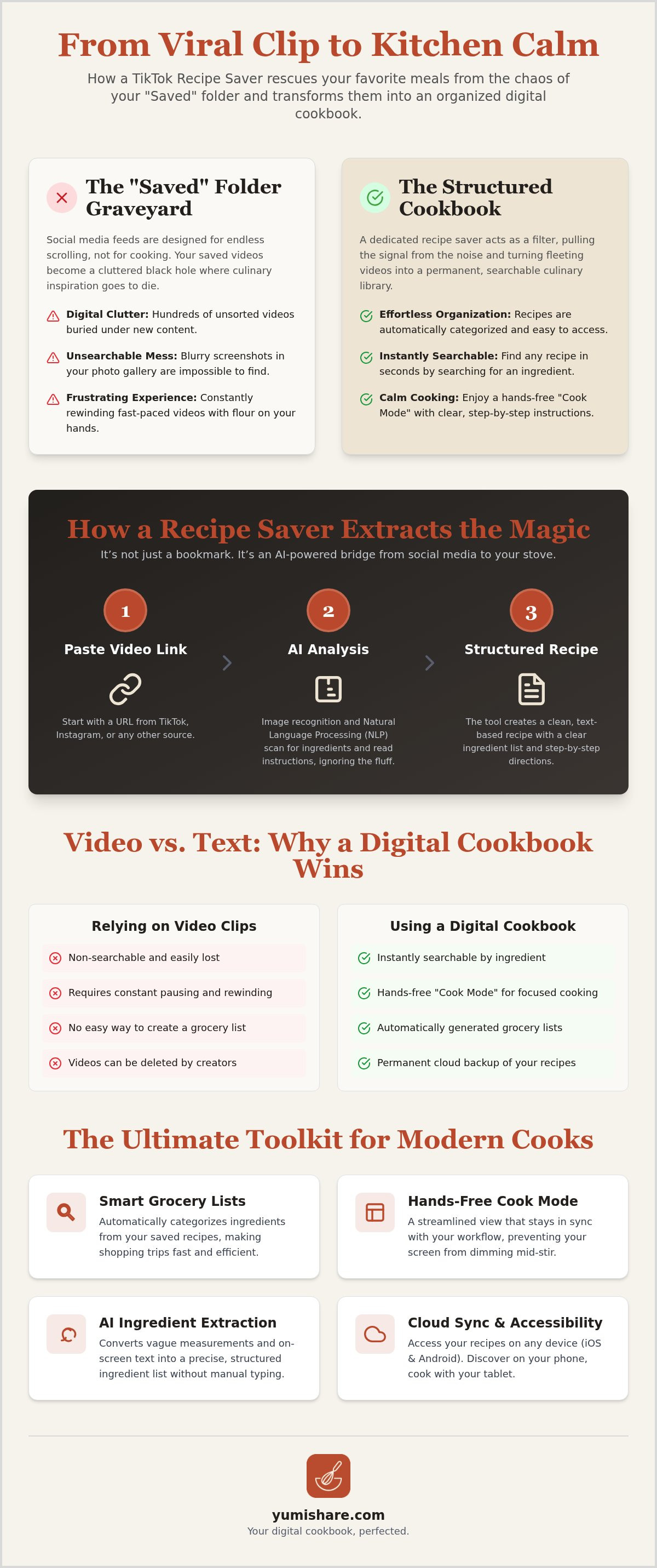
The Problem with Your TikTok "Saved" Folder
You see a vibrant smash burger or a creamy feta pasta. You tap the bookmark icon. You feel a brief spark of productivity. But let's be honest; that "Saved" folder is where inspiration goes to die. It's a black hole of content. You have hundreds of videos tucked away, yet you still ask "what's for dinner?" every single night. This disconnect happens because social platforms are designed for consumption; they aren't built for execution.
The "Saved" Folder Graveyard
The algorithm wins when you stay on the app. It wants you to scroll, not boil water. TikTok food trends move at lightning speed. By the time you're finally ready to cook, the trend has shifted. Your saved video is buried under fifty new clips of travel hacks and comedy skits. This creates a hidden psychological weight. Digital clutter feels like unfinished business. You can only move from passive watching to active cooking when you remove the noise. A dedicated tiktok recipe saver acts as a necessary filter. It pulls the signal from the noise and puts the power back in your hands.
Screenshots vs. Searchable Text
Maybe you try to beat the system by taking screenshots. Now your phone gallery is a mess of blurry frames and ingredient lists you can't quite read. Good luck finding "that one lemon pasta" among 5,000 photos of your family and pets. Screenshots are dead files. They lack metadata. They aren't searchable. They won't help you build a grocery list. A proper digital cookbook turns a fleeting 60-second clip into a permanent culinary asset. You need text. You need structure. You need a way to search for "chicken" and see results in a fraction of a second.
Cooking is a tactile experience. It's often messy. Rewinding a fast-paced video with flour-covered fingers is a recipe for a sticky, frustrated afternoon. You shouldn't have to fight your device to follow a simple step. The friction of the "rewind loop" kills the joy of the kitchen. A tiktok recipe saver solves this by extracting the core data and presenting it clearly. It gives you back your focus. It turns a viral moment into a manageable, real-world meal.
How a TikTok Recipe Saver Extracts the Magic
A tiktok recipe saver isn't just a bookmark tool. It's an AI-powered bridge. It takes a chaotic video and builds a structured text file. Most people assume the app just saves the link. In reality, it performs a complex digital translation. It analyzes the video metadata, scans the screen for text, and listens to the audio cues to reconstruct the recipe from scratch. This technology bridges the gap between social discovery and kitchen reality.
The AI Extraction Process
How does the magic happen? It starts with deep link analysis. When you paste a URL, the app identifies the creator and the video context. Then, image recognition takes over. It reads the on-screen captions and overlays that many creators use to list ingredients. Natural language processing (NLP) then parses this data. It understands that "2 tbs" means two tablespoons. It filters out the "fluff", the intros, the jokes, and the lifestyle shots, to leave only the cooking instructions.
This process converts vague "handfuls" into structured ingredient lists. It categorizes items so they're ready for a grocery list. You move from a blurry visual memory to a precise instruction manual. If you're ready to declutter your kitchen routine, you can explore a modern recipe keeper alternative that does the heavy lifting for you. It handles the "Z-to-A" workflow, moving from a viral spark to a physical result with zero manual typing required.
Cloud Sync and Accessibility
Organizing your recipes is only half the battle. You need to access them where you actually cook. YumiShare ensures your saved recipes stay synced across all your devices. You might discover a dish on your phone during your morning commute, but you'll likely want to view it on a larger tablet screen while you're at the stove. This synchronization removes the friction of switching devices mid-prep.
Cloud synchronization also provides a vital safety net. Creators often delete videos or accounts, leaving your "Saved" folder full of broken links. By extracting the recipe text and storing it in the cloud, you create a permanent backup. Your favorite meals are safe, even if the original video vanishes. With support for both iOS and Android, you can share your curated collection with family members. This ensures everyone has access to the same meal plan and grocery list. It turns digital inspiration into a reliable household resource that lives beyond the social feed.
Video vs. Text: Why You Need a Digital Cookbook
Watching a video is entertainment. Cooking is a performance. When you try to bridge that gap using only the TikTok app, the performance suffers. You end up in a loop of pausing and rewinding. A dedicated tiktok recipe saver changes the medium from a moving image to a static, searchable document. This shift is vital for efficiency. Text allows for instant mental processing. You can glance at a list of ingredients and know exactly what you're missing. You can't do that with a video that hides the measurements behind a fast-paced transition.
Text also enables scaling. If a viral video makes enough for two people, but you're hosting six, a digital cookbook can adjust those numbers instantly. No more manual math on a napkin. Beyond the individual meal, these recipes become building blocks. You can drop them into a weekly meal planning app workflow. This turns a single social discovery into a structured part of your household routine. You move from "I saw this online" to "This is what we're eating on Tuesday."
Hands-Free Cook Mode
Messy hands are the enemy of touchscreens. Every time you touch your phone to check the next step, you risk a hardware disaster. YumiShare solves this with a hands-free Cook Mode. It displays the instructions in large, readable text. More importantly, it keeps the original video accessible. You get the clarity of written steps alongside the visual technique of the creator. You focus on the sear, the chop, and the stir. The app handles the timing and the sequence. It’s digital mindfulness in action. It removes the panic of "did I miss a step?" and replaces it with kitchen calm.
Smart Grocery List Integration
The journey from discovery to dinner usually hits a wall at the grocery store. You stand in the aisle, scrolling through your "Saved" folder to find the ingredients. It’s inefficient. A tiktok recipe saver eliminates this friction. It extracts the ingredients and builds a smart grocery list in one click. Items are categorized by aisle. You don't wander from produce to dairy and back again. This organization reduces impulse buys and food waste. You buy exactly what you need for the recipes you’ve saved. It’s the ultimate "Z-to-A" workflow, moving from a viral spark to a bag of groceries without the mental load.
5 Steps to Organize Your TikTok Food Inspiration
You have the inspiration. Now you need the execution. Moving from a saved video to a plated meal requires a repeatable system. Instead of letting your culinary ideas gather digital dust, follow this five-step workflow to turn your feed into a functional pantry. This process bridges the gap between the frantic energy of social media and the quiet calm of your home kitchen.
Step 1: Capture the Spark. When a video catches your eye, don't just heart it. Hit the share button and copy the link immediately. This is the first step in rescuing the content from the algorithm.
Step 2: Bridge the Gap. Open your tiktok recipe saver and paste the link. If you use a modern recipe keeper alternative like YumiShare, the app will start extracting the data instantly. It identifies the title, ingredients, and steps in seconds.
Step 3: Refine and Personalize. AI does the heavy lifting, but you provide the soul. Review the instructions. Add your own "pro-tips" or swap ingredients to match what's in your fridge. This makes the recipe truly yours.
Step 4: Tag for Tomorrow. Organize your new entry with searchable tags. Think about how you’ll search for it later. Is it a "15-Minute Dinner"? Is it "Vegan"? Tagging ensures you find it when the pressure is on.
Step 5: Commit to the Calendar. Move the recipe into your weekly meal plan. This action triggers the creation of your smart grocery list. You've officially moved from passive consumption to active kitchen execution.
Refining the AI Extraction
AI extraction is highly efficient, but every cook has unique needs. Use the edit feature to adjust serving sizes or replace a complex ingredient with a pantry staple. You can also ensure the saved photo is the exact frame that made your mouth water. This personalization turns a generic viral hit into your own signature dish. It’s about making the technology work for your specific lifestyle and dietary goals. Digital mindfulness means curating only what serves you and removing the noise.
Tagging for Instant Discovery
A digital cookbook is only as good as its search function. Create collections that mirror your life. You might have a "Weekend Brunch" folder or a "TikTok Viral" tag for the latest trends. Because the tiktok recipe saver extracts text, you can search by ingredient. Typing "salmon" will pull up every saved video that uses it. This level of organization removes the mental load of meal planning. You can start using YumiShare to build your searchable library and reclaim your kitchen focus today.
Why YumiShare is the Ultimate TikTok Recipe Saver
Choosing a tiktok recipe saver is about more than just data extraction. It's about reclaiming your mental space. YumiShare bridges the gap between the frantic energy of social media and the tactile satisfaction of a well-ordered home life. It prioritizes your time. It acts as a filter for the digital noise. You start with a free version to see the impact. When you're ready to fully digitize your kitchen, a premium subscription offers unlimited imports. This transition from digital chaos to domestic tranquility is the core of the YumiShare experience.
Cooking should be a moment of calm, not a battle with your phone. The hands-free cook mode for mobile recipes ensures your focus stays on the food. You get large, readable instructions that move at your pace. Because the app syncs the original video with the extracted text, you never lose the creator's technique. It’s a supportive guide that understands the messy reality of daily prep. You don't have to touch your screen with floury hands to find the next step.
Your culinary journey is unique. You need a personal digital recipe box that grows alongside your skills. YumiShare stores your collection in the cloud, making it accessible on any device. Whether you're on an iPhone at the store or an iPad at the stove, your data is always current. This synchronization removes the friction of modern life. It turns a temporary social media trend into a permanent household asset.
Beyond TikTok: A Multi-Platform Solution
Inspiration doesn't stop at one app. YumiShare is a comprehensive destination for every digital food spark. You can save from Instagram Reels, YouTube Shorts, and traditional food blogs with the same ease. If you have years of pins scattered across boards, the Pinterest recipe importer feature allows you to sync those collections into your new cookbook. This creates a single source of truth for your household. You no longer have to remember where you saw that specific pasta dish. Everything is in one searchable place.
Your Digital Kitchen Assistant
YumiShare acts as an efficient problem-solver for the modern home cook. It moves you away from digital overwhelm and toward kitchen calm. By joining the 2026 trend of automated meal planning, you simplify your weekly routine. The app filters out the fluff and leaves only what is useful. It’s an authoritative expert in organization that remains a friendly, supportive companion. You save time, reduce food waste, and enjoy the grounded satisfaction of a well-ordered home. Start your journey from a digital spark to a physical result today.
Reclaim Your Kitchen Focus
You don't have to settle for a cluttered "saved" folder or blurry gallery screenshots. By transforming viral videos into structured, searchable text, you turn fleeting inspiration into a permanent culinary asset. This shift from digital noise to kitchen calm allows you to focus on the joy of cooking rather than the frustration of a 60-second loop. A dedicated tiktok recipe saver is the essential bridge between your social feed and your dinner table. It removes the friction of manual typing and messy rewinding.
Experience the relief of a simplified household routine with AI-powered text extraction and a hands-free cook mode that moves at your pace. Your collection stays safe and accessible with cloud sync across all devices; this ensures you have your recipes on any screen. It's time to move from passive consumption to active kitchen execution. Start organizing your TikTok recipes with YumiShare for free today! Your next favorite meal is just one import away. Build a cookbook that grows with you and enjoy the grounded satisfaction of a well-ordered home.
Frequently Asked Questions
How do I save a recipe from a TikTok video to my phone?
To save a recipe, simply copy the URL of the TikTok video and paste it into the YumiShare app. The AI-driven engine analyzes the video content to extract ingredients and instructions instantly. This method is much more effective than taking screenshots that clutter your gallery. Once imported, your new meal is stored as searchable text in your digital cookbook. It’s the fastest way to use a tiktok recipe saver to organize your kitchen life.
Can I turn a TikTok video into a printable recipe?
Yes, you can easily convert any video into a clean, printable format once it is imported. After the app extracts the ingredients and steps into text, use the share or export function to send the recipe to your printer or save it as a PDF. This allows you to have a physical copy for your kitchen binder if you prefer paper over a screen. It turns a fleeting digital clip into a permanent culinary asset.
Does YumiShare extract ingredients from Instagram Reels too?
Absolutely, the app is a multi-platform solution that works with Instagram Reels, YouTube Shorts, and traditional food blogs. Use the same copy and paste workflow to bridge the gap between social discovery and real-world cooking. Whether you find inspiration on a pin or a short-form video, the AI handles the extraction with the same precision. This ensures every digital food spark you encounter ends up in one centralized, organized destination.
Is there a limit to how many TikTok recipes I can save?
The freemium model allows you to import up to 10 recipes for free to experience the modern efficiency of the app. If you want to build an extensive library, a premium subscription provides unlimited imports. This allows you to scale your digital cookbook as your collection grows. You can rescue every viral meal you encounter without worrying about storage limits. It’s a flexible system designed to grow with your culinary journey.
What happens if the TikTok creator deletes the original video?
Your saved recipe remains safe in your personal digital cookbook even if the original creator deletes the video. Because the app extracts the text and stores it in the cloud, you aren't reliant on the social platform's hosting. This synchronization provides a vital safety net for your favorite meals. You’ll never lose a cherished recipe to a broken link or a deactivated account again. Your instructions are yours to keep forever.
Can I share my saved TikTok recipes with my family?
Yes, you can share your curated recipes with family members to coordinate meal planning and grocery shopping. Use the built-in sharing features to send specific instructions or sync your entire collection across multiple devices. This ensures everyone in the household has access to the same ingredients and steps. It turns a solitary social media discovery into a collaborative household resource. Shared access helps maintain domestic tranquility and keeps everyone on the same page.
Does the app work on both iPhone and Android devices?
The app is available for both iOS and Android users, ensuring you can access your tiktok recipe saver regardless of your device. You can find it on the Apple App Store for your iPhone or iPad and on the Google Play Store for Android devices. Cloud synchronization keeps your data updated across all platforms. Whether you switch phones or use a tablet in the kitchen, your cookbook remains perfectly in sync and ready for your next meal.
FAQ
How do I save a recipe from a TikTok video to my phone?
To save a recipe, simply copy the URL of the TikTok video and paste it into the YumiShare app. The AI-driven engine analyzes the video content to extract ingredients and instructions instantly. This method is much more effective than taking screenshots that clutter your gallery. Once imported, your new meal is stored as searchable text in your digital cookbook. It’s the fastest way to use a tiktok recipe saver to organize your kitchen life.
Can I turn a TikTok video into a printable recipe?
Yes, you can easily convert any video into a clean, printable format once it is imported. After the app extracts the ingredients and steps into text, use the share or export function to send the recipe to your printer or save it as a PDF. This allows you to have a physical copy for your kitchen binder if you prefer paper over a screen. It turns a fleeting digital clip into a permanent culinary asset.
Does YumiShare extract ingredients from Instagram Reels too?
Absolutely, the app is a multi-platform solution that works with Instagram Reels, YouTube Shorts, and traditional food blogs. Use the same copy and paste workflow to bridge the gap between social discovery and real-world cooking. Whether you find inspiration on a pin or a short-form video, the AI handles the extraction with the same precision. This ensures every digital food spark you encounter ends up in one centralized, organized destination.
Is there a limit to how many TikTok recipes I can save?
The freemium model allows you to import up to 10 recipes for free to experience the modern efficiency of the app. If you want to build an extensive library, a premium subscription provides unlimited imports. This allows you to scale your digital cookbook as your collection grows. You can rescue every viral meal you encounter without worrying about storage limits. It’s a flexible system designed to grow with your culinary journey.
What happens if the TikTok creator deletes the original video?
Your saved recipe remains safe in your personal digital cookbook even if the original creator deletes the video. Because the app extracts the text and stores it in the cloud, you aren't reliant on the social platform's hosting. This synchronization provides a vital safety net for your favorite meals. You’ll never lose a cherished recipe to a broken link or a deactivated account again. Your instructions are yours to keep forever.
Can I share my saved TikTok recipes with my family?
Yes, you can share your curated recipes with family members to coordinate meal planning and grocery shopping. Use the built-in sharing features to send specific instructions or sync your entire collection across multiple devices. This ensures everyone in the household has access to the same ingredients and steps. It turns a solitary social media discovery into a collaborative household resource. Shared access helps maintain domestic tranquility and keeps everyone on the same page.
Does the app work on both iPhone and Android devices?
The app is available for both iOS and Android users, ensuring you can access your tiktok recipe saver regardless of your device. You can find it on the Apple App Store for your iPhone or iPad and on the Google Play Store for Android devices. Cloud synchronization keeps your data updated across all platforms. Whether you switch phones or use a tablet in the kitchen, your cookbook remains perfectly in sync and ready for your next meal.