
 Polski
  Deutsch
  Español
  Français
  Italiano
  Português
  Nederlands
  Svenska
  Українська
  Русский
 Shop for Ingredients from Recipes: The 2026 Digital Grocery Checklist
Tired of messy screenshots? Learn how to combine recipes into one shopping list automatically. Our 2026 digital grocery checklist saves you time and stress.

You're standing in a crowded grocery aisle, scrolling through thousands of photos to find that one viral recipe you saved last night. You remember the creamy sauce. You can't recall the specific ingredients. It's a frustrating cycle. Manual typing is slow and error-prone. Screenshots get lost in the digital noise. When you try to combine recipes into one shopping list by hand, forgetting a single item is almost inevitable. It ruins the meal and your evening.
We understand the digital overwhelm of the modern kitchen. You deserve the relief of a well-ordered home and the satisfaction of a plan that actually works. This guide shows you how to master the art of turning social media inspiration into a streamlined shopping list. No manual typing required. We're diving into the 2026 digital grocery checklist to help you sync your favorite videos with a smart, categorized cart. Bridge the gap between your digital spark and a physical result. Simplify your workflow and reclaim your time.
Key Takeaways
- Escape the "screenshot trap" by moving away from disorganized camera rolls toward automated ingredient extraction.
- Learn how AI technology reads unstructured text from social videos to generate precise, error-free ingredient lists.
- Use smart automation to combine recipes into one shopping list that is automatically categorized by grocery aisle for maximum efficiency.
- Reduce your weekly meal planning time from ten minutes of manual typing to just thirty seconds of digital synchronization.
- Bridge the gap between social media discovery and real-world cooking with a digital cookbook that keeps your inspiration organized.
Stop Typing, Start Shopping: Why Manual Lists Fail in 2026
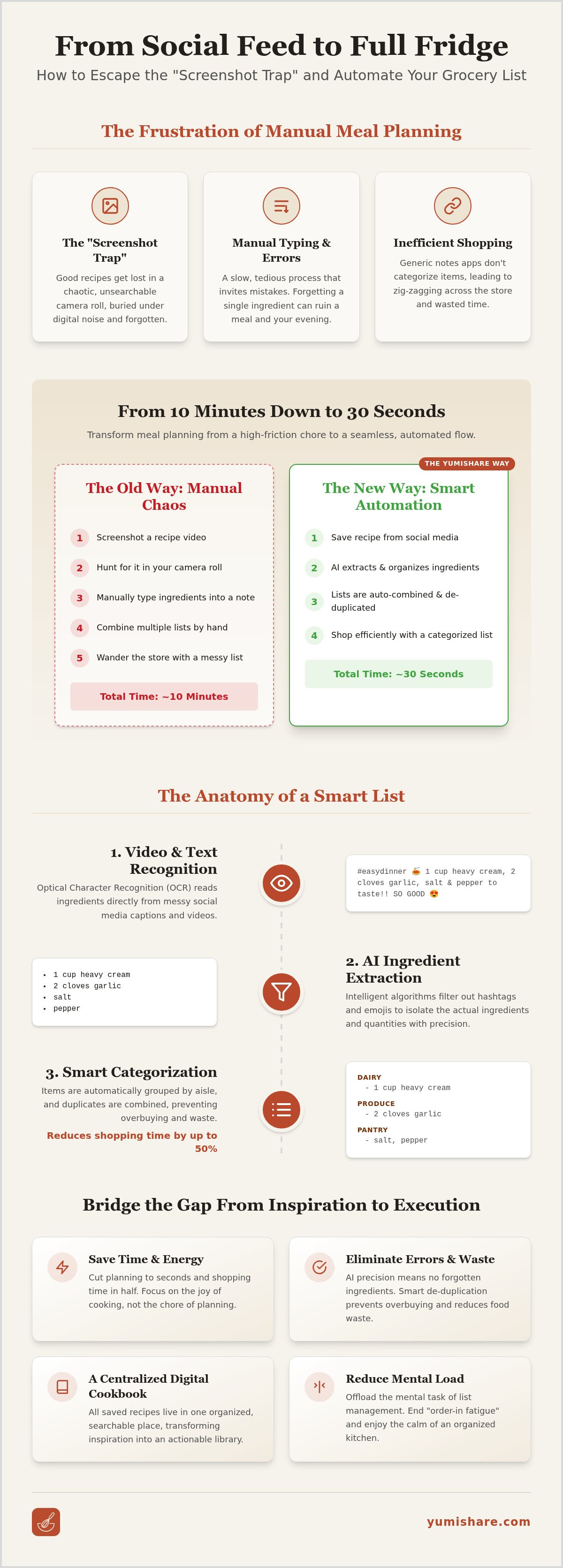
Planning a weekly menu shouldn't feel like a part-time job. In 2026, we're surrounded by endless culinary inspiration on TikTok and Instagram. Yet, the bridge between a saved video and a cooked meal is often broken. Manual data entry is the primary culprit. When you try to combine recipes into one shopping list by typing every clove of garlic and teaspoon of cumin, you invite errors. It's a high mental cost for a low-reward task. This friction often leads to order-in fatigue because the path to the grocery store feels too steep. The mental load of managing these fragmented lists is the invisible barrier to a home-cooked meal. We call this the digital-to-physical gap, where your brain gets tired before you even pick up a spatula.
The Hidden Frustration of Recipe Screenshots
Screenshots are where good recipes go to die. They sit in your camera roll, unsearchable and forgotten. You scroll past photos of pets and work receipts just to find that one pasta dish. Even when you find it, toggling between your gallery and a list app is a recipe for disaster. You miss the heavy cream. You forget the shallots. This isn't just annoying; it's a drain on your digital mindfulness. Instead of this chaos, a dedicated meal planner with grocery list centralizes your inspiration. It turns a static image into actionable data, removing the risk of a ruined dinner and clearing your mental space for the things that matter.
Why Your Notes App Isn’t a Shopping List
Your phone's default notes app is great for quick thoughts. It's terrible for groceries. It doesn't understand that milk belongs in dairy or that apples are in produce. Without smart sorting, you'll find yourself zig-zagging across the store. This inefficiency is a relic of the past. Considering the evolution of online grocery shopping, consumers now expect a seamless digital experience. A generic checklist can't scale quantities for extra guests or automatically combine recipes into one shopping list to remove duplicates. If you have two recipes calling for half an onion, your notes app won't tell you to just buy one. You need a smart grocery list from recipes that understands food categories. It transforms a digital spark into a physical result with zero friction. Focus on the joy of cooking. Reclaim your afternoon and enjoy the calm of an organized kitchen.
The Anatomy of a Smart Grocery List: How AI Extracts Ingredients
A smart grocery list is more than a digital note. It's a living inventory. AI generates this list by scanning unstructured recipe data from social media. It finds the signal in the noise. This technology allows you to combine recipes into one shopping list without the manual labor of typing. It's the difference between a static list and a dynamic tool that works for you. It understands the relationship between a digital spark and the tactile reality of your kitchen.
Turning Social Video Captions into Clean Data
Social media captions are messy. They're filled with emojis, hashtags, and informal slang. Traditional parsers usually fail here. YumiShare uses Optical Character Recognition (OCR) to read text directly from TikTok and Instagram Reels. It identifies quantities and ingredients hidden in the chaos. Ingredient Extraction acts as the bridge between your social media feed and the grocery store. The system recognizes the difference between a main protein and a pinch of salt. It filters out the fluff and leaves only what you need. Try using a Recipe Saver App to see this automation in action and reclaim your mental space.
The Logic of Automated Categorization
Once extracted, the data needs order. Aisle Intelligence automatically groups items into categories like dairy, produce, and pantry. This simple step can reduce your shopping time by up to 50%. You won't find yourself wandering back to the produce section for a single lime. The AI also handles complex unit conversions. It understands that "one cup" and "250ml" are often the same thing, depending on the context of the recipe. It translates the digital recipe into a physical plan with surgical precision.
De-duplication is the final piece of the puzzle. When you combine recipes into one shopping list, the AI merges identical items. If three recipes call for butter, you get one entry with the total amount needed. It prevents overbuying and reduces waste. This transition from inspiration to execution is seamless. It's about moving away from the frantic energy of digital consumption toward the grounded satisfaction of a well-ordered home life. Experience the relief of simplification and the calm of a perfectly organized cart.
Evaluating Your Workflow: Manual vs. Automated List Generators
Manual lists are a relic of a slower era. When you sit down to plan your week, manual typing usually takes about 10 minutes. AI extraction takes just 30 seconds. That's a massive difference in your Sunday afternoon. Beyond time, consider the error rates. Manual entry often leads to forgotten staples like salt or incorrect quantities of main proteins. A simple note is fine for a single item. For a full week of meals, you need a grocery list generator from recipes. It ensures you combine recipes into one shopping list with surgical precision. It's the path toward organization and calm.
Paper lists can't sync. If your partner is already at the store, a paper list on the fridge is useless. Cloud-synced mobile apps allow for instant family sharing. Everyone stays on the same page. This is digital mindfulness in action. It removes the friction of "did you get the milk?" and replaces it with a shared, organized reality. You move away from the frantic energy of forgotten items toward a grounded, tactile satisfaction.
The Time-to-Table Metric
Every minute spent planning is a minute taken away from cooking or relaxing. Analyze the time lost between finding a recipe on TikTok and actually entering the store. Automation drives meal planning consistency. When the process is easy, you're more likely to stick to it. Don't let a clunky workflow stop you from eating well. You can turn web recipes into lists to regain your weekend. It's about moving from a digital spark to a physical result with zero wasted effort. Reclaim your time and focus on the joy of a well-ordered home life.
Accuracy and Reliability in 2026
The AI of 2026 is a different beast than the early, clunky recipe scrapers. It understands context. It knows "1 lb chicken" is an ingredient, not just text. However, a "human-in-the-loop" approach is still vital. You can always edit your smart list to adjust for what you already have in the pantry. It acts as a filter that removes noise and leaves only what is useful.
Comparing workflows reveals a clear winner:
- Manual: Slow (10+ mins), high error rate, no de-duplication.
- URL-based: Faster (2 mins), limited to specific websites.
- AI-Social: Fastest (30 secs), works with TikTok, Instagram, and Reels.
When you combine recipes into one shopping list using AI, you aren't just saving time. You're ensuring a stress-free cooking experience. No more mid-recipe realizations that you forgot a crucial ingredient. Just pure, domestic tranquility and a meal that turns out exactly as you imagined.
The Ultimate Checklist for Ingredient Shopping from Social Recipes
Transformation requires a methodical plan. Moving from a digital spark on your screen to a physical result on your dinner table is easy when you have the right workflow. Follow this five-step checklist to streamline your grocery journey. It’s about moving away from the frantic energy of digital consumption toward the grounded satisfaction of a well-ordered home life. Use this framework to reclaim your mental space and ensure every meal is a success.
- Capture: Save the Reel, TikTok, or Pin to a central location.
- Extract: Run the AI extractor to isolate ingredients and quantities instantly.
- Scale: Review the list and adjust portions based on your household size.
- Sync: Categorize the items by aisle and sync the list to your mobile device.
- Cook: Transition to a hands-free interface once you’re back in the kitchen.
Phase 1: Digital Capture and Extraction
Start by centralizing your inspiration. Whether you’re browsing Instagram or Pinterest, the first step is saving the content where it can be processed. Using the best app for saved recipes ensures that your favorite dishes don't disappear into the digital void of your camera roll. Once saved, trigger the AI extraction. 2026 technology is designed to read through long, messy captions and emojis to find exact measurements. This is the precise moment you combine recipes into one shopping list. Don't just save one meal; batch your inspiration for the entire week. Review the extracted data to ensure it matches your needs. Scale the ingredients up for dinner parties or down for solo meals. This prevents food waste and ensures you buy exactly what you need.
Phase 2: Store Navigation and Execution
Step into the grocery store with empathetic confidence. Your categorized list is now your roadmap. Use the Aisle View to navigate produce, dairy, and pantry sections in a logical, linear flow. This feature removes the noise of the store and lets you focus on the task at hand. Check off items in real-time. It stops the frustrating double-back to the other side of the store for a forgotten lemon. This methodical progression reinforces the sense of effortless organization. Once you return home, your shopping list undergoes a final transformation. It becomes your cook mode for mobile recipes guide. This interface keeps your instructions front and center without you needing to touch the screen with messy hands. It’s the ultimate bridge between digital discovery and real-world execution.
Ready to experience the relief of simplification? Download YumiShare today and turn your social media feed into a perfectly organized shopping list.
Bridge the Gap Between Inspiration and Execution with YumiShare
Social media is the new cookbook. But your TikTok saved folder shouldn't be a digital graveyard. YumiShare is built specifically for the social-media-first home cook. It moves you from a digital spark to a physical result with a single tap. Stop fighting with your phone and start enjoying your kitchen. You can now combine recipes into one shopping list without typing a single word. It’s the ultimate filter that removes digital noise and leaves only what is useful.
The power of automation is at your fingertips. Imagine your TikTok "Dinner Inspo" folder turning into a structured meal plan for the week. YumiShare’s AI identifies the ingredients in your saved videos and organizes them into a smart grocery list. Our premium subscription unlocks unlimited social imports and advanced AI extraction. It’s an investment in your mental space. Reclaim your Sunday afternoons and let technology handle the logistics of your home life. Move away from the frantic energy of digital consumption toward the grounded satisfaction of a well-ordered home.
From Instagram Reels to Your Dinner Table
YumiShare offers a unique ability to sync original videos with extracted recipe text. You don't have to guess the chef's technique or search for the original post while your hands are covered in flour. The video is right there alongside your instructions. This relief comes from having a digital cookbook that actually works. It bridges the gap between seeing a delicious meal and tasting it. Take the first step toward a stress-free shopping journey. Download the app and import your first Instagram Reel today. Experience the satisfaction of a well-ordered pantry and a calm evening.
The Future of Digital Kitchen Organization
As we move through 2026, food trends evolve quickly. YumiShare evolves with them. Our Meal Planner learns your preferences over time, suggesting recipes that fit your lifestyle and dietary needs. It acts as a savvy, organized companion in your pocket. This isn't just software; it's a tool for domestic tranquility. A well-organized kitchen leads to a more manageable daily life. By choosing to combine recipes into one shopping list through YumiShare, you choose clarity over chaos. Focus on the grounded, tactile satisfaction of cooking for the people you love. Let us handle the rest.
Reclaim Your Kitchen with Digital Mindfulness
The journey from a digital spark to a physical result shouldn't be a source of stress. You've learned how to escape the screenshot trap and move toward the relief of simplification. By utilizing AI-powered social media extraction, you can now combine recipes into one shopping list with surgical precision. This transition from digital consumption to a well-ordered home life is the key to domestic tranquility. No more manual typing or forgotten ingredients; just the tactile satisfaction of a plan that actually works.
YumiShare bridges the gap between social inspiration and real-world execution. The app syncs with your original TikTok and Instagram videos, ensuring you never lose the chef's technique. It is available on both iOS and Android to keep your entire household organized. Download YumiShare and turn your saved recipes into smart lists today! Start your stress-free shopping journey and focus on the joy of cooking for the people you love. Your perfectly organized kitchen is just one click away. Reclaim your time and enjoy the calm of a home that runs smoothly.
Frequently Asked Questions
Can I create a shopping list from an Instagram Reel?
Yes, you can instantly generate a shopping list from any Instagram Reel by saving the post to your Recipe Saver App. Our AI technology reads the video captions and extracts ingredients automatically. This removes the need for manual typing or messy screenshots. It’s a seamless way to bridge the gap between social inspiration and your kitchen. Once saved, the items are ready for your next trip to the store.
How does a grocery list generator handle different measurements like metric vs. imperial?
Our smart grocery list generator automatically identifies and converts measurements to your preferred system. Whether the recipe uses grams or ounces, the AI understands the context and scales the quantities appropriately. This feature is essential when you combine recipes into one shopping list, as it ensures all your ingredients are measured consistently. It prevents confusion in the grocery aisle and helps you buy exactly what you need for every dish.
Is it possible to share my generated shopping list with a family member?
Yes, you can easily share your lists with family members through cloud synchronization. Since the app works across both iOS and Android, your partner can see updates in real-time while they are already at the store. This feature promotes domestic tranquility by keeping everyone on the same page. It eliminates duplicate purchases and forgotten items. Simply invite them to your list and experience the relief of a truly organized household.
What happens if the AI misses an ingredient from a TikTok video?
While our AI is highly accurate, you always remain in control. If an ingredient is missed or formatted incorrectly in a TikTok caption, you can manually edit, add, or remove items from your smart list at any time. This approach ensures your list is always 100% reliable. You can quickly double-check the extracted data against the original video, which stays synced within your digital cookbook for easy reference.
Can I add my own items to an automatically generated list?
Absolutely. You can add household staples like milk, eggs, or cleaning supplies to your automatically generated list. The app is designed to be a comprehensive tool for all your shopping needs, not just recipe ingredients. When you combine recipes into one shopping list, you can still keep your regular weekly essentials in the same place. This centralization helps you manage your entire grocery run within a single, organized interface.
Does YumiShare work for recipes found on Pinterest or Facebook?
Yes, YumiShare is built to extract data from multiple social platforms, including Pinterest and Facebook. Simply save the link or the post, and our AI will isolate the ingredients and quantities for your meal plan. This versatility makes it the specific solution for the social-media-first home cook. It transforms digital sparks from across the web into a physical, actionable plan. No matter where you find inspiration, we help you organize it.
Will the shopping list automatically categorize items by aisle?
Yes, your smart grocery list uses Aisle Intelligence to categorize every item automatically. It groups ingredients into logical sections like dairy, produce, and pantry. This organization streamlines your shopping journey because it prevents you from wandering aimlessly across the store. You can navigate the aisles with confidence and speed. It’s a simple way to bring a sense of calm and order to your weekly grocery routine.
Is there a limit to how many recipes I can turn into lists?
There is no limit to how many recipes you can import with a premium subscription. You can save hundreds of dishes to your personal digital cookbook and turn them into lists instantly. This allows you to plan entire months of meals with ease. For those on the free tier, check the current app settings for specific import limits. Investing in the premium version unlocks the full power of our AI-driven organization tools.
FAQ
Can I create a shopping list from an Instagram Reel?
Yes, you can instantly generate a shopping list from any Instagram Reel by saving the post to your Recipe Saver App. Our AI technology reads the video captions and extracts ingredients automatically. This removes the need for manual typing or messy screenshots. It’s a seamless way to bridge the gap between social inspiration and your kitchen. Once saved, the items are ready for your next trip to the store.
How does a grocery list generator handle different measurements like metric vs. imperial?
Our smart grocery list generator automatically identifies and converts measurements to your preferred system. Whether the recipe uses grams or ounces, the AI understands the context and scales the quantities appropriately. This feature is essential when you combine recipes into one shopping list, as it ensures all your ingredients are measured consistently. It prevents confusion in the grocery aisle and helps you buy exactly what you need for every dish.
Is it possible to share my generated shopping list with a family member?
Yes, you can easily share your lists with family members through cloud synchronization. Since the app works across both iOS and Android, your partner can see updates in real-time while they are already at the store. This feature promotes domestic tranquility by keeping everyone on the same page. It eliminates duplicate purchases and forgotten items. Simply invite them to your list and experience the relief of a truly organized household.
What happens if the AI misses an ingredient from a TikTok video?
While our AI is highly accurate, you always remain in control. If an ingredient is missed or formatted incorrectly in a TikTok caption, you can manually edit, add, or remove items from your smart list at any time. This approach ensures your list is always 100% reliable. You can quickly double-check the extracted data against the original video, which stays synced within your digital cookbook for easy reference.
Can I add my own items to an automatically generated list?
Absolutely. You can add household staples like milk, eggs, or cleaning supplies to your automatically generated list. The app is designed to be a comprehensive tool for all your shopping needs, not just recipe ingredients. When you combine recipes into one shopping list, you can still keep your regular weekly essentials in the same place. This centralization helps you manage your entire grocery run within a single, organized interface.
Does YumiShare work for recipes found on Pinterest or Facebook?
Yes, YumiShare is built to extract data from multiple social platforms, including Pinterest and Facebook. Simply save the link or the post, and our AI will isolate the ingredients and quantities for your meal plan. This versatility makes it the specific solution for the social-media-first home cook. It transforms digital sparks from across the web into a physical, actionable plan. No matter where you find inspiration, we help you organize it.
Will the shopping list automatically categorize items by aisle?
Yes, your smart grocery list uses Aisle Intelligence to categorize every item automatically. It groups ingredients into logical sections like dairy, produce, and pantry. This organization streamlines your shopping journey because it prevents you from wandering aimlessly across the store. You can navigate the aisles with confidence and speed. It’s a simple way to bring a sense of calm and order to your weekly grocery routine.
Is there a limit to how many recipes I can turn into lists?
There is no limit to how many recipes you can import with a premium subscription. You can save hundreds of dishes to your personal digital cookbook and turn them into lists instantly. This allows you to plan entire months of meals with ease. For those on the free tier, check the current app settings for specific import limits. Investing in the premium version unlocks the full power of our AI-driven organization tools.