
 Polski
  Deutsch
  Español
  Français
  Italiano
  Português
  Nederlands
  Svenska
  Українська
  Русский
 Smart Grocery List From Recipes: The 2026 Guide to Automated Shopping
Instantly create a smart grocery list from recipes you find online. Our 2026 guide shows you how AI tools automate shopping to save you time and stress.

You're standing in the middle of a crowded grocery aisle, frantically scrubbing through a 60-second TikTok video to find the exact amount of heavy cream needed for tonight's pasta. It's a familiar, frustrating dance. Typing ingredients into your Notes app is tedious. You always seem to miss one crucial item and end up heading back to the store. In 2026, you shouldn't have to work this hard. Generating a smart grocery list from recipes found on social media is no longer a manual chore. It's an automated reality that saves your time and your sanity.
We all know the struggle of scattered digital inspiration that never quite makes it to the dinner table. You deserve a streamlined path from discovery to delicious. This guide explores how to turn those saved Instagram reels and Pinterest pins into a single, organized shopping list in seconds. We'll show you how AI-powered tools like YumiShare can instantly extract ingredients, organize them by aisle, and sync everything to your phone. Get ready to ditch the manual typing and embrace a stress-free, modern way to shop.
Key Takeaways
- Learn how AI converts messy recipe text into a structured smart grocery list from recipes for instant organization.
- Bridge the gap between social media inspiration and the store by importing ingredients directly from video captions.
- Discover the psychological relief of moving from scattered digital notes to a single, centralized meal database.
- Optimize your movement through the store with automatic aisle-based grouping that mimics professional efficiency.
- Prepare for a smoother kitchen workflow using hands-free digital tools that guide you through every step.
What is a smart grocery list from recipes and how does it work?
A smart grocery list from recipes is more than a simple checklist on your phone. It's a dynamic tool that transforms raw recipe text into structured, actionable data. Think of it as a bridge between the inspiration you find on social media and the physical items in your cart. Instead of just storing words, these lists understand what you need to buy, how much of it, and where to find it in the store. It's the difference between a static note and a living database.
The shift from manual Notes app entries to AI-integrated databases marks a major turning point in home organization. Manual entry is slow. It's prone to errors. You likely know the frustration of scrolling through a video three times just to write down the spice list. Automation eliminates this copy-paste fatigue entirely. By using a sophisticated meal planner with grocery list, you sync your entire week's inspiration into one cohesive plan without typing a single word. This synchronization ensures that your shopping needs update the moment you save a new idea.
The evolution of the digital grocery list
We've come a long way from scribbling on the back of envelopes. First, we moved to basic mobile checklists that simply replaced paper. Then came the clipping era, where you could save URLs or use basic web scrapers to pull text from blogs. By 2026, we've entered the age of AI-powered extraction. Today's technology doesn't just look for text on a page. It watches videos and reads captions on platforms like TikTok and Instagram to find exactly what you need. It's a frictionless movement from digital spark to physical result.
Key components of a truly intelligent list
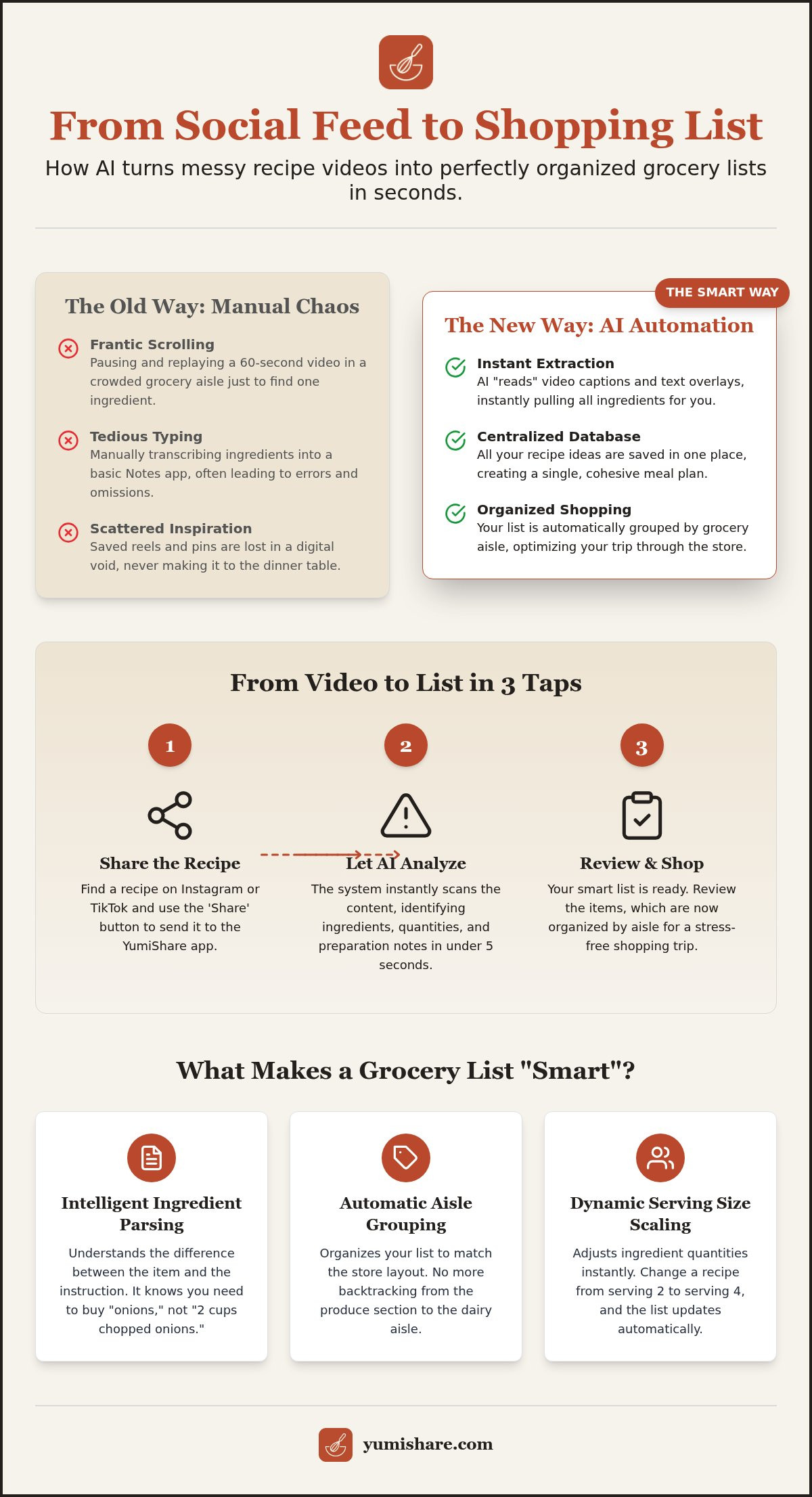
Intelligence in a shopping list relies on three core pillars. First is ingredient parsing. This means the system understands the difference between "2 cups chopped onions" and just "onions." It identifies the core product while keeping the preparation instructions for your cook mode later. No more buying pre-chopped items by mistake because the recipe title was confusing.
Second is auto-categorization. The app groups your items by grocery store aisles like Produce, Dairy, or Pantry. This logic is a natural extension of the broader online food ordering industry, which revolutionized how we categorize food data for efficiency. Finally, dynamic scaling allows you to adjust serving sizes on the fly. If a recipe serves two but you're hosting four, the list updates your quantities instantly. This removes the need for mental math while you're standing in a busy aisle.
How to generate a shopping list from Instagram and TikTok recipes
Most of us find our next favorite dinner while scrolling through social media. You see a vibrant pasta dish on Instagram or a quick air fryer hack on TikTok. You hit the save button. But then what? Usually, the inspiration dies there because transcribing that video feels like a second job. Typing ingredients from a tiny screen into a notes app is a recipe for frustration. AI technology has finally caught up to our scrolling habits. By using a smart grocery list from recipes, you can bridge the gap between a viral clip and a successful trip to the store.
YumiShare's AI specifically targets this social media workflow. It doesn't just look for a link; it "reads" the content itself. It scans video captions for ingredient lists and parses text overlays that pop up on the screen. This allows you to turn recipes into shopping lists with a single click. The speed is remarkable. You can take a complex 30-second video and generate a full, categorized list in under 5 seconds. It's a digital filter that removes the noise and leaves only what you need to buy.
Extracting ingredients from social media videos
Stop the manual typing. Your phone should work for you, not the other way around. Follow these three simple steps to automate your planning process immediately.
- Step 1: Share the video. Open your Reel or TikTok and hit the share icon. Send it directly to the YumiShare app.
- Step 2: Let the AI parse. The app instantly analyzes the captions and visual text to identify ingredients, quantities, and preparation steps.
- Step 3: Review and approve. Give the structured recipe a quick glance to ensure everything looks correct. Hit save, and your items are added to your weekly list.
Handling non-standard recipe formats
Not every creator is organized. Some forget measurements in the caption. Others only mention a "pinch of salt" or "three cloves of garlic" in the audio or a quick text bubble. YumiShare’s AI is designed to handle these messy formats. It looks for context clues in text overlays to fill the gaps. If a measurement is truly missing, the app highlights it for you. You can use the quick-edit feature to add your own tweaks in seconds. This ensures your list is perfect before you leave the house. If you're ready to stop the manual struggle, you can start using the YumiShare app and experience the relief of automated organization.
Smart lists vs. manual notes: Why automation wins in 2026
Manual note-taking is a relic of a slower era. We've all sat at the kitchen table on a Sunday, squinting at a phone screen to transcribe ingredients into a basic checklist. It's a tedious ritual that drains your mental energy before the week even begins. In contrast, a smart grocery list from recipes generates your entire shopping plan in seconds. This shift toward automation isn't just about saving time. It's about accuracy. When you manually type, you miss things. You misread measurements or skip over the one unique spice that makes the dish work. Automation removes the human error that leads to mid-week store runs.
The rise of the meal planning app reflects a growing demand for digital mindfulness. We want tools that act as filters, removing the noise of data entry and leaving only the results. Recent data from the U.S. Grocery Shopper Trends report shows that modern shoppers are increasingly relying on these integrated tools to manage busy schedules. They aren't just looking for a place to store recipes; they want a system that executes the plan for them. Automation provides the bridge between a digital save and a physical meal.
The hidden cost of manual list-making
The time you spend writing a list is only the first cost. The real price is paid at the grocery store. Manual lists are rarely sorted by aisle. You find yourself in the dairy section, only to realize you missed a lemon back in produce. This back-and-forth makes shopping take twice as long as it should. It's frustrating. It's inefficient. Even mobile checklists often fail here, as they require you to manually categorize every item you type. One typo can hide an ingredient in the wrong section, ensuring you'll have to double back later. The mental fatigue of tracking a messy list is a burden you no longer need to carry.
The automation advantage: Efficiency and peace of mind
Automation transforms the shopping experience into a streamlined walk-through. By utilizing aisle-by-aisle sorting, these tools can reduce your time in the store by up to 40%. You move with purpose because your list is already grouped logically. Produce items are together. Dairy is consolidated. You never have to wonder if you've missed something in a specific section. Peace of mind comes from knowing the AI caught every detail.
- Cloud synchronization: Your list lives in the cloud, not on a paper scrap left on the counter. It's always in your pocket.
- Real-time sharing: Update your list and your partner sees it instantly. No more "did you get the milk?" texts while they're already at the checkout.
- Dynamic updates: Add a fifth recipe to your week and the list integrates the new ingredients into your existing categories automatically.
This level of organization turns a chaotic chore into a quiet, efficient task. You save your time. You save your sanity. Most importantly, you ensure that every ingredient you need for that viral social media recipe actually makes it into your kitchen.
How to optimize your shopping trip with AI-powered categorization
Shopping shouldn't feel like a scavenger hunt. You need a smart grocery list from recipes that understands the physical layout of your store. Most apps just provide a static list of words. A truly intelligent system acts as a central hub for your culinary life. By using the best app for saved recipes, you bridge the gap between digital inspiration and the physical aisles. This technology doesn't just store data; it optimizes your movement. It learns your store's geography as you check items off. Over time, it adapts to your specific workflow, ensuring your path is as direct as possible.
Mastering the 'Aisle-by-Aisle' workflow
Efficiency is the primary goal of any automated list. The AI groups your items into logical segments like Produce, Meat, Dairy, Frozen, and Pantry. This organization prevents the "forgotten lemon" scenario. You won't find yourself in the dairy section only to realize you missed an item back at the start of the store. Tap. Check. Move on. The interface stays clean and focused. You can even customize categories to match the unique quirks of your favorite local shop. This level of personalization turns a chaotic chore into a quiet, methodical walk through the store.
- Group logically: Items are automatically placed in their respective departments.
- Customize layouts: Rearrange categories to match your specific store's flow.
- Stay updated: Check off items with a single tap to see exactly what remains.
Consolidating ingredients across multiple recipes
Managing five or more recipes for the week is a mathematical headache. You don't want to buy three separate bags of onions because three different recipes called for them. This is where the "Smart Combine" feature becomes essential. Ingredient Consolidation is the process of summing identical items across a weekly plan to prevent over-buying. If Recipe A requires half an onion and Recipe B requires a whole one, your list simply says "2 Onions." It does the math so you don't have to.
The system also distinguishes between pantry staples and trip-specific items. It knows that salt and olive oil are likely already in your cabinet, while fresh basil is a must-buy for tonight's dinner. This filter removes the noise and leaves only the essentials. You save money by avoiding duplicates. You save time by knowing exactly what you need. Ready to transform your Sunday routine? Download the YumiShare app today and experience the relief of a perfectly organized shopping trip.
YumiShare: The ultimate smart grocery list generator from recipes
You've seen how automation changes the game. Now, it's time to choose the right partner for your kitchen. YumiShare is built specifically for the social media age. It's the bridge between a saved reel and a finished meal. While other apps focus on manual entry or basic web clipping, YumiShare prioritizes the platforms where you actually find inspiration. It handles the messy reality of TikTok captions and Instagram text overlays with ease. Generating a smart grocery list from recipes becomes a background task, not a chore. You focus on the cooking; the app handles the logistics.
The transition from scrolling to shopping is now seamless. You no longer need to toggle between apps or take screenshots that clutter your photo gallery. YumiShare acts as a savvy, organized companion that values your time. It respects your mental space by acting as a filter, removing the noise of the digital world and leaving only the tactile satisfaction of a well-planned week. It's efficiency meets domestic tranquility.
Why YumiShare is the best recipe keeper alternative
Digital mindfulness is at the heart of the YumiShare experience. It's about removing noise. Most apps act as cluttered warehouses for links you'll never visit again. YumiShare acts as a filter. It extracts only what matters: the ingredients and the steps. This makes it a powerful recipe keeper alternative for those who value clarity over complexity. The synergy between the smart list and Cook Mode is effortless. Once you're back from the store, the app guides you through the preparation with a hands-free interface. No more greasy fingers on your phone screen. Just pure, focused cooking.
For those who want to push their organization further, premium features offer deeper insights. Unlock unlimited AI imports to save every idea that catches your eye. Use nutrition analysis to track your weekly health goals automatically. It's a comprehensive system designed to bridge the gap between digital inspiration and real-world execution.
Getting started: Your first smart list in 60 seconds
Don't let another great recipe sit forgotten in your saved folder. You can modernize your routine right now. The process is quick, intuitive, and designed for immediate results. Follow these steps to transform your shopping experience.
- Download the app: Create your free account to start organizing your digital kitchen.
- Import a creator's recipe: Choose a post from your favorite Instagram or TikTok chef and share it directly to YumiShare.
- Add to your list: Tap the "Add to Shopping List" button. Watch as the AI parses, categorizes, and consolidates your items instantly.
Experience the satisfaction of a well-ordered home life. Move away from the frantic energy of manual lists and toward a calmer, more efficient kitchen. Start building your smart grocery list with YumiShare today!
Step into a Smarter Kitchen Today
The days of scrolling through videos while standing in a busy grocery aisle are over. You've seen how AI-powered extraction from Instagram and TikTok can turn a digital spark into a physical result in seconds. By adopting a smart grocery list from recipes, you reclaim your Sunday afternoons and eliminate the stress of forgotten ingredients. Aisle-by-aisle organization ensures you move through the store with purpose; meanwhile, ingredient consolidation prevents the waste of over-buying. It's about moving away from digital overwhelm and toward the grounded satisfaction of a well-ordered home.
Your journey doesn't end at the checkout counter. With hands-free Cook Mode integration, the same app that built your list now guides your hands in the kitchen. This seamless flow from social discovery to the final plate is the new standard for 2026. You deserve an organized companion that respects your time and mental space. Don't let your favorite recipes stay trapped in a saved folder any longer. Take the first step toward a more tranquil and efficient household right now.
Stop manual typing and start your smart grocery list with YumiShare! You're ready to master your meal planning and enjoy a stress-free cooking experience every single night.
Frequently Asked Questions
How do I create a grocery list from multiple recipes at once?
Select all your desired recipes within the meal planner and tap the "Add to Shopping List" button. The app instantly aggregates every ingredient from your chosen meals into one master list. This prevents you from having to manage separate checklists for every meal. It provides a single, unified view of your entire week's needs in one place.
Can I share my smart grocery list with my spouse or partner?
You can sync your list across multiple devices using real-time cloud synchronization. Simply log in with the same account on your partner's phone to see immediate updates. When one person checks off an item in the store, it disappears from the other person's screen instantly. This coordination stops duplicate purchases and ensures you stay on the same page.
Does the app work with recipes from Instagram and TikTok?
YumiShare is specifically designed to extract data from social media video captions and text overlays. Just share the Reel or TikTok video directly to the app to generate your smart grocery list from recipes. The AI reads the visual and written content to find ingredients that traditional "clipping" tools often miss, making it a powerful tool for social discovery.
Will the smart list combine similar ingredients automatically?
The app uses a "Smart Combine" feature to merge identical items into a single, consolidated quantity. If three different recipes call for half an onion, your list will simply show "1.5 Onions" in the produce section. This ingredient consolidation is essential for preventing over-buying and keeping your pantry organized without any manual math on your part.
Can I add custom items to the list that aren't in a recipe?
You can add non-recipe items like dish soap or snacks using a quick-add button. These items are automatically sorted into the correct store aisles alongside your recipe ingredients. This ensures your entire shopping trip is managed in one central hub. You don't have to jump between different apps to find your household essentials.
Does YumiShare work on both iPhone and Android?
YumiShare is currently available on iOS for iPhone users. An Android version is announced as "coming soon" as of August 2026. iPhone users can download the app today to start organizing their digital kitchen and syncing lists across all their Apple devices. This ensures your meal plans are always accessible whenever you have your phone.
Is there a limit to how many recipes I can add to one list?
There is no technical limit to the number of recipes you can add to a single shopping list. Whether you are planning three meals or twenty, the app scales to handle the data effortlessly. The AI continues to organize and consolidate ingredients regardless of how complex your smart grocery list from recipes becomes during your weekly planning session.
How does the AI handle ingredients with different units (e.g., grams vs. ounces)?
The AI automatically converts and normalizes different units of measurement to provide a clear, unified total. It understands the relationship between metric and imperial units to ensure your consolidated quantities are accurate. This removes the need for manual conversions while you're shopping. You can trust the totals without doing any mental gymnastics in the aisle.
FAQ
How do I create a grocery list from multiple recipes at once?
Select all your desired recipes within the meal planner and tap the "Add to Shopping List" button. The app instantly aggregates every ingredient from your chosen meals into one master list. This prevents you from having to manage separate checklists for every meal. It provides a single, unified view of your entire week's needs in one place.
Can I share my smart grocery list with my spouse or partner?
You can sync your list across multiple devices using real-time cloud synchronization. Simply log in with the same account on your partner's phone to see immediate updates. When one person checks off an item in the store, it disappears from the other person's screen instantly. This coordination stops duplicate purchases and ensures you stay on the same page.
Does the app work with recipes from Instagram and TikTok?
YumiShare is specifically designed to extract data from social media video captions and text overlays. Just share the Reel or TikTok video directly to the app to generate your smart grocery list from recipes. The AI reads the visual and written content to find ingredients that traditional "clipping" tools often miss, making it a powerful tool for social discovery.
Will the smart list combine similar ingredients automatically?
The app uses a "Smart Combine" feature to merge identical items into a single, consolidated quantity. If three different recipes call for half an onion, your list will simply show "1.5 Onions" in the produce section. This ingredient consolidation is essential for preventing over-buying and keeping your pantry organized without any manual math on your part.
Can I add custom items to the list that aren't in a recipe?
You can add non-recipe items like dish soap or snacks using a quick-add button. These items are automatically sorted into the correct store aisles alongside your recipe ingredients. This ensures your entire shopping trip is managed in one central hub. You don't have to jump between different apps to find your household essentials.
Does YumiShare work on both iPhone and Android?
YumiShare is currently available on iOS for iPhone users. An Android version is announced as "coming soon" as of August 2026. iPhone users can download the app today to start organizing their digital kitchen and syncing lists across all their Apple devices. This ensures your meal plans are always accessible whenever you have your phone.
Is there a limit to how many recipes I can add to one list?
There is no technical limit to the number of recipes you can add to a single shopping list. Whether you are planning three meals or twenty, the app scales to handle the data effortlessly. The AI continues to organize and consolidate ingredients regardless of how complex your smart grocery list from recipes becomes during your weekly planning session.
How does the AI handle ingredients with different units (e.g., grams vs. ounces)?
The AI automatically converts and normalizes different units of measurement to provide a clear, unified total. It understands the relationship between metric and imperial units to ensure your consolidated quantities are accurate. This removes the need for manual conversions while you're shopping. You can trust the totals without doing any mental gymnastics in the aisle.