
 Polski
  Deutsch
  Español
  Français
  Italiano
  Português
  Nederlands
  Svenska
  Українська
  Русский
 Turn Web Recipes into Lists: 2026 Automated Shopping Guide
Instantly turn web recipes into lists with our 2026 guide. Use AI to create smart, categorized shopping lists from any URL and end grocery store chaos.

You're standing in a crowded grocery aisle, scrolling through a food blog to find an ingredients list buried beneath a long story about a summer in Tuscany. By the time you find the measurements, you realize you missed the heavy cream three aisles back. It's a familiar cycle of digital overwhelm. We save inspiration on Instagram, Pinterest, and TikTok, yet we still end up manually typing items or squinting at blurry screenshots. You deserve a more grounded, tactile satisfaction from your cooking routine.
In this guide, you'll learn how to turn web recipes into lists using AI-driven automation. We'll show you how to eliminate manual transcription errors and bypass recipe fluff forever. We explore the tools that transform any URL into a perfectly categorized shopping list in seconds. You'll discover how to build a centralized digital cookbook that syncs across your devices. Let's move from digital discovery to a well-ordered home life with one-click efficiency.
Key Takeaways
- Stop the "tab-switching" dance between recipe blogs and notes apps to reclaim your time and mental space.
- Discover how AI extraction technology identifies ingredients and quantities to prevent costly transcription errors.
- Master a streamlined workflow to turn web recipes into lists using automated share extensions and one-click imports.
- Centralize your scattered "saved" folders from TikTok, Pinterest, and Instagram into one unified, searchable digital cookbook.
- Transform chaotic ingredients into smart grocery lists that automatically categorize items by aisle for a faster, calmer shopping experience.
The Digital Friction: Why Manual Recipe Lists are Failing You
Manual planning feels like a chore because it is. You find a great dish online, but the path to your plate is blocked by busywork. Toggling between a mobile browser and a notes app creates tab-switching fatigue. It breaks your creative flow. It turns a moment of inspiration into a tedious data entry task. When you try to turn web recipes into lists by hand, you're fighting against the very technology that should be helping you.
One small typo changes everything. If you miss a teaspoon of baking powder or mistake cloves for bulbs of garlic, the meal is compromised. These transcription errors happen most often when you're rushed. Many of us default to photos to save time, but you should stop taking recipe screenshots immediately. They are digital dead-ends. You can't search them; you can't scale them; and they don't help you shop. By 2026, the personal digital recipe box has evolved. It's no longer a static folder of images. It's a dynamic, searchable database that works for you.
The High Cost of "Free" Manual Planning
Manual list-making isn't actually free. It costs you precious time. Spending 15 to 20 minutes per meal on searching and transcribing adds up to hours of lost weekends every month. There is also a heavy mental load. You're constantly trying to remember if you have cumin in the pantry while staring at a screen. This leads to the "forgotten item" tax. One missing ingredient results in an extra trip to the store. It wastes fuel and drains your energy. Simplify your life by automating the process.
Moving from Inspiration to Execution
Social media platforms are the modern cookbooks. We discover dinner through a viral TikTok or a Pinterest pin. However, these platforms lack a direct link to your grocery cart. They offer inspiration without the infrastructure for execution. To bridge this gap, we need structured data. While early efforts like RecipeML attempted to standardize recipe formats using XML, modern AI does the heavy lifting today. It identifies the "one cup of diced onions" and turns it into a clean line item. This technology allows you to turn web recipes into lists without the friction. It creates a seamless path from a digital spark to a physical result on your kitchen table.
How AI Extraction Turns Web Recipes into Structured Lists
Web-to-list AI is the quiet engine driving modern kitchen efficiency. This technology identifies ingredients, quantities, and units within unstructured text. It allows you to turn web recipes into lists with clinical precision. Unlike the brittle web scrapers of the past, 2026 AI models handle the chaotic formatting found in food blogs and social media captions with ease. They don't just copy text; they understand it.
Natural Language Processing (NLP) is the specific technology at work. It breaks down a phrase like "1 cup of diced onions" into three distinct data points: Quantity (1), Unit (cup), and Item (onions). This process is foundational to Stanford NLP research on recipe extraction, which explores how machines navigate the linguistic quirks of culinary instructions. For creators who post text-heavy reels, Optical Character Recognition (OCR) scans the screen to pull data where copy-pasting is blocked. This ensures you can turn web recipes into lists regardless of the original format.
The Magic of Ingredient Parsing
Ingredient parsing is the core of modern meal prep. This technology recognizes synonyms instantly. It knows that "scallions" and "green onions" are the same item. It also handles scaling. If you need to feed ten people instead of four, the AI recalculates every measurement automatically. Perhaps most importantly, it filters out the noise. It skips the 1,000-word story about a rainy afternoon and goes straight to the data. You get the clarity you need without the fluff.
Smart Categorization for Faster Shopping
A flat list is better than a screenshot, but a categorized list is a game changer. This technology creates a "Store-Path" for you. It groups items by aisle: Produce, Dairy, Meat, and Pantry. Using a smart grocery list from recipes can reduce your total shopping time by 30% according to current user efficiency trends. You no longer wander aimlessly between aisles. You move with purpose.
Experience this level of organization yourself by using YumiShare's automated extraction tools to simplify your weekly shop. Transitioning from digital inspiration to a physical grocery cart has never felt more natural.
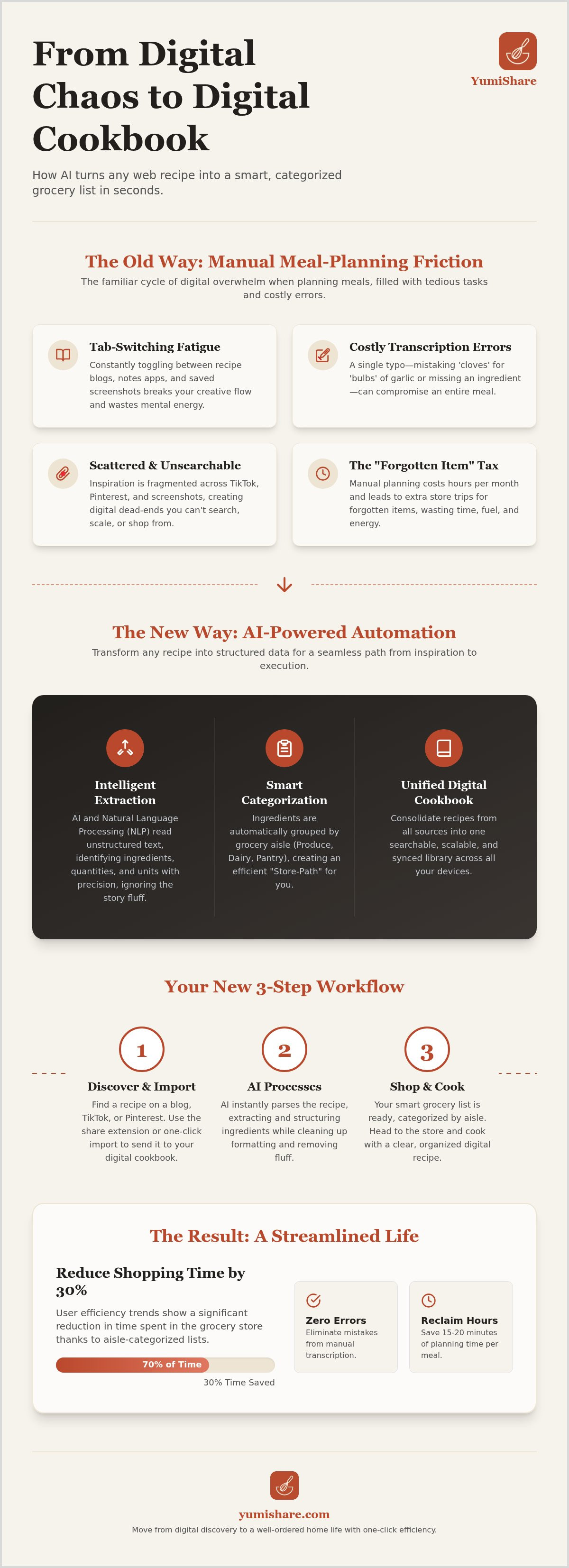
5 Steps to Convert Any Web Recipe into a Smart Grocery List
Transitioning from a digital discovery to a physical grocery cart requires more than just a bookmark. It requires a system. To effectively turn web recipes into lists, follow this methodical workflow. It removes the friction of manual entry and ensures you never miss a vital ingredient again. This process bridges the gap between seeing a dish and serving it.
Step 1: Capturing the Source URL
Start by identifying your inspiration. Whether it's a viral TikTok, a Pinterest pin, or a traditional blog post, the URL is your key. There's a vital difference between "saving" a link and "importing" a recipe. Saving just adds to the digital clutter. Importing extracts the raw data. Use a browser extension or a mobile "Share" icon to send the link directly to your recipe manager. If you encounter a paywall or a persistent newsletter popup, try copying the ingredient text directly. Modern AI can still parse this unstructured text into a clean format with ease.
Step 2: Refining the AI Extraction
AI provides the foundation, but you provide the final touch. Once the data is extracted, scan for "optional" items. Remove the toasted sesame seeds if they aren't your style. This is also the time to account for pantry staples. Most creators assume you have salt, pepper, and olive oil. If you're running low, add them manually now. One of the most powerful features of 2026 tools is the ability to merge duplicates. If you're cooking three different dishes that all require garlic, the system should consolidate these into a single total. This prevents you from buying three separate bulbs when you only need one.
Step 3: Verify and Scale. Before finalizing, check the serving sizes. If you're hosting a dinner party, use the scaling tool to adjust quantities instantly. The AI recalculates everything, from grams to teaspoons, ensuring the ratios remain perfect. This step eliminates the mental math that often leads to kitchen disasters.
Step 4: Generate the List. With one tap, consolidate your ingredients into a categorized checklist. This transforms a messy group of items into a logical path through the store. Produce first, then dairy, then the inner aisles. To turn web recipes into lists that actually work, categorization is non-negotiable. It turns a thirty-minute chore into a ten-minute breeze.
Step 5: Sync and Shop. Finally, let the cloud do the work. Your list should sync immediately to your mobile device. When you walk into the store, your phone becomes your savvy companion. Check off items as you go. Experience the grounded satisfaction of a well-ordered shop and a stress-free evening in the kitchen.
Consolidating Fragmented Sources: TikTok, Pinterest, and Web Articles
Digital inspiration is everywhere, but it's often trapped in silos. You have a "Food" board on Pinterest, a "Saved" folder on Instagram, and a dozen open tabs on your browser. This "Social Media Silo" problem makes it nearly impossible to turn web recipes into lists without a headache. You spend more time hunting for the right link than you do actually cooking. Centralization is the cure for this digital overwhelm.
A dedicated pinterest recipe importer acts as a bridge. It pulls your scattered pins into a single, organized digital cookbook. Instead of jumping between apps, you have one source of truth. This tool identifies the data within the pin and prepares it for your grocery list. It turns a fragmented collection of images into a functional database for your kitchen.
Turning Viral Videos into Shopping Lists
Video based recipes are the hardest to shop for manually. You have to pause, rewind, and type while squinting at a screen. It's a recipe for frustration. AI driven extraction removes this friction by converting Instagram Reels and TikTok captions into readable, list-ready text. Once you turn web recipes into lists, the "Cook Mode" advantage kicks in. This feature syncs your categorized shopping list back to the original video instructions. It ensures that the inspiration you found on social media stays with you until the final garnish is added.
The Power of a Unified Meal Plan
A single "Master List" is the final step in true kitchen organization. You can plan weekly meals by simply dragging and dropping your web imports into a calendar. This birds eye view offers significant budgeting benefits. You see the total ingredient count before you ever hit the store. This high energy approach to planning reduces food waste. You buy exactly what the web recipes require, nothing more. It replaces the frantic energy of last minute shopping with the grounded satisfaction of a well ordered home.
Stop letting your favorite recipes stay scattered across the internet. Use YumiShare's consolidation features to bring all your digital inspiration into one smart, searchable home.
Optimizing Your Grocery Workflow with YumiShare
YumiShare serves as the definitive bridge between your digital inspiration and a well-ordered home. While we've explored the technology behind extraction, this platform is where that theory becomes practice. It is the fastest way to turn web recipes into lists in 2026. By removing the manual labor of transcription, it leaves you with more time for the actual craft of cooking. It's about moving from a state of overwhelm to a state of calm.
Efficiency is built into every layer of the interface. Use the cross-platform synchronization to start your research on a desktop and finish it in the grocery aisle. Your data moves with you. Beyond the list, the app provides advanced nutrition analysis for every web find. It automatically calculates the health impact of your meals so you don't have to. The final step in this digital-to-physical transformation is the hands-free Cook Mode. It keeps your instructions clear and accessible, preventing messy fingers from touching your screen.
Why YumiShare is the 2026 Standard
This platform is built with deep empathy for the modern user. We know you find your best meals on social media, not just in traditional cookbooks. YumiShare respects that discovery process. It prioritizes efficiency by requiring minimal clicks to move from a "Saved" post to a "Smart Grocery List." This is digital mindfulness in action. By filtering out the ads, stories, and popups, it removes the noise of the web and lets you focus entirely on the food. It's a savvy, organized companion that values your mental space.
Getting Started: Your First List in Under 60 Seconds
Transformation doesn't have to be a long process. You can reclaim your kitchen organization in less than a minute. Follow these simple steps to begin your journey toward a more manageable daily life:
- Download the app and create your account to enable cloud sync across all your devices.
- Use the "Import" feature on any URL from Pinterest, TikTok, or your favorite food blog.
- Watch as the AI parses the text and categorizes every ingredient into a smart checklist immediately.
- Review the quantities, scale the servings if you're hosting guests, and head to the store with confidence.
Stop fighting with blurry screenshots and fragmented notes apps. Experience the relief of a streamlined workflow that respects your time and your love for cooking. Turn your first web recipe into a list with YumiShare today!
Master Your Digital Meal Planning
You no longer have to feel overwhelmed by the endless stream of digital inspiration. Moving from a chaotic "Saved" folder to a structured kitchen requires the right tools. By shifting from manual transcription to AI automation, you eliminate the friction that ruins your cooking flow. You've learned how to centralize fragmented sources from TikTok and Pinterest into a single, searchable home. This transition allows you to turn web recipes into lists with one-click efficiency. It replaces the frantic energy of the grocery store with the grounded satisfaction of a well-ordered plan.
YumiShare is the 2026 standard for modern home cooks. It provides AI-powered ingredient parsing and syncs across all your mobile devices. Join the thousands of users who have already simplified their weekly shop. Start turning web recipes into smart lists with YumiShare to experience the relief of true organization. Your next great meal is just a click away. Step into your kitchen with confidence and calm.
Frequently Asked Questions
How do I turn a website recipe into a grocery list automatically?
Use an app like YumiShare with AI-powered extraction. Copy the recipe URL or use the "Share" extension on your mobile browser. The system identifies ingredients and quantities to generate a categorized checklist instantly. This process eliminates manual typing and ensures your list is ready for the store in seconds.
Can I convert a recipe from a TikTok video into a shopping list?
Yes, you can. Import the TikTok link into your recipe manager. The AI extracts the ingredient data from captions and descriptions to turn web recipes into lists without the hassle of pausing the video. It's the most efficient way to capture viral culinary trends for your weekly meal plan.
What is the best app for turning web recipes into lists in 2026?
YumiShare is the leading solution for 2026. It stands out by combining AI-driven ingredient extraction with cross-platform synchronization. It's designed specifically for people who find inspiration on social media and need a savvy, organized companion to bridge the gap between digital discovery and real-world execution.
Does YumiShare work with recipes from Instagram Reels?
Yes, YumiShare supports Instagram Reels imports. Simply use the "Share" button on the Reel and select the app. The AI scans the caption and text to build your smart grocery list immediately. It removes the noise of social media so you can focus on the food.
How does AI ingredient extraction handle different measurements?
The AI uses Natural Language Processing to identify quantities, units, and items. It understands measurements like "grams" or "cups" and recognizes synonyms like "scallions" versus "green onions." You can even scale the servings, and the system recalculates every ingredient measurement for you automatically.
Can I combine ingredients from multiple web recipes into one list?
Yes, you can consolidate multiple recipes into a single master list. The app automatically merges duplicate items from different dishes. If three recipes require garlic, the system totals the amount for you. This prevents overbuying and ensures a more efficient trip through the grocery store.
Is there a way to turn Pinterest pins into a grocery list?
Yes, use the Pinterest importer feature to turn web recipes into lists directly from your boards. The tool pulls the underlying data from the pin and organizes it by aisle. This transforms your scattered inspiration into a grounded, tactile plan for your next meal.
Do these tools work on both iPhone and Android?
Yes, YumiShare is available on both iPhone and Android devices. Cloud synchronization ensures your digital cookbook and smart grocery lists are always up to date. You can plan your meals on a tablet at home and access your checklist on your phone at the store.
FAQ
How do I turn a website recipe into a grocery list automatically?
Use an app like YumiShare with AI-powered extraction. Copy the recipe URL or use the "Share" extension on your mobile browser. The system identifies ingredients and quantities to generate a categorized checklist instantly. This process eliminates manual typing and ensures your list is ready for the store in seconds.
Can I convert a recipe from a TikTok video into a shopping list?
Yes, you can. Import the TikTok link into your recipe manager. The AI extracts the ingredient data from captions and descriptions to turn web recipes into lists without the hassle of pausing the video. It's the most efficient way to capture viral culinary trends for your weekly meal plan.
What is the best app for turning web recipes into lists in 2026?
YumiShare is the leading solution for 2026. It stands out by combining AI-driven ingredient extraction with cross-platform synchronization. It's designed specifically for people who find inspiration on social media and need a savvy, organized companion to bridge the gap between digital discovery and real-world execution.
Does YumiShare work with recipes from Instagram Reels?
Yes, YumiShare supports Instagram Reels imports. Simply use the "Share" button on the Reel and select the app. The AI scans the caption and text to build your smart grocery list immediately. It removes the noise of social media so you can focus on the food.
How does AI ingredient extraction handle different measurements?
The AI uses Natural Language Processing to identify quantities, units, and items. It understands measurements like "grams" or "cups" and recognizes synonyms like "scallions" versus "green onions." You can even scale the servings, and the system recalculates every ingredient measurement for you automatically.
Can I combine ingredients from multiple web recipes into one list?
Yes, you can consolidate multiple recipes into a single master list. The app automatically merges duplicate items from different dishes. If three recipes require garlic, the system totals the amount for you. This prevents overbuying and ensures a more efficient trip through the grocery store.
Is there a way to turn Pinterest pins into a grocery list?
Yes, use the Pinterest importer feature to turn web recipes into lists directly from your boards. The tool pulls the underlying data from the pin and organizes it by aisle. This transforms your scattered inspiration into a grounded, tactile plan for your next meal.
Do these tools work on both iPhone and Android?
Yes, YumiShare is available on both iPhone and Android devices. Cloud synchronization ensures your digital cookbook and smart grocery lists are always up to date. You can plan your meals on a tablet at home and access your checklist on your phone at the store.