
 Polski
  Deutsch
  Español
  Français
  Italiano
  Português
  Nederlands
  Svenska
  Українська
  Русский
 Recipe Chaos Solution: How to Organize Your Digital Kitchen in 2026
Find your perfect recipe chaos solution. Learn to organize social media saves into a digital cookbook with AI tools and automated grocery lists. Cook with ease!

You're standing in the grocery aisle, scrolling frantically through your phone gallery for that one TikTok recipe screenshot you saved last Tuesday. You remember the viral pasta looked incredible; now, it's buried under hundreds of photos and work memes. It's a familiar frustration. This digital clutter demands a real recipe chaos solution. Your Instagram saved folder has become a black hole where dinner ideas go to die, and manually typing ingredients into a notes app is simply too tedious.
Imagine moving from a digital spark to a physical result without the friction. This guide shows you how to transform scattered social media bookmarks into a streamlined, searchable digital cookbook. You'll learn to consolidate every screenshot, link, and video into one organized space that respects your mental bandwidth. It is about reclaiming your time and finding the joy in cooking again.
We'll dive into the world of AI-powered extraction and smart organization. Discover how to pull ingredients directly from video links and generate automated grocery lists in seconds. It's time to bridge the gap between social media inspiration and a well-ordered home life. Let's turn that digital clutter into your most valuable kitchen tool.
Key Takeaways
- Learn why your saved folders on Instagram and TikTok are failing and how to consolidate them into a single, searchable digital recipe box.
- Follow a proven five-step workflow to audit and import your fragmented culinary data into a central organizational hub.
- Discover a modern recipe chaos solution that uses AI to extract ingredients and instructions from social media videos automatically.
- Bridge the gap between inspiration and execution with smart grocery lists that eliminate the need for manual typing.
- Explore how hands-free Cook Mode prevents screen damage and keeps your focus on the tactile joy of cooking.
The Digital Recipe Chaos: Why Your "Saved" Folders Are Failing
"Recipe Chaos" isn't just a messy kitchen counter. It's the invisible weight of fragmented culinary data. You see a viral pasta on TikTok; you save a sourdough guide on Instagram; you screenshot a Pinterest list. Now, those ideas live in three different digital silos. This fragmentation creates a mental load that turns meal prep into a chore. When inspiration is scattered, you spend more time searching than cooking. This is why you need a definitive recipe chaos solution to regain control of your kitchen.
Digital overwhelm at the stove is real. It leads to decision fatigue and the "order out" surrender. The antidote is a Unified Digital Cookbook. This is a single, searchable space that houses every spark of inspiration you've ever had. It moves you away from the frantic energy of digital consumption toward the grounded satisfaction of a well-ordered home.
The Problem with Social Media Bookmarking
Social platforms excel at discovery. They're designed to keep you scrolling. They aren't built for retrieval. Your Instagram collections and TikTok "likes" are often where great meals go to die. You might remember a specific reel while standing in the grocery aisle. Finding it among hundreds of other saves is nearly impossible. This is the "missing ingredient" problem. You have the visual memory of the dish but no easy way to access the shopping list.
Screenshots often make the problem worse. Your phone gallery becomes a graveyard of unorganized images. A single screenshot rarely captures the full method or the specific measurements. Without a way to search these images, they become digital noise that hides the very instructions you need. You're left with a cluttered phone and an empty plate.
Why Manual Recipe Boxes Don’t Work in 2026
The pace of modern life has outrun the traditional recipe box. Manual data entry is the enemy of efficiency. If it takes ten minutes to type a recipe you found in ten seconds, you simply won't do it. Paper scraps and messy notebooks are charming, but they don't sync to your phone or sort themselves by aisle. They lack the agility required for a modern lifestyle.
While early recipe management apps paved the way for digital storage, the volume of content in 2026 requires deep automation. You need a recipe chaos solution that matches the speed of your scrolling. The goal is to move from "I saw this" to "I'm cooking this" with zero manual friction. Your digital kitchen should be a source of domestic tranquility, not another source of digital clutter.
How to Solve Recipe Chaos: A 5-Step Workflow
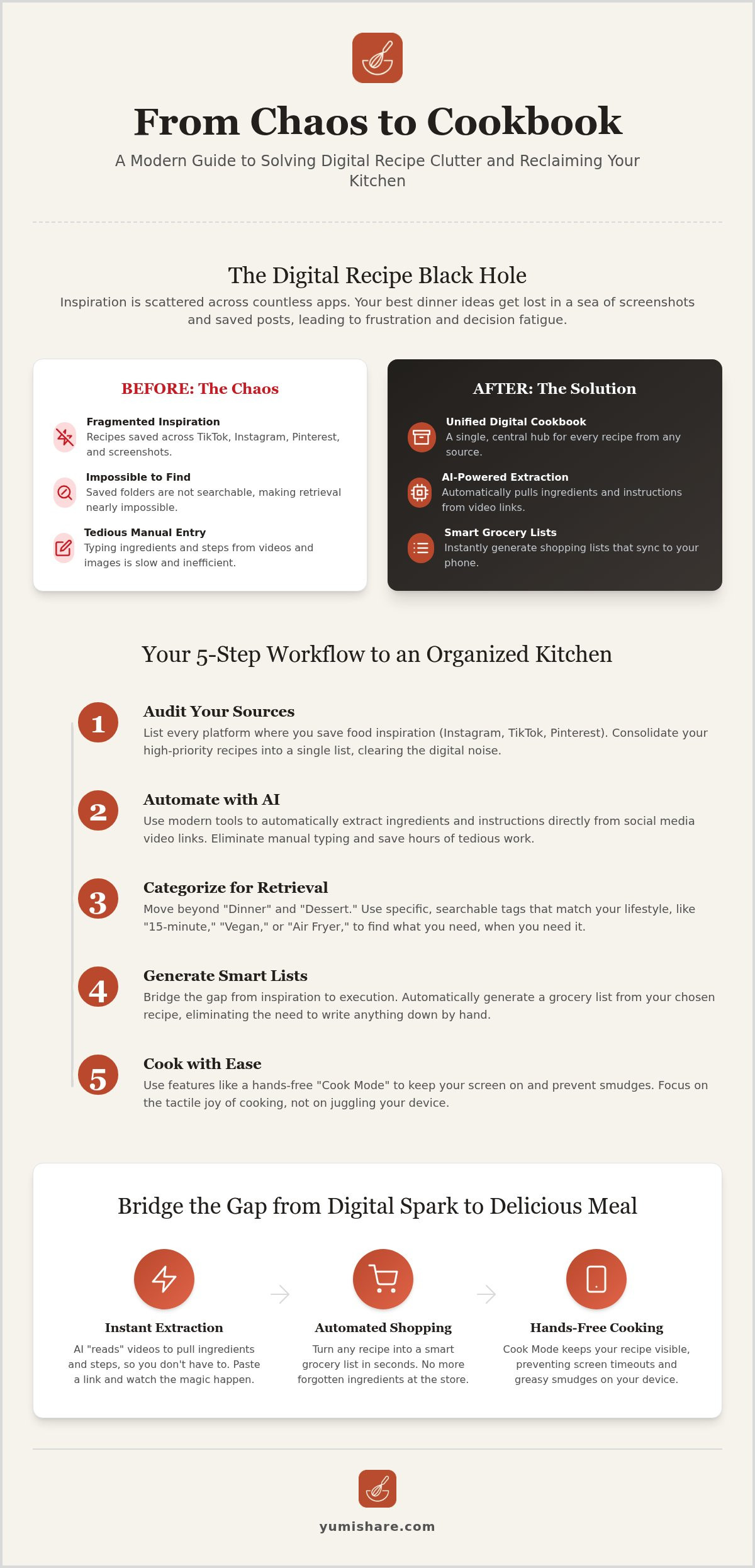
Stop taking screenshots immediately. They are static, unsearchable, and clutter your phone gallery. To implement a true recipe chaos solution, you need a central digital hub. This workflow transforms scattered links into a functional kitchen system. It is about moving from a passive scroller to an active, organized cook. By centralizing your data, you remove the friction that prevents you from actually trying those viral dishes.
Modern AI tools have changed the game. They now automate the most boring parts of organization, like typing out ingredient lists or formatting instructions. This allows you to focus on the tactile, satisfying parts of cooking. Follow these steps to build a digital kitchen that finally works for you.
Step 1: Audit Your Digital Sources
Start by listing every platform where you currently save food inspiration. Instagram, TikTok, Pinterest, and Facebook groups are the usual suspects. Be ruthless during this audit. Identify which platforms provide genuine value and which are just digital noise. Consolidate your high-priority "must-try" links into a single temporary list. This clears your mental deck and prepares you for a clean import into your new central hub.
Step 2: Automate the Extraction Process
Manual data entry is the primary reason most organization systems fail. Use technology to do the heavy lifting for you. Modern AI tools can now extract ingredients from TikTok videos automatically. The AI "reads" the video frames to pull out text overlays, measurements, and step-by-step instructions. This technology works across Reels, YouTube Shorts, and Pins. It eliminates the need to pause and rewind videos repeatedly just to write down quantities.
Step 3: Categorize for Future Retrieval
Organization only works if it makes finding things easier later. Move beyond broad, unhelpful labels like "Dinner" or "Dessert." Instead, use specific tags that match your lifestyle: "15-minute," "Vegan," or "Air Fryer." Ensure every recipe is searchable by ingredient. If you have leftover spinach, a quick search should reveal every relevant dish in your collection. Clean up the formatting so instructions are crisp and readable at a glance. For a more streamlined experience, consider using a Recipe Saver App to manage these categories automatically.
Step 4 & 5: Plan and Execute
The final steps involve turning your data into action. Drag your newly categorized recipes into a weekly meal planner. This bridges the gap between digital inspiration and a physical meal. When it's time to cook, your hub should provide a clear, distraction-free view of the instructions. This turns the frantic energy of discovery into the calm satisfaction of a well-ordered home life.
Bridging the Gap: From Digital Inspiration to Grocery List
The distance between a viral video and a finished meal is often measured in forgotten ingredients. You find a recipe you love, but the momentum dies when you realize you're missing three key items. This friction is where most culinary ambitions fail. A truly effective recipe chaos solution must handle the logistics as well as the storage. It's not enough to save the link; you need the ingredients in your pantry. You need a system that moves as fast as your inspiration.
Using a meal planner with grocery list eliminates "forgotten item" syndrome. Instead of scribbling on back-of-the-envelope notes, you batch multiple recipes into a single, organized shopping trip. Smart lists take this a step further. They categorize every item by grocery store aisle automatically. You move through the produce section once. You hit the dairy aisle once. It’s methodical, fast, and remarkably calm. This level of organization transforms a chaotic chore into a streamlined routine.
Generating Lists Without Manual Typing
Automation is the key to consistency. When you save a social media link, the system should generate your shopping list with one click. This isn't just about copying text. It's about data transformation. If you're cooking for six instead of two, the system scales the measurements instantly. Your grocery list updates in real time to reflect these changes. It removes the mental math that often leads to errors at the store.
Stop buying duplicates. Cross-referencing your list with what you already have in your pantry prevents waste. You can check off staples like olive oil or salt before you even leave the house. This precision keeps your kitchen lean and your budget in check. It’s a simple way to bring digital mindfulness into your physical space.
Syncing Your Plan Across Devices
Life is mobile. Your organization system must be too. This is why cloud synchronization is a vital feature for a recipe keeper alternative. You might plan your week on a tablet at the kitchen table, but you need that list on your phone at the supermarket. Accessing your data anywhere ensures you're never tethered to a single device when you need to make a quick decision.
Real-time updates are essential for busy households. If your partner picks up milk on the way home, they can check it off the shared list. You see the update instantly. No more double-buying. No more confusion about who is grabbing what. This shared logic reinforces the brand’s promise of turning complexity into simplicity. It’s a seamless transition from digital discovery to real-world execution.
Imagine you're mid-knead, hands covered in sticky dough, when your phone screen goes black. You need the next measurement, but touching your device means leaving a smear of flour and oil. This "Messy Finger" problem is the final hurdle in your digital kitchen journey. A true recipe chaos solution doesn't just store data; it assists you through the heat of the moment, ensuring your hardware stays clean and your focus remains on the food.
Hands-free execution is the ultimate goal of a modern kitchen. It moves you away from the frantic energy of toggling between apps and toward the grounded, tactile satisfaction of a well-ordered process. By removing the physical barriers between you and your instructions, you can cook with a sense of empathetic confidence. You'll know your digital assistant has your back while you handle the heat.
The Power of Hands-Free Cook Mode
Enter Cook Mode. This feature acts as your silent sous-chef, keeping your device awake and your instructions visible. By using cook mode for mobile recipes, you eliminate the need to tap or swipe with dirty hands. Voice commands or auto-scroll features keep the recipe moving at your pace. The interface highlights your current step in high contrast, so a quick glance tells you exactly what to do next. It acts as a filter that removes digital noise and leaves only the utility you need.
Integrating Video for Visual Learners
Sometimes, reading "fold the egg whites" isn't enough to grasp a technique. Seeing the motion in real-time is far more effective. Syncing your instructions with the original TikTok or Reel allows you to see the creator's exact movements. You can loop specific segments of the video to master tricky maneuvers, like crimping a pie crust or emulsifying a sauce, without leaving your recipe hub. You get the creator's vibe and expertise without the distracting comments section or the urge to keep scrolling.
To finish your station setup, invest in a sturdy tablet or phone stand. Position it at eye level, safely away from steam and oil splatters. This small adjustment creates a dedicated workspace that respects your time and mental space. You're no longer just following a screen; you're executing a plan with precision. Experience the relief of a streamlined kitchen by trying the Cook Mode today.
YumiShare serves as the definitive recipe chaos solution for the social media age. It targets the specific friction of the "social-to-table" workflow. By acting as a filter for digital noise, it leaves you with only what is useful. You can finally stop the cycle of saving and forgetting. Reclaim your kitchen efficiency and your mental bandwidth with a tool built for the speed of 2026. The platform’s AI-powered import feature handles the heavy lifting across Instagram, TikTok, and Pinterest. It doesn't just bookmark a page; it understands the content. This allows you to build a searchable, organized library in minutes. You can even share your curated, "chaos-free" cookbook with friends. This community aspect turns your personal organization into a shared resource for your inner circle.Why YumiShare is the Best App for Saved Recipes
Most traditional recipe management apps still rely on manual data entry. YumiShare replaces that tedious process with high-speed AI extraction. If you can copy a link, you can save a recipe. This efficiency is why it’s the best choice for anyone moving from fragmented saves to a unified hub. Use this newfound speed to focus on how to plan weekly meals that match your actual cravings. The app supports your natural workflow, from the initial spark of discovery to the final bite.
Getting Started: From Chaos to Calm in 10 Minutes
Start your transformation today with version 1.1 of the app. The process is designed for immediate relief. Download the app on iOS or Android and import your first three "most wanted" recipes. The free tier allows for up to 10 recipe imports, letting you test the automation before committing. Watch as the AI populates your digital recipe box with precise measurements and instructions.
Once your recipes are imported, set up your first weekly meal plan. Drag your favorites into the calendar and watch your smart grocery list generate itself. It is a methodical, step-by-step path to domestic tranquility. Stop fighting your phone and start enjoying your kitchen again. Experience the Recipe Chaos Solution—Download YumiShare Today.
Reclaim Your Kitchen and Your Time
Digital clutter doesn't have to dictate your dinner plans or drain your mental energy. You now have the roadmap to transform scattered social media bookmarks into a streamlined, searchable digital cookbook. By shifting away from the frantic cycle of manual typing and gallery screenshots, you embrace a more grounded, tactile cooking experience. It's time to let technology handle the logistics so you can handle the ingredients.
A true recipe chaos solution provides the relief of simplification. Use AI-powered extraction from Instagram and TikTok to build your library instantly. With smart grocery list generation and a hands-free Cook Mode, the transition from digital discovery to physical meal becomes effortless. You can finally focus on the joy of the craft rather than the frustration of the search. Your well-ordered home life starts with a single, searchable hub.
Take the first step toward domestic tranquility today. Your next great culinary adventure deserves a space that is as organized as it is inspiring. End the recipe chaos and start cooking with YumiShare. Happy cooking.
Frequently Asked Questions
What is the best way to organize recipes from multiple social media platforms?
Centralize your inspiration in a single digital recipe box. Instead of jumping between apps, use a saver that pulls data from Instagram, TikTok, and Pinterest. This creates a unified library where every dish is searchable by ingredient. It is the definitive recipe chaos solution to eliminate fragmented "saved" folders. You'll move from digital consumption to real-world cooking with a clearer head. It's the fastest way to professionalize your kitchen.
Can I save a recipe from a TikTok video without typing it out?
Yes, you can skip the manual typing entirely. Use an AI-powered extraction tool to 'read' the video frames and pull out the ingredients and instructions. Simply copy the TikTok link and paste it into your recipe saver. The technology handles the formatting for you. It captures measurements and steps instantly. This allows you to focus on the cooking rather than the data entry. It’s a clean, efficient way to manage viral content.
How do I turn an Instagram Reel into a printable grocery list?
Import the Reel link into your digital recipe hub to generate a smart grocery list. Once the AI extracts the ingredients, the app organizes them by grocery store aisle. You can then view this list on your mobile device or use your phone's print function for a physical copy. This process bridges the gap between seeing a viral dish and having the ingredients ready. It's a fast, methodical way to shop without forgetting staples.
Is there an app that syncs my Pinterest recipes with a meal planner?
YumiShare specifically syncs your Pinterest saves with an integrated meal planner. Copy the Pin link to import the data into your central cookbook. Once saved, you can drag the recipe onto your weekly calendar. This automation ensures your meal plan is built from recipes you actually want to eat. It creates a seamless workflow from social discovery to a scheduled menu. You’ll find that organizing your week becomes a brisk, five-minute task.
How can I cook hands-free using my phone or tablet?
Activate a specialized Cook Mode to keep your screen awake and responsive. This feature highlights your current step and often allows for voice commands or auto-scrolling. It prevents the need to touch your device with messy fingers while handling raw ingredients. By syncing the instructions with the original video, you get a clear visual guide that keeps your focus on the tactile joy of preparing a meal. It keeps your device clean and your focus sharp.
What is the most effective recipe chaos solution for a busy family?
The most effective recipe chaos solution for families is a cloud-synced app that supports multiple users. This allows you to share a single digital cookbook and synchronized grocery lists across everyone's devices. When one person buys an item, the list updates in real time for everyone else. It removes the mental load of coordination. It turns a chaotic household routine into a streamlined, collaborative experience that saves time and money every single day.
FAQ
What is the best way to organize recipes from multiple social media platforms?
Centralize your inspiration in a single digital recipe box. Instead of jumping between apps, use a saver that pulls data from Instagram, TikTok, and Pinterest. This creates a unified library where every dish is searchable by ingredient. It is the definitive recipe chaos solution to eliminate fragmented "saved" folders. You'll move from digital consumption to real-world cooking with a clearer head. It's the fastest way to professionalize your kitchen.
Can I save a recipe from a TikTok video without typing it out?
Yes, you can skip the manual typing entirely. Use an AI-powered extraction tool to 'read' the video frames and pull out the ingredients and instructions. Simply copy the TikTok link and paste it into your recipe saver. The technology handles the formatting for you. It captures measurements and steps instantly. This allows you to focus on the cooking rather than the data entry. It’s a clean, efficient way to manage viral content.
How do I turn an Instagram Reel into a printable grocery list?
Import the Reel link into your digital recipe hub to generate a smart grocery list. Once the AI extracts the ingredients, the app organizes them by grocery store aisle. You can then view this list on your mobile device or use your phone's print function for a physical copy. This process bridges the gap between seeing a viral dish and having the ingredients ready. It's a fast, methodical way to shop without forgetting staples.
Is there an app that syncs my Pinterest recipes with a meal planner?
YumiShare specifically syncs your Pinterest saves with an integrated meal planner. Copy the Pin link to import the data into your central cookbook. Once saved, you can drag the recipe onto your weekly calendar. This automation ensures your meal plan is built from recipes you actually want to eat. It creates a seamless workflow from social discovery to a scheduled menu. You’ll find that organizing your week becomes a brisk, five-minute task.
How can I cook hands-free using my phone or tablet?
Activate a specialized Cook Mode to keep your screen awake and responsive. This feature highlights your current step and often allows for voice commands or auto-scrolling. It prevents the need to touch your device with messy fingers while handling raw ingredients. By syncing the instructions with the original video, you get a clear visual guide that keeps your focus on the tactile joy of preparing a meal. It keeps your device clean and your focus sharp.
What is the most effective recipe chaos solution for a busy family?
The most effective recipe chaos solution for families is a cloud-synced app that supports multiple users. This allows you to share a single digital cookbook and synchronized grocery lists across everyone's devices. When one person buys an item, the list updates in real time for everyone else. It removes the mental load of coordination. It turns a chaotic household routine into a streamlined, collaborative experience that saves time and money every single day.