
 Polski
  Deutsch
  Español
  Français
  Italiano
  Português
  Nederlands
  Svenska
  Українська
  Русский
 Organizing Dinner Ideas: Social Media to Digital Kitchen
Stop scrolling and start cooking! Learn how to organize dinner ideas from social media into a central hub with automated grocery lists. Reclaim your 5 PM.

Last Tuesday at 5:45 PM, you were staring at a blurry screenshot of a lemon chicken recipe, trying to find the ingredient list buried in a social media caption. You knew the dish looked incredible, but the friction of manually typing out instructions felt like too much work after a long day. We've all built a digital junk drawer of saved reels and pins that never actually reach the stove. It's time to organize dinner ideas with a system that works as fast as you scroll.
You deserve a kitchen experience that feels like a sanctuary rather than a source of stress. This article promises to help you stop the endless search and start cooking by centralizing every inspiration into one source of truth. We'll show you how to turn social media sparks into automatic grocery lists and structured meal plans. We're moving from the frantic energy of digital consumption to the grounded satisfaction of a well-ordered home life. Get ready to eliminate decision fatigue and reclaim your 5:00 PM peace of mind.
Key Takeaways
- Identify the "Digital Junk Drawer" effect and learn why saving on social media isn't the same as having a functional plan.
- Master the "Rule of 3" categorization strategy to organize dinner ideas based on your real-life schedule; focus on speed and occasion rather than just ingredients.
- Build a centralized digital cookbook by auditing your scattered saved folders and importing them into a single, searchable hub.
- Streamline your Sunday routine with a 15-minute "Dinner Draft" that maps your favorite inspirations to a functional weekly calendar.
- Leverage AI-driven automation to turn social media videos into smart grocery lists and hands-free cooking instructions.
The Digital Junk Drawer: Why Organizing Dinner Ideas Feels Impossible
Your phone is likely a graveyard of culinary inspiration. You see a vibrant pasta dish on TikTok and hit save. You bookmark a slow-cooker hack on Pinterest. You screenshot a friend's ingredient list on Instagram. Individually, these are great ideas. Collectively, they create the "Digital Junk Drawer" effect. This is the modern kitchen's biggest hurdle: having too much information and no way to use it. When you try to organize dinner ideas, you aren't just fighting clutter; you're fighting fragmentation.
Saving a post is a passive act. It feels like progress, but it's just a digital bookmark. Organizing, however, is the bridge to action. Without a system, the psychological cost is high. By the 5:00 PM rush, your brain is tired. Sifting through four different apps to find "that one chicken recipe" creates decision fatigue. This friction usually leads to the same three boring meals or another night of expensive takeout. In 2026, a personal digital recipe box isn't just a luxury. It's a mental health tool that removes the "what's for dinner" panic from your daily life.
The Social Media Fragmentation Trap
Dinner ideas are now scattered across a dozen platforms. Instagram has its "Saved" folders. TikTok has "Favorites." Facebook has "Bookmarked." These platforms are designed to keep you scrolling, not to help you cook. Each folder is a silo. You can't search your Instagram saves while looking at your Pinterest boards. Worse yet, screenshots are where good recipes go to die. They aren't searchable, they don't sync with your calendar, and they provide no way to scale ingredients for your family size. You're left with a collection of images that offer inspiration but zero execution.
The Friction Factor: Why You Never Cook What You Save
The gap between discovery and execution is filled with manual labor. Think about the steps required to actually use a video recipe. You have to watch the video repeatedly. You have to pause it to write down ingredients. You have to manually check your pantry. This effort is the opposite of what meal preparation is supposed to be. Effective prep should reduce work, not create new administrative tasks. A saved video doesn't automatically generate a grocery list. It doesn't tell you how long the prep takes. To successfully organize dinner ideas, you need a unified system that extracts the data from the noise. You need a way to turn a 15-second digital spark into a physical result on your table without the heavy lifting.
Designing Your Dinner Ecosystem: Categorization Strategies That Work
Organizing by ingredient is a relic of the past. If you save a recipe under "Chicken," you still face decision fatigue on a Tuesday night. Is it a 15-minute stir-fry or a 3-hour roast? To effectively organize dinner ideas, you must categorize by lifestyle and energy levels. This shift moves your digital cookbook from a static list to a functional tool that respects your time. By focusing on how you actually live, you create a system that serves you during the 5:00 PM rush.
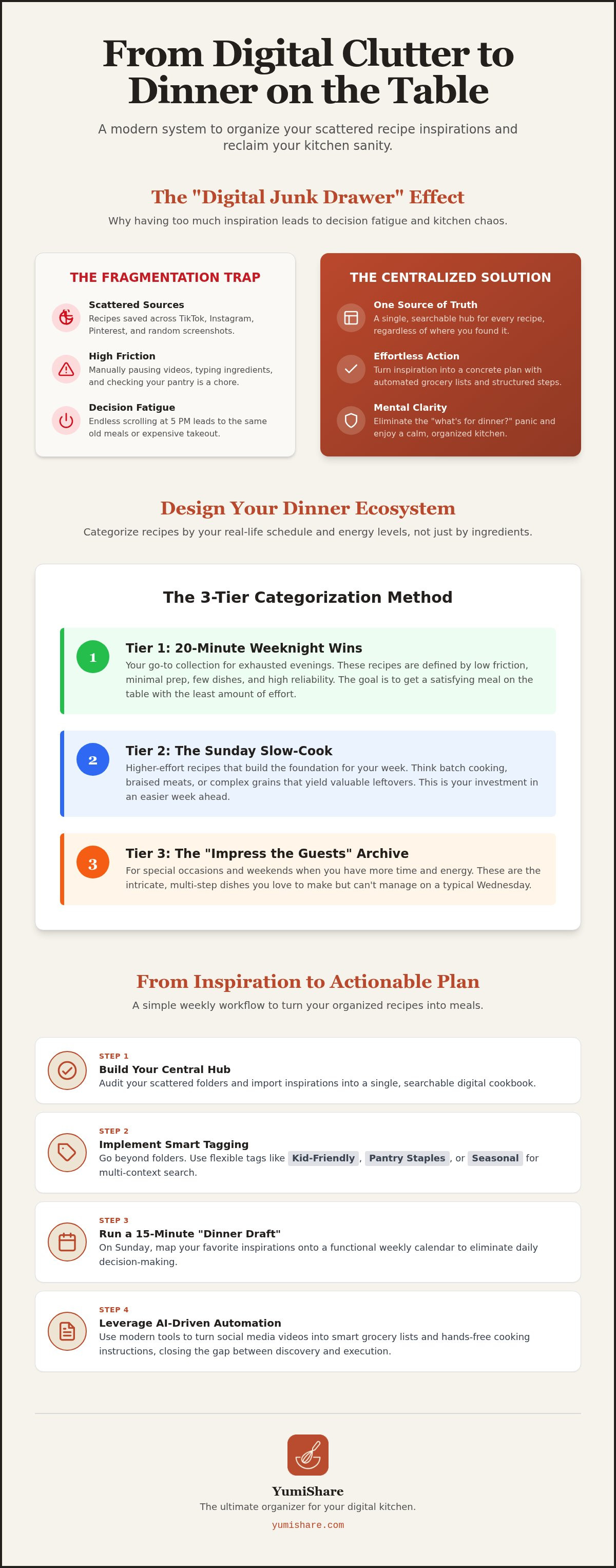
The 3-Tier Categorization Method
Adopt the "Rule of 3" to sort your inspirations into actionable buckets. This prevents your library from becoming overwhelming. Start with these tiers:
- Tier 1: 20-Minute Weeknight Wins. These are low-friction meals. Minimal prep, few dishes, and high reliability. Use these when you're exhausted.
- Tier 2: The Sunday Slow-Cook. Higher effort recipes that yield leftovers. Think batch cooking, braised meats, or complex grains. This is where you build your week's foundation.
- Tier 3: The "Impress the Guests" Archive. Save these for special occasions. They are the intricate, multi-step dishes you love but don't have time for on a Wednesday.
Smart Tagging for Real Life
Move beyond folders and embrace tags. Tags allow a single recipe to live in multiple contexts. A "Kid-Friendly" tag might overlap with "Comfort Food" or "Healthy." This flexibility is a core part of any modern Meal prep guide. Consider tagging by "Pantry Staples" for those nights before a grocery run, or "Specialty Shop" for when you have time to visit the market. You can even tag by season to align with peak produce, which naturally lowers your grocery costs.
Don't let your main library get cluttered with unvetted ideas. Maintain a "To-Try" queue. This acts as a filter. Only move a recipe to your permanent collection after you've cooked it and confirmed your family likes it. Using a dedicated recipe saver app makes this filtering process effortless. You can quickly add metadata like prep time, cost, and difficulty levels. This data allows you to filter your entire collection in seconds. Instead of scrolling, you're searching with purpose. You're no longer just collecting; you're curating a kitchen that runs on autopilot.
From Inspiration to Action: Building Your Personal Digital Cookbook
Discovery is effortless. You see a dish, you like it, and you hit save. But a saved video isn't a meal. To organize dinner ideas effectively, you must transform these digital sparks into a structured, searchable library. This transition requires a deliberate workflow that bridges the gap between your phone screen and your stovetop. It's about moving from a collector of content to a curator of experiences.
Follow these five steps to build your functional library:
- Audit your folders. Open every app where you've hit "save" in the last year. You'll likely find a chaotic mix of inspiration scattered across Instagram, TikTok, and Pinterest.
- Choose your hub. Avoid generic notes apps. They lack the intelligence to handle culinary data. Pick a platform that supports cross-platform importing.
- Extract the data. Don't just save a link. You need the ingredients and steps in a text-based, searchable format that you can read while cooking.
- Prune the dead weight. Be ruthless. If a recipe requires ingredients you can't find or techniques you'll never use, delete it. A lean library is a functional library.
- Set a weekly sync. Dedicate ten minutes each Sunday to move new saves into your central hub. This keeps your system current and ready for the week ahead.
The End of Manual Typing: AI Recipe Extraction
Manual transcription is the primary reason saved recipes are never cooked. It's tedious and time-consuming. Modern apps like YumiShare solve this by using AI to convert social media videos into structured text. This isn't just about reading instructions. Smart extraction identifies specific ingredients, which is the foundation for creating automated grocery lists. By keeping the original video link within your digital cookbook, you maintain the visual reference for technique while ditching the friction of manual typing.
Centralizing the Chaos: One Source of Truth
Fragmentation is the enemy of a calm kitchen. Keeping some ideas on Pinterest and others in Instagram folders ensures you'll lose track of your best inspirations. A cloud sync recipe manager acts as your single source of truth. It ensures your library is accessible on your phone at the market and on your tablet at the stove. This level of organization is essential for consistent meal prep or meal planning. If you're ready to dive deeper into specific tools, our Ultimate Recipe Saver App guide covers everything you need to know to finalize your digital kitchen transformation.
The Weekly Workflow: How to Use Your Organized Dinner Ideas
A library of recipes is only valuable if it translates to a hot meal on your table. You've done the work to organize dinner ideas into categories and tiers. Now, you need a repeatable rhythm to move those ideas from your screen to your stove. This isn't about rigid scheduling. It's about creating a flexible "Dinner Draft" that removes the daily mental load of deciding what to eat. When your system is structured, the transition from inspiration to execution becomes a natural part of your week.
Spend 15 minutes every Sunday evening reviewing your digital cookbook. Map your selected recipes to a calendar using the "Theme Night" hack. Assigning categories like "Taco Tuesday" or "Slow-Cooker Sunday" provides a mental shortcut. It narrows your search within your own library. Once your week is drafted, generate a smart grocery list from recipes in seconds. This automation ensures you never face the "forgotten ingredient" crisis that often derails a home-cooked meal. You're no longer guessing; you're operating with a clear plan.
The Sunday Prep Ritual
Consistency is the secret to a calm kitchen. Use your Sunday session to balance your energy levels for the coming days. Pick one or two new inspirations from your "To-Try" folder to keep things exciting. Fill the remaining slots with your "20-Minute Wins" for those inevitable late-work nights. This ritual transforms meal planning from a chore into a quick administrative task. By automating your grocery list, you eliminate the friction of manual inventory checks. You'll enter the week knowing exactly what's for dinner and that every ingredient is already in your pantry.
Executing with Confidence: Cook Mode
The 5:00 PM rush is where most systems fail. You're tired, the kids are hungry, and your phone screen keeps turning off while you're mid-prep. Using cook mode for mobile recipes changes the experience entirely. It keeps your device active and provides hands-free navigation so you don't have to touch your screen with messy hands. Seeing the original social media video alongside the extracted text gives you a visual reference for techniques like folding dough or dicing aromatics. It's like having a digital kitchen assistant guiding you through every step.
Life happens, and plans change. "Dinner Audibles" are inevitable. If a Tuesday meeting runs over, don't reach for the takeout menu. Open your organized library and filter by "Quick" or "Pantry Staples." Because your ideas are already categorized, you can pivot in seconds without the stress of a fresh search. Ready to turn your social media saves into a functional kitchen system? Start building your digital cookbook with YumiShare today.
Automating Your Kitchen: Why YumiShare is the Ultimate Organizer
Stop fighting against the algorithms that keep you scrolling and start using them to your advantage. Most digital tools act as simple binders, but YumiShare functions as an active kitchen assistant. It's the bridge that connects the chaotic world of social discovery to the quiet efficiency of your dinner table. When you choose to organize dinner ideas with a dedicated system, you aren't just saving files. You're building a workflow that respects your time and mental space. It's about moving from a state of digital overwhelm to a place of domestic tranquility.
The Power of the Social Media Importer
Viral trends on TikTok and aesthetic plates on Instagram are great for inspiration, but they're notoriously difficult to execute. YumiShare solves the fragmentation problem with a one-tap importing feature. Whether it's a Pinterest pin or a YouTube short, the app extracts the essential data instantly. You maintain the visual spark of the original video while gaining the functional clarity of text-based instructions. This removes the friction of pausing and rewinding videos just to catch a measurement. You get the best of both worlds: the creator's technique and a clean, readable recipe.
The AI-powered extraction goes beyond simple text. It identifies ingredients and quantities, feeding directly into your smart grocery lists. This level of automation is why YumiShare is a leader in the meal planning space for 2026. It turns a 15-second digital spark into a physical result without the administrative headache. You can organize dinner ideas by simply hitting a button, letting the technology handle the heavy lifting of transcription and categorization.
Scaling Your Organization
Dinner organization shouldn't fall on one person's shoulders. YumiShare includes collaborative features that allow you to share your library and weekly drafts with a partner or family member. This transparency ensures everyone is on the same page, from the grocery store aisles to the kitchen counter. If plans change, your partner can see the "Dinner Audibles" you've already vetted, making the 5:00 PM pivot seamless for the whole household.
You aren't just managing tonight's meal; you're building a legacy digital cookbook. Imagine having a curated collection of your family's favorite dishes, all searchable and ready to cook at a moment's notice. It's time to reclaim your evening peace. Move away from the frantic energy of unsorted screenshots and embrace the relief of a well-ordered kitchen. Organize your dinner ideas today with YumiShare and experience the transformation from digital clutter to culinary calm.
Reclaim Your 5:00 PM Peace
Transformation begins when you stop scrolling and start streamlining. You've learned how to dismantle the digital junk drawer by centralizing your inspiration into a single source of truth. By shifting from ingredient-based folders to lifestyle-based categories, you've built a system that respects your daily energy levels. Now is the perfect time to organize dinner ideas with a workflow that turns viral videos into physical results. You don't have to face the dinner rush with decision fatigue anymore. The path from discovery to the dinner table is finally clear.
YumiShare is your partner in this journey toward a calmer home life. Leverage the AI-powered social media importer to extract instructions instantly. Enjoy the convenience of smart grocery list generation and the reliability of cross-device cloud synchronization. Experience the relief of a kitchen that runs on autopilot. Start Organizing Your Dinner Ideas with YumiShare for Free today. You have the tools to turn digital chaos into culinary calm. Your next favorite meal is just one tap away.
Frequently Asked Questions
What is the best way to organize recipes from different social media platforms?
The most effective method is to use a central hub that supports cross-platform importing. Don't rely on platform-specific folders like Instagram Saves or Pinterest Boards. These silos prevent you from searching your whole collection at once. Instead, use a dedicated recipe saver app to aggregate every digital spark into one searchable library. This approach ensures your favorite inspirations are always accessible, regardless of where you first discovered them.
How can I organize dinner ideas without spending hours on data entry?
Leverage AI-driven automation to handle the heavy lifting. Manual transcription is the biggest obstacle when you want to organize dinner ideas. Modern tools can extract ingredients and instructions directly from video links or social posts. This technology eliminates the need for typing, allowing you to build a comprehensive digital cookbook in seconds. You focus on the cooking while the software manages the administrative details of your kitchen.
Is there an app that can turn TikTok videos into recipes?
Yes, YumiShare is specifically designed to extract instructions and ingredients from TikTok videos using AI. It identifies the culinary data within the video and converts it into a structured, readable format. This allows you to follow along without constantly pausing or rewinding a short clip. By syncing with the original content, you maintain the visual guide while gaining the functional text needed for efficient meal prep.
How do I organize a "To-Try" folder without it getting overwhelming?
Treat your "To-Try" folder as a temporary queue rather than a permanent archive. Limit yourself to 10 or 15 active recipes at any time. If you haven't cooked a specific dish within three months, delete it or move it to a "Someday" archive. This keeps your main library lean and actionable. Only move a recipe to your permanent collection after you've successfully prepared it and confirmed your family enjoys it.
Can I share my organized dinner ideas with my family?
Cloud-based recipe managers make sharing effortless. You can sync your meal plans and grocery lists across multiple devices, ensuring your partner or roommates have real-time access to the week's draft. This collaborative approach removes the burden of organization from one person. Whether someone is at the grocery store or starting prep at home, they can see exactly what's on the menu and what ingredients are required for each dish.
How often should I prune or declutter my digital recipe box?
Perform a quick audit every three to six months. Digital clutter can lead to decision fatigue, so it's vital to remove recipes that no longer serve your lifestyle. Delete dishes that were too complex, ingredients you can't source, or meals your family didn't like. A smaller, curated collection of high-quality recipes is far more useful than a massive library of mediocre ideas you'll never actually cook.
What categories should I use to organize my weeknight dinner ideas?
Organize by friction level rather than just ingredients. Use categories like "20-Minute Wins" for high-stress days and "One-Pot Wonders" for minimal cleanup. You might also include a "Pantry Staple" tag for nights before your grocery run. This strategy ensures you can find a meal that matches your current energy and time availability. Categorizing by lifestyle needs makes your organized dinner ideas immediately actionable during the evening rush.
FAQ
What is the best way to organize recipes from different social media platforms?
The most effective method is to use a central hub that supports cross-platform importing. Don't rely on platform-specific folders like Instagram Saves or Pinterest Boards. These silos prevent you from searching your whole collection at once. Instead, use a dedicated recipe saver app to aggregate every digital spark into one searchable library. This approach ensures your favorite inspirations are always accessible, regardless of where you first discovered them.
How can I organize dinner ideas without spending hours on data entry?
Leverage AI-driven automation to handle the heavy lifting. Manual transcription is the biggest obstacle when you want to organize dinner ideas. Modern tools can extract ingredients and instructions directly from video links or social posts. This technology eliminates the need for typing, allowing you to build a comprehensive digital cookbook in seconds. You focus on the cooking while the software manages the administrative details of your kitchen.
Is there an app that can turn TikTok videos into recipes?
Yes, YumiShare is specifically designed to extract instructions and ingredients from TikTok videos using AI. It identifies the culinary data within the video and converts it into a structured, readable format. This allows you to follow along without constantly pausing or rewinding a short clip. By syncing with the original content, you maintain the visual guide while gaining the functional text needed for efficient meal prep.
How do I organize a "To-Try" folder without it getting overwhelming?
Treat your "To-Try" folder as a temporary queue rather than a permanent archive. Limit yourself to 10 or 15 active recipes at any time. If you haven't cooked a specific dish within three months, delete it or move it to a "Someday" archive. This keeps your main library lean and actionable. Only move a recipe to your permanent collection after you've successfully prepared it and confirmed your family enjoys it.
Can I share my organized dinner ideas with my family?
Cloud-based recipe managers make sharing effortless. You can sync your meal plans and grocery lists across multiple devices, ensuring your partner or roommates have real-time access to the week's draft. This collaborative approach removes the burden of organization from one person. Whether someone is at the grocery store or starting prep at home, they can see exactly what's on the menu and what ingredients are required for each dish.
How often should I prune or declutter my digital recipe box?
Perform a quick audit every three to six months. Digital clutter can lead to decision fatigue, so it's vital to remove recipes that no longer serve your lifestyle. Delete dishes that were too complex, ingredients you can't source, or meals your family didn't like. A smaller, curated collection of high-quality recipes is far more useful than a massive library of mediocre ideas you'll never actually cook.
What categories should I use to organize my weeknight dinner ideas?
Organize by friction level rather than just ingredients. Use categories like "20-Minute Wins" for high-stress days and "One-Pot Wonders" for minimal cleanup. You might also include a "Pantry Staple" tag for nights before your grocery run. This strategy ensures you can find a meal that matches your current energy and time availability. Categorizing by lifestyle needs makes your organized dinner ideas immediately actionable during the evening rush.