
 Polski
  Deutsch
  Español
  Français
  Italiano
  Português
  Nederlands
  Svenska
  Українська
  Русский
 Stop Losing Saved Recipes: The 2026 Guide to Digital Organization
Tired of losing recipes to link rot? This 2026 guide shows you how to stop losing saved recipes using AI to create a permanent, organized digital cookbook.

You finally have the ingredients for that viral miso pasta you saved last Tuesday. You open your Instagram folders, scroll through a hundred home decor tips, and realize the video was deleted by the creator. That "saved" recipe is gone forever. It's a frustrating, common cycle where digital clutter actually makes it harder to cook. If you want to stop losing saved recipes, you need to move beyond the save button and toward a system that actually works for you.
Saving a link isn't the same as being organized. True digital mindfulness in the kitchen means turning those fleeting social media sparks into a permanent, searchable digital cookbook. You shouldn't have to pause videos every three seconds to scribble down measurements or take screenshots that just clog up your phone storage. You deserve a streamlined experience that bridges the gap between digital inspiration and a real-world dinner. It is about moving from the frantic energy of scrolling to the grounded satisfaction of a well-ordered home.
This guide shows you how to transform your recipe collection for 2026. We'll explore how AI-driven extraction can pull ingredients directly from TikToks and Reels, creating a reliable space for every meal. Learn how to automate your grocery lists and keep your favorite instructions safe from link rot. It's time to clear the noise and focus on the joy of cooking.
Key Takeaways
- Identify the "link rot" trap and why relying on social media save folders is the fastest way to lose your favorite meals.
- Master the art of recipe extraction to stop losing saved recipes by turning fleeting video data into permanent, searchable text.
- Audit your current organization methods to eliminate the friction between finding an inspiring dish and actually starting the stove.
- Implement a 5-step centralized workflow to import and organize your existing saves from Instagram, TikTok, and Pinterest.
- Bridge the gap between digital discovery and a physical dinner with tools that automate grocery lists and provide hands-free cooking guidance.
The Digital Recipe Graveyard: Why You Keep Losing Your Saved Meals
Your digital kitchen is likely a graveyard of broken links and forgotten screenshots. You see a vibrant pasta dish on your feed, hit the save icon, and tell yourself you'll make it Sunday. When Sunday arrives, the recipe is gone. This cycle of digital loss happens because social media platforms aren't designed for storage. They're designed for discovery. To stop losing saved recipes, you have to understand why the current system is rigged against your dinner plans.
The primary culprit is a phenomenon called "Link Rot." This occurs when the original creator deletes a post, hides their profile, or the platform removes content for copyright issues. Your saved link doesn't contain the recipe; it only points to a location that might not exist tomorrow. Effective Personal Information Management (PIM) suggests that data you value should be stored in a format you control. Relying on a live URL is a gamble you'll eventually lose. Beyond link rot, algorithm shifts often bury your favorite creators. You might remember a specific creator's "easy salmon," but if the algorithm decides to show you different content, finding that specific video again becomes a digital needle in a haystack.
The Problem with Platform-Locked Saves
Instagram and TikTok are walled gardens. They want you to stay in the app, scrolling through ads, not heading to the kitchen to cook. These platforms make it intentionally difficult to search within your "Saved" folders. You can't filter by "chicken" or "gluten-free" in a standard Instagram folder. You're forced to scroll manually through hundreds of unrelated posts. This friction creates massive decision fatigue. By the time you find a recipe, you're too tired to actually prep the meal.
Why Screenshots are a Temporary (and Messy) Fix
Screenshots feel like a safe backup, but they quickly become visual clutter. They eat up your phone storage and disappear into a gallery filled with thousands of other photos. The biggest issue is searchability. A standard mobile screenshot is just an image, not a text file. You can't search your photo library for "2 cups of flour" and expect results. It's time to stop taking recipe screenshots and start using a system that extracts the actual data. When you extract the text, the recipe becomes a tool you can use, search, and scale. Don't settle for a dead image when you could have a living, searchable cookbook.
Extraction vs. Bookmarking: The Key to Never Losing a Recipe
Bookmarking is a fragile promise. It is just a digital sticky note pointing to a website that could vanish at any moment. Recipe extraction is fundamentally different. It uses AI to pull raw data from a video or image and turn it into structured text. This shift is how you stop losing saved recipes. When you extract, you transform a fleeting social media link into a permanent digital asset. You move from "borrowing" a creator's content to "owning" your own culinary library. It is the difference between a messy pile of clippings and a professionally bound cookbook.
In 2026, AI technology has bridged the gap between video discovery and practical cooking. Older tools could only clip text from traditional blogs. Modern systems now "read" the video itself. They identify ingredients mentioned in a TikTok caption or shown on screen. They translate those quick cuts into a linear, logical set of instructions. This shift ensures your recipes are safe even if the original creator deletes their profile. It turns your phone from a simple storage locker into a functional, intelligent kitchen tool.
The Anatomy of a Structured Recipe
Structure is the secret to a functional kitchen. Extracted text isn't just a block of words; it separates ingredients from instructions and metadata. This organization allows for smart features like serving size scaling. Want to double a recipe for a dinner party? A structured system does the math for you instantly. AI also interprets messy social media captions. It filters out the "link in bio" fluff and emoji clutter. It leaves only what you need to cook, presented in a clean and readable format.
Building a Resilient Digital Cookbook
A resilient system lives where you do. Your kitchen tablet should always match your phone without manual effort. Cross-platform sync and cloud backups ensure you never lose a single byte of data. This level of reliability is why YumiShare is considered the best app for saved recipes today. It offers the peace of mind that comes with a well-ordered home life. If you want to simplify your routine, using a dedicated recipe saver app is the most effective way to bridge the gap between digital inspiration and real-world results. Stop scrolling and start cooking with a system built for the modern age.
Auditing Your Current Recipe Organization Methods
Your current recipe system is likely a mix of good intentions and digital clutter. To stop losing saved recipes, you must audit your process with brutal honesty. Most home cooks rely on a fragmented strategy. They keep a handwritten notebook for family classics, a cluttered "Notes" app for random links, and dozens of Instagram folders for inspiration. This fragmentation creates friction. It turns the simple act of choosing a meal into a stressful digital scavenger hunt.
Perform the "Friction Test" on your current routine. Count the steps between seeing a delicious video and having the ingredients on your counter. If you have to manually type out ingredients from a Reel or search through three different apps to find a specific link, your system is failing you. High friction leads to "what's for dinner" decision fatigue. Eventually, you stop using your saved recipes altogether. You settle for the same three tired meals or order expensive takeout because finding that one pasta dish feels like too much work.
Legacy Apps vs. Modern Social Savers
Traditional recipe managers were built for the era of food blogs. They excel at "clipping" text from a website, but they struggle with 2026 media. They can't "see" what is happening in a TikTok video or an Instagram Reel. This forces you to pay the "Copy-Paste" tax. You waste ten minutes pausing and rewinding a video just to type out the measurements. It is time to consider a recipe keeper alternative designed for the video age. You need a tool that speaks the language of social discovery and handles video extraction natively.
The Hidden Cost of "Free" Saving Methods
Free saving methods aren't actually free. You pay in lost time and mental energy. Think about the last time you stood in the grocery aisle, scrolling frantically for a link that wouldn't load. Think of the frustration of realizing you missed a key ingredient because your screenshot was cut off. A dedicated, structured system pays for itself by reducing food waste. It turns your inspiration into a precise grocery list. It ensures you buy exactly what you need, nothing more. Efficiency in the kitchen leads to tranquility in the home. Stop letting your inspiration expire in a folder you never open.
How to Centralize Your Recipes: A 5-Step Workflow
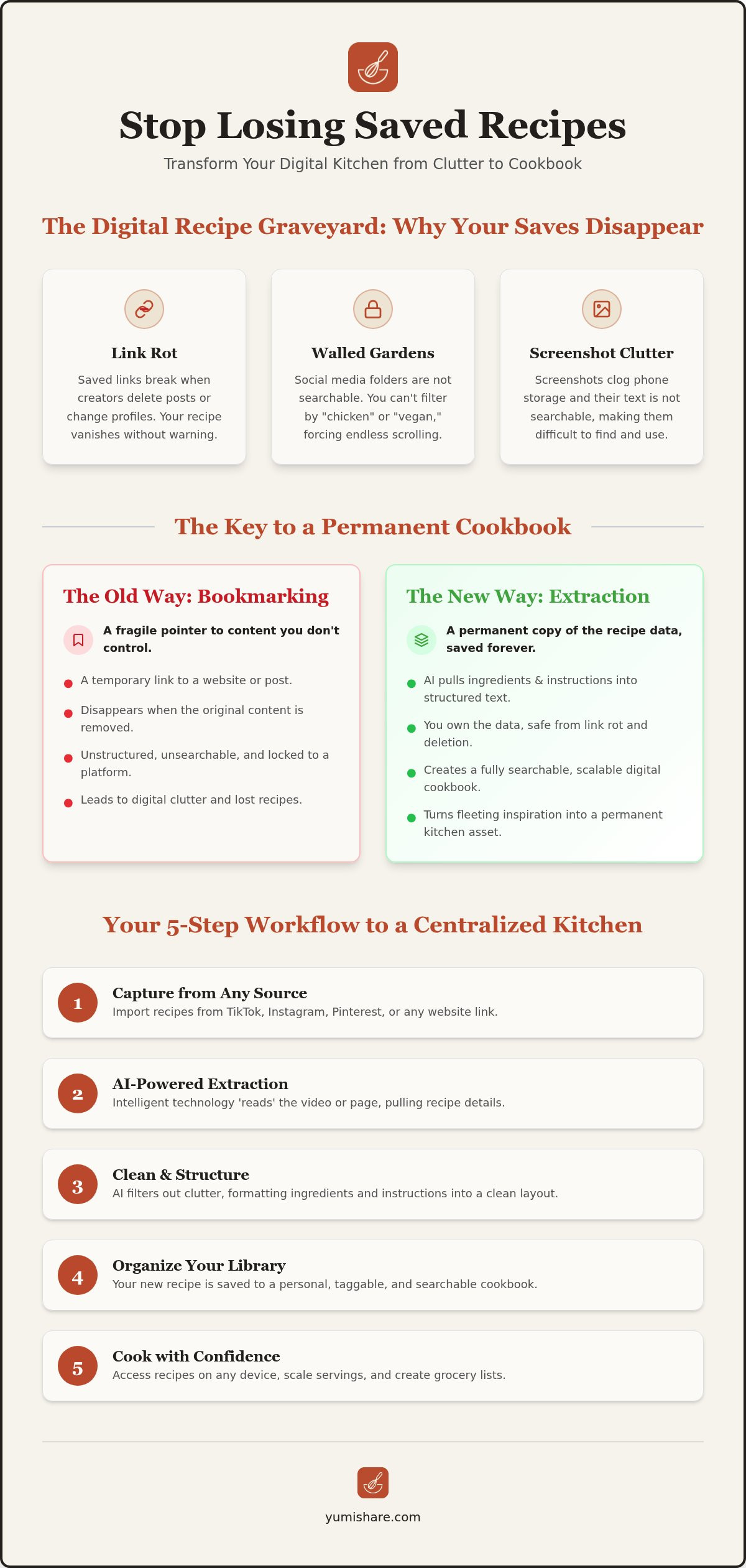
Moving from a fragmented collection to a streamlined library requires a methodical approach. You can't just keep hitting "save" and expect order to emerge on its own. To stop losing saved recipes, follow this five step workflow to reclaim your kitchen's digital space. This process moves your inspiration from the social feed into a functional environment where you can actually use it.
Step 1: Choose your central hub. Pick one dedicated application for all digital recipe data. Avoid using general note apps or browser bookmarks. You need a tool designed for food, not just text. Step 2: Import your existing saves. Gather your links from Instagram, TikTok, and Pinterest. Move them into your hub immediately after discovery. Step 3: Use AI extraction. Don't just save the link. Use technology to convert the video content into structured instructions. Step 4: Tag and categorize. Assign labels based on meal type, prep time, or dietary needs. This makes your library searchable. Step 5: Schedule your first meal plan. Use your newly organized data to pick three meals for the coming week. Transformation happens when you stop scrolling and start cooking.
Platform-Specific Tips for Importing
Each platform has its own hurdles. For Instagram Reels, copy the post link and paste it into your saver app to ensure the AI can read the caption and visual cues. TikTok favorites often have minimal text, so rely on AI extraction to interpret the video steps for you. When syncing Pinterest boards, make sure your hub pulls the original source data. This prevents you from ending up with a "dead pin" that leads to a 404 error page. If you are ready to simplify this entire process, you can download the YumiShare Recipe Saver App and start importing with a single tap.
Maintaining Your System Weekly
Consistency is the enemy of clutter. Set aside ten minutes every Sunday for a "Sunday Sync." Use this time to organize any random discoveries from the week. Prune recipes that no longer excite you. A smaller, high quality library is always better than a massive, unmanageable one. Finally, link your organized recipes to a meal planner with grocery list. This creates a seamless transition from your phone to the grocery store. When your recipes are organized, dinner becomes the easiest part of your day.
From Discovery to Dinner: The YumiShare Solution
YumiShare is the bridge between a digital spark and a physical result. Most apps act as simple filing cabinets, but a true solution must move with you from the social feed to the stove. If you want to stop losing saved recipes, you need a tool that handles the transition automatically. YumiShare eliminates the friction of manual entry with one-click imports from every major social platform. It doesn't just save a link; it captures the soul of the recipe and makes it yours forever.
This efficiency extends beyond the screen and into the grocery store. Once your library is organized, YumiShare turns those extracted ingredients into an automated grocery list. It categorizes items by aisle, ensuring your shopping trips are fast and focused. You no longer have to toggle between a blurry screenshot and a notes app while standing in the produce section. The year 2026 is the year of the "Digital Kitchen Assistant." It is a time when technology finally respects your mental space and your time.
Cook Mode: The Final Step in Organization
Organization is useless if it falls apart the moment you start chopping. YumiShare includes a dedicated cook mode for mobile recipes that keeps you focused on the task at hand. This feature provides a clean, step-by-step interface that is easy to read from a distance. Hands-free navigation means you can move through instructions without touching your screen with messy hands. It even syncs your text instructions with the original video. If you need a visual cue for a specific folding technique, the reference is right there. It is the grounded, tactile satisfaction of a well-ordered kitchen brought into the digital age.
Your Digital Recipe Box, Reimagined
The ultimate goal of digital organization is domestic tranquility. There is a deep sense of peace that comes from knowing your culinary library is searchable, permanent, and safe from link rot. You can finally stop the frantic search for that one lost pasta video and start enjoying the process of creation. YumiShare also makes it simple to share your curated collections with friends and family. You aren't just sharing a link; you are sharing a functional, structured recipe they can actually use. Start your organized kitchen journey today. Reclaim your inspiration and turn every digital save into a successful dinner.
Reclaim Your Kitchen and Your Time
The era of the digital recipe graveyard is over. You now have the tools to move beyond the frustration of broken links and cluttered screenshot folders. By choosing extraction over bookmarking, you ensure your favorite meals are safe from platform changes and deleted posts. It's about moving from the frantic energy of scrolling to the grounded satisfaction of a well-ordered home life. When you centralize your workflow, you stop losing saved recipes and start building a culinary legacy you can actually use.
Experience the relief of a streamlined kitchen. With AI-powered extraction from 5+ social platforms, automatic grocery list generation, and a hands-free Cook Mode for stress-free prep, your digital inspiration finally meets real-world execution. Don't let another great meal disappear into the algorithm. You deserve a system that respects your time and your mental space.
Stop losing recipes and start cooking with YumiShare today. Your future self will thank you for the clarity, and your kitchen will finally feel like the sanctuary it was meant to be.
Frequently Asked Questions
Where do my saved recipes go on Instagram and TikTok?
Saved recipes go into platform-specific "Saved" or "Favorites" folders. On Instagram, you find them in your profile menu under the "Saved" icon. On TikTok, they live in the bookmark tab on your profile page. These folders are often cluttered and impossible to search by ingredient. They don't store the actual data, just a link to the original post. This is why you need a dedicated system to stop losing saved recipes.
How can I save a recipe from a video without writing it down?
Use an AI-powered extraction tool like YumiShare. Instead of pausing and rewinding to scribble notes, you simply share the video link to the app. The AI reads the video and caption to pull out ingredients and instructions automatically. It converts the visual content into a structured text format. This saves you time and ensures you have a permanent copy that doesn't require any manual typing or pausing.
What happens to my saved recipes if a creator deletes their post?
If you only bookmarked the link, the recipe disappears forever. This is known as "link rot." When a creator deletes a video or goes private, your saved bookmark points to a dead end. To prevent this, you must extract the data into a personal digital cookbook. Once the text and photos are saved in your own library, they remain accessible even if the original social media post is removed from the platform.
Is there an app that can extract ingredients from a TikTok video?
Yes, YumiShare is specifically designed to extract ingredients and instructions from TikTok videos using AI. It identifies the text in the video and the caption to create a structured recipe card. This feature bridges the gap between digital inspiration and real-world execution. The app works across iOS and Android, allowing you to turn short-form video content into a functional part of your permanent, searchable culinary collection.
How do I organize recipes from multiple different social media platforms?
Centralization is the key to managing content from Instagram, TikTok, Pinterest, and YouTube. Use a single recipe saver app as your primary hub. Instead of checking four different "Saved" folders, move every discovery into one searchable library immediately. You can tag these imports by meal type or prep time. This creates a unified system where all your digital inspiration lives in one organized, reliable place that you actually control.
Can I turn my saved recipes into a grocery list automatically?
You can use YumiShare to generate smart grocery lists directly from your organized recipes. Once the AI extracts the ingredients, the app can aggregate them into a shopping list categorized by grocery aisle. This reduces the time spent wandering through stores and ensures you never forget a key ingredient. It is a seamless way to move from planning your week to finishing your shopping without the stress of manual list-making.
What is the best way to search through hundreds of saved recipes?
The best method is to use a searchable digital database with custom tags and metadata. Social media folders only allow you to scroll, but a dedicated app lets you filter by keyword, ingredient, or dietary need. You can find "chicken dinner" or "gluten-free" in seconds. This level of organization removes the decision fatigue that comes with managing a massive, unsearchable collection of digital bookmarks that would otherwise be lost.
How do I stop taking screenshots of recipes and save them properly?
Transition from static images to data extraction. Screenshots are messy, consume phone storage, and aren't searchable. Instead of snapping a picture, share the recipe link to a saver app that uses AI to pull the text. This creates a functional file where you can scale serving sizes and use a hands-free cook mode. It turns a dead image into a dynamic tool for your kitchen that you can actually use while cooking.
FAQ
Where do my saved recipes go on Instagram and TikTok?
Saved recipes go into platform-specific "Saved" or "Favorites" folders. On Instagram, you find them in your profile menu under the "Saved" icon. On TikTok, they live in the bookmark tab on your profile page. These folders are often cluttered and impossible to search by ingredient. They don't store the actual data, just a link to the original post. This is why you need a dedicated system to stop losing saved recipes.
How can I save a recipe from a video without writing it down?
Use an AI-powered extraction tool like YumiShare. Instead of pausing and rewinding to scribble notes, you simply share the video link to the app. The AI reads the video and caption to pull out ingredients and instructions automatically. It converts the visual content into a structured text format. This saves you time and ensures you have a permanent copy that doesn't require any manual typing or pausing.
What happens to my saved recipes if a creator deletes their post?
If you only bookmarked the link, the recipe disappears forever. This is known as "link rot." When a creator deletes a video or goes private, your saved bookmark points to a dead end. To prevent this, you must extract the data into a personal digital cookbook. Once the text and photos are saved in your own library, they remain accessible even if the original social media post is removed from the platform.
Is there an app that can extract ingredients from a TikTok video?
Yes, YumiShare is specifically designed to extract ingredients and instructions from TikTok videos using AI. It identifies the text in the video and the caption to create a structured recipe card. This feature bridges the gap between digital inspiration and real-world execution. The app works across iOS and Android, allowing you to turn short-form video content into a functional part of your permanent, searchable culinary collection.
How do I organize recipes from multiple different social media platforms?
Centralization is the key to managing content from Instagram, TikTok, Pinterest, and YouTube. Use a single recipe saver app as your primary hub. Instead of checking four different "Saved" folders, move every discovery into one searchable library immediately. You can tag these imports by meal type or prep time. This creates a unified system where all your digital inspiration lives in one organized, reliable place that you actually control.
Can I turn my saved recipes into a grocery list automatically?
You can use YumiShare to generate smart grocery lists directly from your organized recipes. Once the AI extracts the ingredients, the app can aggregate them into a shopping list categorized by grocery aisle. This reduces the time spent wandering through stores and ensures you never forget a key ingredient. It is a seamless way to move from planning your week to finishing your shopping without the stress of manual list-making.
What is the best way to search through hundreds of saved recipes?
The best method is to use a searchable digital database with custom tags and metadata. Social media folders only allow you to scroll, but a dedicated app lets you filter by keyword, ingredient, or dietary need. You can find "chicken dinner" or "gluten-free" in seconds. This level of organization removes the decision fatigue that comes with managing a massive, unsearchable collection of digital bookmarks that would otherwise be lost.
How do I stop taking screenshots of recipes and save them properly?
Transition from static images to data extraction. Screenshots are messy, consume phone storage, and aren't searchable. Instead of snapping a picture, share the recipe link to a saver app that uses AI to pull the text. This creates a functional file where you can scale serving sizes and use a hands-free cook mode. It turns a dead image into a dynamic tool for your kitchen that you can actually use while cooking.