
 Polski
  Deutsch
  Español
  Français
  Italiano
  Português
  Nederlands
  Svenska
  Українська
  Русский
 How to Organize Recipes from Facebook: The 2026 Digital Kitchen Checklist
Tired of losing saved videos? Learn how to organize recipes from Facebook with our 2026 checklist. Use AI to create a digital cookbook and never lose a meal ...

You finally find that viral garlic butter pasta recipe in your Saved folder, only to realize the video has already expired because of Facebook's 30-day deletion policy. It's a common heartbreak. We've all been there, scrolling through an endless feed to find a meal that simply isn't there anymore. You shouldn't have to rely on luck or cluttered phone screenshots to feed your family. It's time to organize recipes from facebook using a system that actually works in a modern kitchen.
The digital clutter stops today. You can transform those scattered social posts into a searchable, AI-powered digital cookbook in just a few minutes. No more manual typing or squinting at blurry photos while you stand over a hot stove. We promise to help you reclaim your time and your mental space. Stop the scroll and start cooking. It's time to move from digital discovery to a physical result.
This 2026 digital kitchen checklist covers everything you need to know about automatic ingredient extraction and smart organization. You'll learn how to bridge the gap between social media inspiration and a well-ordered home life. Let's turn your digital sparks into a streamlined workflow that puts your favorite recipes at your fingertips.
Key Takeaways
- Protect your culinary finds from the "Saved" folder graveyard by understanding the technical limits of social media bookmarks.
- Save hours of manual typing and learn to organize recipes from facebook using AI-driven extraction tools.
- Apply our 2026 checklist to verify recipe sources and confirm your AI tool can parse ingredient lists from video captions.
- Follow a simple two-step workflow to move any post from your Facebook feed into a permanent, searchable digital library.
- Transform your cooking experience with hands-free Cook Mode and smart grocery lists that bridge the gap between discovery and dinner.
The Facebook Recipe Graveyard: Why Your Saved Posts Disappear
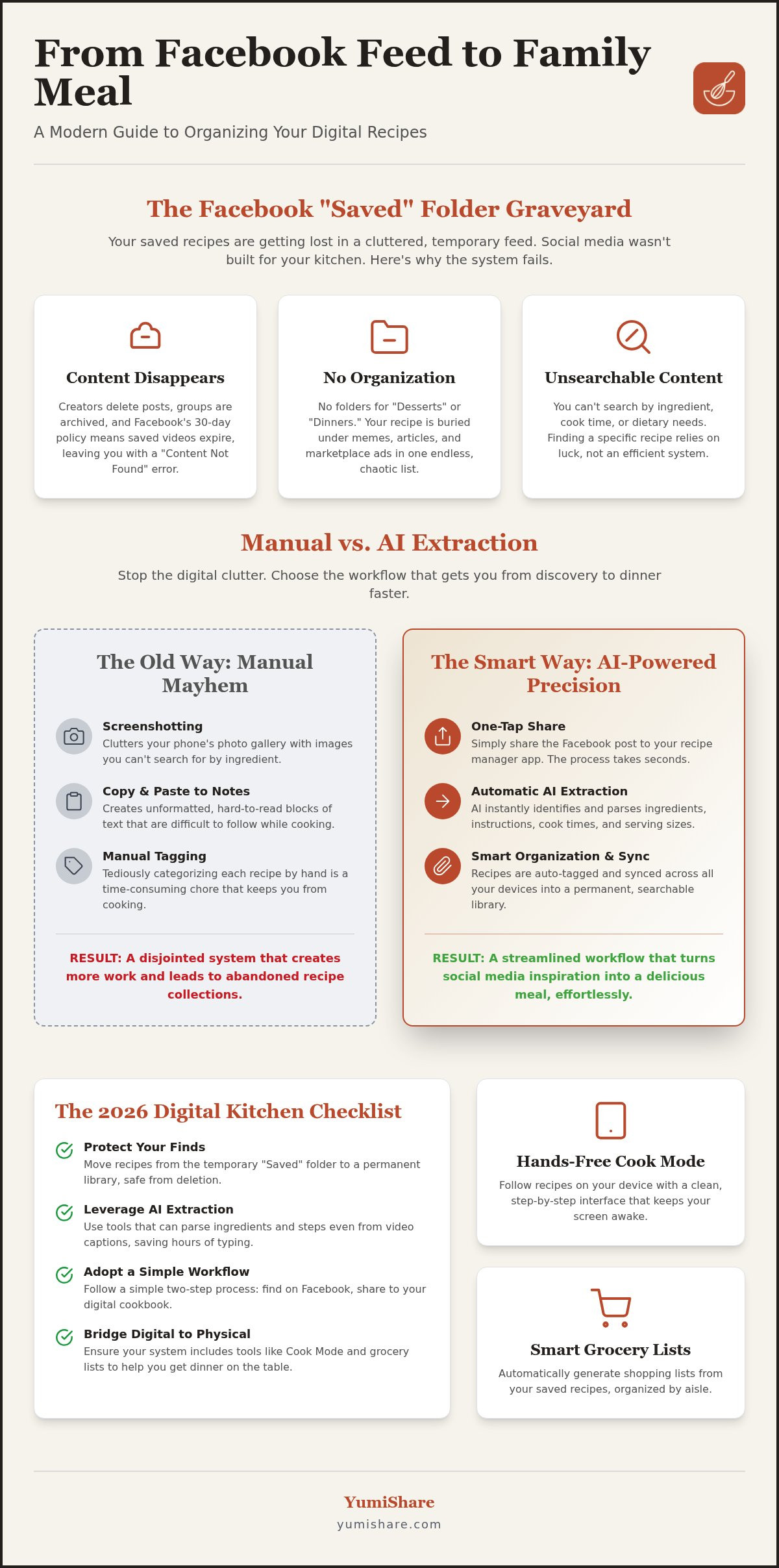
Your Facebook "Saved" folder isn't a library. It's a graveyard. You see a mouthwatering slow-cooker meal, tap the ribbon icon, and tell yourself you'll make it Sunday. But when Sunday arrives, that recipe is buried under hundreds of memes, news articles, and marketplace listings. Facebook's native tools weren't built for home cooks. They were built for general bookmarks. This makes it nearly impossible to efficiently organize recipes from facebook without a dedicated system.
The technical limitations are frustrating. There are no folders for "Desserts" or "Quick Dinners." You can't search by ingredient. Even worse, social media content is ephemeral. If a creator deletes their post or a group moderator archives the community, your saved link becomes a dead end. You're left with a "Content Not Found" message right when you're ready to start chopping. This digital instability turns your culinary inspiration into a source of stress rather than a plan for dinner.
The Problem with Facebook Groups and Feeds
Algorithms prioritize what's new, not what's useful to you right now. If you didn't save a post immediately, finding it again is like hunting for a needle in a digital haystack. Private groups add another layer of complexity. If the group's privacy settings change, your access to that specific post might vanish entirely. You also lose the vital context found in the comments. Often, the best tips and substitutions are hidden in the thread, but standard saving tools only grab the main post. Understanding the structure of a recipe is key, yet Facebook treats these posts like any other status update, stripping away the functional utility you need in the kitchen.
Manual Organization: Why It Fails in 2026
Stop relying on screenshots. They clog your phone's storage and remain invisible to your search bar. You can't search your photo gallery for "gluten-free" and expect helpful results. Manual copy-pasting into Notes apps is equally flawed. You end up with unformatted blocks of text that are hard to read while you're busy at the stove. Printing to PDF is a relic of the past; it kills the interactive video elements that made the recipe appealing in the first place. Without a smart way to organize recipes from facebook, you're stuck with a disjointed system that fails the moment you step into the kitchen. You need a bridge from the digital spark to the physical result.
Manual vs. AI Extraction: Choosing Your Organization Method
Deciding how to organize recipes from facebook usually means choosing between your time and your tools. Old-school manual entry feels familiar, but it's a drain on your evening. By 2026, AI technology has mastered the art of recipe extraction. Optical Character Recognition (OCR) is now incredibly precise. It doesn't just read words; it understands the context of a kitchen. It knows that "350" refers to the oven temperature, not a page number. This intelligence is a vital part of managing digital clutter and keeping your cooking space calm.
The Manual Workflow (The Hard Way)
The manual workflow is the hard way. You open Facebook and copy ingredients. You paste them into a separate list. The text is often messy and unformatted. It looks terrible on a mobile screen. You have to spend extra time re-formatting everything just to make it readable. Then comes the tagging. You manually categorize by protein, meal type, or dietary restriction. It’s a tedious cycle that keeps you away from the actual joy of cooking. Most people give up halfway through, leaving their recipes to rot in a digital pile. It turns a moment of inspiration into a chore.
The AI-Powered Workflow (The Smart Way)
When you organize recipes from facebook using automation, you reclaim your mental space. This workflow utilizes a best recipe manager for iphone to streamline the entire process. You simply tap "Share" on the Facebook post. The AI engine instantly identifies the ingredients and steps. It ignores the long-winded stories about the author's childhood and focuses on the data. Within seconds, you have a searchable entry in your digital cookbook.
Modern organization relies on these data points to help you filter by what's in your fridge. The AI automatically populates metadata like cook times, serving sizes, and nutritional facts. This data is then synced across all your devices. You can find your dinner plan on your laptop and follow the steps on your phone at the stove. Transitioning to a dedicated recipe saver app turns your social media inspiration into immediate action. It moves you from the frantic energy of digital consumption toward the grounded satisfaction of a well-ordered home.
The Ultimate Checklist for Organizing Facebook Recipes
Successful meal planning starts with a filter. When you see a post in a private group, you need to know if it's worth your storage space. The first step to organize recipes from facebook is source verification. Does the post contain the full text, or is it just a link to a blog? If it's a link, you're at the mercy of that website staying online. If it's text in a caption, you need a tool that doesn't just bookmark the URL but actually reads the ingredients. This is especially vital in private groups where content isn't indexed by search engines.
Your checklist should prioritize functional utility. Ask yourself these questions before hitting save:
- AI Extraction: Can your app parse ingredients directly from a video caption?
- Categorization: Does it allow custom tags like "Facebook Group Finds" or "Keto"?
- Grocery Integration: Will this recipe automatically populate your shopping list?
- Video Retention: Does the app keep the original video for visual cues?
Essential Tech Features for Your Digital Cookbook
Modern kitchens demand more than just a list of ingredients. You need cloud synchronization to create a digital family cookbook that stays updated for everyone in the house. This ensures that when you edit a recipe, your partner sees the changes instantly. Look for apps with offline access. Spotty kitchen Wi-Fi shouldn't stop your dinner prep. Versatility is also key. A robust pinterest recipe importer allows you to centralize your inspiration from across the web, not just Facebook.
Organizational Habits for Success
Systems only work if you use them. Adopt the "5-Minute Rule." Import recipes the moment you see them in your feed. Don't let them sit in your "Saved" folder where they'll be forgotten. Perform a monthly folder clean-out. Delete the recipes you haven't cooked and likely never will. This prevents digital bloat. Finally, use consistent tagging. Standard labels like "Weeknight Meals" or "Slow Cooker" make your global search effective. When you organize recipes from facebook with discipline, you turn a chaotic feed into a curated culinary library.
Step-by-Step: Moving Recipes from Facebook to Your Digital Cookbook
Transforming a social media post into a kitchen-ready resource is simpler than you think. Follow these four steps to move from discovery to dinner without the digital clutter. First, locate the Share button on the Facebook post or video. Don't use the bookmark icon; it’s a dead end. Select Copy Link or share it directly to your recipe saver app from the system menu. This single action is the most effective way to organize recipes from facebook while you're on the go.
Once the link is shared, the AI engine takes over. It identifies the ingredients and steps automatically. Review the parsed data for accuracy. Usually, it's perfect, but a quick glance ensures the measurements are exactly right. Finally, assign a tag like "Slow Cooker" or "Friday Night Dinner." This small habit ensures you can find the recipe in seconds next month. Share. Copy. Review. Tag. Four simple steps to a better kitchen.
Handling Different Facebook Post Formats
Different formats require different approaches. For Facebook Reels, use a convert youtube shorts to recipes style workflow. This process extracts structured data from fast-paced video descriptions and comments. If you encounter image-based posts, like a handwritten recipe card photo, let the OCR technology do the heavy lifting. It reads the text from the image so you don't have to type a single word. Even long-form posts in private groups are no match for AI. The system filters out the introductory stories and saves only the functional cooking instructions you actually need.
Optimizing for Mobile Use
Efficiency happens on your phone. Set up the Share Extension on your iPhone or Android device. This allows you to transfer content without ever leaving the Facebook app. Once your recipe is safely in your digital cookbook, activate Cook Mode. This feature keeps your screen awake and synced with the original video, even if your hands are messy. Finally, sync your new discovery with your weekly meal plan. This moves the recipe from a digital spark to a physical meal on your table. To start building your searchable library today, download the YumiShare app and take control of your kitchen.
YumiShare: Your All-in-One Solution for Facebook Recipe Management
YumiShare acts as the ultimate filter for your digital kitchen. Most tools stop at saving a link, but YumiShare starts there. Our AI engine is specifically tuned to parse the unique structure of Facebook posts. It identifies ingredients and instructions with high accuracy, even from messy captions or private group threads. This is the most efficient way to organize recipes from facebook without lifting a finger to type. It turns a social spark into a structured database entry in seconds. You get the relief of simplification without the frustration of manual data entry.
The Cook Mode feature solves the biggest problem with social media recipes: the actual cooking process. Instead of scrolling through a long post or re-watching a video ten times, Cook Mode keeps you focused. It syncs with the original video so you can see the visual cues while your instructions stay front and center. Your screen won't turn off. Your hands stay free to focus on the food. It's domestic tranquility powered by modern efficiency. You no longer have to worry about losing your place in a 15-minute video while your onions are burning. The app acts as a savvy, organized companion in your kitchen.
From Social Spark to Physical Result
Bridge the gap between scrolling and cooking with integrated meal planning. YumiShare moves your recipes from a "Saved" folder to a "Sunday Night Dinner" slot. You can transform your Facebook finds into smart grocery lists with a single tap. The app automatically categorizes items by aisle, making your shopping trip as streamlined as your meal prep. By eliminating the need for manual typing, you save hours of administrative work every month. Keep your kitchen organized and your phone storage free from thousands of forgotten screenshots. It's about digital mindfulness. You keep only what adds value to your home life and discard the digital noise that clutters your mind.
Start Organizing Your Kitchen Today
Experience the relief of a searchable, clean digital cookbook. No more digging through private groups or hunting for that one specific comment thread from last July. It's the only way to truly organize recipes from facebook in a way that feels permanent. You can download the app for free right now and import your first 10 Facebook recipes. See how quickly your chaotic feed turns into a professional-grade culinary library. This is the premium choice for users who are tired of the "Saved Folder" graveyard. You deserve a system that values your time and your mental space above all else. Download YumiShare and organize your Facebook recipes now! It's time to turn your digital inspiration into a physical reality at your dinner table.
Reclaim Your Kitchen from the Digital Feed
Your Facebook feed is a source of endless inspiration, but it shouldn't be a source of stress. You now know that relying on social media bookmarks is a recipe for lost potential. By using AI to organize recipes from facebook, you move past the cluttered screenshots and broken links that haunt the "Saved" folder. Moving from social discovery to a physical result is simpler than ever when you have a clear plan.
Transform your digital habits now. YumiShare offers the tools you need to simplify your home life, featuring AI-powered extraction from all social platforms and smart grocery list generation that saves you time at the store. Our hands-free Cook Mode ensures you stay focused on the food while your phone stays kitchen-ready. Stop the endless search. Start building a library that actually works for you.
Start Organizing Your Recipes with YumiShare
You deserve a kitchen that feels like a sanctuary of calm. Take the first step toward digital mindfulness today and enjoy the grounded satisfaction of a well-ordered home.
Frequently Asked Questions
Can I organize recipes from private Facebook groups?
Yes, you can organize recipes from facebook even if they are posted in private groups. As long as you have access to the post, you can share the link directly to YumiShare. Our AI engine then reads the visible text and extracts the data into your personal cookbook. This ensures your private group finds are preserved even if you lose access to the group later.
Does YumiShare work with Facebook Reels and videos?
Absolutely. YumiShare is specifically designed to handle dynamic content like Facebook Reels and videos. The AI extracts ingredients from the description and captions. Once saved, you can use Cook Mode to follow the steps while the original video remains accessible for visual reference. It bridges the gap between a fast-paced video and a practical, step-by-step cooking experience.
Is there a limit to how many recipes I can import from Facebook?
New users can download the app for free and import their first 10 recipes to experience the system. For those with a massive "Saved" folder graveyard, a premium subscription offers unlimited imports. This allows you to centralize your entire culinary history in one searchable location. You can scale your digital library as your collection grows without worrying about storage limits or cluttered feeds.
What happens if a Facebook post I saved is later deleted?
Your imported recipes are safe even if the original post is deleted. Once YumiShare extracts the data, it is stored in your personal digital cookbook. Unlike Facebook’s native "Saved" feature, which relies on the original post staying active, our app creates a permanent record. This protection is essential given Facebook's 30-day deletion policy for certain video content and the ephemeral nature of social feeds.
How does AI extraction handle recipes written in the comments section?
Our AI engine is specifically tuned to recognize the structure of a recipe wherever it appears. If a creator posts the ingredients in the main caption but adds the instructions in the comments, the parser identifies and organizes them. It filters out the social chatter and leaves you with a clean, functional recipe. This level of detail ensures you don't miss those vital adjustments found in the thread.
Can I share my organized Facebook recipes with family members?
Yes, you can easily share your curated collection with family and friends. YumiShare supports cloud synchronization, allowing you to create a digital family cookbook. When you organize recipes from facebook and add them to your shared library, everyone with access sees the updates instantly. It’s a perfect way to collaborate on meal planning or pass down favorite viral finds to the next generation.
Does the app work on both iPhone and Android devices?
YumiShare offers full cross-platform support for both iPhone and Android users. Your digital cookbook syncs across all your devices, so you can discover a recipe on your tablet and follow it on your phone. This flexibility ensures you always have your ingredients and instructions at your fingertips. Whether you're at the grocery store or standing at the stove, your organized library is always accessible.
Can I create a grocery list from a Facebook recipe automatically?
Yes, you can generate a smart grocery list with a single tap. Once a recipe is imported, the app identifies the ingredients and adds them to your shopping list. It even categorizes items by aisle to make your trip more efficient. This feature turns a moment of digital inspiration into a practical, actionable plan for your next meal without any manual typing.
FAQ
Can I organize recipes from private Facebook groups?
Yes, you can organize recipes from facebook even if they are posted in private groups. As long as you have access to the post, you can share the link directly to YumiShare. Our AI engine then reads the visible text and extracts the data into your personal cookbook. This ensures your private group finds are preserved even if you lose access to the group later.
Does YumiShare work with Facebook Reels and videos?
Absolutely. YumiShare is specifically designed to handle dynamic content like Facebook Reels and videos. The AI extracts ingredients from the description and captions. Once saved, you can use Cook Mode to follow the steps while the original video remains accessible for visual reference. It bridges the gap between a fast-paced video and a practical, step-by-step cooking experience.
Is there a limit to how many recipes I can import from Facebook?
New users can download the app for free and import their first 10 recipes to experience the system. For those with a massive "Saved" folder graveyard, a premium subscription offers unlimited imports. This allows you to centralize your entire culinary history in one searchable location. You can scale your digital library as your collection grows without worrying about storage limits or cluttered feeds.
What happens if a Facebook post I saved is later deleted?
Your imported recipes are safe even if the original post is deleted. Once YumiShare extracts the data, it is stored in your personal digital cookbook. Unlike Facebook’s native "Saved" feature, which relies on the original post staying active, our app creates a permanent record. This protection is essential given Facebook's 30-day deletion policy for certain video content and the ephemeral nature of social feeds.
How does AI extraction handle recipes written in the comments section?
Our AI engine is specifically tuned to recognize the structure of a recipe wherever it appears. If a creator posts the ingredients in the main caption but adds the instructions in the comments, the parser identifies and organizes them. It filters out the social chatter and leaves you with a clean, functional recipe. This level of detail ensures you don't miss those vital adjustments found in the thread.
Can I share my organized Facebook recipes with family members?
Yes, you can easily share your curated collection with family and friends. YumiShare supports cloud synchronization, allowing you to create a digital family cookbook. When you organize recipes from facebook and add them to your shared library, everyone with access sees the updates instantly. It’s a perfect way to collaborate on meal planning or pass down favorite viral finds to the next generation.
Does the app work on both iPhone and Android devices?
YumiShare offers full cross-platform support for both iPhone and Android users. Your digital cookbook syncs across all your devices, so you can discover a recipe on your tablet and follow it on your phone. This flexibility ensures you always have your ingredients and instructions at your fingertips. Whether you're at the grocery store or standing at the stove, your organized library is always accessible.
Can I create a grocery list from a Facebook recipe automatically?
Yes, you can generate a smart grocery list with a single tap. Once a recipe is imported, the app identifies the ingredients and adds them to your shopping list. It even categorizes items by aisle to make your trip more efficient. This feature turns a moment of digital inspiration into a practical, actionable plan for your next meal without any manual typing.